
1. 서론
This user manual provides comprehensive instructions for the setup, operation, and maintenance of your SHARP LC-32HI5012E HD Ready Smart LED TV. Please read this manual thoroughly before using your television to ensure proper functionality and safety.
The SHARP LC-32HI5012E is an 81 cm (32-inch) HD Ready Smart LED TV featuring Active Motion 200 technology for enhanced picture quality and a Triple Tuner for versatile reception options. It includes integrated Wi-Fi and a Harman/Kardon sound system for a complete entertainment experience.
2. 패키지 내용
패키지를 열 때 다음 품목이 모두 포함되어 있는지 확인하세요.
- SHARP LC-32HI5012E Main Unit
- 리모콘(배터리 포함)
- 사용 설명서 (본 문서)

이미지: 앞면 view of the SHARP LC-32HI5012E television, displaying a vibrant city skyline on its screen. This image shows the slim bezel design and the central SHARP logo.
3. 설정
3.1 스탠드 조립
Carefully place the TV screen-down on a soft, flat surface to prevent damage. Attach the two stand feet to the designated slots at the bottom of the TV, securing them with the provided screws. Ensure the stand is firmly attached before proceeding.
3.2 주변기기 연결하기
Your TV offers various connection options for external devices:
- HDMI 포트(x3): 블루레이 플레이어, 게임 콘솔, 셋톱박스를 연결합니다.
- USB 포트(x2): USB 드라이브에서 미디어를 재생하는 경우.
- Antenna In (RF): Connect your terrestrial antenna for DVB-T/T2HD reception.
- 앉아있음: DVB-S/S2 수신을 위해 위성 안테나를 연결하세요.
- RJ45(랜): 유선 인터넷 연결용.
- CI+ 포트: For conditional access modules (CAM) to view 암호화된 채널.
- Mini Component/YPbPr, Mini AV Composite: 오래된 아날로그 장치의 경우.
- 디지털 광 오디오 출력: 외부 오디오 시스템에 연결합니다.
- Audio out / Headphone: 헤드폰이나 외부 스피커용.

이미지: 후면 view of the SHARP LC-32HI5012E television, highlighting the arrangement of various input and output ports for connecting external devices.
3.3 초기 전원 켜기 및 첫 번째 설정
After connecting all necessary cables, plug the power cord into an electrical outlet. Press the power button on the remote control or the TV. The first-time setup wizard will guide you through:
- 언어 선택.
- 네트워크 연결(Wi-Fi 또는 유선 LAN).
- Channel scanning for DVB-C, DVB-S/S2, or DVB-T/T2HD.
- 시간대 및 기타 기본 설정.
4. 사용 설명서
4.1 기본 TV 기능
- 전원 켜기/끄기: 리모컨이나 TV의 전원 버튼을 사용하세요.
- 볼륨 조절: VOL +/- 버튼을 사용하세요.
- 채널 선택: Use CH +/- or number buttons.
- 입력 소스: Press the SOURCE button to switch between HDMI, AV, TV, etc.
- 메뉴 탐색: Use arrow keys and OK button to navigate menus.
4.2 스마트 TV 기능
Your SHARP LC-32HI5012E is equipped with integrated Wi-Fi and offers access to various smart features:
- 사전 설치된 앱: Access popular streaming services like Netflix and YouTube directly.
- Web 브라우저: TV에서 바로 인터넷을 탐색해 보세요.
- Aquos Net+: Access additional online content and services provided by Sharp.
Ensure your TV is connected to the internet for full Smart TV functionality.
4.3 오디오 시스템
The integrated Harman/Kardon sound system provides a high-quality audio experience with excellent dynamics and clarity. Adjust audio settings in the TV menu to customize your sound preferences.
5. 유지관리
5.1 화면 청소
화면을 청소하려면 부드럽고 보풀이 없는 천으로 부드럽게 닦으세요. 잘 지워지지 않는 얼룩은 가볍게 닦아주세요.amp천에 물이나 특수 화면 세척제를 묻혀 닦으세요. 하지 마세요 액체를 화면에 직접 분사합니다.
5.2 일반 관리
- TV를 직사광선과 열원으로부터 멀리 두세요.
- TV 주변에 적절한 환기가 이루어지도록 하세요.
- 번개가 칠 때나 장시간 방치할 때는 TV의 플러그를 콘센트에서 뽑아 두세요.
6. 문제 해결
If you encounter any issues with your TV, please refer to the following common problems and solutions before contacting support.
| 문제 | 가능한 원인 | 해결책 |
|---|---|---|
| 전원이 없습니다 | Power cord unplugged, power outlet issue. | 전원 코드 연결을 확인하세요. 다른 콘센트에 꽂아 보세요. |
| 화면은 나오지 않지만 소리는 나옵니다 | 잘못된 입력 소스, 케이블 불량. | 입력 소스가 올바른지 확인하십시오. HDMI/AV 케이블 연결 상태를 확인하십시오. |
| 소리가 나지 않습니다 | 음량이 음소거되었거나 너무 작습니다. 외부 오디오 시스템에 문제가 있는 것 같습니다. | Unmute volume, increase volume. Check external audio connections. |
| Wi-Fi에 연결할 수 없습니다 | 비밀번호가 잘못되었거나, 공유기 문제이거나, TV가 공유기에서 너무 멀리 떨어져 있는 경우입니다. | Re-enter password. Restart router. Move TV closer or use wired connection. |
7. 사양
| 특징 | 세부 사항 |
|---|---|
| 상표 | 날카로운 |
| 모델 번호 | LC-32HI5012E |
| 화면 기술 | 주도의 |
| 해결 | HD 지원(1366 x 768픽셀) |
| 화면 대각선 | 81.3cm(32인치) |
| 새로 고침 빈도 | 60Hz |
| 특징 | 인터넷(스마트 TV) |
| 지원되는 인터넷 서비스 | Netflix, YouTube, Browser |
| 연결 기술 | USB, HDMI, LAN, Wi-Fi |
| 튜너 | DVB-C, DVB-S/S2, DVB-T/T2HD |
| 오디오 시스템 | 하만/카돈 |
| 제품 치수 (W x H x D) | 74 x 49.1 x 18cm (스탠드 포함) |
| 무게 | 4.8 킬로그램 |
| 장착 유형 | 테이블 마운트 |
7.1 에너지 효율
The SHARP LC-32HI5012E has an energy efficiency rating of F. For detailed energy consumption information, please refer to the energy label and product information sheet.

Image: Energy efficiency label for the SHARP LC-32HI5012E television, showing its energy class F and power consumption details.
더 자세한 내용은 EPREL 공식 데이터베이스를 참조하십시오. https://eprel.ec.europa.eu/qr/402565
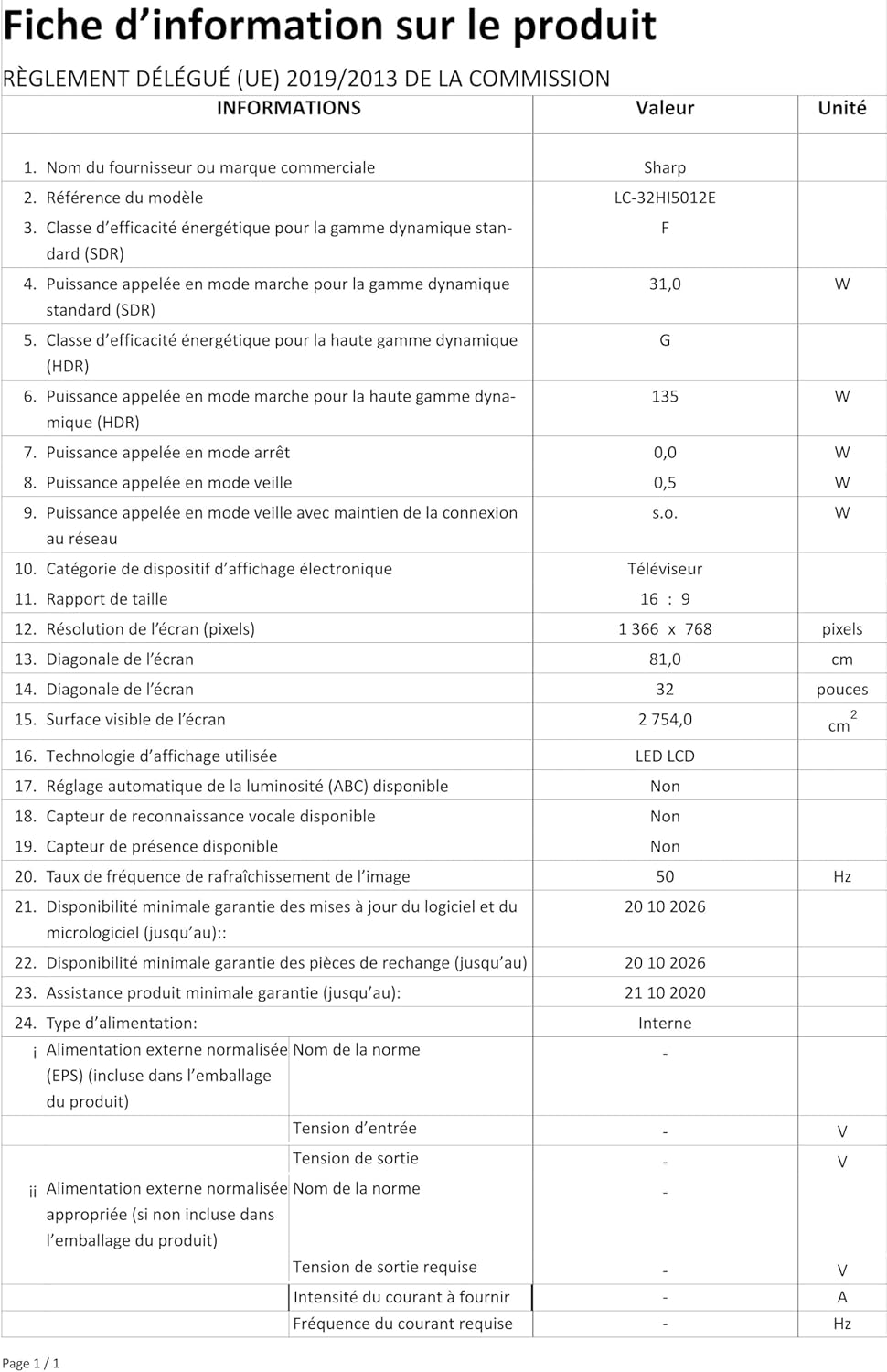
Image: Product information sheet detailing technical specifications and compliance information for the SHARP LC-32HI5012E television.
8. 보증 및 지원
For warranty information, please refer to the warranty card included with your product or visit the official SHARP web사이트. 보증 청구에 대비해 구매 증빙 자료로 구매 영수증을 보관하세요.
For technical support or service inquiries, please contact SHARP customer service. Contact details can typically be found on the SHARP official web사이트 또는 제품 포장.