
Itek ITMC30V201FHD
iTek GGC 30인치 곡면 모니터 사용 설명서
Model: ITMC30V201FHD
환영
Thank you for choosing the iTek GGC 30-inch Curved Monitor. This manual provides essential information for setting up, operating, and maintaining your new monitor. Please read it thoroughly before use to ensure optimal performance and safety.
중요 안전 지침
To prevent damage and ensure safe operation, please observe the following precautions:
- 모니터를 비, 습기 또는 극한의 온도에 노출시키지 마세요.
- 모니터 주변의 통풍이 잘 되도록 하십시오. 통풍구를 막지 마십시오.
- 모니터와 함께 제공된 전원 어댑터만 사용하세요.
- 전원 코드 위에 무거운 물건을 올려 놓지 마세요.
- 모니터를 장기간 사용하지 않을 경우 전원 플러그를 콘센트에서 뽑으십시오.
- 모니터를 직접 수리하려고 하지 마십시오. 모든 수리는 자격을 갖춘 기술자에게 맡기십시오.
- 모니터 화면을 청소하세요.asin부드럽고 마른 천으로 닦아주세요. 연마성 세제나 용제는 사용하지 마세요.
패키지 내용
다음 품목이 패키지에 포함되어 있는지 확인하세요.
- iTek GGC 30-inch Curved Monitor
- 모니터 스탠드(베이스 및 넥)
- 전원 어댑터 및 케이블
- DisplayPort 케이블
- HDMI 케이블
- 사용자 설명서
- 스탠드 조립용 나사
제품 끝view
The iTek GGC 30-inch Curved Monitor is designed for an immersive viewing experience, ideal for gaming and professional use. It features a WFHD (2560x1080) resolution, a high 200Hz refresh rate, and a rapid 1ms MPRT response time.

Key Performance Highlights
- 200Hz Refresh Rate & AMD FreeSync Technology: Experience ultra-smooth visuals and tear-free gaming with a high refresh rate and adaptive sync technology.

Figure 2: 200Hz Refresh Rate and AMD FreeSync Technology in action. - Flicker-Free & Low Blue Light: Designed to reduce eye strain during prolonged use, providing a more comfortable view경험.

Figure 3: Flicker-Free and Low Blue Light features for eye comfort. - 1ms MPRT 응답 시간: Minimizes motion blur and ghosting, crucial for fast-paced games and action sequences.

Figure 4: Rapid Refresh Rate and Response Time for smooth visuals. - 1800R 곡면 디스플레이: The immersive curvature brings the edges of the screen closer to your field of view, enhancing depth perception and reducing distortion.

Figure 5: 1800R Curved Display for an immersive experience.
설정
스탠드 조립
- 모니터와 스탠드 구성품을 포장에서 조심스럽게 꺼내세요.
- Attach the stand neck to the monitor panel using the provided screws. Ensure it clicks securely into place or is fastened tightly.
- Attach the stand base to the stand neck, securing it with the thumb screw or screws from underneath.
- 조립된 모니터를 안정적이고 평평한 표면에 놓으세요.
모니터 연결
The iTek GGC monitor offers multiple connectivity options for various devices:
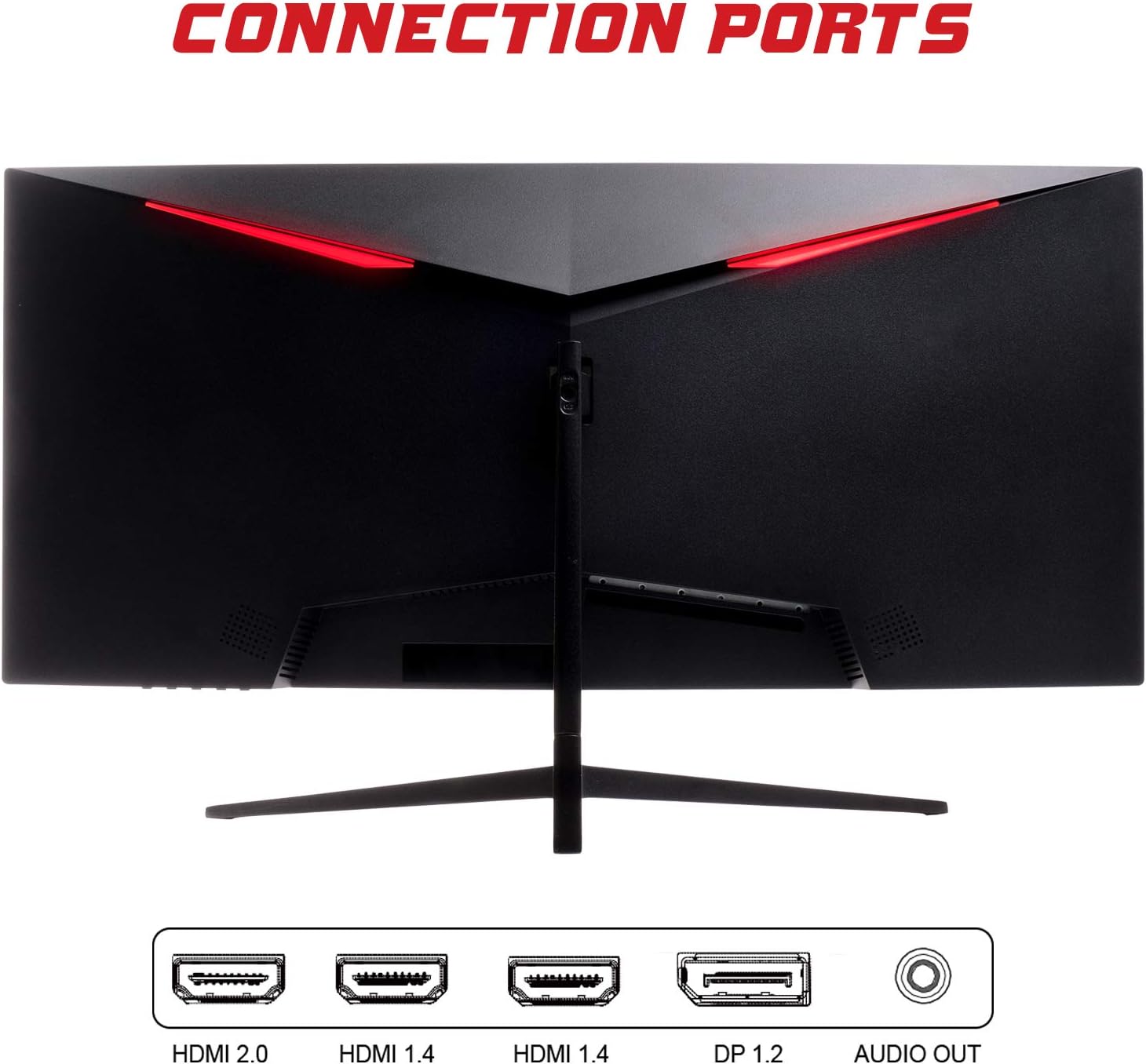
- 디스플레이포트(DP 1.2): For high-resolution and high-refresh-rate connections to your PC.
- HDMI (HDMI 2.0, HDMI 1.4 x2): Connect to PCs, gaming consoles, and other multimedia devices. HDMI 2.0 supports higher refresh rates at certain resolutions.
- 오디오 출력: 외부 스피커 또는 헤드폰을 연결하세요.
비디오 케이블을 연결한 후, 전원 어댑터를 모니터에 연결하고 전원 콘센트에 꽂으세요.
모니터 작동
전원 켜기/끄기
모니터를 켜거나 끄려면 일반적으로 모니터 하단이나 뒷면에 있는 전원 버튼을 누르십시오. 모니터가 켜지면 전원 표시등이 켜집니다.
온스크린 디스플레이(OSD) 메뉴
OSD 메뉴를 사용하면 다양한 모니터 설정을 조정할 수 있습니다. 모니터의 버튼(일반적으로 뒷면 또는 오른쪽 하단)을 사용하여 메뉴를 탐색하세요.
- 사진 설정: 밝기, 대비, 선명도, 감마를 조정합니다.
- 색상 설정: 색온도, 색조 및 채도를 조정하세요.
- 입력 선택: DisplayPort와 HDMI 입력 간에 수동으로 전환합니다.
- 오디오: 오디오 출력 볼륨을 조절하세요.
- 시스템 설정: Access language, OSD timeout, and reset options.
- 게임 기능: Enable/disable FreeSync, adjust response time overdrive, and activate crosshair overlays if available.
유지
적절한 관리는 모니터의 수명을 연장시켜 줍니다.
- 청소하기 전에는 항상 모니터를 끄고 전원 코드를 뽑으십시오.
- 부드럽고 보풀이 없는 천을 사용하여 화면을 부드럽게 닦으세요. 잘 지워지지 않는 얼룩은 가볍게 닦아주세요.amp천에 물이나 부드럽고 연마성이 없는 화면 세척제를 묻힙니다.
- 모니터를 청소하세요asin부드럽고 마른 천으로 닦으세요.
- 화면이나 기타 표면에 액체를 직접 분사하지 마십시오.asing.
- Do not use benzene, thinner, ammonia-based cleaners, or abrasive materials.
문제 해결
모니터에 문제가 발생하면 다음 표에서 일반적인 문제와 해결 방법을 참조하십시오.
| 문제 | 가능한 해결책 |
|---|---|
| 전원이 없습니다 | Ensure the power cable is securely connected to the monitor and the power outlet. Check if the power outlet is working. |
| 신호 없음 / 빈 화면 | Verify the video cable (DisplayPort or HDMI) is firmly connected to both the monitor and your computer. Select the correct input source via the OSD menu. Ensure your computer is powered on and not in sleep mode. |
| 이미지가 깜빡이거나 불안정함 | Check the video cable connection. Try a different cable or port. Ensure your graphics card drivers are up to date. Adjust the refresh rate in your computer's display settings. |
| Poor image quality (blurry, distorted colors) | Adjust brightness, contrast, and color settings in the OSD menu. Ensure the display resolution on your computer matches the monitor's native resolution (2560x1080). |
| 오디오 출력에서 소리가 나지 않습니다. | Check the audio cable connection to your speakers/headphones. Verify the volume setting in the OSD menu and on your computer. Ensure the correct audio output device is selected in your computer's sound settings. |
기술 사양
| 특징 | 사양 |
|---|---|
| 상표 | 아이텍 |
| 모델 | ITMC30V201FHD |
| 화면 크기 | 30 인치 |
| 패널 유형 | VA |
| 곡률 | R1800 |
| 해결 | 2560 x 1080 (WFHD) |
| 종횡비 | 21시 9분 |
| 새로 고침 빈도 | 200Hz |
| 응답 시간 | 1ms MPRT |
| 명도 | 350칸델라/제곱미터 |
| 대비율 | 3000시 1분 |
| View잉 각도 | 178° (수평/수직) |
| 연결성 | 1x DisplayPort 1.2, 1x HDMI 2.0, 2x HDMI 1.4, Audio Out |
| 특별 기능 | HDR Ready, FreeSync, Low Blue Light, Flicker Free, VESA Mountable |
| 제품 치수(스탠드 포함) | 70.68 x 40.89 x 18.48cm |
| 무게 | 6.9kg |
에너지 효율성

For detailed energy consumption information and product registration, please refer to the official EPREL database:
보증 및 지원
Your iTek GGC monitor is backed by a manufacturer's warranty. Please retain your proof of purchase for warranty claims.
- 보장된 제품 지원: This product is guaranteed to have support available until at least January 1, 2031.
- For technical support, warranty inquiries, or service requests, please contact iTek customer service through their official web구매 시 제공된 사이트 또는 연락처 정보.
Ask a question about this manual
Ask about setup, troubleshooting, compatibility, parts, safety, or missing instructions. Manuals+ will review the question and use this page’s manual context to help answer it.