
제품 끝view
The OSOYOO RC Two Wheel Self Balancing Smart Robot Car Kit is an educational and engaging project designed for enthusiasts of all levels, from beginners to experienced robotics fans. Based on the OSOYOO UNO R3 for Arduino, this kit allows users to build, program, and control a two-wheeled, self-stabilizing vehicle. It provides a practical platform for understanding concepts such as PID (Proportion Integral Differential) control.
The kit features a robust aluminum alloy chassis, high-precision motors with hall encoders for superior performance, and essential components like the MPU6050 3-axis Accelerometer Gyroscope Sensor and TB6612 Motor Driver.

Image: The OSOYOO Self Balancing Robot Car Kit, fully assembled, showcasing its two-wheel design and compact structure, alongside its product packaging.
키트 내용 및 조립
Before beginning assembly, ensure all components listed below are present in your kit. You will need to provide three 65mm 18650 rechargeable batteries, as they are not included.

Image: All individual components of the OSOYOO Self Balancing Robot Car Kit, including the chassis plates, motors, wheels, Arduino board, sensors, and connecting wires, neatly laid out.
주요 모듈:

Image: A detailed diagram illustrating the main electronic modules: the OSOYOO UNO R3 board, TB6612FNG motor driver, Bluetooth module, and MPU6050 gyroscope/accelerometer sensor, along with their connections.
- 섀시 조립: Begin by attaching the motors to the bottom aluminum alloy chassis plate using the provided screws and brackets.
- 바퀴 설치: Securely mount the wheels onto the motor shafts.
- Electronic Module Mounting: Install the OSOYOO UNO R3 board, motor driver (TB6612), MPU6050 sensor, and Bluetooth module onto the designated positions on the chassis plates. Refer to the module distribution diagram for correct placement.
- 배선 연결: Carefully connect all modules according to the provided wiring diagram (not included in this manual, refer to official OSOYOO documentation or online resources). Ensure correct polarity for power connections.
- 배터리 홀더 : Install the battery holder and connect it to the power input of the main control board. Insert the three 18650 rechargeable batteries.
- 최종 조립: Secure the top chassis plate and any remaining structural components. Double-check all connections before powering on.
작동 지침
Once assembled and powered, the OSOYOO Self Balancing Robot Car is designed to maintain its balance automatically. Initial setup may involve uploading the necessary Arduino code to the UNO R3 board.
- 전원 켜기: Ensure batteries are correctly installed and charged. Flip the power switch to turn on the robot car. The robot should attempt to balance itself.
- 블루투스 연결: The kit includes a Bluetooth module, allowing for wireless control and parameter adjustment via a compatible smartphone application.
- 앱 제어(해당하는 경우): Download the official OSOYOO balancing car app (or a compatible third-party app) from your device's app store. Pair your smartphone with the robot car via Bluetooth.
- 파라미터 튜닝: The app typically allows for real-time adjustment of PID parameters (Proportional, Integral, Derivative gains) to fine-tune the robot's balancing performance and responsiveness. Experiment with these settings to achieve optimal stability and movement.
- 움직임 제어: Use the app's interface to control the robot's forward, backward, and turning movements.

Image: A smartphone displaying the user interface of a control application for the Smart Balancing Car, showing options for angle and speed parameter adjustments, and Bluetooth connection status.
유지
Regular maintenance ensures the longevity and optimal performance of your OSOYOO Self Balancing Robot Car.
- 청소: Keep the robot car clean from dust and debris, especially around the wheels, motors, and sensor areas. Use a soft, dry cloth.
- 사이: Periodically check all wiring connections to ensure they are secure and free from corrosion. Loose connections can lead to erratic behavior.
- 배터리 관리 : Always use rechargeable 18650 batteries and follow their charging guidelines. Remove batteries if the robot will not be used for an extended period to prevent leakage.
- 소프트웨어 업데이트: Check the official OSOYOO website or community forums for any firmware or software updates for the Arduino code, which may improve performance or add features.
문제 해결
로봇 자동차에 문제가 발생하면 다음의 일반적인 문제 및 해결 방법을 참조하십시오.
- Robot does not balance:
- Ensure the MPU6050 sensor is correctly oriented and securely mounted.
- Verify all power connections are stable and batteries are sufficiently charged.
- Check the PID parameters in the control software/app. Incorrect values can prevent stable balancing. Refer to online tutorials or default settings.
- Confirm the motors are functioning correctly and are properly connected to the TB6612 driver.
- Motors not moving or moving erratically:
- Check motor wiring to the TB6612 driver and the driver's connection to the UNO R3.
- Ensure the motor driver is receiving adequate power.
- Verify the motor control signals from the UNO R3 are correct in the code.
- 블루투스 연결 문제:
- Ensure the Bluetooth module is correctly wired and powered.
- Check if the module is discoverable and paired correctly with your device.
- Restart both the robot car and your control device.
- Code upload failures:
- Verify the correct board and port are selected in the Arduino IDE.
- USB 케이블이 제대로 연결되어 있는지 확인하세요.
- Close any other programs that might be using the serial port.
명세서
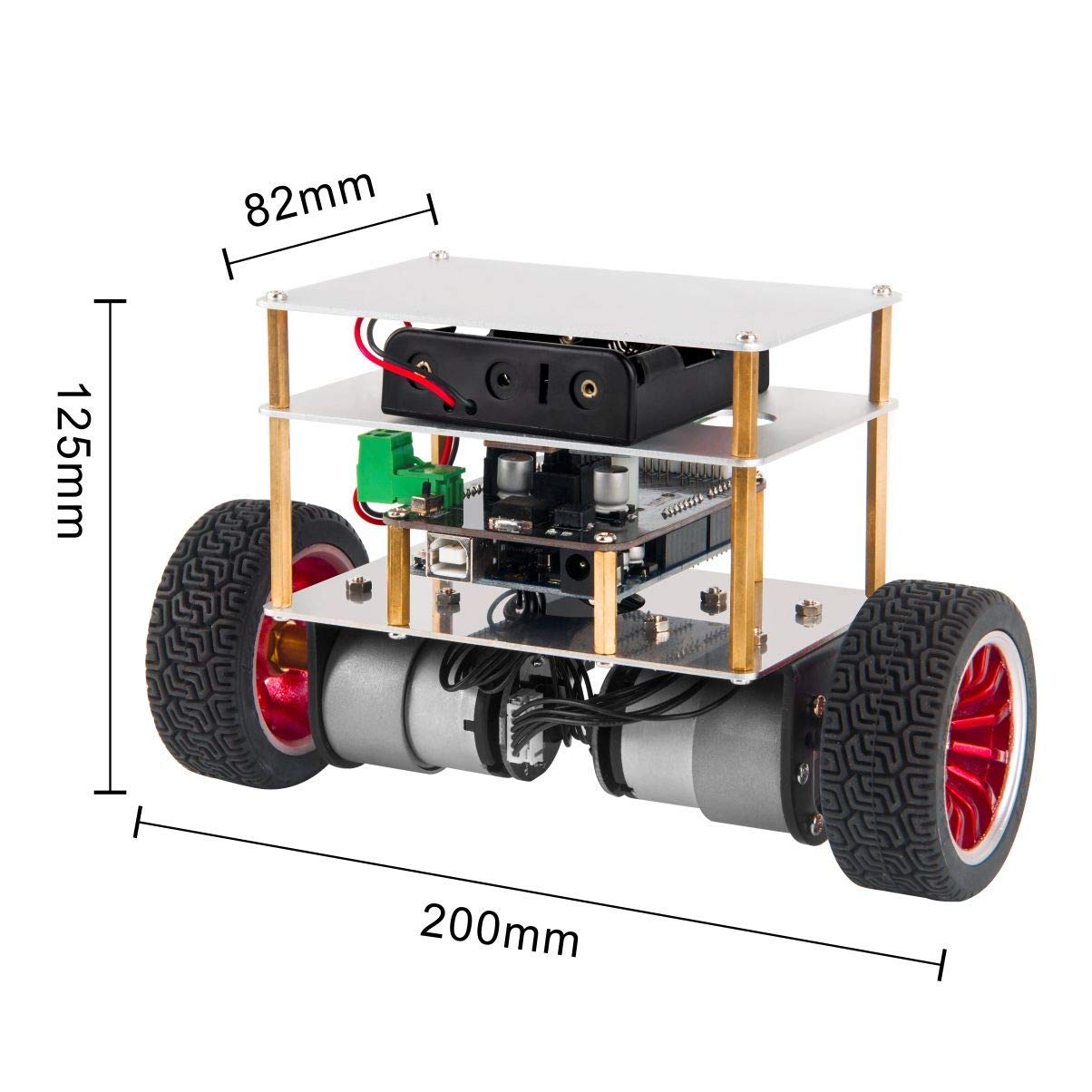
Image: A diagram illustrating the approximate dimensions of the assembled OSOYOO Self Balancing Robot Car: 200mm length, 125mm height, and 82mm width.
| 특징 | 세부 사항 |
|---|---|
| 모델 번호 | SB-59 |
| 제어 장치 | OSOYOO UNO R3 for Arduino |
| 자이로 스코프 센서 | MPU6050 (3-axis Accelerometer Gyroscope) |
| 모터 드라이버 | 티비6612 |
| 섀시 소재 | 알루미늄 합금 |
| 색상 | 검은색 |
| 조립이 필요합니다 | 예 |
| 필요한 배터리 | Yes (3x 65mm 18650 rechargeable batteries, not included) |
| 추천연령 | 12 months and up (Note: Assembly and programming may require adult supervision or older users) |
보증 및 지원
For warranty information, technical support, or further assistance with your OSOYOO RC Two Wheel Self Balancing Smart Robot Car Kit, please refer to the official OSOYOO web해당 웹사이트를 방문하거나 구매 플랫폼을 통해 판매자에게 직접 문의하세요. 보증 청구를 위해 구매 증빙 자료를 보관하십시오.