
1. 제품 오버view
The Schlage Connect Smart Deadbolt offers advanced security and convenient keyless access for your home. This Z-Wave Plus compatible deadbolt integrates seamlessly with various smart home systems, allowing for remote control and monitoring. It features a durable touchscreen keypad, a built-in alarm, and the ability to manage multiple access codes.
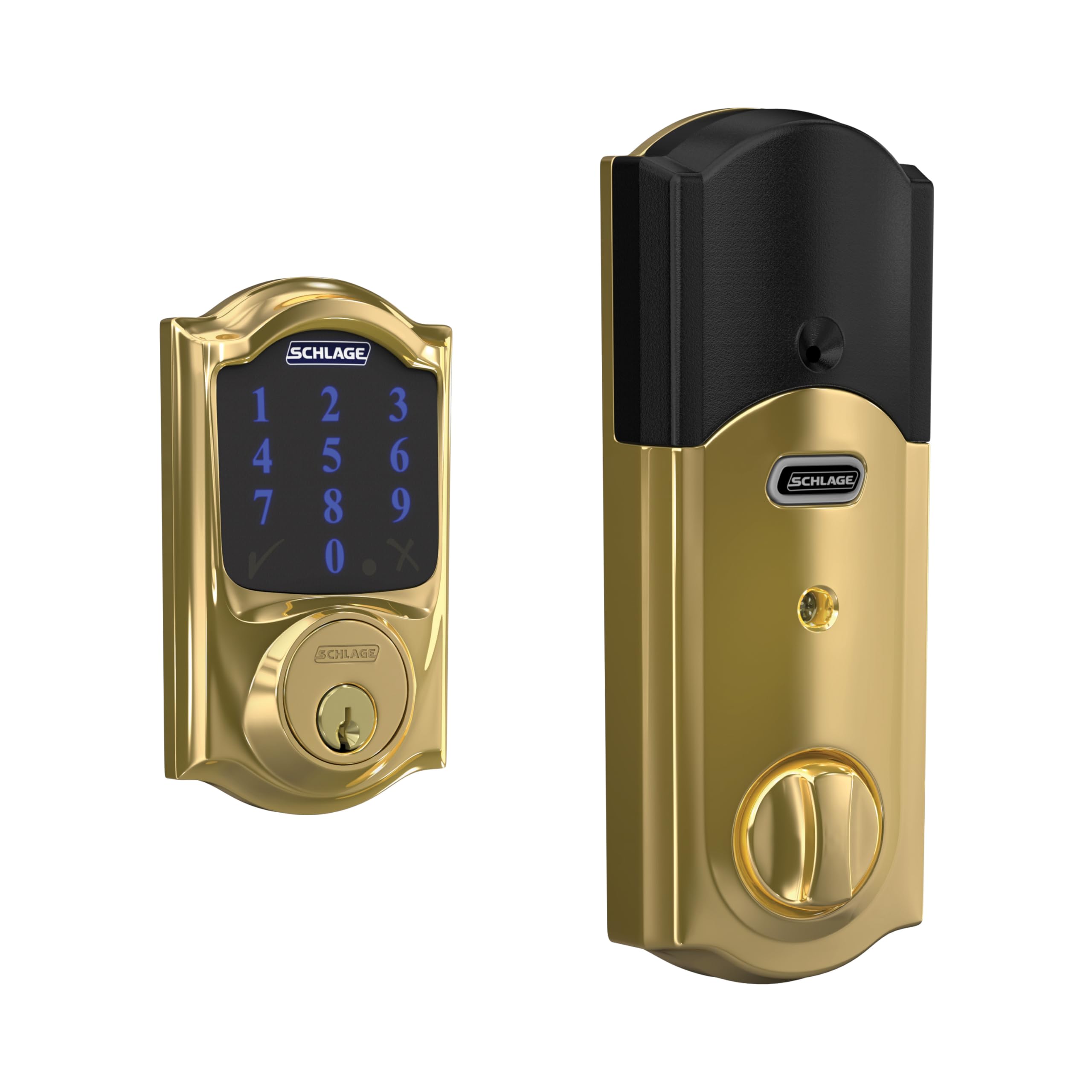
Figure 1: Schlage Connect Smart Deadbolt with Touchscreen Keypad in Bright Brass finish.
주요 특징:
- Z-Wave Plus Compatibility: Integrate with smart home or security systems like Samsung SmartThings or Ring Alarm for remote lock/unlock functionality.
- 터치스크린 키패드: Fingerprint-resistant touchscreen for keyless entry.
- 액세스 코드: Manage up to 30 unique access codes for family, friends, or service providers.
- 내장 알람: Alerts to potential door attacks.
- 간편한 설치: Designed for simple installation with a screwdriver, featuring Snap ‘n Stay technology.
- 배터리 작동: Uses 4 AA batteries with a low battery indicator and backup key.
- 강화된 보안: Secure encryption with S2 Security protocol.
2. 설정 및 설치
The Schlage Connect Smart Deadbolt is designed for straightforward installation on standard doors. No hardwiring is required, making it suitable for DIY installation.
설치 단계:
- 문 준비: Ensure your door meets the standard specifications for deadbolt installation.
- 잠금장치를 설치하세요: Utilize the unique Snap ‘n Stay technology to hold the deadbolt in place, freeing both hands for the next steps.
- Attach Keypad and Interior Assembly: Secure the exterior keypad and interior assembly to the door using a screwdriver.
- 배터리 삽입: 제공된 AA 배터리 4개를 설치합니다.
- 테스트 작업: Verify that the deadbolt operates smoothly both manually and via the keypad.

Figure 2: The Schlage Connect Smart Deadbolt is designed for easy installation with basic tools.
스마트 홈 통합:
To enable smart features like remote access and voice control, pair your Schlage Connect deadbolt with a compatible Z-Wave enabled smart home or security system (sold separately). This typically involves a one-button enrollment process on your smart home hub.

Figure 3: One-button enrollment simplifies connecting your deadbolt to a smart home system.
Video 1: This video demonstrates the features and installation process of the Schlage BE469ZP CAM Connect Smart Deadbolt with Alarm with Camelot Trim.
3. 사용 설명서
키리스 엔트리:
To unlock the deadbolt using the touchscreen keypad, simply enter your programmed access code. The keypad illuminates for easy visibility in low light conditions. To lock, press the Schlage button or turn the interior thumbturn.

Figure 4: The touchscreen keypad allows for easy and secure keyless entry.
Managing Access Codes:
You can program and manage up to 30 unique access codes directly on the lock or through your connected smart home system's application. Refer to your smart home hub's instructions for app-based code management.

Figure 5: Manage up to 30 access codes and control your lock remotely via smartphone when connected to a smart home system.
음성 제어:
If integrated with a compatible Z-Wave smart home system and voice assistant (e.g., Amazon Alexa, Google Assistant), you can lock and unlock your door using voice commands. Ensure your voice assistant device is properly configured with your smart home hub.
4. 유지관리
배터리 교체:
The deadbolt features a low battery indicator that provides weeks of warning before the batteries fully deplete. To replace, remove the interior cover and insert 4 new AA batteries. A backup key is provided to prevent lockouts if batteries die unexpectedly.
청소:
터치스크린과 외부 구성품을 부드러운 천으로 닦으세요.amp cloth. Avoid abrasive cleaners or solvents that could damage the finish or electronic components. The fingerprint-resistant finish helps maintain a clean appearance.
5. 문제 해결
- 키패드가 응답하지 않음: Check battery levels. If the batteries are low or dead, replace them.
- 잠금이 걸리지 않음/해제되지 않음: Ensure the door is properly aligned and the deadbolt can extend fully into the strike plate. Check for any obstructions.
- Smart Home Connectivity Issues: Verify your Z-Wave hub is powered on and within range. Consult your smart home system's manual for pairing and troubleshooting Z-Wave devices.
- 잘못된 코드 입력: If the lock repeatedly rejects your code, ensure you are entering the correct sequence and that the code is still active.
6. 사양
| 특징 | 세부 사항 |
|---|---|
| 상표 | 슐라지 |
| 모델 번호 | BE469ZPCAM605 |
| 잠금 유형 | 키패드 데드 볼트 |
| 연결 프로토콜 | Z-Wave Plus |
| 액세스 코드 | 최대 30개 |
| 특징 | 내장 알람 |
| 재료 | 아연 |
| 색상 | 밝은 황동 |
| 품목 치수(L x W x H) | 5 x 3 x 1 인치 |
| 품목 무게 | 3.5 파운드 |
| 작동 온도(외부) | -35°C ~ 66°C |
| 작동 온도(내부) | -10°C ~ 49°C |
| 포함된 구성 요소 | Installation Hardware, Installation Instructions, 4 AA batteries |

Figure 6: Product dimensions for the Schlage Connect Smart Deadbolt.
7. 보증 및 지원
The Schlage Connect Smart Deadbolt is backed by a limited lifetime mechanical and finish warranty, and a limited three-year electronics warranty. For full details, please refer to the official Schlage warranty documentation. Warranty is valid on purchases from authorized retailers.
For technical support, product registration, or further assistance, please visit the official Schlage web사이트를 방문하거나 고객 서비스에 문의하세요. 자세한 정보와 지원 리소스는 다음에서 확인할 수 있습니다. www.schlage.com.
비디오 2: 오버view of Schlage's commitment to home security and product reliability.