
1. 서론
This manual provides detailed instructions for the installation, operation, and maintenance of your TooQ TQE-2528B 2.5-inch SATA USB 3.1 Gen1 HDD Enclosure. This device allows you to convert a 2.5-inch SATA I/II/III hard disk drive or solid-state drive into an external storage solution, connecting via USB 3.1 Gen1 for high-speed data transfer.
2. 패키지 내용
패키지에 모든 품목이 들어 있는지 확인하세요.
- TooQ TQE-2528B 2.5-inch SATA USB 3.1 Gen1 HDD Enclosure
- USB 3.0 Type-A to Micro-B 케이블
- 사용 설명서 (본 문서)

Image 2.1: The TooQ TQE-2528B enclosure shown with its included USB 3.0 cable.
3. 제품 오버view
The TooQ TQE-2528B is designed for ease of use and portability. Key features include:
- Compatible with 2.5-inch SATA I/II/III HDDs and SSDs up to 9.5mm height.
- USB 3.1 Gen1 (USB 3.0) interface for data transfer speeds up to 5.0 Gbps.
- Tool-free installation for quick setup.
- LED indicator for connection status and data access.
- Powered directly via USB port.
3.1. 구성 요소 식별
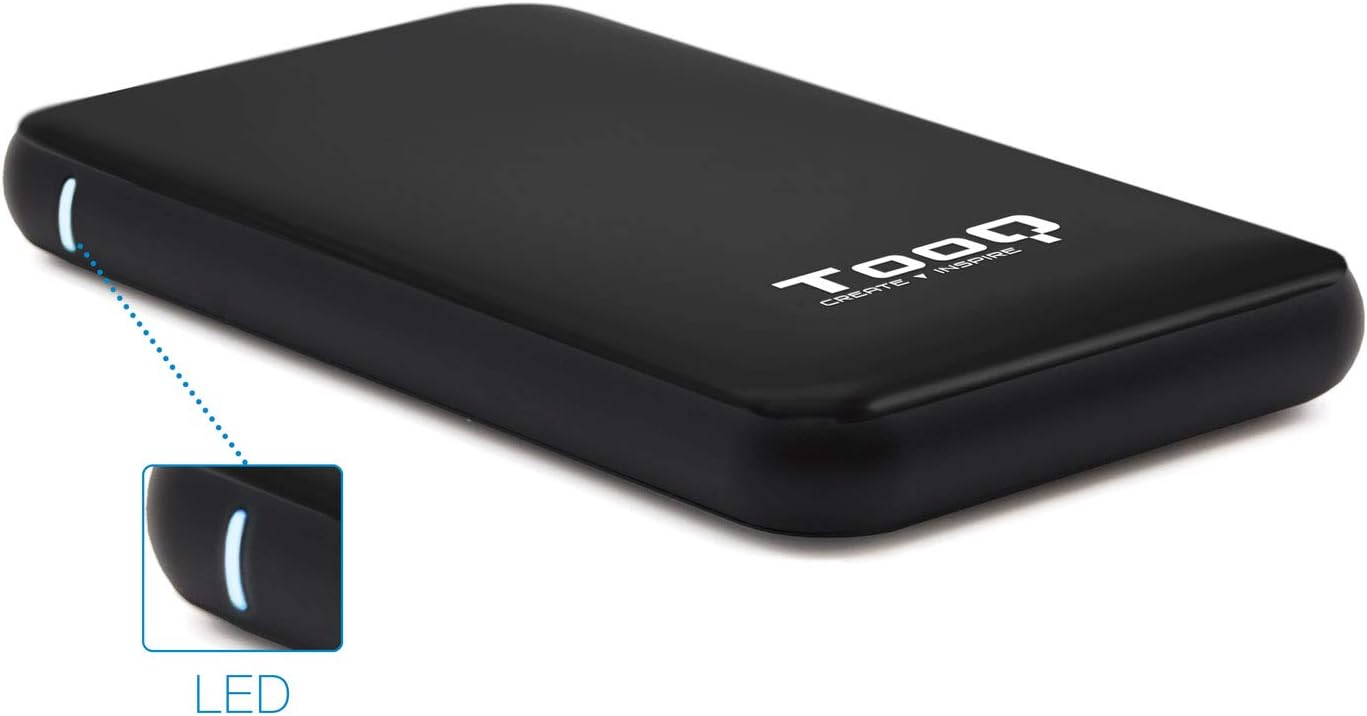
Image 3.1: The enclosure features an LED indicator on the side, which illuminates to show power and data activity.

Image 3.2: The rear of the enclosure includes a power button and a Micro-USB port for connection.
4. Setup: Hard Drive Installation
Follow these steps to install a 2.5-inch SATA HDD or SSD into the enclosure:
- 인클로저를 엽니다: Gently slide the top cover of the enclosure to open it. The design allows for tool-free access.
- 드라이브 연결: Align your 2.5-inch SATA HDD/SSD with the SATA connector inside the enclosure. Carefully push the drive into the connector until it is firmly seated. Ensure the drive is flush with the internal tray.
- 인클로저를 닫습니다. 윗덮개를 제자리에 밀어 넣어 딸깍 소리가 날 때까지 밀어 넣습니다.
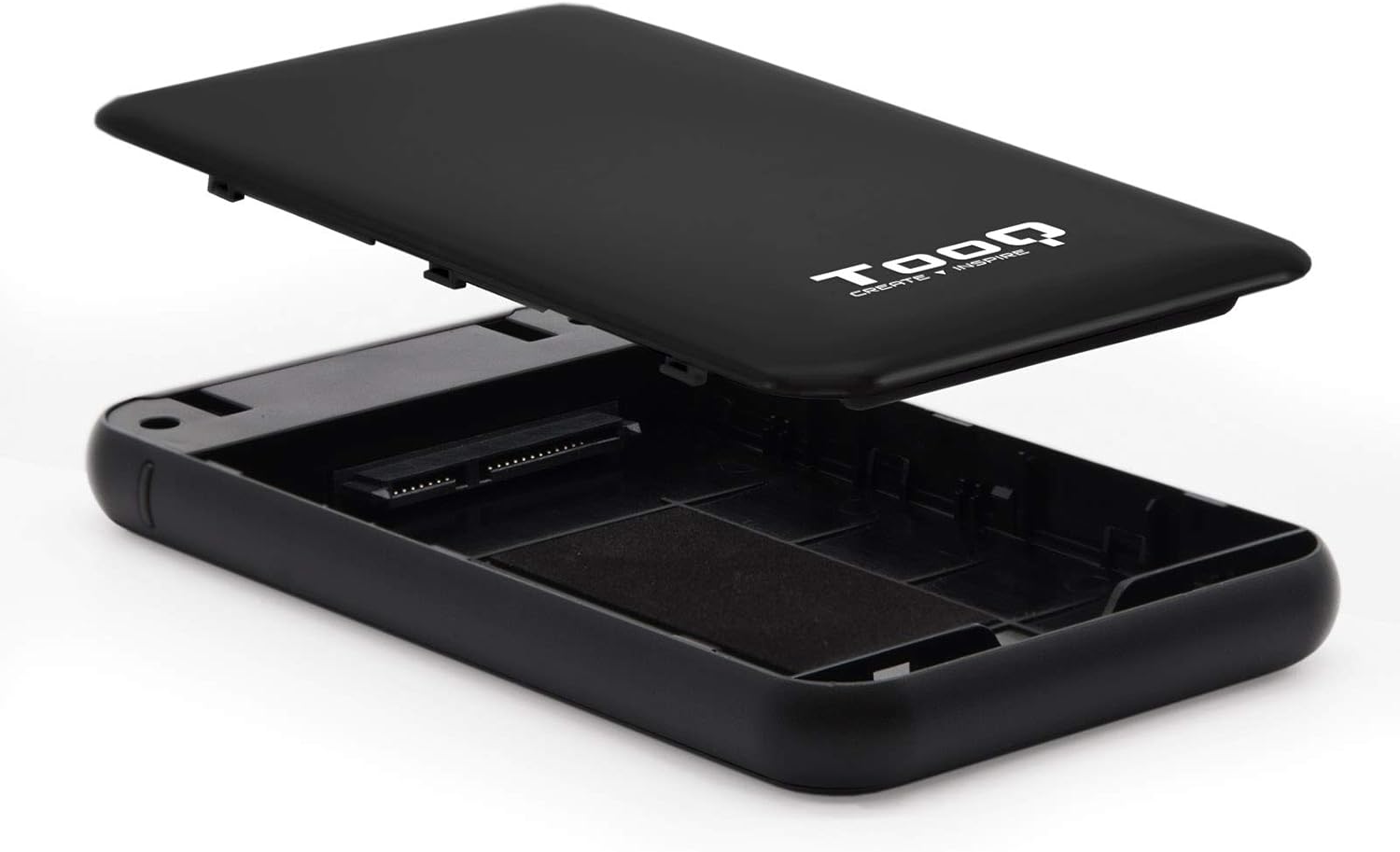
Image 4.1: The enclosure opened, revealing the internal SATA data and power connector for a 2.5-inch drive.
5. 사용 설명서
After installing your hard drive, connect the enclosure to your computer:
- USB 케이블을 연결하십시오: Plug the Micro-B end of the included USB 3.0 cable into the enclosure's Micro-USB port.
- 컴퓨터에 연결: Plug the Type-A end of the USB cable into an available USB port on your computer. For optimal performance, use a USB 3.0 or USB 3.1 Gen1 port.
- 전원 켜기: If the enclosure has a power button (refer to Image 3.2), press it to turn on the device. The LED indicator (Image 3.1) will illuminate, indicating power and connection status.
- 드라이브에 액세스하기: Your operating system should automatically detect the new storage device.
- New Drives: If you are using a brand new hard drive, it may need to be initialized and formatted before use. Refer to your operating system's disk management tools for this process.
- Existing Drives: If the drive contains data, it should appear as a removable drive in 'My Computer' (Windows) or on the desktop (macOS).

Image 5.1: The TooQ TQE-2528B enclosure connected to a laptop, demonstrating a typical usage scenario.
6. 유지관리
To ensure the longevity and optimal performance of your enclosure:
- 케이스를 깨끗하고 먼지가 없는 상태로 유지하세요. 청소 시에는 부드럽고 마른 천을 사용하세요.
- 극한의 온도, 습도 또는 직사광선에 장치를 노출하지 마십시오.
- 제품을 떨어뜨리거나 강한 충격을 가하지 마십시오.
- Always safely eject the drive from your operating system before disconnecting the USB cable to prevent data corruption.
7. 문제 해결
If you encounter issues with your TooQ TQE-2528B enclosure, refer to the following common solutions:
- 드라이브가 감지되지 않음:
- USB 케이블이 외장 케이스와 컴퓨터에 제대로 연결되어 있는지 확인하십시오.
- 컴퓨터의 다른 USB 포트에 연결해 보십시오.
- Verify that the hard drive is correctly seated within the enclosure's SATA connector.
- Check your computer's Disk Management (Windows) or Disk Utility (macOS) to see if the drive is recognized but uninitialized or unformatted.
- Test the enclosure with a different 2.5-inch SATA drive, if available, to rule out a drive issue.
- 느린 데이터 전송:
- Ensure you are connected to a USB 3.0 or USB 3.1 Gen1 port on your computer. Connecting to a USB 2.0 port will result in slower speeds.
- 운영 체제와 드라이버가 최신 버전인지 확인하십시오.
- Enclosure Does Not Power On:
- Ensure the USB cable is properly connected and providing power. The enclosure is bus-powered.
- 컴퓨터의 다른 USB 포트를 사용해 보십시오.
8. 사양
| 모델 번호 | TQE-2528B |
| 호환 드라이브 | 2.5-inch SATA I/II/III HDD/SSD (up to 9.5mm height) |
| 인터페이스 | USB 3.1 Gen1 (USB 3.0) |
| 데이터 전송 속도 | 최대 5.0Gbps |
| 전원 공급 장치 | USB Bus-powered (5 Volts) |
| 재료 | ABS 플라스틱 |
| 치수(길이 x 너비 x 높이) | 13.5cm x 8cm x 1.6cm (약 5.3 x 3.1 x 0.6인치) |
| 무게 | 50g(약 0.11파운드) |
| 운영 체제 호환성 | Universal (Windows, macOS, Linux) |

Image 8.1: Technical drawing illustrating the dimensions of the TooQ TQE-2528B enclosure.
9. 보증 및 지원
TooQ products are designed for reliability and performance. This product comes with a standard manufacturer's warranty. For specific warranty terms and conditions, please refer to the warranty card included with your product or visit the official TooQ web대지.
For technical support, frequently asked questions, or to download the latest drivers (if applicable), please visit the official TooQ support web해당 웹사이트를 방문하거나 고객 서비스 부서에 문의하십시오. 연락처 정보는 일반적으로 제품 포장이나 공식 웹사이트에서 찾을 수 있습니다. web대지.
제조업체: TOOQ
국제 무역 품목 번호(GTIN): 08433281008304