
1. 제품 오버view
The Comfee MDDE-10DEN3 Dehumidifier is designed to efficiently remove excess moisture from indoor air, creating a more comfortable and healthier environment. It is suitable for rooms up to approximately 40 cubic meters. This unit features a clearly designed control panel for easy operation, a 2-liter water tank, and includes essential protections such as frost and overflow protection. It utilizes R290 refrigerant for effective dehumidification.
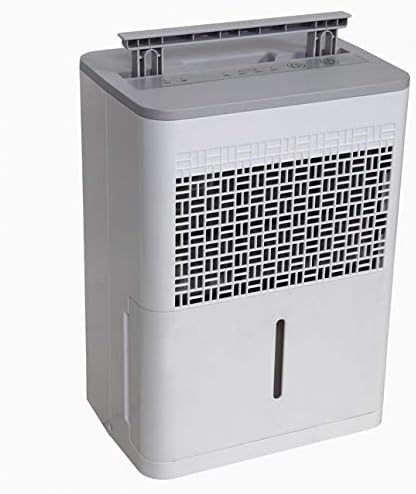
그림 1: 앞쪽 view of the Comfee MDDE-10DEN3 Dehumidifier. This image shows the compact design of the unit, with the air intake grille visible on the front and the water level indicator on the side.
2. 안전 지침
부상이나 제품 손상을 방지하기 위해 제습기 작동 전에 모든 안전 지침을 주의 깊게 읽어 주십시오. 나중에 참조할 수 있도록 이 설명서를 보관하십시오.
- 전원 공급 장치가 볼륨과 일치하는지 확인하십시오.tag단위의 정격 라벨에 지정되어 있습니다.
- 손상된 코드나 플러그로 제습기를 작동하지 마세요.
- 공기 흡입구 또는 배출구를 막지 마십시오. 장치 주변에 최소 20cm(8인치)의 공간을 유지하십시오.
- 젖은 상태 또는 d에서 기기를 사용하지 마십시오.amp 욕실이나 세탁실처럼 물과 접촉할 수 있는 환경에서 사용됩니다.
- 청소나 유지관리 작업을 하기 전에는 항상 장치의 플러그를 뽑으세요.
- 운송 및 작동 중에는 제품을 똑바로 세워 두십시오.
- This appliance uses R290 refrigerant, which is flammable. Do not puncture the refrigerant circuit.
- 제품을 직접 수리하거나 개조하지 마십시오. 수리는 자격을 갖춘 서비스 담당자에게 문의하십시오.
- 어린이와 애완동물의 손이 닿지 않는 곳에 보관하세요.
3. 제품 구성품
Familiarize yourself with the main parts of your Comfee MDDE-10DEN3 Dehumidifier:
- 제어판: Located on the top of the unit, used for setting operation modes and humidity levels.
- 공기 흡입구 그릴: Where air is drawn into the unit for dehumidification.
- 공기 배출구: 건조한 공기가 배출되는 곳.
- 수조: Collects condensed water. Features a water level indicator.
- 핸들: 간편한 휴대를 위해.
- 전원 코드: 기기를 전기 콘센트에 연결합니다.

그림 2: 클로즈업 view of the Comfee MDDE-10DEN3 Dehumidifier control panel. This image displays the various buttons and indicator lights, including power, humidity settings (40%, 50%, 60%), and defrost indicators.
4. 설정
- 짐 풀기: 제습기를 포장에서 조심스럽게 꺼내세요. 나중에 보관하거나 운반할 때를 대비해 포장을 보관하세요.
- 놓기: Place the unit on a firm, level surface in the desired room. Ensure there is at least 20 cm (8 inches) of free space around all sides of the unit for proper air circulation. Do not place it near heat sources or in direct sunlight.
- 전원 연결: 전원 코드를 접지된 콘센트에 꽂으세요. 콘센트가 장치의 전력 요구 사항을 충족하는지 확인하세요.
- 수조: 물탱크가 장치에 올바르게 삽입되었는지 확인하세요.
5. 사용 설명서
제어판을 통해 제습기의 기능을 관리할 수 있습니다.
그림 3: 상세한 view of the control panel for operation reference.
- 전원 버튼 (①): 기기를 켜거나 끄려면 누릅니다.
- 습도 설정 버튼 (②): Press to cycle through desired humidity levels: 40%, 50%, 60%. The corresponding indicator light will illuminate. The unit will operate until the set humidity level is reached.
- 연속 작업: If no specific humidity level is set, the unit may operate continuously.
- Defrost Indicator (③): Illuminates when the unit is in defrost mode, which occurs automatically when coil temperatures are too low. The dehumidification process will pause during defrosting.
- 물탱크 만수 표시기 (④): Illuminates when the water tank is full or incorrectly inserted. The unit will stop operating until the tank is emptied and reinserted correctly.
- 자동 재시작 기능: 정전이 발생한 경우tage, the unit will automatically restart with the previously set humidity level once power is restored.
연속 배수 (선택 사항)
For continuous operation without needing to empty the water tank, a drainage hose (not included) can be connected to the continuous drainage port on the back of the unit. Ensure the hose is sloped downwards to allow gravity drainage into a suitable receptacle.
6. 유지관리
정기적인 유지관리를 통해 최적의 성능을 보장하고 제습기의 수명을 연장할 수 있습니다.
- 물탱크 비우기: When the "Full Water Tank" indicator illuminates, carefully pull out the water tank, empty the collected water, and reinsert it firmly until it clicks into place.
- 공기 필터 청소: 공기 필터는 사용량에 따라 2주에 한 번 또는 그 이상 자주 청소해야 합니다.
- 장치의 전원을 끄고 전원 콘센트에서 플러그를 뽑으세요.
- Remove the air filter from the back or side of the unit (refer to diagram in full manual if available).
- 필터를 따뜻한 비눗물로 씻으세요. 깨끗이 헹군 후 완전히 자연 건조시킨 후 다시 장착하세요.
- 필터 없이 제습기를 작동하지 마세요.
- 장치 외부 청소: 부드러운 천으로 외부를 닦아주세요.amp 옷감. 강한 화학 물질이나 연마성 세제를 사용하지 마십시오.
- 저장: If storing the unit for an extended period, ensure the water tank is empty and clean, and the filter is clean and dry. Store the unit upright in a cool, dry place.
7. 문제 해결
일반적인 문제와 해결 방법은 다음 표를 참조하세요.
| 문제 | 가능한 원인 | 해결책 |
|---|---|---|
| 기기가 켜지지 않습니다. | No power; power cord loose; water tank full or not properly inserted. | Check power outlet and cord connection. Empty and reinsert water tank correctly. |
| 물이 수집되지 않았습니다. | Humidity level set too high; room temperature too low; air filter clogged; continuous drainage hose connected and draining. | Lower desired humidity setting. Ensure room temperature is above 5°C (41°F). Clean air filter. Check continuous drainage setup. |
| 장치가 지속적으로 작동합니다. | Humidity level not reached; unit set to continuous operation. | Allow more time for dehumidification. Set a specific humidity level if continuous operation is not desired. |
| Defrost indicator is on. | Coils are frosting up due to low ambient temperature. | This is normal operation. The unit will automatically defrost and resume dehumidification. |
If the problem persists after trying these solutions, please contact Comfee customer support.
8. 사양
| 특징 | 사양 |
|---|---|
| 모델명 | MDDE-10DEN3 |
| 상표 | 콤피 |
| 제습 능력 | 10리터/24시간 |
| 물탱크 용량 | 2리터 |
| 추천 객실 크기 | Up to approximately 40 m³ |
| 냉각제 | R290 |
| 치수(패키지) | 44.8 x 36.3 x 34cm |
| 품목 무게 | 11 킬로그램 |
| 색상 | 화이트/그레이 |
| 작동 모드 | 오토매틱 |
9. 보증 및 지원
Specific warranty information for your Comfee MDDE-10DEN3 Dehumidifier is typically provided with your purchase documentation or on the manufacturer's official web본 사이트. 보증 범위, 약관 및 조건에 대한 자세한 내용은 다음 자료를 참조하십시오.
For technical support, service, or inquiries about replacement parts, please contact Comfee customer service. Contact information can usually be found on the Comfee web사이트나 제품 포장에 표시하세요.
You can visit the official Comfee store for more information: 컴피 스토어