
소개
Thank you for choosing the MIFA A3 Soundbox Bluetooth Portable Speaker. This manual provides essential information for the safe and efficient use of your device. Please read it thoroughly before operating the speaker and retain it for future reference.
안전 정보
- 스피커를 극한의 온도, 직사광선 또는 높은 습도에 노출시키지 마세요.
- 스피커를 떨어뜨리거나 강한 충격을 주지 마십시오.
- 스피커를 직접 분해하거나 수리하려고 하지 마십시오. 자격을 갖춘 서비스 담당자에게 문의하십시오.
- Keep the speaker away from water and liquids, despite its waterproof rating, to prevent damage to charging ports or internal components.
- 지정된 충전 케이블과 어댑터만 사용하세요.
패키지 내용
다음 품목이 패키지에 포함되어 있는지 확인하세요.
- MIFA A3 Bluetooth Portable Speaker
- USB 충전 케이블
- AUX 오디오 케이블
- 사용 설명서 (본 문서)
제품 끝view
The MIFA A3 speaker features intuitive touch controls and multiple connectivity options. Familiarize yourself with the speaker's layout:
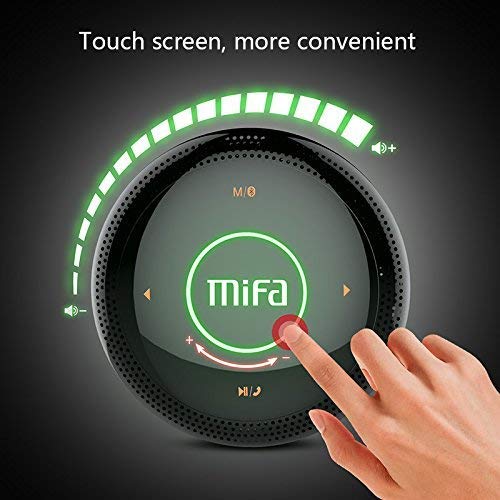
그림 1: 맨 위 view of the MIFA A3 speaker, highlighting the touch-sensitive control panel. The panel displays volume indicators, play/pause, and track navigation buttons. A central 'Mifa' logo is also visible.
- 터치 제어판: Located on the top surface for volume adjustment, playback control, and mode selection.
- 마이크로폰: 핸즈프리 통화를 위해.
- 충전 포트: 충전을 위한 마이크로 USB 포트.
- 보조 입력: 유선 연결을 위한 3.5mm 오디오 잭.
- 마이크로 SD 카드 슬롯: 메모리 카드에서 음악을 직접 재생하기 위한 용도입니다.
설정
1. 스피커 충전
처음 사용하기 전에 스피커를 완전히 충전하십시오. 제공된 USB 충전 케이블을 스피커의 충전 포트에 연결하고 다른 한쪽 끝을 USB 전원 어댑터(별매) 또는 컴퓨터의 USB 포트에 연결하십시오.
- 충전 중에는 충전 표시등이 켜집니다.
- The indicator will turn off or change color once fully charged.
- A full charge provides approximately 8 hours of continuous playtime.
2. 전원 켜기/끄기
- 전원을 켜려면: Press and hold the Power button (usually integrated into the touch panel or a dedicated button) for 2-3 seconds until you hear an audible prompt or see an indicator light.
- 전원을 끄려면: Press and hold the Power button again for 2-3 seconds.
작동 지침
1. 블루투스 페어링
- 스피커 전원이 켜져 있고 블루투스 페어링 모드인지 확인하십시오(파란색 표시등이 깜빡이거나 음성 안내가 나옴).
- 기기(스마트폰, 태블릿, PC)에서 Bluetooth를 활성화하고 사용 가능한 기기를 검색하세요.
- 장치 목록에서 "MIFA A3"을 선택하십시오.
- 페어링이 완료되면 스피커에서 소리로 확인 메시지가 표시되고 표시등이 파란색으로 켜집니다.
- The speaker will automatically connect to the last-paired device when powered on, if that device's Bluetooth is active and within range.
2. AUX 연결
For devices without Bluetooth, use the provided 3.5mm AUX audio cable:
- AUX 케이블의 한쪽 끝을 스피커의 AUX 입력 포트에 연결하십시오.
- 다른 쪽 끝을 오디오 장치의 헤드폰 잭에 연결합니다.
- 스피커가 자동으로 AUX 모드로 전환됩니다.
3. 마이크로 SD 카드 재생
Insert a Micro SD card (up to 32GB, FAT32 format) with music file지정된 슬롯에 카드를 삽입하십시오. 스피커가 자동으로 카드를 감지하고 재생을 시작합니다.
4. Touch Control Operations
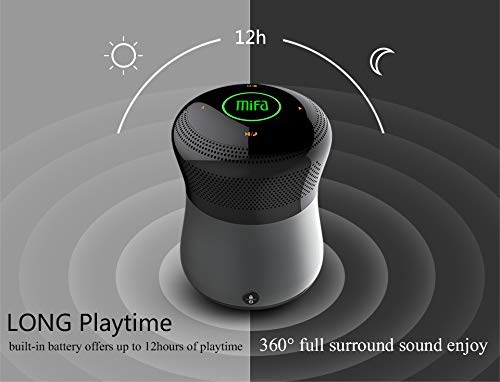
그림 2: The MIFA A3 speaker shown with an overlay indicating "LONG Playtime" (up to 12 hours) and "360° full surround sound enjoy." This image emphasizes the speaker's battery life and audio dispersion.
- 볼륨 조절: Slide your finger clockwise on the touch panel to increase volume, counter-clockwise to decrease.
- 재생/일시 중지: Tap the central Play/Pause icon.
- 다음 트랙: Tap the "Next" arrow icon.
- 이전 트랙 : Tap the "Previous" arrow icon.
- 모드 스위치: Tap the "M/O" icon to cycle between Bluetooth, AUX, and Micro SD card modes.
- 잠금 버튼: Press the lock icon to prevent accidental touch inputs.
5. Call Handling (Bluetooth Mode)
- 전화 받기: Tap the Play/Pause icon when a call comes in.
- 통화 종료: Tap the Play/Pause icon again.
- 전화 거부: Press and hold the Play/Pause icon for 2 seconds.
유지
- 부드럽고 마른 천으로 스피커를 닦으세요. 연마성 세제나 용제를 사용하지 마세요.
- 장시간 사용하지 않을 때는 스피커를 시원하고 건조한 곳에 보관하세요.
- Charge the battery at least once every three months to maintain battery health.
문제 해결
| 문제 | 가능한 해결책 |
|---|---|
| 스피커의 전원이 켜지지 않습니다. | 배터리가 충전되어 있는지 확인하세요. 전원에 연결한 후 다시 시도해 보세요. |
| 블루투스로 페어링할 수 없습니다. |
|
| 소리가 나지 않습니다. |
|
| 음질이 좋지 않습니다. |
|
명세서
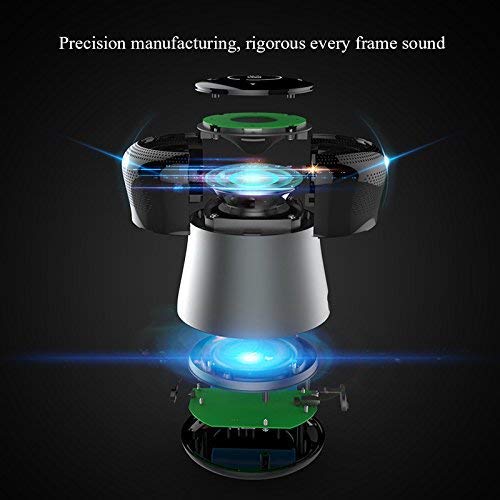
그림 3: An exploded diagram of the MIFA A3 speaker, illustrating its internal components and structural design, emphasizing precision manufacturing.
| 모델 | MIFA A3 |
| 출력 전력 | 10와트 |
| 연결성 | Bluetooth 4.2, AUX, Micro SD Card |
| 배터리 | 1800mAh 리튬이온 |
| 노는 시간 | 최대 8시간(60% 볼륨) |
| 충전 시간 | 약 3-4시간 |
| 마이크로폰 | 핸즈프리 통화용 내장 |
| 방수복 | Yes (as per product specifications, but general caution advised for ports) |
| 제어 방법 | 만지다 |
| 호환 장치 | 노트북, PC, 스마트폰, 태블릿 |
보증 및 지원
MIFA products are designed to provide reliable performance. For warranty information or technical support, please refer to the warranty card included with your purchase or visit the official MIFA web사이트. 보증 청구를 위해 구매 증빙 자료를 보관하세요.
For further assistance, you may contact MIFA customer support through their official channels.