
1. 서론
This manual provides detailed instructions for the installation and operation of the EASYGUARD ES002-P5 Push Start Button Kit. This system is designed to upgrade your vehicle with a push-button engine start/stop function and keyless go capabilities. It is compatible with most DC12V vehicles, including both diesel and petrol engines, and manual or automatic transmissions.
2. 중요 사항 및 안전 정보
- 전문 설치 권장: Installation of this system requires advanced knowledge of car electrical systems. Professional car alarm installer installation is highly recommended to ensure correct functionality and prevent damage to your vehicle.
- 스티어링 휠 잠금 장치: When installing the system, it is necessary to release, unlock, or remove the steering wheel lock if your vehicle is equipped with one.
- 원격 엔진 시동: The remote engine start function is only available for automatic transmission vehicles. To utilize this feature, your existing remote (key fob) must provide three locking pulses when the lock button is pressed three times consecutively. If this condition is not met, the remote engine start function will not be available.
- No Remote/Key Fob Included: This kit does not include a remote or key fob. It is designed to work with your vehicle's existing factory or aftermarket remote/key fobs.
- 이모빌라이저 바이패스: If your original car remote control (key) contains a chip immobilizer, an additional bypass module (e.g., ASIN: B00MEHBVIC) is required. Universal bypass modules are generally compatible, excluding DATA or CAN-BUS style modules.
- LED 표시등: The engine start button LED illuminates blue when the system is disarmed, and when ACC or ON modes are active. It changes to purple once the vehicle engine has started.
3. 패키지 내용
패키지에 모든 구성품이 들어 있는지 확인하세요.
- 제어 모듈 1개
- Push button x 1
- 6P ignition harness x 1
- Wire harness x 1
4. 설정 및 설치
Due to the complexity of vehicle electrical systems, detailed step-by-step installation instructions are provided in a separate guide included with your product. This section outlines general considerations and component identification.
4.1 컴포넌트 오버view

그림 4.1: The push start button and its accompanying wiring harness. This image shows the main push button with a chrome ring and the multi-colored wires of the harness connected to a white connector.

그림 4.2: 맨 위 view of the EASYGUARD control module. The module is black with the "EASYGUARD" logo embossed on the top surface. A red DIP switch block is visible on one side.

그림 4.3: 각진 view of the EASYGUARD control module, showing various connectors for wiring. Multiple white and black connectors are visible on the sides of the black module.
4.2 Button Dimensions and LED Colors

그림 4.4: 상세한 view of the push start button, illustrating its dimensions (70mm total length, 41mm diameter, 30mm visible diameter) and LED color states. The button glows blue when disarmed, ACC, or ON, and purple when the engine is started.

그림 4.5: 사이드 프로file of the push start button, showing its depth and mounting mechanism. This view highlights the black plastic housing and the chrome ring around the button face.
Ensure adequate space is available for the push button's depth during installation. Refer to Figure 4.4 for precise dimensions.
5. 사용 설명서
The EASYGUARD ES002-P5 system offers two primary methods for starting the vehicle and a simple method for shutting it off.
5.1 자동차 시동 걸기

그림 5.1: Visual guide demonstrating two methods to start the vehicle using the push start button. Method 1 involves a single short press while pressing the brake pedal. Method 2 involves holding the button for 3 seconds while pressing the brake pedal.
- Method 1 (Short Press): While the system is disarmed, step on the foot brake pedal and then briefly press the push start button once. The engine will start.
- 방법 2 (길게 누르기): While the system is disarmed, keep the foot brake pedal pressed and hold the push start button for approximately 3 seconds. The engine will start.
5.2 Shutting Off the Car
그림 5.2: Visual guide demonstrating how to shut off the vehicle. Once the car is started, step on the foot brake pedal and short press the push start button once to turn off the engine.
Once the car engine is running, step on the foot brake pedal and briefly press the push start button once. This action will shut off the engine.
5.3 Switching ACC-ON-OFF Modes
The system allows switching between ACC (Accessory), ON (Ignition), and OFF modes without starting the engine. This functionality is typically achieved by pressing the start button without pressing the brake pedal. Refer to the detailed installation guide for specific sequences if not immediately apparent.
6. 유지관리
The EASYGUARD ES002-P5 Push Start Button Kit is designed for minimal maintenance. Ensure all wiring connections remain secure and free from corrosion. Periodically check the push button for any physical damage or debris that might impede its operation. No user-serviceable parts are inside the control module.
7. 문제 해결
If you encounter issues with your EASYGUARD ES002-P5 system, consider the following common troubleshooting steps:
- 엔진이 시동되지 않음:
- Ensure the foot brake pedal is fully depressed when attempting to start the engine.
- Verify that the system is disarmed.
- 모든 배선 연결부에 헐거움이나 부식이 있는지 확인하십시오.
- If your vehicle has a chip immobilizer, confirm that the bypass module is correctly installed and functioning.
- Remote Engine Start Not Working:
- Confirm your vehicle has an automatic transmission.
- Verify that your existing remote (key fob) sends three locking pulses when the lock button is pressed three times. This is a requirement for the remote start feature.
- Button LED Color Incorrect:
- Blue indicates disarmed, ACC, or ON mode. Purple indicates the engine is running. If the colors do not match the operational state, re-check wiring to the button.
- Steering Wheel Remains Locked:
- Ensure the steering wheel lock has been properly released, unlocked, or removed as part of the installation process. This is a critical step for proper system function.
For persistent issues, it is strongly recommended to consult a professional car alarm installer or contact technical support.
8. 사양
| 특징 | 세부 사항 |
|---|---|
| 모델 번호 | ES002-P5 |
| 상표 | 이지가드 |
| 호환 장치 | Most DC12V cars (Diesel & Petrol, Manual & Automatic) |
| 품목 무게 | 0.634 온스 |
| 제품 치수 | 6.69 x 5.51 x 1.97 인치 |
| 무선 리모컨 | No (Works with existing remotes) |
| 제조업체 | 중산 EASYGUARD 전자 유한회사 |
8.1 Control Module Dimensions
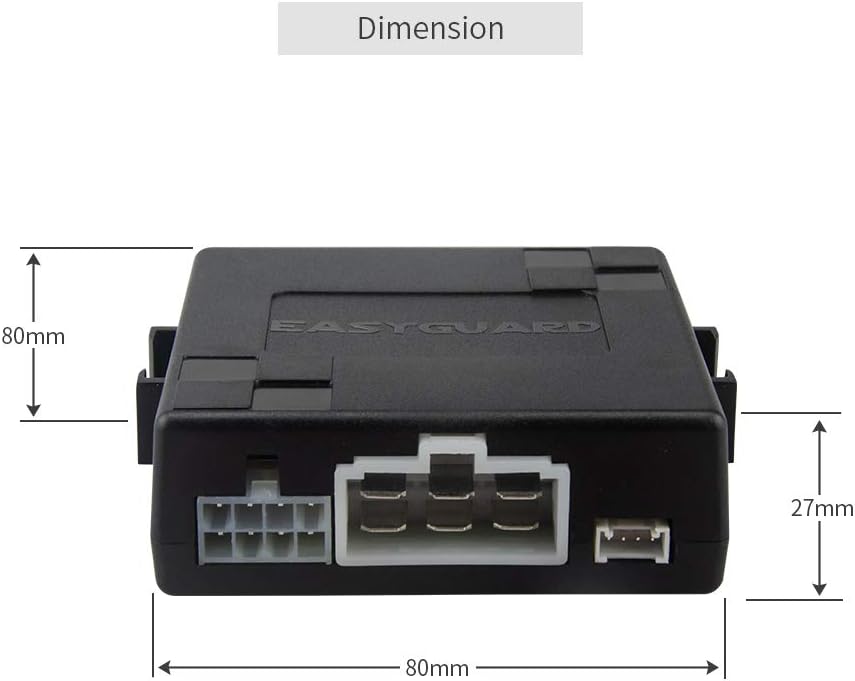
그림 8.1: Dimensions of the EASYGUARD control module, showing a length and width of 80mm and a height of 27mm. This provides critical information for finding a suitable mounting location.
9. 보증 정보
Specific warranty details for the EASYGUARD ES002-P5 Push Start Button Kit are typically provided with the product packaging or can be obtained by contacting EASYGUARD customer support directly. Please retain your proof of purchase for any warranty claims.
10. 기술 지원
EASYGUARD is committed to providing technical support for its products. If you require assistance with installation, troubleshooting, or have any questions regarding the ES002-P5 kit, please refer to the contact information provided in your product documentation or visit the official EASYGUARD website. Professional installation is highly recommended for this product.