
KitVision KVOBS72
KitVision Observer 720p Dash Cam User Manual
Model: KVOBS72
소개
The KitVision Observer 720p Dash Cam is designed to record your journeys, providing a reliable record of events on the road. This device features automatic recording upon vehicle ignition, loop recording to manage storage efficiently, and a built-in G-sensor for collision detection. It also includes motion detection and parking mode functionalities for enhanced surveillance. Footag난 다시 있을 수 있어viewed on the integrated 2.45-inch LCD screen.
제품 특징
- 자동 녹음: Starts recording automatically when the vehicle is powered on.
- 루프 녹음: 가장 오래된 잠금 해제된 파일을 덮어쓰면서 지속적으로 기록합니다.tage to ensure memory card space is utilized efficiently.
- G-센서: 갑작스러운 충격이나 충돌을 감지하고 현재 비디오를 자동으로 잠급니다.tag덮어쓰기를 방지합니다.
- 동작 감지: Records when motion is detected in front of the camera, useful for monitoring while parked.
- 주차 모드: 차량이 주차되어 있을 때 감시 기능을 제공합니다.
- 720p HD 비디오: Records video at 720p resolution and 30 frames per second.
- 140-Degree Wide-Angle Lens: 광범위한 영역을 포착합니다 view 도로의.
- 2.45인치 LCD 화면: Allows for immediate playback and menu navigation.
- WDR(광역 동적 범위) 기술: Enhances video quality in varying light conditions, improving night and day recording.
- 5-Megapixel Photo Mode: Captures still images for detailed documentation.
패키지 내용
다음 항목에 대한 상자를 체크해 주세요.
- KitVision Observer 720p Dash Cam
- 석션 컵 마운트
- 자동차 충전기
- USB 케이블
- 사용자 설명서
- Memory card (may be sold separately)

Image: KitVision Observer 720p Dash Cam and its retail packaging.
설치 가이드
1. 설치
흡착식 거치대를 앞유리의 깨끗하고 건조한 부분, 가급적 뒷유리 뒤쪽에 부착하세요.view 거울을 가리지 않도록 하세요 view. Ensure the camera lens has a clear line of sight to the road ahead. Secure the mount by pressing the suction cup firmly against the glass and engaging the locking mechanism.
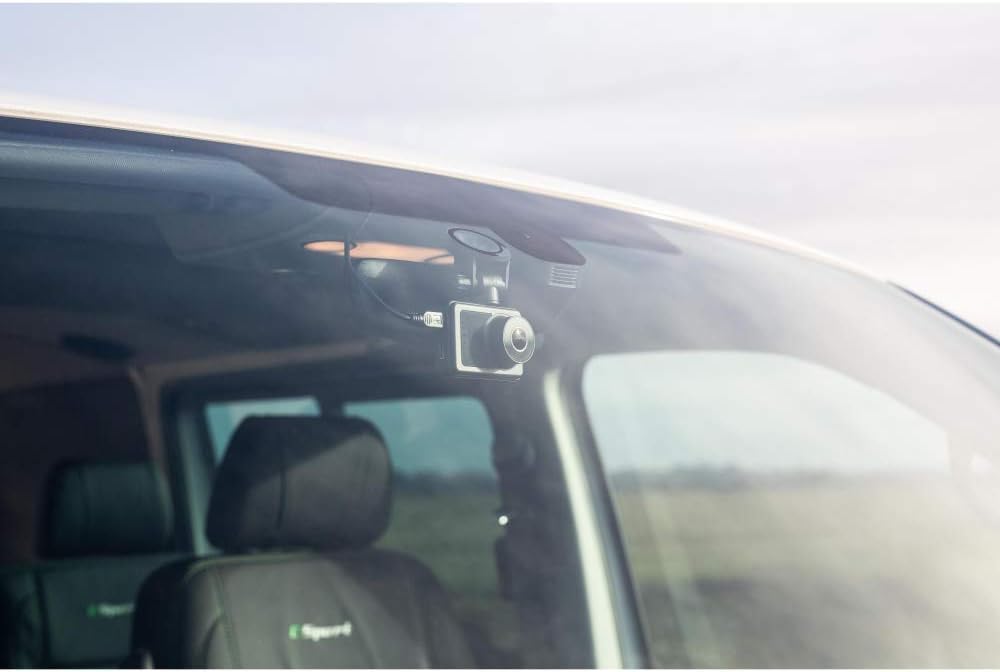
Image: Dash Cam installed on a car windshield, showing optimal placement.
2. 마이크로 SD 카드 삽입
Locate the Micro SD card slot on the side of the dash cam. Insert a compatible Micro SD card (up to 32GB, Class 10 or higher recommended) into the slot until it clicks into place. Ensure the card is inserted correctly to prevent damage.

이미지: 후면 view of the dash cam, highlighting the screen and control buttons. The Micro SD card slot is typically on the side.
3. 전원 켜기
Connect the car charger to the dash cam's power input port and plug the other end into your vehicle's 12V power outlet (cigarette lighter socket). The dash cam will typically power on automatically when your vehicle starts and begin recording.

이미지: 측면 view of the dash cam, illustrating the USB and HDMI ports for power and connectivity.
작동 지침
1. 기본 녹음
Once powered on, the dash cam will automatically start recording. A recording indicator (e.g., a flashing red dot or icon) will appear on the screen. To manually stop/start recording, press the designated record button (refer to your device's button layout).
2. 루프 레코딩
The dash cam records video in continuous loops (e.g., 1, 3, or 5-minute segments). When the memory card is full, the oldest unlocked video file기존 기록은 새로운 기록으로 덮어쓰여집니다. 이를 통해 수동 개입 없이 지속적인 녹음이 가능합니다.
3. G-센서 (비상 기록)
The built-in G-sensor detects sudden acceleration, braking, or collisions. When triggered, it automatically locks the current video segment, preventing it from being overwritten by loop recording. These locked files are typically stored in a separate folder on the SD card.
4. 동작 감지
When enabled in the settings, motion detection allows the dash cam to start recording automatically if it detects movement in its field of view while the vehicle is parked. This feature requires continuous power or a sufficiently charged internal battery.
5. 주차 모드
Parking mode, when activated, provides surveillance when your vehicle is parked. It often works in conjunction with the G-sensor or motion detection to record incidents while the car is stationary. Ensure your dash cam has a power source (e.g., hardwired kit) for extended parking mode use.
6. 재생
다시view 기록된 footage, stop recording (if active) and enter playback mode via the menu options. Use the navigation buttons to browse through files and select a video to watch on the 2.45-inch LCD screen. You can also remove the Micro SD card and view file컴퓨터에서 s.

이미지: 앞면 view of the dash cam, showing the screen displaying live road footage.
유지
1. 청소
Wipe the camera lens and screen periodically with a soft, lint-free cloth. Do not use abrasive cleaners or solvents, as these can damage the surfaces. Ensure the suction cup mount is clean for optimal adhesion.
2. 보관
If storing the dash cam for an extended period, remove the Micro SD card and store the device in a cool, dry place away from direct sunlight and extreme temperatures. Fully charge the internal battery before storage to maintain its lifespan.
문제 해결
| 문제 | 가능한 해결책 |
|---|---|
| 대시캠 전원이 켜지지 않습니다. | Check the car charger connection to both the dash cam and the vehicle's power outlet. Ensure the vehicle's power outlet is functioning. The internal battery may be depleted; charge it for a few hours. |
| 녹화가 예기치 않게 중단됩니다. | The Micro SD card may be full. Ensure loop recording is enabled. The card may be faulty or too slow; try formatting the card or using a new Class 10 (or higher) Micro SD card. |
| 비디오 푸tage는 흐릿하거나 불분명합니다. | Clean the camera lens. Ensure the protective film has been removed from the lens. Check if the camera is securely mounted and not vibrating. |
| Suction cup mount does not stick. | Clean both the windshield and the suction cup thoroughly. Ensure the surface is dry. Apply slight moisture to the suction cup before pressing firmly and engaging the lock. Warm the suction cup slightly if in cold conditions. |
| G센서가 너무 민감하거나/민감하지 않습니다. | 블랙박스 메뉴에서 G센서 감도 설정을 조정하세요. |
| 날짜와 시간이 잘못되었습니다. | Set the correct date and time in the dash cam's system settings. |
기술 사양
- 상표: KitVision
- 모델 이름: KVOBS72
- 비디오 캡처 해상도: 720p (1280x720)
- 프레임 속도: 30fps
- 비디오 형식: MP4
- 사진 해상도: 5메가픽셀
- 분야 View: 140도
- 화면 크기: 2.45인치
- 디스플레이 유형: 액정표시장치
- 저장: Supports Micro SD cards up to 32GB (Class 10 recommended)
- 특별 기능: Motion Detection, Night Vision, G-Sensor, WDR
- 장착 유형: 석션 컵 마운트
- 전원: Car Charger (12V), Internal Lithium-Ion Battery
- 색상: 검은색
- 품목 무게: 56그램
보증 정보
This product is covered by a standard manufacturer's warranty. Please refer to the warranty card included in your package or visit the official KitVision web보증 범위 및 청구에 대한 자세한 약관은 해당 사이트를 참조하세요.
고객 지원
For technical assistance, troubleshooting, or further inquiries, please contact KitVision customer support. Contact details can typically be found on the product packaging, the official KitVision web사이트나 보증서를 참조하세요.
Ask a question about this manual
Ask about setup, troubleshooting, compatibility, parts, safety, or missing instructions. Manuals+ will review the question and use this page’s manual context to help answer it.