
소개
This manual provides essential information for the safe and effective operation of your VOLTCRAFT IR 2201-50D USB Infrared Thermometer. Please read these instructions thoroughly before using the device and retain them for future reference. This device is designed for non-contact temperature measurement across a wide range, featuring a dual laser for precise targeting and a USB interface for data transfer.
안전 지침
- 레이저 안전 : Do not look directly into the laser beam or point it at people or animals. The laser is used for targeting only.
- 눈 보호: Always wear appropriate eye protection when operating the device in environments where laser exposure is a concern.
- 온도 제한: 기기를 작동 범위를 벗어난 극한 온도에 노출시키지 마십시오.
- 배터리 취급: Ensure correct battery polarity. Remove batteries if the device will not be used for an extended period. Dispose of batteries according to local regulations.
- 유지: Only perform maintenance as described in this manual. Refer all other servicing to qualified personnel.
- 환경 조건: Avoid using the device in high humidity, dusty, or explosive environments.
패키지 내용
Verify that all items listed below are present and in good condition upon unpacking.
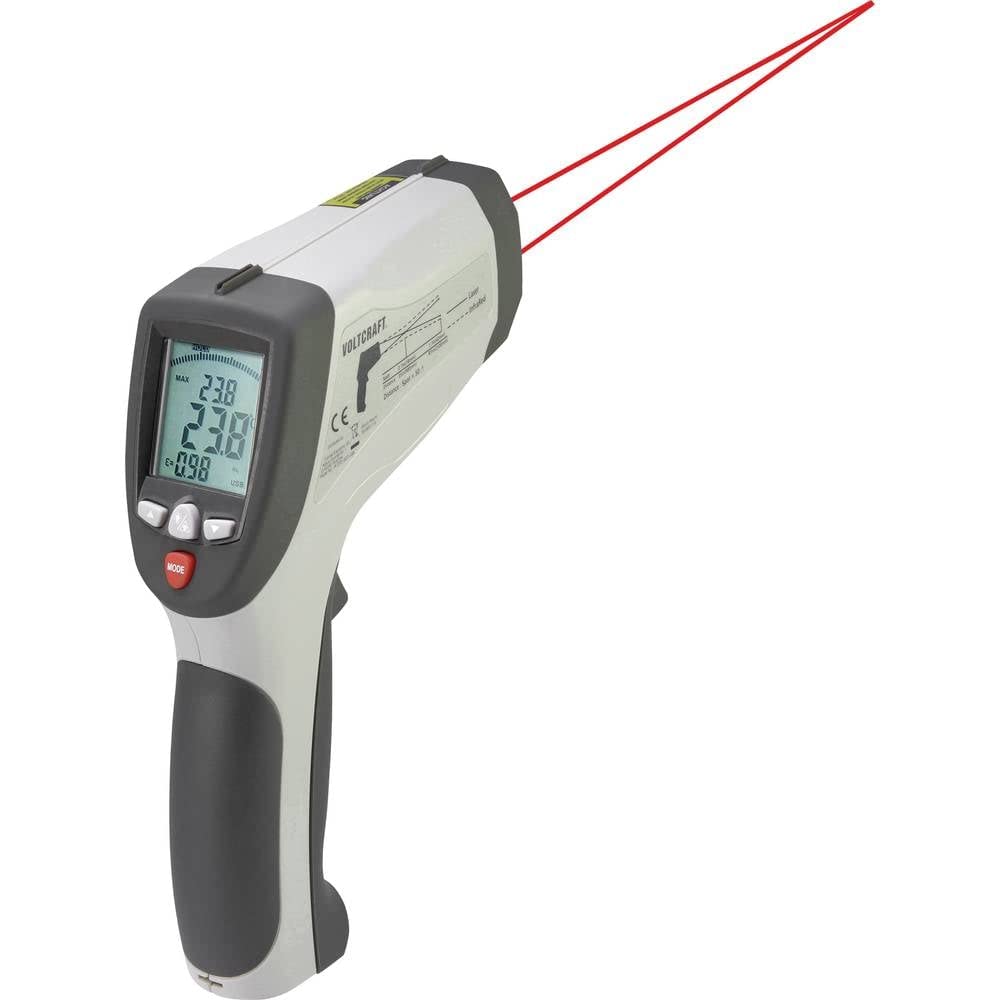
Image: Complete kit for the VOLTCRAFT IR 2201-50D Infrared Thermometer.
- VOLTCRAFT IR 2201-50D Infrared Thermometer
- 하드 휴대용 케이스
- 미니 삼각대
- USB 연결 케이블
- K-Type Temperature Probe
- 소프트웨어 CD
- 사용 설명서 (본 문서)
제품 끝view
The VOLTCRAFT IR 2201-50D is a high-precision infrared thermometer designed for non-contact temperature measurements. Key features include:
- 듀얼 레이저 타겟팅: Provides accurate aiming for precise measurement areas.
- 광범위한 온도 범위: Measures from -50 °C to 2200 °C (-58 °F to 3992 °F).
- High Optical Resolution (D:S): 50:1 distance-to-spot ratio for measuring small targets from a distance.
- 빠른 응답 시간: 150 ms for quick readings.
- 조정 가능한 방사율: 측정 범위는 0.1에서 1.0까지로, 다양한 표면에서 정확한 측정이 가능합니다.
- USB 인터페이스: For data logging and connection to a computer (software included).
- K-Type Input: Supports external K-type thermocouples for contact temperature measurements.

이미지: 앞면 view of the thermometer, highlighting the measurement lens and laser emitters.

이미지: 측면 view of the thermometer, showing the display and controls.
설정
- 배터리 설치: Open the battery compartment (usually located in the handle). Insert one 9V battery, ensuring correct polarity. Close the compartment securely.
- 전원 켜기: Press the trigger to power on the device. The display will illuminate.
- 단위 선택: If necessary, use the 'MODE' button to cycle through settings and select your preferred temperature unit (°C or °F). Refer to the on-screen indicators.
- 방사율 조정: For accurate readings, adjust the emissivity setting (E) to match the surface being measured. Consult a standard emissivity table for common materials. Use the up/down arrow buttons to change the value.
- K-Type Probe Connection (Optional): If using the K-type probe, insert its connector into the designated K-type input port on the side of the thermometer.
- USB 연결(선택 사항): To connect to a computer for data logging, use the provided USB cable. Install the software from the included CD before connecting the device.
작동 지침
- 비접촉식 측정:
- 온도계를 목표 표면에 대세요.
- Press and hold the trigger. The dual lasers will indicate the measurement area.
- 측정된 온도가 디스플레이에 표시됩니다. 측정값을 고정하려면 트리거에서 손을 떼십시오.
- Maintain the specified distance-to-spot ratio (50:1) for optimal accuracy. For example, at 50 inches distance, the measurement spot diameter is 1 inch.
- K-Type Probe Measurement:
- Ensure the K-type probe is securely connected.
- Select the K-type measurement mode using the 'MODE' button.
- Place the tip of the K-type probe in contact with the surface or substance to be measured.
- The temperature reading from the probe will be displayed.
- Data Logging (via USB):
- Connect the thermometer to your computer using the USB cable.
- Launch the installed software.
- Follow the software instructions to configure data logging parameters and start/stop recording measurements.
- 디스플레이 기능 : The display may show various indicators such as MAX/MIN temperature, average temperature, differential temperature, and emissivity settings. Use the 'MODE' button to navigate these functions.
유지
- 청소:
- 기기를 닦으세요asing는 부드러운 d로 발음합니다.amp 천. 연마성 세척제나 용매를 사용하지 마십시오.
- Clean the infrared lens gently with a soft cloth or cotton swab and a small amount of isopropyl alcohol. Avoid scratching the lens.
- 저장: Store the thermometer in its hard carrying case in a cool, dry place when not in use. Remove batteries if storing for extended periods.
- 배터리 교체: 디스플레이에 배터리 부족 표시가 나타나면 9V 배터리를 교체하세요.
문제 해결
| 문제 | 가능한 원인 | 해결책 |
|---|---|---|
| 장치의 전원이 켜지지 않습니다. | 배터리가 방전되었거나 잘못 설치되었습니다. | 9V 배터리를 교체하거나 극성을 확인하십시오. |
| 온도 판독값이 부정확합니다. | 방사율 설정이 잘못되었거나, 렌즈가 더럽거나, 목표물이 너무 멀거나 너무 작을 수 있습니다. | Adjust emissivity for the target material. Clean the lens. Ensure the target fills the measurement spot. |
| 레이저가 보이지 않습니다. | Laser function disabled; low battery. | Check device settings to enable laser. Replace battery. |
| USB 연결이 인식되지 않습니다. | Software not installed; faulty cable; driver issue. | Install the software from the CD. Try a different USB port or cable. Consult software documentation for driver installation. |
명세서
| 매개변수 | 값 |
|---|---|
| 모델 번호 | 1599565 |
| Temperature Range (IR) | -50 °C ~ 2200 °C (-58 °F ~ 3992 °F) |
| 광학 분해능(D:S) | 50시 1분 |
| 응답 시간 | 150밀리초 |
| Emissivity | 0.1에서 1.0까지 조절 가능 |
| 레이저 타입 | 듀얼 레이저 |
| 연결성 | USB |
| 전원 공급 장치 | 9V 배터리(별도 구매) |
| 치수(길이 x 너비 x 높이) | 15.5 x 5.2 x 20.4cm(6.1 x 2.0 x 8.0인치) |
| 무게 | 320그램(0.7파운드) |
| 재료 | 플라스틱 |
보증 및 지원
VOLTCRAFT products are designed for reliability and performance. For warranty information, technical support, or service inquiries, please refer to the documentation included with your purchase or visit the official VOLTCRAFT website. Please have your model number (IR 2201-50D) and serial number (if applicable) ready when contacting support.
제조업체: 볼트크래프트
관리 지침: Clean the device as described in the Maintenance section.