
1. 서론
The Romoss QS10 is a 10000mAh portable power bank designed to provide convenient charging for a wide range of mobile devices. It features an integrated Micro USB cable and includes adapters for Lightning and Type-C connections, eliminating the need to carry multiple charging cables. This manual provides essential information for the safe and efficient operation of your power bank.
2. 제품 오버view
The QS10 power bank offers a versatile charging solution with its built-in cable and adapter system. Its compact design makes it suitable for travel and daily use.
주요 특징:
- Integrated Cable System: Includes a built-in Micro USB cable with detachable Lightning and Type-C adapters for broad device compatibility.
- 다중 입력 옵션: Recharge the power bank using Micro USB, Lightning, or Type-C cables.
- 대용량: 10000mAh capacity provides multiple charges for smartphones and tablets.
- 컴팩트한 디자인: Approximately the size of an iPhone X, designed for portability.
패키지 내용:
- Romoss QS10 Power Bank
- Integrated Micro USB Cable
- Lightning Adapter (detachable)
- Type-C Adapter (detachable)
- 사용 설명서 (본 문서)
3. 설정 및 첫 사용
Before initial use, fully charge your Romoss QS10 Power Bank.
Retrieving the Integrated Cable and Adapters:
- Locate the integrated Micro USB cable on the side of the power bank.
- Gently click out the Micro USB connector from its storage slot.
- Pull the Micro USB cable to extend it.
- To access the Lightning or Type-C adapters, insert the Micro USB connector into the designated slot on the power bank and press lightly. The desired adapter will emerge connected to the Micro USB cable.

Image: Steps for retrieving the integrated Micro USB cable and adapters. This image illustrates how to pull out the Micro USB connector, extend the cable, and then attach or retrieve the Lightning/Type-C adapters from their storage.
4. 사용 설명서
4.1. 파워뱅크 충전하기
The Romoss QS10 can be recharged using a Micro USB, Lightning, or Type-C cable. A charging cable is not included for recharging the power bank itself.
- Connect a compatible charging cable (Micro USB, Lightning, or Type-C) to the corresponding input port on the power bank.
- 충전 케이블의 다른 쪽 끝을 USB 전원(예: 벽면 어댑터, 컴퓨터 USB 포트)에 연결하십시오.
- 보조 배터리의 LED 표시등은 충전 상태를 나타내기 위해 켜집니다. 모든 LED가 켜져 있으면 완충된 것입니다.

Image: Flexible recharge options. This image displays the three different input ports (Micro USB, Lightning, Type-C) available on the Romoss QS10 power bank for recharging the unit.
4.2. 장치 충전
Use the integrated cable and appropriate adapter to charge your smartphone or tablet.
- Retrieve the integrated Micro USB cable and the necessary adapter (Lightning or Type-C) as described in the Setup section.
- Connect the appropriate adapter to the Micro USB cable, then plug it into your device's charging port.
- 보조 배터리가 자동으로 기기 충전을 시작합니다. LED 표시등은 보조 배터리의 남은 배터리 잔량을 보여줍니다.

Image: Charging a Micro USB device. This image shows the Romoss QS10 power bank connected to and charging a smartphone via its integrated Micro USB cable.
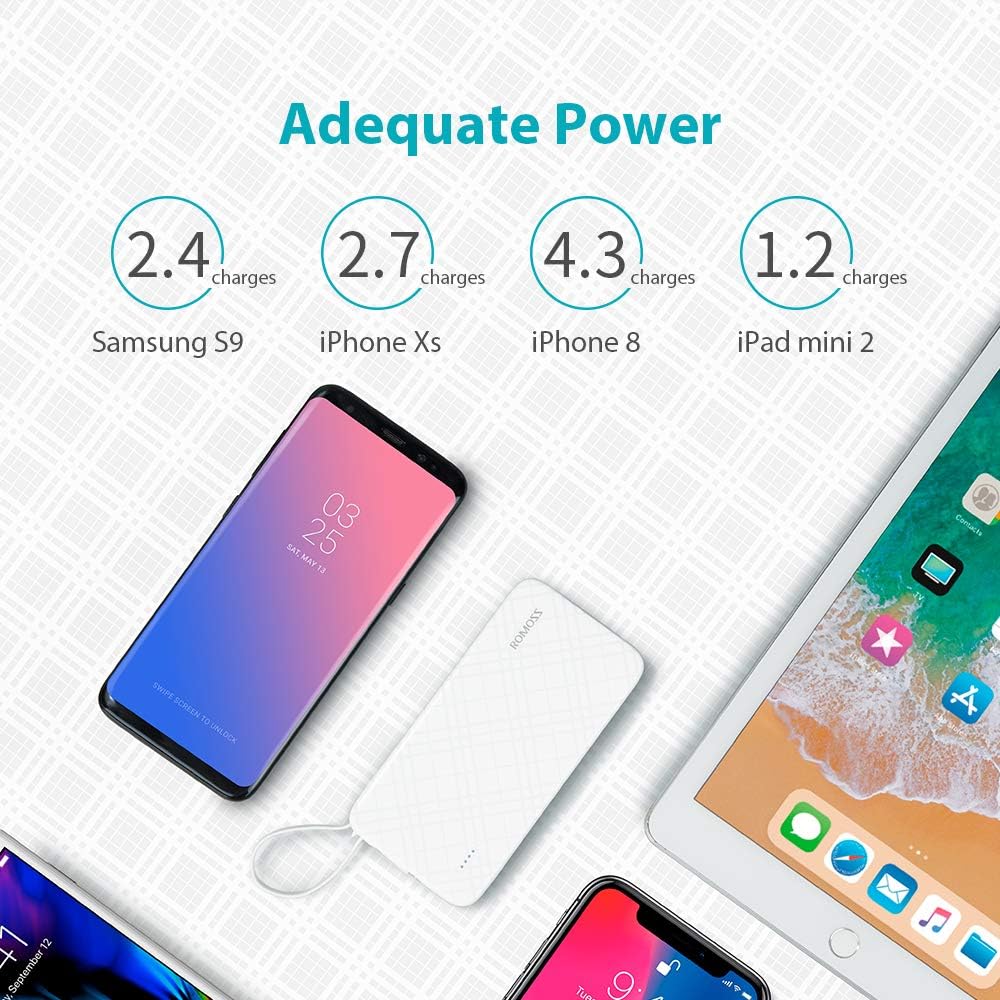
Image: Charging an iPhone or iPad. This image demonstrates the Romoss QS10 power bank charging an iPhone, utilizing the integrated cable with the detachable Lightning adapter.

Image: Charging a Type-C device. This image shows the Romoss QS10 power bank connected to and charging a Samsung S9+ (or similar Type-C device) using the integrated cable with the detachable Type-C adapter.
Estimated Charging Capacity:
The 10000mAh capacity can provide approximately:
- 4 full charges for an iPhone 8
- 2 full charges for a Samsung Galaxy S9
- 1 full charge for an iPad mini 2

Image: Adequate Power. This diagram illustrates the approximate number of charges the 10000mAh power bank can provide for different devices, such as Samsung S9, iPhone Xs, iPhone 8, and iPad mini 2.
5. 유지관리
- 모바일 배터리는 극한의 온도, 직사광선, 습기에 노출되지 않도록 보관하세요.
- 모바일 충전기를 떨어뜨리거나 강한 충격을 주지 마십시오.
- 부드럽고 마른 천으로 기기를 닦으세요. 강한 화학 물질이나 연마재를 사용하지 마세요.
- Store the power bank in a cool, dry place when not in use. For prolonged storage, charge the power bank to about 50% every three months to maintain battery health.
6. 문제 해결
| 문제 | 가능한 원인 | 해결책 |
|---|---|---|
| 보조 배터리가 충전되지 않음 | Charging cable or adapter is faulty; Power source is insufficient; Power bank is fully charged. | Try a different charging cable or adapter. Ensure the power source is active. Check LED indicators for full charge. |
| 보조 배터리에서 장치가 충전되지 않음 | Power bank is depleted; Integrated cable or adapter is not properly connected or faulty; Device is incompatible. | Recharge the power bank. Ensure the integrated cable and adapter are securely connected to both the power bank and your device. Test with another device if possible. |
| Lightning/Type-C adapter not working or showing 'not compatible' message | Adapter is damaged or not fully seated; Device firmware issue. | Ensure the adapter is firmly connected to the Micro USB cable and your device. Inspect the adapter for any visible damage. If issues persist, consider replacing the adapter. |
| Power bank feels warm during use | 충전/방전 중 정상 작동. | This is normal. If it becomes excessively hot, disconnect immediately and contact customer support. |
7. 사양
| 특징 | 세부 사항 |
|---|---|
| 모델 번호 | QS10-301-01-UK-Update |
| 용량 | 10000mAh |
| 배터리 유형 | 리튬폴리머 |
| 입력 | 5V/2.1A (Micro USB, Lightning, Type-C) |
| 산출 | 5V/2.1A |
| 치수(길이 x 너비 x 높이) | 14.99 x 7.37 x 1.27cm |
| 무게 | 238g |
| 권장 사용 | 태블릿, 휴대폰 |
8. 보증 및 지원
The Romoss QS10 Power Bank comes with a 12개월 보증 구매일로부터. 본 보증은 제조상의 결함에 대한 보증이며, 정상적인 사용 환경에서 제품이 의도한 대로 작동하는지 확인합니다.
For technical support, warranty claims, or any inquiries regarding your Romoss product, please contact Romoss customer service. Refer to the contact information provided on the product packaging or the official Romoss web최신 지원 채널을 제공하는 사이트입니다.