
소개
This manual provides detailed instructions for the operation and maintenance of your BOBLOV BT-S3 Helmet Headset. The BT-S3 is designed for motorcycle communication, offering hands-free calling, music playback, FM radio, and intercom functionality for riders. Please read this manual thoroughly before using the device to ensure proper function and safety.
패키지 내용
아래 나열된 모든 품목이 패키지에 포함되어 있는지 확인하세요.
- 1 x BOBLOV BT-S3 Helmet Intercom Unit
- 1 x Stereo Headphones (with microphone)
- 1 x Mounting Clip & Screws
- 1 x 드라이버
- 1 x USB 충전 케이블
- 1 x 사용자 설명서
- 1 x Velcro Pad (for mounting)
- 오디오 라인 1개

그림 1: All components included in the BOBLOV BT-S3 package.
제품 끝view
제어 버튼 및 포트

그림 2: BOBLOV BT-S3 control buttons and connection ports.
- 전화버튼: Used for answering/ending calls, redialing, and activating voice assistant.
- 볼륨 + 버튼: Increases volume, navigates forward in music/FM.
- 볼륨 - 버튼: Decreases volume, navigates backward in music/FM.
- 전원/인터콤 버튼: Powers the device on/off, initiates/ends intercom, plays/pauses music, activates FM radio.
- Charger and Headset Socket: Multi-purpose port for charging and connecting the headset.
- Cable Input Interface: For connecting the headset cable.
설정
1. 장치 충전
Before initial use, fully charge the BT-S3 unit. Connect the provided USB cable to the charging port on the device and to a standard USB power adapter (not included). The LED indicator will show charging status. A full charge typically takes approximately 2-3 hours.
2. Installing the Headset in Your Helmet
The BT-S3 can be installed in various helmet types, including full-face, half-face, and open-face helmets.
- Attach the mounting clip to the side of your helmet using the provided screws and screwdriver, or use the adhesive Velcro pad for a tool-free installation. Ensure the clip is securely fastened.
- Slide the BT-S3 intercom unit onto the mounting clip until it clicks into place.
- Open the helmet's inner lining. Position the stereo headphones inside the helmet, ensuring they are aligned with your ears for optimal sound.
- Route the microphone to a position near your mouth, ensuring it is not obstructed.
- Connect the headset cable to the designated port on the BT-S3 unit.

그림 3: Helmet mounting clip and unit attachment.
작동 지침
전원 켜기/끄기
- 전원 켜기: 를 누르고 계세요 전원/인터콤 버튼 for approximately 3 seconds until you hear an audible prompt and the LED indicator lights up.
- 전원 끄기 : 를 누르고 계세요 전원/인터콤 버튼 for approximately 3 seconds until you hear an audible prompt and the LED indicator turns off.
블루투스를 이용해 휴대폰과 페어링하기
- Ensure the BT-S3 is powered off.
- 를 누르고 계세요 전원/인터콤 버튼 for approximately 5-7 seconds until the LED indicator flashes red and blue alternately, indicating pairing mode.
- 휴대폰에서 Bluetooth를 활성화하고 사용 가능한 기기를 검색하세요.
- Select "BT-S3" from the list of devices. If prompted for a password, enter "0000".
- 페어링이 완료되면 LED 표시등이 파란색으로 천천히 깜빡이고 확인음이 들립니다.
인터콤 기능
The BT-S3 supports full-duplex wireless communication. It allows for 2 riders to intercom simultaneously, with a maximum talking range of 1000 meters. Up to 3 riders can be connected, but only two can actively communicate at any given time. If a third rider wishes to join, one of the active intercom participants must end their conversation.

그림 4: Intercom connection scenarios.
- 인터콤 장치 페어링:
- Ensure both BT-S3 units are powered off.
- 두 기기 모두에서 길게 누르세요 전원/인터콤 버튼 for approximately 5-7 seconds until the LED indicators flash red and blue alternately.
- 짧게 누르세요 전원/인터콤 버튼 on one of the units. The units will search and pair with each other.
- Once paired, the LED indicators will flash blue slowly, and you will hear a confirmation tone.
- 인터콤 시작: After pairing, a short press of the 전원/인터콤 버튼 on either unit will initiate an intercom conversation.
- 인터콤 종료: 짧게 누르면 전원/인터콤 버튼 will end the intercom conversation.
전화통화
- 전화 받기: When a call comes in, the device will automatically answer after a few rings (auto-receiving phone calls feature). Alternatively, short press the 전화 버튼 대답하다.
- 통화 종료: 짧게 누르세요 전화 버튼 진행 중인 통화를 종료합니다.
- 전화 거부: 를 누르고 계세요 전화 버튼 수신 전화를 거부하려면 2초 동안 누릅니다.
- 마지막 번호 재다이얼: 두 번 누르세요 전화 버튼 마지막으로 걸었던 번호로 다시 전화를 겁니다.
음악 재생
After pairing with your mobile phone, you can stream music to the BT-S3.
- 재생/일시 중지: 짧게 누르세요 전원/인터콤 버튼 음악을 재생하거나 일시 중지합니다.
- 다음 트랙: 짧게 누르세요 볼륨 + 버튼.
- 이전 트랙 : 짧게 누르세요 볼륨 - 버튼.
FM 라디오
The BT-S3 includes an FM radio function.
- FM 켜기/끄기: 두 번 누르세요 전원/인터콤 버튼 to activate or deactivate FM radio.
- 스캔 스테이션: While FM is active, short press the 볼륨 + or 볼륨- 채널을 바꾸는 버튼.
GPS Voice Instructions
When paired with a smartphone running a GPS application, the BT-S3 can receive voice instructions directly to your headset.
유지
- 기기를 건조하게 유지하십시오. 극한의 온도에 노출시키지 마십시오.
- 부드러운 천으로 장치를 청소하십시오. damp 옷감. 가혹한 화학 물질이나 연마성 세제를 사용하지 마십시오.
- 충전하지 않을 때는 방수 기능을 유지하기 위해 충전 포트 덮개를 단단히 닫아 두십시오.
- 장기간 사용하지 않을 때는 기기를 서늘하고 건조한 곳에 보관하세요.
문제 해결
| 문제 | 가능한 원인 | 해결책 |
|---|---|---|
| 장치의 전원이 켜지지 않습니다. | 배터리가 부족합니다. | 장치를 완전히 충전하십시오. |
| 휴대전화와 페어링할 수 없습니다. | 기기가 페어링 모드가 아닙니다. 휴대폰의 블루투스가 꺼져 있습니다. | Ensure BT-S3 is flashing red/blue. Enable Bluetooth on phone and search again. |
| 인터콤이 연결되지 않습니다. | Units not paired or out of range. | Re-pair intercom units. Ensure units are within 1000m range. |
| Poor audio quality / Wind noise. | 마이크 배치 위치; 환경적 요인. | Adjust microphone closer to mouth. The device features DSP cancellation for wind noise. |
| 배터리 수명이 예상보다 짧습니다. | Frequent use of high volume or intercom. | Battery life varies with usage. Ensure full charge before use. |
명세서
- 모델: BT-S3
- 연결성: 무선(블루투스)
- 인터콤 범위: 최대 1000미터 (두 라이더 간 거리)
- 작업 속도: 최대 시속 100km
- 대화 시간: 최대 8시간
- 대기 시간: 최대 300시간
- 통화 시간: 최대 10시간
- 음악 재생 시간: 최대 6시간
- 방수 기능: Water-resistant (fully weather protection)
- 소음 제거 : Wind noise DSP cancellation
- 특징: Auto-receiving phone calls, FM Radio, Stereo music (A2DP), GPS voice instructions
- 헬멧 호환성: Fits all kinds of helmets (full/half/open face)
- 제어 방법: 터치 버튼
- 헤드폰 잭: 3.5mm 잭 (헤드셋 연결용)
- 한국어: 889251631535

그림 5: Estimated battery performance for various functions.
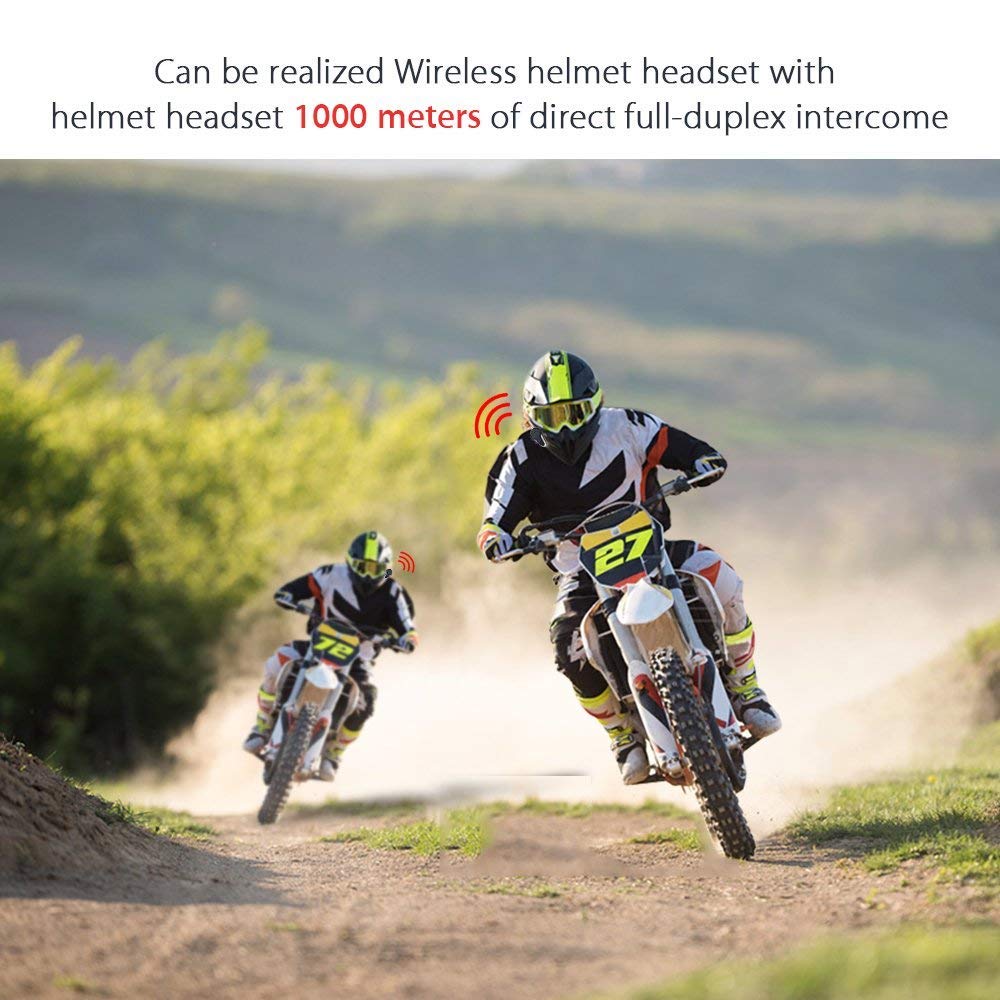
그림 6: Wireless helmet headset with 1000 meters direct full-duplex intercom.

그림 7: Versatile applications for the BT-S3 headset, including motorcycling and skiing.
보증 및 지원
Specific warranty information is not provided in the product details. For warranty claims, technical support, or further assistance, please contact your retailer or the manufacturer directly. Retain your proof of purchase for any warranty-related inquiries.
Manufacturer: BOBLOV