
1. 서론
Thank you for choosing the XTUGA MRV122FX 12-Channel Audio Mixer. This professional mixing console is designed for high-quality audio performance in various settings, including live gigs, studio recording, and DJ events. It features an ultra-low noise design, advanced microphone preamplifiers, a built-in digital effects processor, Bluetooth connectivity, and USB playback/recording capabilities. This manual provides detailed instructions to help you set up, operate, and maintain your mixer for optimal performance.

이미지 1.1: 앞면 view of the XTUGA MRV122FX 12-Channel Audio Mixer, showcasing all controls and input/output sections.
2. 주요 특징
- Ultra-Low Noise Design: Engineered for the highest possible headroom and minimal noise interference.
- Studio-Grade XDR2 Mic Preamps: Equipped with 6-16 Extended Dynamic Range mic preamplifiers, offering a 60dB gain range, 130dB dynamic range, and +22dBu line input handling.
- 팬텀 파워 : 콘덴서 마이크용 +48V 팬텀 전원을 사용할 수 있습니다.
- 채널 EQ: 4-band active EQ on mono channels (High, Mid-high, Mid-low, Low) and 2-band EQ on stereo channels. Includes an 18dB/octave, 75Hz Lo-Cut filter on mic channels.
- Built-in Digital Effects Processor: Features 16 high-quality 24-bit DSP effects with Tap Tempo functionality.
- Multi-format Play Support: Integrated Bluetooth for wireless audio streaming from mobile devices, and a digital display MP3 player with U-DISK input and recording (REC) function.
- Two-Way USB Function: Allows music playback via USB and connection to a computer for recording.
- 견고한 구조: Ultra-fashion all-metal chassis design for durability and high-density dust resistance.
- 범용 전원 공급 장치: 다권tage power supply (100-240V) for worldwide use.
- Dual 7-Band Stereo Graphic Equalizer: For precise overall mix adjustment.
3. 설정
3.1 포장 풀기 및 배치
Carefully remove the mixer from its packaging. Inspect the unit for any signs of damage. Place the mixer on a stable, flat surface, ensuring adequate ventilation around the unit.
3.2 전원 연결
Connect the provided power cable to the mixer's power input and then to a suitable AC power outlet (100-240V). Ensure the power switch is in the OFF position before connecting. The mixer is designed with a multi-voltage power supply for global compatibility.

Image 3.1: Rear panel of the mixer showing the 100-240V power input and fuse holder.
3.3 입력 연결
The MRV122FX features 12 input channels, including 10 mono microphone/line inputs and 2 stereo line inputs (channels 9/10 and 11/12). Channels 1-8 are mono inputs with XLR and 1/4" TRS/TS jacks.
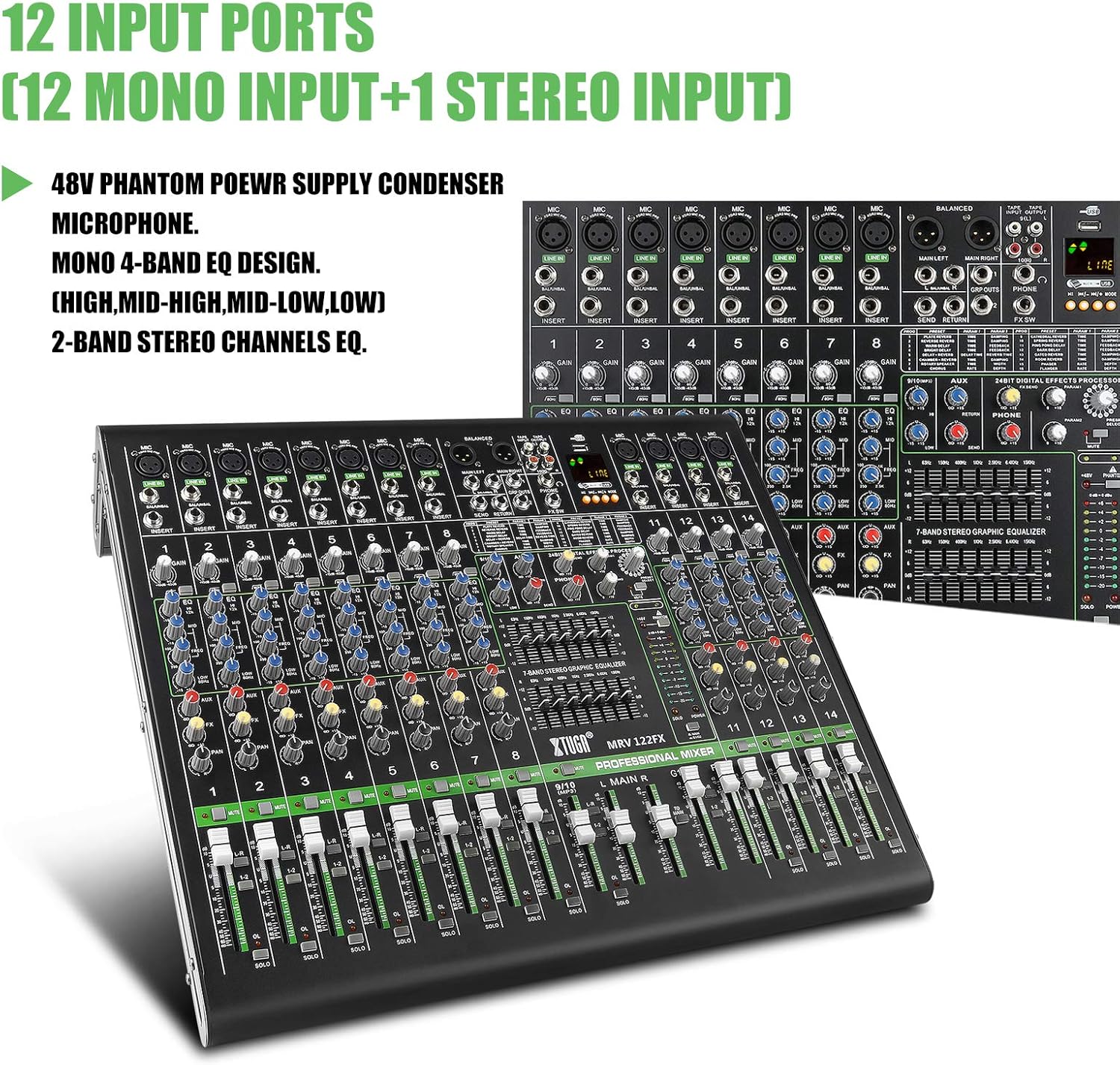
Image 3.2: Close-up of the mixer's input section, highlighting the 12 input ports (10 mono, 2 stereo).
- 마이크: Connect dynamic or condenser microphones to the XLR inputs (channels 1-8). For condenser microphones, activate the +48V phantom power switch located near the master section.
- 라인 레벨 장치: 악기(키보드, 기타 등)를 연결하세요.amps), media players, or other line-level devices to the 1/4" TRS/TS LINE IN jacks on mono channels or the stereo LINE IN jacks on channels 9/10 and 11/12.
- 포인트 삽입: Channels 1-8 include 1/4" TRS insert jacks for connecting external signal processors (e.g., compressors, gates) to individual channels.
3.4 출력 연결
- 주요 출력 : Connect your main PA system or recording interface to the MAIN L/R XLR or 1/4" TRS outputs.
- AUX 전송: Use the AUX SEND 1/4" output to connect to stage 모니터 또는 외부 이펙트 프로세서.
- 헤드폰: Connect headphones to the PHONES 1/4" stereo jack for monitoring.
- USB 출력: Connect the USB port to a computer for digital audio recording.
4. 믹서 작동
4.1 채널 컨트롤 (모노 채널 1-8)
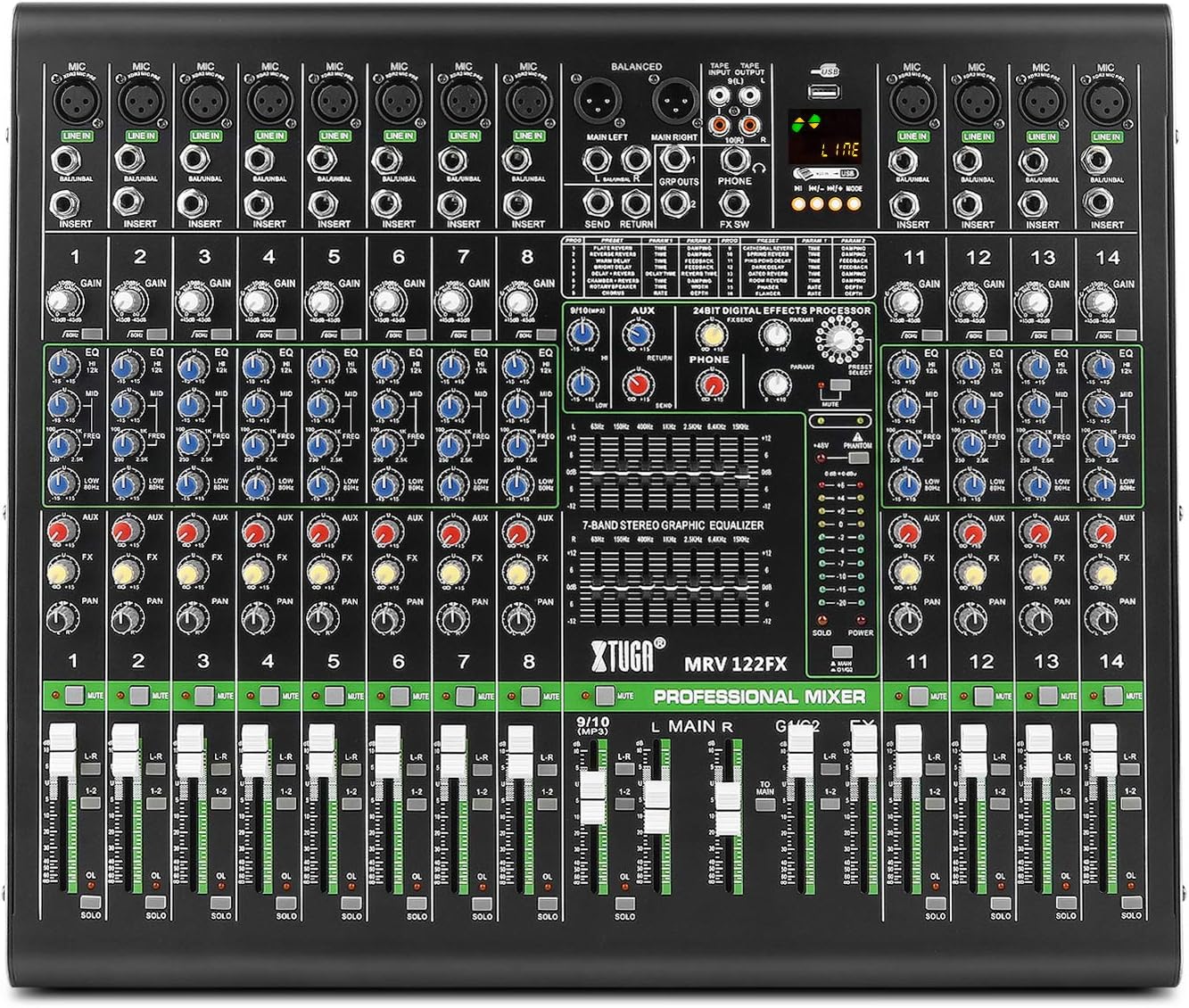
이미지 4.1: 상세 view of a single channel strip, showing Gain, EQ, Aux, FX, Pan, Mute, and Fader controls.
- 이득: Adjusts the input sensitivity for the microphone or line input. Set this to achieve a strong signal without clipping (the OL LED should flash only occasionally).
- EQ (High, Mid-high, Mid-low, Low): These four knobs allow you to shape the tone of the input signal. Adjust to enhance or cut specific frequencies.
- LO-CUT: Activates an 18dB/octave, 75Hz high-pass filter to remove unwanted low-frequency rumble.
- 보조: Controls the amount of channel signal sent to the AUX SEND output.
- FX : Controls the amount of channel signal sent to the internal effects processor.
- PAN : 스테레오 필드(좌우) 내에서 채널 신호의 위치를 지정합니다.
- 음소거: 채널을 음소거합니다.
- 독주: Routes the channel signal to the headphones for isolated monitoring without affecting the main mix.
- 채널 페이더: Adjusts the overall volume level of the channel in the main mix.
4.2 Stereo Channels (9/10 and 11/12)
These channels are designed for stereo line-level inputs. They typically feature 2-band EQ, AUX, FX, BALANCE (instead of PAN), MUTE, SOLO, and a channel fader.
4.3 마스터 섹션 제어
- 메인 좌/우 페이더: Control the overall output volume of the main stereo mix.
- AUX 리턴: Adjusts the level of the signal returning from an external effects processor connected to the AUX RETURN inputs.
- 휴대폰 레벨: 헤드폰 출력의 볼륨을 제어합니다.
- 7밴드 스테레오 그래픽 이퀄라이저: This equalizer allows for fine-tuning the overall frequency response of the main mix. Adjust the sliders to boost or cut specific frequency bands.

Image 4.2: Close-up of the 7-band stereo graphic equalizer, showing frequency bands and boost/cut controls.
4.4 Digital Effects Processor (DSP)

Image 4.3: Section of the mixer highlighting the 24-bit digital effects processor with 16 modes.
- 프로그램 노브: Rotate to select one of the 16 built-in DSP effects (e.g., Reverb, Delay, Chorus).
- 파라미터 노브: 선택한 효과의 특정 매개변수를 조정합니다(예: 리버브의 잔향 시간, 딜레이의 지연 시간).
- FX 레벨: Controls the overall volume of the effects return into the main mix.
- 탭 템포: For time-based effects like delay, press this button repeatedly to set the tempo.
4.5 Bluetooth, MP3/USB Playback and Recording

Image 4.4: Close-up of the digital display and multimedia control section, including USB and Bluetooth functionality.
- 블루투스: Activate Bluetooth on your mobile device and search for the mixer. Pair with the device to stream audio wirelessly. Use the dedicated controls on the mixer to manage playback.
- MP3 (U-DISK) Playback: Insert a USB flash drive (U-DISK) containing MP3 files into the USB port. Use the digital display and control buttons to navigate and play tracks.
- 녹화 기능: The mixer supports recording directly to a USB flash drive. Refer to the digital display interface for recording options.
- USB Computer Connection: Connect the mixer to a computer via USB to use it as an audio interface for recording or playback.
5. 유지관리
To ensure the longevity and optimal performance of your XTUGA MRV122FX mixer, follow these maintenance guidelines:
- 청소: Use a soft, dry cloth to clean the exterior of the mixer. Avoid using abrasive cleaners, solvents, or waxes, as these can damage the finish and controls.
- 먼지 보호 : Keep the mixer covered when not in use to prevent dust and debris from accumulating on the controls and inside the chassis.
- 환경 조건: 믹서는 직사광선, 극한 온도 및 높은 습도를 피해 서늘하고 건조한 곳에서 작동 및 보관하십시오.
- 전력 안전: Always disconnect the power cable before cleaning or if the unit will be unused for an extended period.
6. 문제 해결
If you encounter issues with your XTUGA MRV122FX mixer, refer to the following common problems and solutions:
- 사운드 출력 없음:
- 모든 전원 연결을 확인하고 믹서가 켜져 있는지 확인하십시오.
- 메인 페이더와 채널 페이더가 모두 올라가 있는지 확인하십시오.
- Ensure no MUTE buttons are active on channels or master.
- Check connections to your amp전원 공급기 또는 전원 스피커.
- Confirm input sources are active and sending a signal.
- 소리가 왜곡되거나 불분명하게 들림:
- Reduce the GAIN on input channels if the OL (Overload) LED is constantly lit.
- Lower the main output faders if the main meters are consistently in the red.
- Check all cables for damage or improper connection.
- 팬텀 전원이 작동하지 않음:
- Ensure the +48V phantom power switch is engaged.
- Verify that condenser microphones are connected via XLR cables.
- Bluetooth 연결 문제:
- 믹서와 기기 모두에서 블루투스가 활성화되어 있는지 확인하십시오.
- Check that the mixer is in pairing mode.
- Move your device closer to the mixer to reduce interference.
- Digital Display Language (e.g., Chinese):
- Some units may default to a specific language. Check the digital display's menu options for a language setting. If no option is available, contact customer support for assistance.
7. 사양
| 특징 | 사양 |
|---|---|
| 모델 번호 | MRV122FX |
| 채널 수 | 12 |
| 품목 무게 | 8.89kg |
| 제품 치수 | 60 x 56 x 24cm |
| 연결 기술 | XLR, USB, Bluetooth |
| 전원 | 유선 전기(100-240V) |
| Mic Input (Max) | 30dBu |
| Line Input (Max) | 21dBu |
| Mixer Rated Output (Main) | +4dBu |
| Frequency Response (Mic Input to Main Output) | +0-1 dB, <10Hz to 80KHz; +0-3 dB, <10Hz to 120KHz |
| EQ (each band) | ±15dB |
| 디지털 효과 프로세서 | 24-bit, 16 FX settings |
8. 보증 및 지원
보증 정보, 기술 지원 또는 서비스 문의는 구매 시 제공된 설명서를 참조하거나 판매점에 문의하십시오. 보증 청구를 위해서는 구매 증빙 자료를 보관하십시오.