
1. 서론
Thank you for choosing the Feelworld S55 V3 5.5-inch DSLR Camera Field Monitor. This manual provides essential information for setting up, operating, and maintaining your monitor. Please read it thoroughly before use to ensure optimal performance and longevity of the device.
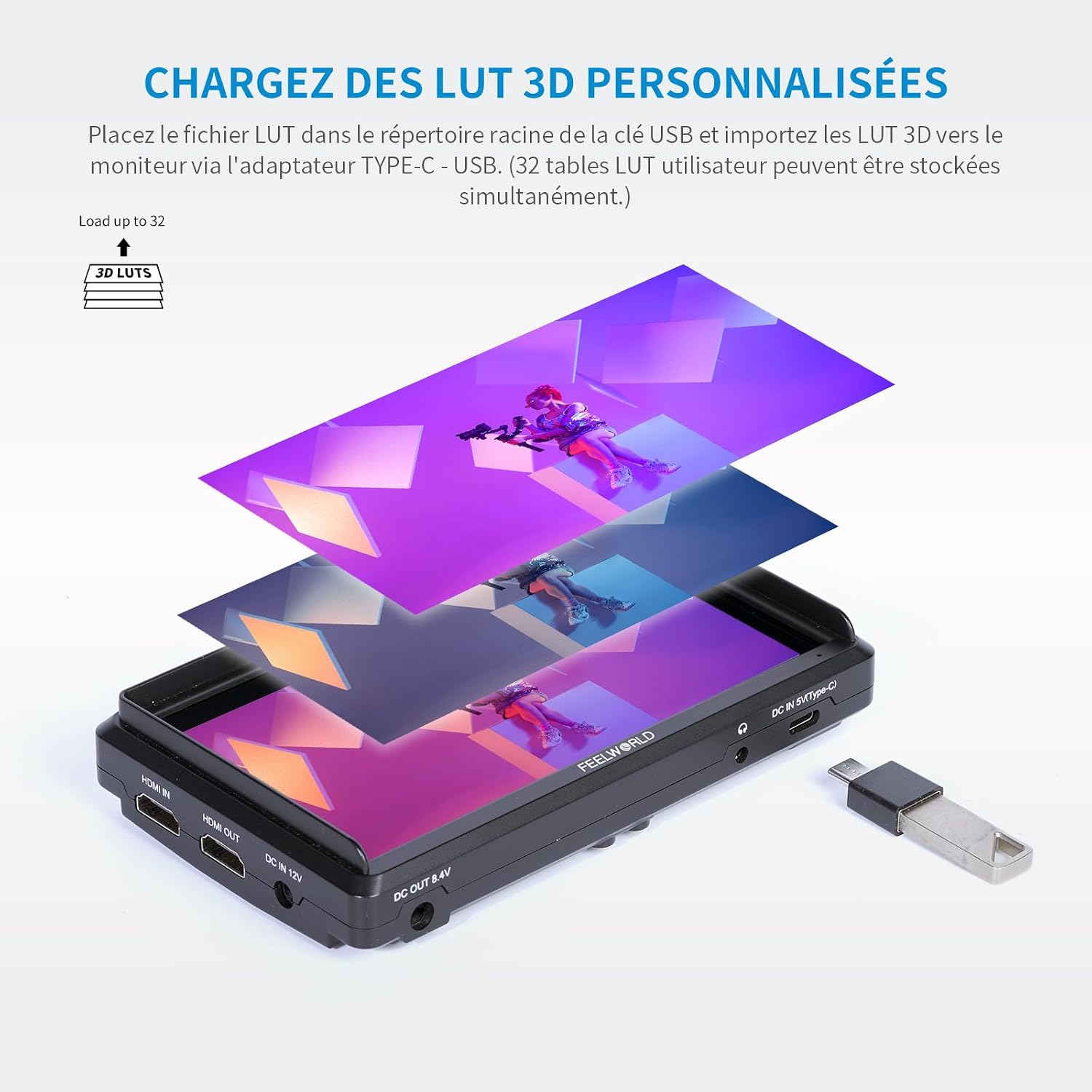
그림 1.1: 전면 view of the Feelworld S55 V3 monitor.
2. 제품 오버view
2.1 주요 특징
- Clear 5.5-inch Full HD Display: Features a 1920x1080 native resolution, 450nit brightness, and a 1000:1 contrast ratio for vivid and accurate image reproduction.
- 고급 색상 제어: Supports REC.709 3D LUT Log and user 3D LUT uploads (up to 32) for precise color calibration and custom looks.
- Versatile 4K HDMI Connectivity: Equipped with 4K HDMI input and output ports for live signal display and simultaneous output to other monitors.
- 가볍고 휴대성이 뛰어난 디자인: Weighs approximately 190 grams, making it ideal for outdoor and handheld applications. Compatible with gimbals and lightweight camera systems.
- 유연한 전력 솔루션: Supports NP-F series batteries (F550 included), Canon LP-E6 batteries (not included), 12V DC input, and 5V Type-C input. Includes a DC power output port to power your camera.
- Professional Video Assist Functions: Includes Histogram, Peaking Filter, False Colors, Exposure, Nine Grid, Embedded Audio, Pixel-to-Pixel, Check Field, Image Flip, Anamorphic Mode, Image Freeze, and Zoom-in.
2.2 패키지 내용
표준 패키지에는 다음 품목이 포함됩니다.
- Feelworld S55 V3 Monitor
- 마이크로 HDMI 케이블
- F550 배터리
- 보관 가방
- 양산
- Tilt Arm Mounting Support
- 사용자 설명서

Figure 2.1: Included accessories with the S55 V3 monitor.
2.3 모니터 레이아웃
Familiarize yourself with the ports and buttons on your S55 V3 monitor:
- 상단 패널 : Control buttons for menu navigation and function shortcuts.
- 왼쪽: HDMI Input, HDMI Output, DC IN 12V, DC OUT 8.4V, 3.5mm Ear Phone Slot.
- 오른쪽: Type-C Input (for power).
- 뒤쪽: Battery plate for NP-F series or LP-E6 batteries.

그림 2.2: 측면 view showing HDMI and power ports.

Figure 2.3: Top control buttons and menu interface.
3. 설정
3.1 모니터 전원 켜기
The S55 V3 offers multiple power options:
- NP-F 배터리: Attach a compatible NP-F series battery (e.g., F550, F750, F970) to the battery plate on the rear of the monitor. An F550 battery is included.
- LP-E6 Battery: The multipurpose battery plate also supports Canon LP-E6 batteries (not included).
- DC 12V 입력: Connect the included 12V/1.5A power adapter to the DC IN 12V port.
- Type-C 입력: For convenient power, connect a 5V/2A mobile phone charger or power bank to the Type-C port.
- DC 출력(8.4V): Use the DC OUT 8.4V port with an optional dummy battery cable to power your DSLR or mirrorless camera directly from the monitor's battery.

Figure 3.1: Flexible power solutions for the monitor.
3.2 모니터 장착
The S55 V3 can be mounted in several ways:
- Camera Hot Shoe: Use the included tilt arm to mount the monitor directly onto your camera's hot shoe or cold shoe mount.
- Gimbal/Stabilizer: The lightweight design and compact size make it suitable for mounting on gimbals or stabilizers using standard mounting points.
- Tripod/Rig: The monitor features 1/4-inch screw threads for attachment to tripods, magic arms, or camera rigs.
Figure 3.2: Monitor mounted on a camera, demonstrating DC output to power the camera.
3.3 카메라에 연결하기
Connect your camera to the monitor using an HDMI cable:
- Ensure both the monitor and camera are powered off.
- Connect one end of the HDMI cable (e.g., Micro HDMI to HDMI) to your camera's HDMI output port.
- HDMI 케이블의 반대쪽 끝을 HDMI 케이블에 연결하세요. HDMI 입력 port on the S55 V3 monitor.
- If you need to output the signal to another monitor, connect a second HDMI cable from the HDMI 출력 port on the S55 V3 to the input of the secondary monitor.
- Power on your camera, then power on the S55 V3 monitor. The camera's video feed should appear on the monitor.
4. 사용 설명서
4.1 기본 작업
- 전원 켜기/끄기: Press and hold the power button (usually located on the top right) for a few seconds to turn the monitor on or off.
- 메뉴 탐색: Use the 'MENU' button to access the main menu. Use the arrow buttons (left/right) to navigate through options and 'F1/V' or 'F2/Λ' to confirm or adjust settings.
- 기능 버튼(F1, F2, F3): These are customizable shortcut buttons. You can assign frequently used functions (e.g., Peaking, False Color, Histogram) to these buttons via the menu.
4.2 고급 기능
The S55 V3 includes a suite of professional video assist functions:

Figure 4.1: Professional video assist features display.
- 히스토그램 : 이미지의 톤 분포를 표시하여 하이라이트와 섀도우 부분의 클리핑을 방지하는 데 도움을 줍니다.
- 최고조의 집중력: Highlights sharp edges in your image, assisting with precise manual focusing.
- 거짓 색상: Uses color overlays to represent different exposure levels, aiding in accurate exposure setting.
- 노출(얼룩말): Displays zebra patterns over areas exceeding a set exposure threshold.
- 나인 그리드: 촬영 구도를 잡는 데 도움이 되는 가이드를 제공합니다.
- 임베디드 오디오: 화면에 오디오 레벨을 표시합니다.
- 픽셀 대 픽셀: 확대/축소 없이 이미지를 원래 해상도로 표시합니다.
- 체크 필드 : Displays a single color channel (Red, Green, Blue, or Mono) for color calibration.
- 이미지 뒤집기 : 다양한 장착 방향에 유용하게 사용할 수 있는 수평 또는 수직으로 이미지를 뒤집습니다.
- 아나모픽 모드: 아나모픽 푸를 압축 해제합니다tage 적절한 view주고받음.
- 이미지 정지: Freezes the current frame on the screen.
- 확대: 중요한 초점을 맞추기 위해 이미지의 일부를 확대합니다.
4.3 Color Calibration and 3D LUTs
The S55 V3 supports professional color calibration:
- REC.709 Standard: The monitor is factory calibrated to the REC.709 standard for accurate color reproduction.
- 3D LUT 지원: You can upload up to 32 custom 3D LUTs (Look Up Tables) to the monitor. This allows you to preview 당신의 푸tage with specific color grades or log conversions in real-time.
To load 3D LUTs:
- Save your .cube LUT files to the root directory of a USB flash drive.
- Connect the USB drive to the monitor via a Type-C to USB adapter.
- Navigate to the LUT menu option and select 'Import LUT'. Follow the on-screen instructions to load your desired LUTs.

Figure 4.2: Loading custom 3D LUTs via USB.

Figure 4.3: Professional color calibration display.
5. 유지관리
5.1 청소
- 화면: 전자 제품 화면용으로 특별히 제작된 부드럽고 보풀이 없는 천을 사용하세요. 잘 지워지지 않는 얼룩은 가볍게 닦아내세요.ampen the cloth with a screen cleaning solution (avoid harsh chemicals or alcohol).
- 몸: Wipe the monitor body with a soft, dry cloth. Do not use liquid cleaners directly on the monitor.
5.2 보관
- When not in use, store the monitor in its protective storage bag or a padded case to prevent scratches and damage.
- 장기간 보관할 경우 누출을 방지하기 위해 배터리를 제거하세요.
- 직사광선 및 극한의 온도를 피해 서늘하고 건조한 곳에 보관하세요.
6. 문제 해결
If you encounter issues with your Feelworld S55 V3 monitor, refer to the following common problems and solutions:
| 문제 | 가능한 원인 | 해결책 |
|---|---|---|
| 모니터 전원이 켜지지 않습니다. | Low or dead battery; power cable not connected; faulty power source. | Charge or replace the battery. Ensure power cables are securely connected. Try a different power source. |
| 비디오 신호가 없습니다. | HDMI cable loose or faulty; incorrect input selected; camera not outputting video; incompatible resolution. | Check HDMI cable connections. Ensure the camera is powered on and outputting video. Verify camera's HDMI output settings. Try a different HDMI cable. |
| 이미지가 왜곡되었거나 색상이 잘못되었습니다. | Incorrect color settings; active LUT applied; faulty HDMI cable. | Reset monitor color settings to default. Disable any active LUTs. Try a different HDMI cable. |
| 버튼이 반응하지 않습니다. | Firmware issue; temporary glitch. | Power cycle the monitor (turn off and on). If the issue persists, check the Feelworld web펌웨어 업데이트 사이트. |
If the problem persists after trying these solutions, please contact Feelworld customer support.
7. 사양
| 특징 | 세부 사항 |
|---|---|
| 상표 | 느낌 |
| 모델 | S55 V3 (FW572-EU) |
| 화면 크기 | 5.5인치 |
| 해결 | 1920 x 1080(풀HD) |
| 명도 | 450칸델라/제곱미터 |
| 대비율 | 1000시 1분 |
| View잉 각도 | IPS (Wide View각도) |
| 입력 포트 | 1 x HDMI, 1 x DC IN (12V), 1 x Type-C (5V) |
| 출력 포트 | 1 x HDMI, 1 x DC OUT (8.4V), 1 x 3.5mm Headphone Jack |
| 전력 호환성 | NP-F series batteries (F550 included), Canon LP-E6 batteries (not included), DC 12V, Type-C 5V |
| 무게 | Approx. 190 grams (monitor only) |
| 제품 크기(L x W x H) | 14.8 x 1.86 x 8.2cm |
| 패키지 치수(L x W x H) | 20.9 x 15.8 x 10.4cm |
| 색상 | 검은색 |
| 방수성 | 방수가 아닙니다 |
| 출시일 | 23년 2019월 XNUMX일 |
8. 보증
The Feelworld S55 V3 monitor comes with a 1년 제조사 보증. This warranty covers defects in materials and workmanship under normal use. It does not cover damage caused by misuse, accidents, unauthorized modifications, or improper maintenance. Please retain your proof of purchase for warranty claims.
9. 지원
For technical assistance, troubleshooting, or warranty inquiries, please contact Feelworld customer support through their official website or the retailer where you purchased the product. You may also find additional resources, FAQs, and firmware updates on the official Feelworld support page.
공식적인 Web대지: www.feelworld.cn