
1. 서론
This manual provides essential information for the installation, operation, and maintenance of your Theben Selecta 172 top3 Digital 2-Channel Astro Timer. This device is designed for precise time-controlled switching applications, featuring astronomical functions, weekly programming, and app-based configuration. Please read these instructions carefully before using the product to ensure safe and efficient operation.
2. 안전 지침
경고: Electrical shock hazard. Installation and maintenance should only be performed by a qualified electrician in accordance with national wiring regulations and local safety standards.
- Always disconnect power before installation or servicing the device.
- 적절한 접지를 확인하십시오.
- 장치를 습기나 극한의 온도에 노출시키지 마십시오.
- 전원을 복구하기 전에 모든 연결이 안전한지 확인하세요.
- The device is designed for DIN rail mounting. Ensure it is securely fastened.
3. 제품 오버view
The Theben Selecta 172 top3 is a digital astro timer with two independent channels, designed for flexible and precise control of electrical loads. It features a weekly program, two external inputs, and three special programs. Programming can be done directly on the device, via PC, or conveniently through a mobile app using the optional Bluetooth Obelisk top3.

그림 3.1: 앞쪽 view of the Theben Selecta 172 top3 Digital Astro Timer, showing the display, control buttons, and terminal connections.
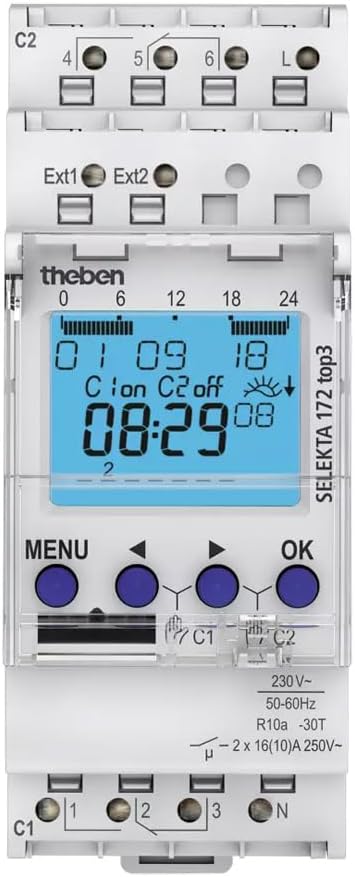
그림 3.2: 상세한 view of the timer's digital display and navigation buttons (MENU, arrow keys, OK). The display shows current time, date, and channel status.
주요 특징:
- 2 independent channels with weekly program.
- Astronomical switching function with 3 individual twilight areas.
- 2 external inputs for additional control.
- Channel switching and channel locking capabilities.
- App programming via optional Bluetooth Obelisk top3 for secure data transfer.
- Zero crossing circuit for relay-friendly switching.
- Automatic summer/winter time conversion.
- Power reserve for continued operation during power outag에스.
4. 설치(Setup)
The Selecta 172 top3 is designed for quick and easy installation on a DIN rail.
4.1 장착
- Ensure the power supply is disconnected at the main breaker.
- Snap the timer onto a standard 35mm DIN rail. The device occupies 2 TE (Terminal Units) width.
- 단단히 고정되었는지 확인하십시오.
4.2 배선
The device uses DuoFix plug-in terminals for secure and tool-free wiring. Refer to the wiring diagram on the device and in this manual.
- 메인 전원 공급 장치(L 및 N)를 지정된 단자에 연결하십시오.
- Connect the loads to be controlled to the output terminals (C1, C2). Each channel can handle up to 16(10)A at 250V~.
- Connect external inputs (Ext1, Ext2) if additional control signals are required.
- 모든 연결부가 단단히 고정되어 있고 극성이 올바른지 확인하십시오.

그림 4.1: View of the terminal connections for power input, external inputs, and two output channels.
4.3 초기 전원 켜기
After wiring, restore power. The device display should illuminate. Follow the on-screen prompts for initial setup, including language, date, and time.
5. 운영
The Selecta 172 top3 offers multiple programming methods for maximum flexibility.
5.1 On-Device Programming
Use the MENU and OK buttons along with the arrow keys to navigate the on-screen menu.
- 날짜 및 시간 설정: Access the 'Settings' menu to adjust the current date and time. The device includes automatic summer/winter time conversion.
- 주간 프로그램: Configure switching times for each day of the week for both channels.
- Astro Function: The astronomical function calculates sunrise and sunset times based on your geographical location, allowing for automatic switching relative to dawn and dusk. You can set up to 3 individual twilight areas.
- 특별 프로그램: Utilize the 3 special programs for specific events or temporary overrides.
- Channel Switching/Locking: Configure how channels interact or lock them to prevent unauthorized changes.

그림 5.1: Diagram illustrating the astronomical function, showing how the timer calculates sunrise, sunset, and twilight periods (6° Dämmerung = 6° Twilight, 12° Dunkelheit = 12° Darkness) for precise light control.
5.2 App Programming (via Bluetooth Obelisk top3)
For enhanced convenience and security, the Selecta 172 top3 can be programmed using a mobile app in conjunction with the optional Bluetooth Obelisk top3 (item no. 9070130).
- Connect Obelisk: Insert the Bluetooth Obelisk top3 into the designated slot on the timer.
- 앱 다운로드 : Download the official Theben top3 app from your device's app store.
- Secure Transfer: Timer programs can only be transferred from the app to the timer when the Bluetooth Obelisk top3 is physically plugged into the clock, ensuring maximum tamper-proof security.
- 직관적인 인터페이스: The app provides a user-friendly interface for creating, editing, and managing switching programs.

그림 5.2: The Theben Selecta 172 top3 timer shown alongside various mobile devices demonstrating the app programming interface and the Bluetooth Obelisk top3.
5.3 PC Programming (via Obelisk Interface)
The device also features an Obelisk interface for PC programming, offering another flexible method for managing complex schedules.
6. 유지관리
The Theben Selecta 172 top3 is designed for long-term, maintenance-free operation.
- 청소: 부드럽고 마른 천을 사용하여 기기 외부를 닦으세요. 연마성 세제나 용제는 사용하지 마세요.
- 내부 구성 요소: There are no user-serviceable parts inside the device. Do not attempt to open the casing.
- 펌웨어 업데이트: Check the Theben web기능 향상이나 버그 수정을 위한 펌웨어 업데이트가 있는지 해당 사이트 또는 앱을 확인하십시오.
7. 문제 해결
If you encounter issues with your Theben Selecta 172 top3, refer to the following common problems and solutions.
| 문제 | 가능한 원인 | 해결책 |
|---|---|---|
| 디스플레이가 비어 있습니다. | 전원 공급이 없습니다. | Check circuit breaker and wiring connections to L and N terminals. |
| Loads not switching as programmed. | Incorrect program settings, manual override active, or wiring issue. | Verify program settings, check for active manual overrides, inspect load wiring. |
| App programming not working. | Bluetooth Obelisk top3 not inserted, app not connected, or Obelisk faulty. | Ensure Obelisk is correctly inserted. Check app's connection status. Try restarting the app. |
| 시간/날짜가 잘못되었습니다. | Initial setup error or power reserve depleted. | Manually set time/date via menu. If power reserve is depleted, allow device to charge for a few hours. |
If the problem persists, contact Theben customer support or a qualified electrician.
8. 사양
Detailed technical specifications for the Theben Selecta 172 top3 Digital Astro Timer.
| 매개변수 | 값 |
|---|---|
| 모델 번호 | 1720130 |
| 상표 | 테벤 |
| 채널 | 2 |
| 프로그램 유형 | Weekly, Astro, Special Programs |
| 외부 입력 | 2 |
| 설치 | DIN Rail (2 TE width) |
| Switching Capacity per Channel | 2 x 16(10)A, 250V~ |
| LED 전원 | 600와트 |
| 유입 전류 | 800A / 200μs |
| 대기 전력 | 0.4와트 |
| 터미널 | DuoFix plug-in terminals |
| 치수(제품) | 6.4 x 3.5 x 8.4cm |
| 무게 | 130g |
| 재료 | 폴리카보네이트 |
| 에너지 효율 등급 | B |

그림 8.1: Table detailing the maximum lamp load capacities for the Selecta 172 top3.
번역:
- LED-Lampe < 2 W: 50 W (LED lamp < 2 W)
- LED-Lampe > 2 W: 600 W (LED lamp > 2 W)
- 로이츠스토플ampenlast (VVG): 2600 VA (Fluorescent lamp load (conventional ballast))
- Glüh- / Halogenlampenlast: 2600 W (Incandescent / Halogen lamp 짐)
- Kompaktleuchtstofflampen: 1100 W (Compact fluorescent lamps)
9. 보증 및 지원
The Theben Selecta 172 top3 Digital Astro Timer comes with a standard manufacturer's warranty. Please refer to the warranty card included with your product or visit the official Theben web자세한 보증 약관은 해당 사이트에서 확인하세요.
For technical support, troubleshooting assistance, or inquiries regarding your product, please contact Theben customer service through their official web사이트 또는 제품 포장에 제공된 연락처 정보를 참조하세요.
10. 예amp르 애플리케이션
The Theben Selecta 172 top3 is versatile and suitable for various time-controlled switching applications.

그림 10.1: Example of the timer controlling street lighting in a town square, ensuring lights activate and deactivate according to astronomical times.

그림 10.2: Illustration of ground-level pathway lighting being managed by the timer, providing illumination during twilight and night hours.

그림 10.3: 전ample of the timer controlling facade lighting on buildings, enhancing aesthetics and security after dark.