
1. 서론
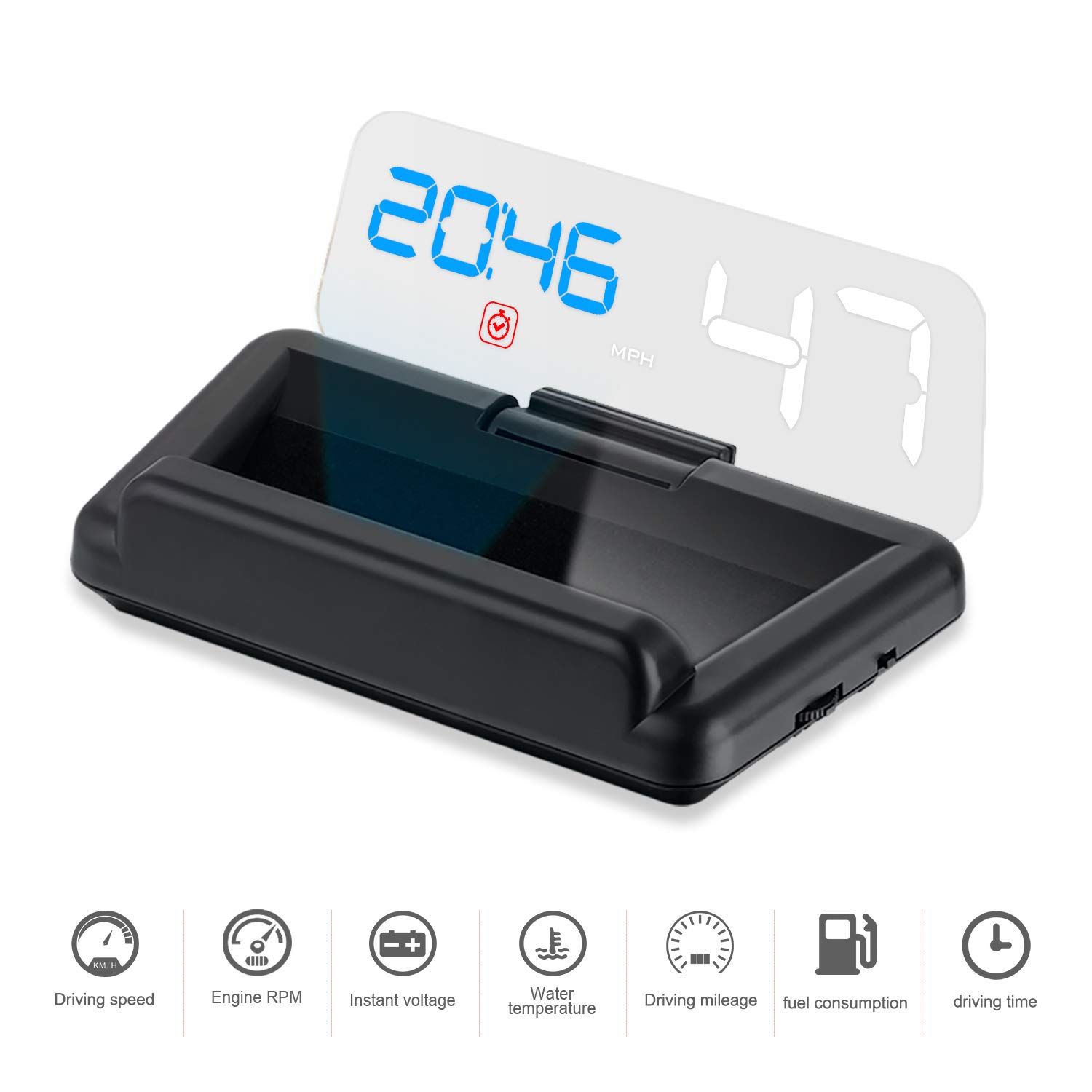
The iKiKin C500 Car Head-Up Display (HUD) is designed to enhance your driving experience by projecting essential vehicle information directly into your line of sight. This device utilizes an OBD2 interface to display data such as speed, RPM, voltage, water temperature, fuel consumption, driving distance, driving time, and clock, all without requiring a reflective film on your windshield.
Key features include a clear LED screen with a reflective glass for optimal visibility even in sunlight, automatic brightness adjustment based on ambient light, and multiple alarm functions to ensure safer driving.

2. 호환성
The iKiKin C500 HUD is compatible with vehicles equipped with an OBD2 interface. Please verify your car's compatibility before purchase.
2.1. OBD2 Model Application Range:
- American gasoline cars produced after 2004 that comply with the OBD2 protocol.
- Gasoline cars from other regions produced after 2008 that comply with the OBD2 protocol.
2.2. Incompatible Car Models:
- American Cars: Dodge, JEEP, SAIL, Chrysler, and models produced before or in 2004.
- All French and Italian car models.
- Japan Cars: Suzuki, Mazda6, Infiniti (QX50, Q50, Q501), Toyota Avanza 2013, Lexus (IS250, EX250, ES300h), Honda (Jazz, CRV), and cars produced before 2008.
- Some South Korean KIA and Hyundai models (e.g., Hyundai Sonata 2013, KIA Soul PS 2017).
- Oil-electric hybrid and diesel cars, pickup trucks, trucks, RVs, and cars with modified computer systems.

3. 제품 구성품
The iKiKin C500 package includes the following items:
- HUD Unit
- 사용자 설명서
- OBD 케이블
- 미끄럼방지 매트
- 깨끗한 천


4. 설정 및 설치
The iKiKin C500 HUD is designed for simple plug-and-play installation. Follow these steps:
- OBD2 포트를 찾으세요: Identify your vehicle's OBD2 diagnostic port. This is typically located under the dashboard on the driver's side, often near the steering column. Refer to your vehicle's owner's manual if you cannot locate it.
- OBD 케이블을 연결하세요: Plug one end of the provided OBD cable into the HUD unit's power port and the other end into your vehicle's OBD2 port. Ensure a secure connection.
- HUD 장치를 배치하십시오: Place the HUD unit on your dashboard using the non-slip mat. Position it so that the projected display is clearly visible on the reflective glass without obstructing your view 도로의.
- 차량 시동을 걸세요: Once connected and positioned, start your car. The HUD unit will automatically power on and begin displaying data.
No additional reflection film is required on your windshield as the unit uses its own reflective glass for projection.
5. 운영
The iKiKin C500 HUD provides various display modes and alarm functions to keep you informed while driving.
5.1. 디스플레이 정보:
The HUD can display a range of driving information, including:
- Speed (MPH/KM/H)
- 엔진 RPM
- 물 온도
- 권tage
- 연료 소비량
- 주행거리
- 운전 시간
- 시계

5.2. 디스플레이 모드:
The unit offers 8 different display modes, allowing you to customize the information shown. You can switch between these modes to view various combinations of data, such as Speed only, Speed + RPM, Speed + Driving Distance, Speed + Fuel Consumption, Speed + Clock, Speed + Water Temperature, Speed + Voltage, and Speed + Driving Time.

5.3. Alarm and Reminder Functions:
The HUD includes multiple reminders and alarms to enhance driving safety:
- 오류 코드 지우기: Indicates engine fault codes.
- 과속 경보 : 설정된 속도 제한을 초과하면 경고를 표시합니다.
- 피로 운전 알림: Suggests taking a break after extended driving periods.
- RPM 알람: Notifies you if engine RPM exceeds a set threshold.
- 수온 과다 경보: 엔진 과열을 경고합니다.
- 낮은 볼륨tage 알람: Alerts to low battery voltage.
- Shift Reminder: Suggests optimal gear shifts for fuel efficiency.
These reminders are designed to help prevent accidents and promote safer driving habits.
6. 문제 해결
If you encounter issues with your iKiKin C500 HUD, refer to the following common troubleshooting steps:
- 디스플레이/전원 없음:
- Ensure the OBD cable is securely connected to both the HUD unit and the vehicle's OBD2 port.
- Verify that your vehicle is compatible with the OBD2 protocol (refer to Section 2).
- 차량의 퓨즈 박스에서 OBD2 포트 또는 액세서리 전원과 관련된 퓨즈가 끊어졌는지 확인하십시오.
- 부정확한 속독:
- The HUD's speed reading can be calibrated. Refer to the detailed user manual (included in the package) for instructions on how to access and adjust the speed calibration settings.
- Alarms Not Functioning or Incorrectly Triggering:
- Some alarm thresholds (e.g., water temperature, voltage) may have fixed default values that are not user-adjustable. Consult the full user manual for specific details on alarm settings and adjustability.
- Ensure the HUD is receiving accurate data from the OBD2 port.
- 배터리 소모 문제:
- The HUD is designed to shut off automatically after the car is turned off. If you experience battery drain, ensure the unit is indeed powering down. If not, check the OBD2 port for constant power supply or consider disconnecting the unit when the vehicle is not in use for extended periods.
- Display Too Bright at Night:
- The HUD has a built-in photosensitive component that automatically adjusts brightness. If it remains too bright, ensure the light sensor on the unit is not obstructed.
For more detailed troubleshooting steps and advanced settings, please refer to the comprehensive user manual provided with your product.
7. 사양
| 특징 | 세부 사항 |
|---|---|
| 상표 | 아이키킨 |
| 모델 번호 | iKiKin-HUDC500 |
| 화면 크기 | 5.3 인치 |
| 재료 | 폴리카보네이트(PC), 아크릴로니트릴 부타디엔 스티렌(ABS) |
| 품목 무게 | 260그램(9.17온스) |
| 패키지 크기 | 6.69 x 4.88 x 1.65 인치 |
| ASIN | B07H7GGPCP |
| 한국어: | 738920305959, 738920305973 |
| 첫 번째 이용 가능 날짜 | 10년 2018월 XNUMX일 |
8. 유지관리
To ensure the longevity and optimal performance of your iKiKin C500 HUD, follow these maintenance guidelines:
- 청소: Use the provided clean cloth or a soft, dry, lint-free cloth to gently wipe the display screen and the unit's exterior. Avoid using abrasive cleaners, solvents, or spray directly onto the unit.
- 놓기: Ensure the unit is placed on a stable surface using the non-slip mat to prevent movement during driving. Avoid placing it in direct sunlight for prolonged periods when the vehicle is parked, as extreme temperatures can affect electronics.
- 저장: If storing the unit for an extended period, disconnect it from the OBD2 port and store it in a cool, dry place away from direct sunlight and extreme temperatures.
9. 보증 및 지원
For warranty information, technical support, or any inquiries not covered in this manual, please contact iKiKin customer service. Refer to the contact information provided in your product packaging or on the official iKiKin web대지.
보증을 위해 구매 영수증을 보관하는 것이 좋습니다.