
1. 서론
This user manual provides detailed instructions for the installation, configuration, and operation of the Tenda TEG1124P-24-250W Unmanaged Gigabit PoE Ethernet Switch. Please read this manual thoroughly before using the device to ensure proper setup and optimal performance. Keep this manual for future reference.
2. 제품 오버view
2.1 주요 특징
- 24개의 기가비트 이더넷 포트(10/100/1000Mbps)
- Power over Ethernet (PoE) support on all 24 ports
- Unmanaged switch for plug-and-play simplicity
- Total PoE power budget of 250 Watts
- 내구성이 뛰어난 금속 casing for robust performance
- Compatible with various PoE-powered devices such as IP cameras
2.2 패키지 내용
- Tenda TEG1124P-24-250W Unmanaged Gigabit PoE Ethernet Switch
- 랙 마운트 키트
- 4 발 패드
- 전원 코드
- 빠른 설치 가이드
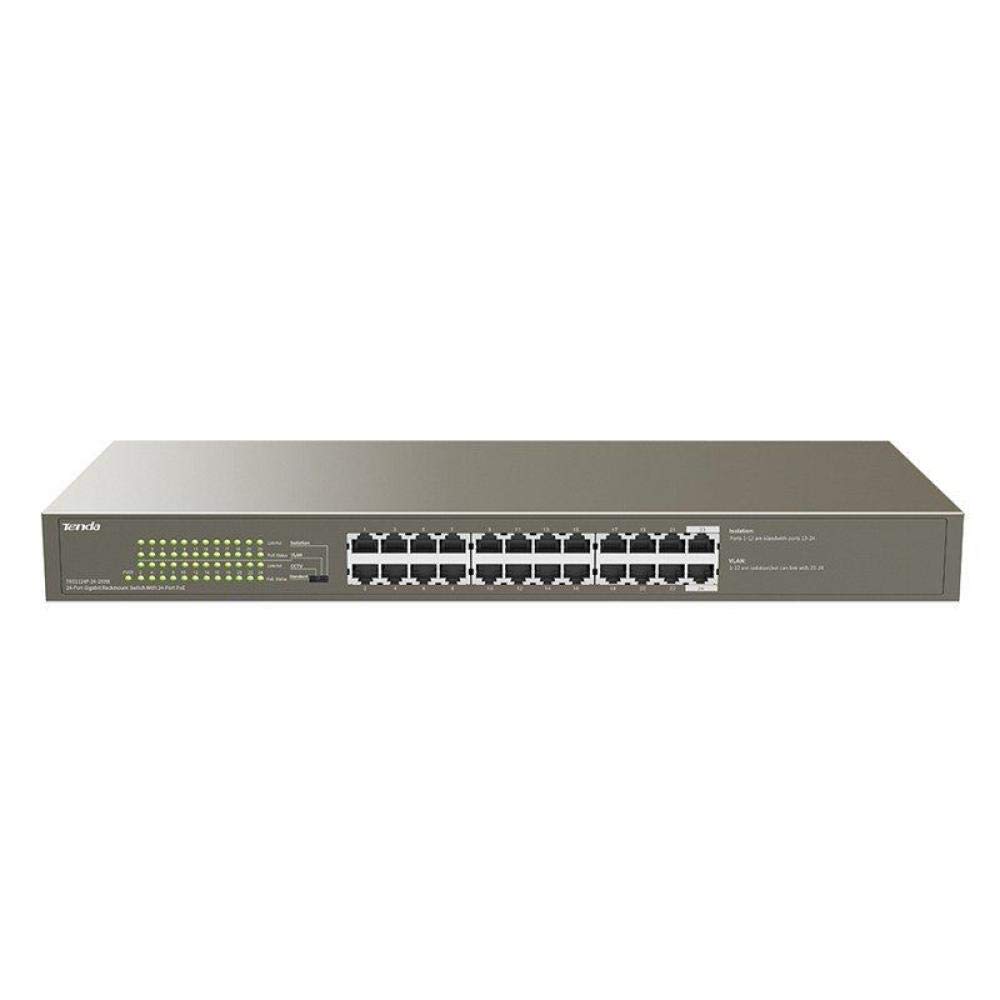
그림 1: 전면 view of the Tenda TEG1124P-24-250W Unmanaged Gigabit PoE Ethernet Switch, showing 24 RJ45 ports and LED indicators.
3. 설정
3.1 물리적 설치
The Tenda TEG1124P-24-250W switch can be installed on a desktop or mounted in a standard 19-inch equipment rack.
- 데스크탑 배치: Attach the included rubber foot pads to the bottom of the switch. Place the switch on a flat, stable surface with adequate ventilation.
- 랙 장착: Use the provided rack mount brackets and screws to secure the switch into a standard 19-inch equipment rack. Ensure proper airflow around the device.

Figure 2: Diagram illustrating the dimensions of the Tenda TEG1124P-24-250W switch: approximately 24.64 cm length, 16.51 cm width, and 2.79 cm height.
3.2 장치 연결
- 전원 연결: Connect the provided power cord to the power inlet on the rear panel of the switch and then to a suitable power outlet.
- 네트워크 장치: Connect your network devices (e.g., computers, servers, NVRs) to any of the 24 RJ45 ports using standard Ethernet cables.
- PoE 장치: For Power over Ethernet (PoE) compatible devices (e.g., IP cameras, VoIP phones, wireless access points), connect them to any of the 24 RJ45 ports. The switch will automatically detect and provide power to these devices if they are PoE compliant and within the switch's power budget.
4. 사용 설명서
4.1 전원 켜기
After connecting the power cord, the switch will automatically power on. The Power LED indicator on the front panel should illuminate, indicating that the device is receiving power.
4.2 LED 표시등
스위치 전면 패널에는 상태 정보를 제공하는 LED 표시등이 있습니다.
- 전원 LED: 스위치에 전원이 들어오면 불이 들어옵니다.
- 링크/동작 LED(포트당):
- 솔리드 그린: 안정적인 네트워크 연결이 설정되었습니다.
- 녹색 깜박임: 포트를 통해 데이터가 전송되거나 수신되고 있습니다.
- 끄다: No network link is detected.
- PoE Status LEDs (per port):
- 단색 노란색: 연결된 장치에 PoE 전원이 공급되고 있습니다.
- 노란색 깜박임 : PoE power fault or overload detected.
- 끄다: No PoE device connected or no power being supplied.
4.3 PoE 기능
The TEG1124P-24-250W switch automatically detects and supplies power to IEEE 802.3af/at compliant Powered Devices (PDs) connected to its ports. It is an unmanaged switch, meaning no configuration is required for basic network and PoE operation. The total power budget for PoE is 250W. Ensure that the total power consumption of all connected PoE devices does not exceed this limit.
5. 유지관리
To ensure the longevity and reliable operation of your Tenda switch, follow these maintenance guidelines:
- 청소: 스위치 외부를 부드럽고 마른 천으로 정기적으로 닦아주십시오. 액체 또는 에어로졸 세척제를 사용하지 마십시오. 통풍구에 먼지나 이물질이 끼지 않도록 하십시오.
- 통풍: 과열을 방지하기 위해 스위치를 통풍이 잘 되는 곳에 설치하십시오. 통풍구를 막지 마십시오.
- 환경 조건: Operate the switch within the recommended temperature and humidity ranges specified in the product specifications.
- 케이블 관리 : 네트워크 케이블은 정리하여 안전하게 고정하여 우발적인 연결 해제나 손상을 방지하십시오.
6. 문제 해결
If you encounter issues with your Tenda TEG1124P-24-250W switch, refer to the following common problems and solutions:
- 전원 없음:
- 전원 코드가 스위치와 작동하는 콘센트에 제대로 연결되어 있는지 확인하십시오.
- 다른 장치를 연결하여 전원 콘센트가 작동하는지 확인하세요.
- Check the Power LED on the front panel. If it is off, contact technical support.
- 네트워크 연결 없음:
- Check the Link/Act LED for the connected port. If it is off, ensure the Ethernet cable is properly connected at both ends.
- 다른 이더넷 케이블이나 포트를 사용해 보세요.
- Verify that the connected device (e.g., computer, router) is powered on and functioning correctly.
- PoE 장치가 켜지지 않음:
- Check the PoE Status LED for the connected port. If it is off, ensure the device is PoE compliant (IEEE 802.3af/at).
- If the PoE LED is flashing yellow, there might be a power fault or overload. Disconnect other PoE devices to reduce the total power load.
- Ensure the connected PoE device is not drawing more power than the switch can provide per port or exceeding the total 250W budget.
- Try connecting the PoE device to a different port.
7. 사양
| 특징 | 설명 |
|---|---|
| 브랜드 이름 | 텐다 |
| 모델 번호 | TEG1124P-24-250W |
| 제품 유형 이름 | 네트워크 스위치 |
| 포트 수 | 24 |
| 스위치 유형 | Unmanaged PoE |
| 데이터 전송 속도 | 1000Mbps(기가비트) |
| 사용자 인터페이스 | RJ45, PoE |
| 최대 PoE 전력 | 250 와트 |
| 케이스 재질 종류 | 금속 |
| 색상 | 회색 |
| 호환 장치 | 카메라 |
| 제품 크기(L x W x H) | 24.6cm x 16.5cm x 2.8cm |
| 품목 무게 | 3434그램 |
8. 보증 및 지원
보증 정보 및 기술 지원은 제품에 동봉된 보증 카드를 참조하거나 Tenda 공식 웹사이트를 방문하십시오. website. You may also contact your local distributor or reseller for assistance.