
1. 제품 오버view
The SINOX 12V DC BLDC Ceiling Fan is an energy-efficient ceiling fan designed for operation with a 12-volt DC power source, such as a battery or solar panel. It features a Brushless Direct Current (BLDC) motor, remote control functionality, and a 1200mm blade sweep, providing high airflow and quiet operation.
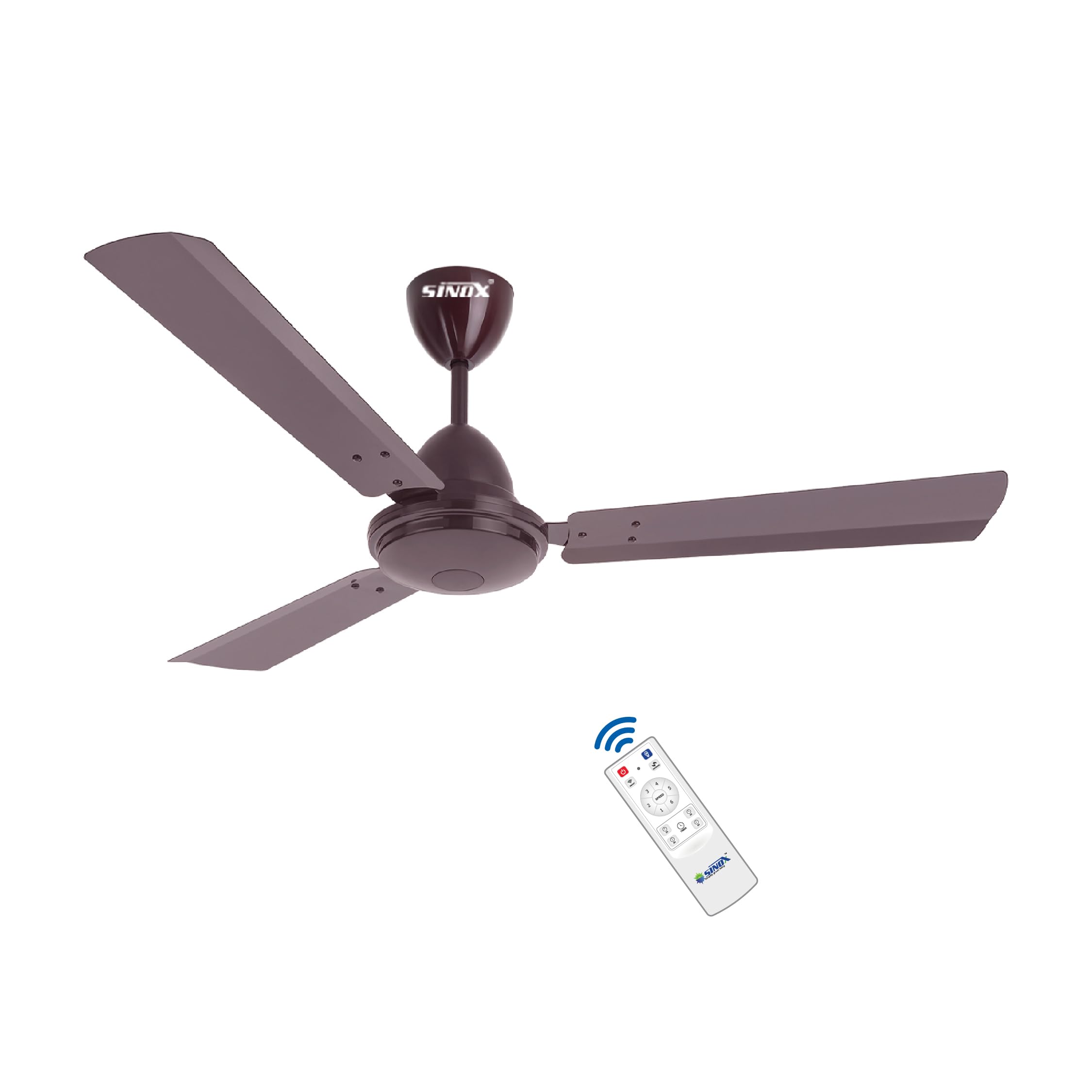
Image 1.1: SINOX 12V DC BLDC Ceiling Fan (Brown)
2. 안전 정보
Please read all safety instructions before installation and use. Failure to follow these instructions may result in electric shock, fire, or serious personal injury.
- 전원: This fan is designed for 12V DC operation only. Do not connect directly to AC mains (230 Volt) or any power source outside the 10V-19V DC range. Connecting to an incorrect power source will void the warranty and can cause severe damage.
- 배선: Use 2.5 square mm wire for DC side connections to ensure optimal performance and safety.
- 설치: Installation should be performed by a qualified electrician in accordance with local electrical codes. Ensure the mounting structure can support the fan's weight.
- Motor Integrity: Do not open the motor housing. Opening the motor will void the warranty.
- 블레이드 클리어런스: Ensure adequate clearance between the fan blades and any surrounding objects or walls.
- 어린이와 애완동물: 팬의 작동 및 설치 중에는 어린이와 애완동물이 팬에 접근하지 못하도록 하세요.
3. 패키지 내용
설치를 진행하기 전에 모든 구성 요소가 있고 손상되지 않았는지 확인하세요.
- 모터 박스 1개
- 칼날 세트 1개 (칼날 3개)
- 1 x 원격 제어
- 캐노피 2개
- 1 x Down Rod
- 1 x 샤클 키트
- 1 x 보증 카드
4. 사양
| 특징 | 사양 |
|---|---|
| 상표 | 시녹스 |
| 모델명 | 프리미엄 |
| 색상 | 갈색 |
| 선풍기 디자인 | 천장 선풍기 |
| 전원 | Battery-Powered, Solar Powered |
| 운영 볼륨tag및 범위 | 10V-19V DC |
| 왓tage | 32 와트 |
| 모터 유형 | BLDC(브러시리스 직류) |
| 속도 | 375 RPM |
| 기류 용량 | 230 CMM (Cubic Meters per Minute) |
| 블레이드 수 | 3 |
| 블레이드 길이 | 1200밀리미터(48인치) |
| 제어 방법 | 원격 제어 |
| 전력 수준의 수 | 5 |
| 특징 | Remote Controlled, 0.5 Watt LED Light, Reverse Polarity Protection, Short Circuit Protection |
| 장착 유형 | 다운로드 마운트 |
| 제품 치수 | 61D x 137.2W x 58.4H 센티미터 |
| 품목 무게 | 4.8 킬로그램 |
| 재료 유형 | 알류미늄 |
| 마무리 유형 | 파우더 코팅 |
5. 설정 및 설치
This section provides general guidelines for installing your SINOX BLDC Ceiling Fan. Professional installation is recommended.
5.1. 설치 전 점검
- Ensure the power source is disconnected before starting installation.
- Confirm that the ceiling junction box or mounting bracket is securely fastened and can support the fan's weight (approx. 4.8 kg).
- Verify that you have all components listed in Section 3.
5.2. Wiring Diagram (Example for Solar/Battery Connection)
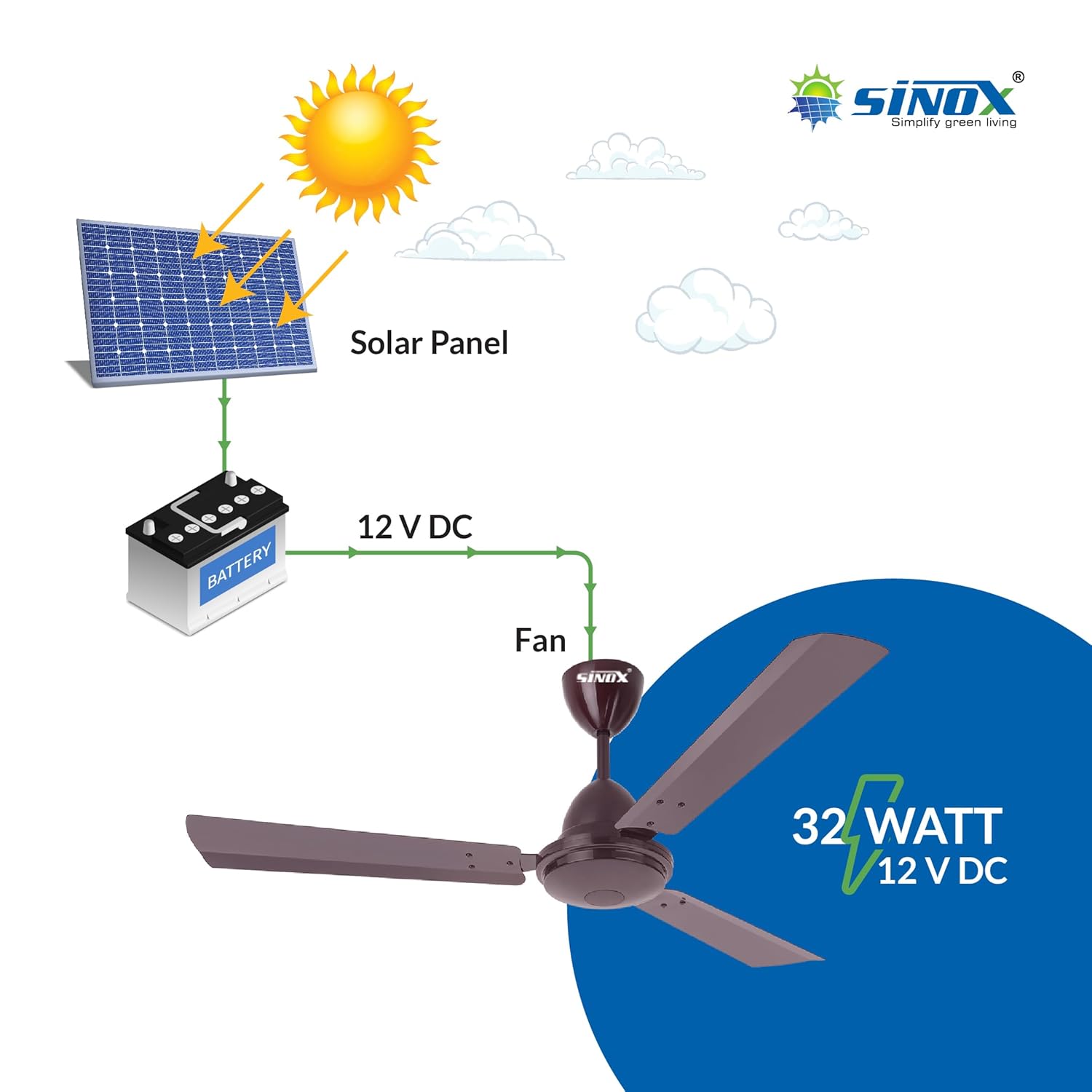
이미지 5.1: Example wiring for 12V DC BLDC fan with solar panel and battery.
The fan operates on 12V DC. It can be connected to a 12V battery or directly to a 12V solar panel (60 Watts to 100 Watts recommended). Ensure correct polarity when connecting to the DC power source. Use 2.5 square mm wire for the DC side for optimal performance.
5.3. 팬 장착
- 천장 접합 상자에 장착 브래킷을 단단히 부착합니다.
- Assemble the downrod and canopy components.
- Carefully lift the motor assembly and attach it to the downrod.
- Connect the fan's electrical wires to the 12V DC power supply, ensuring correct polarity (positive to positive, negative to negative). The fan includes reverse polarity protection.
- Secure the canopy to cover the wiring connections.
- 제공된 나사를 사용하여 팬 날개를 모터 하우징에 부착하십시오. 모든 날개가 단단히 고정되었는지 확인하십시오.
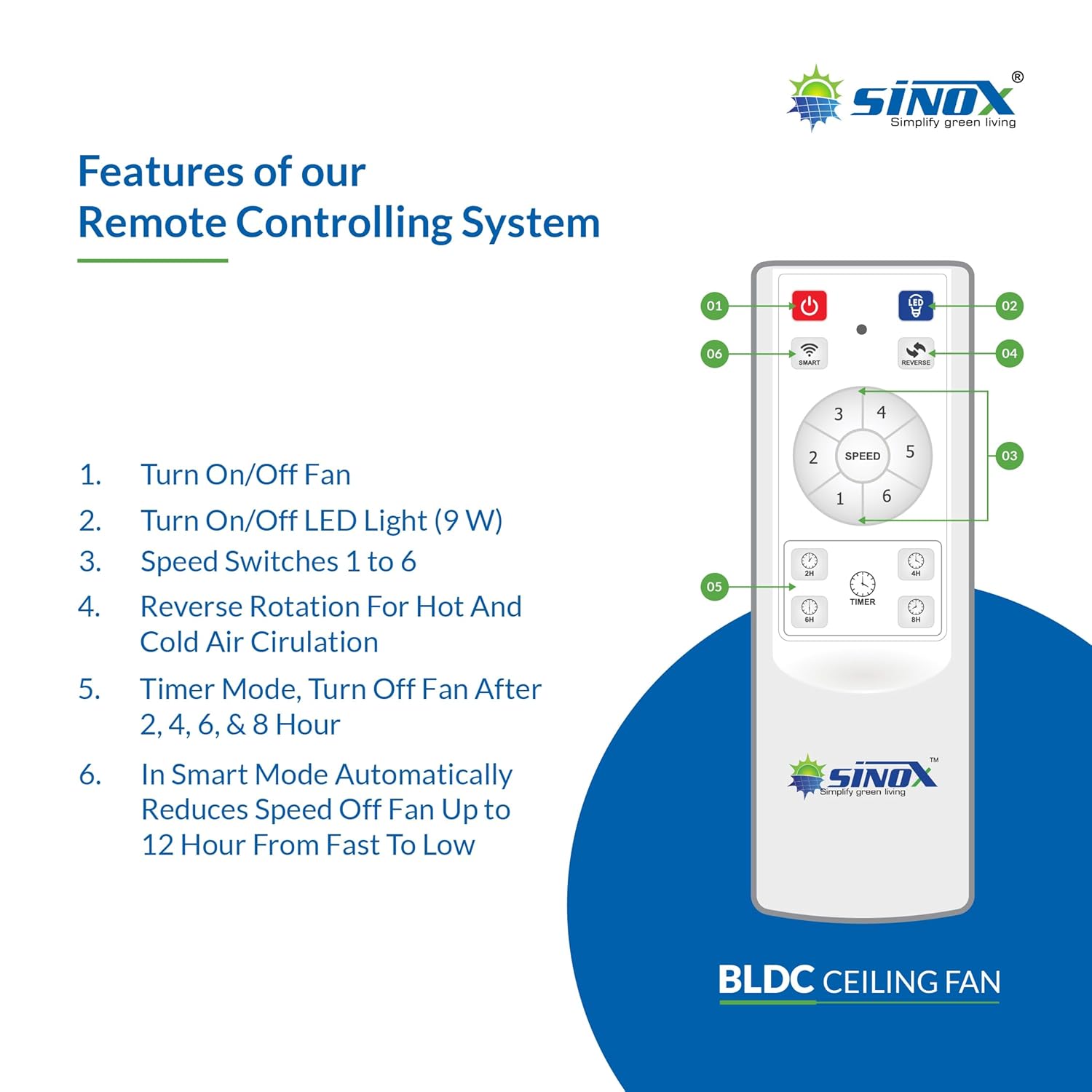
Image 5.2: BLDC motor technology components.
6. 사용 설명서
Your SINOX BLDC Ceiling Fan is operated using the included remote control.
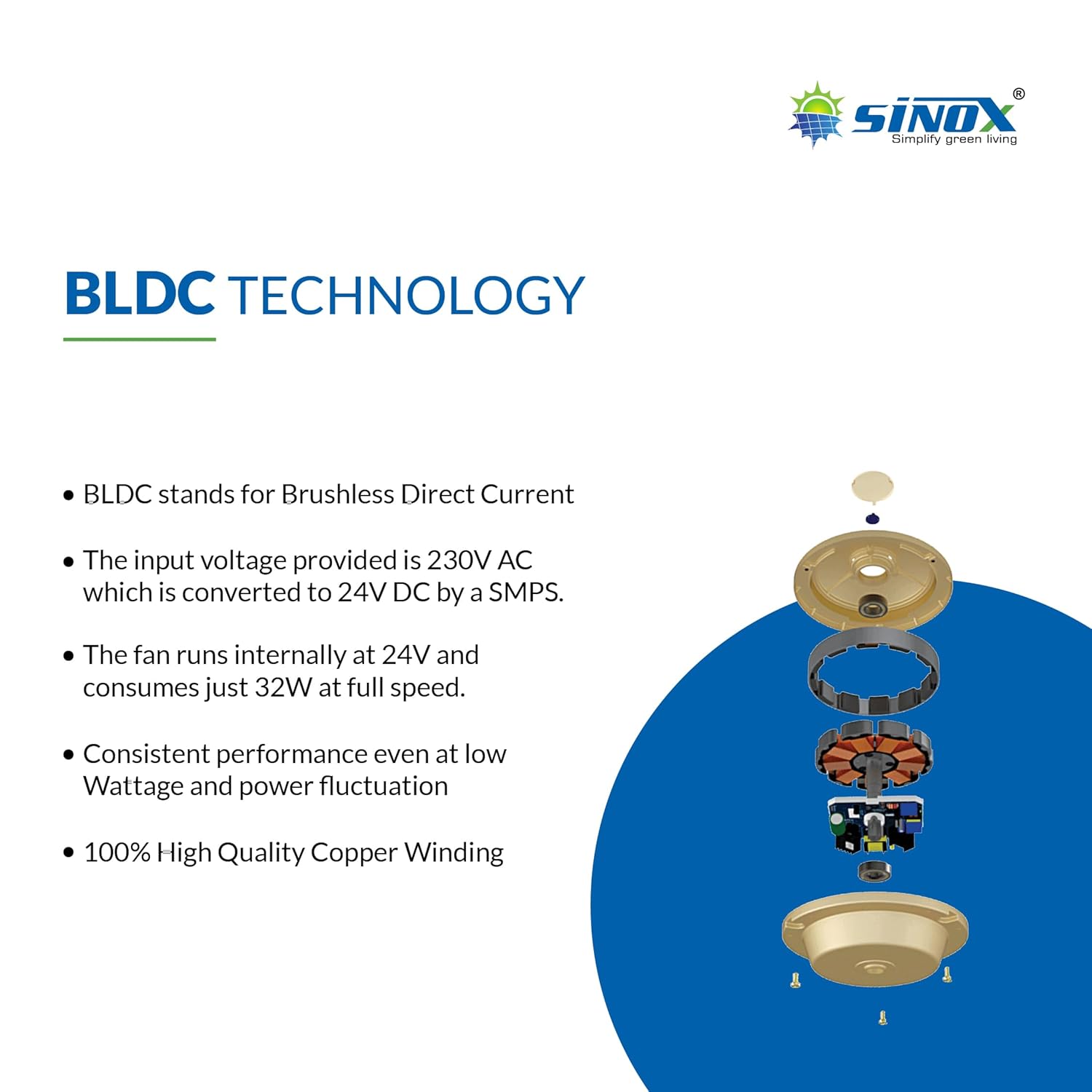
이미지 6.1: 리모컨 기능.
6.1. 원격 제어 기능
- 전원 켜기/끄기: 를 누르세요 red power button (01) 선풍기를 켜거나 끄려면.
- LED 조명 켜기/끄기: 를 누르세요 light bulb button (02) to turn the integrated 0.5 Watt LED light on or off.
- 속도 제어: 사용하세요 speed buttons (03) (numbered 1 to 6) to adjust the fan speed. Speed 1 is the lowest, and Speed 6 is the highest.
- 역회전: 를 누르세요 reverse button (04) to change the direction of blade rotation. This feature is useful for circulating hot air in winter or enhancing cooling in summer.
- 타이머 모드: 사용하세요 timer buttons (05) (2H, 4H, 6H, 8H) to set the fan to automatically turn off after 2, 4, 6, or 8 hours.
- 스마트 모드 : 를 누르세요 Smart button (06) to activate Smart Mode. In this mode, the fan automatically reduces its speed over a period of up to 12 hours, from fast to low.

Image 6.2: Fan with integrated 0.5 Watt LED light.
7. 유지관리
Regular maintenance ensures optimal performance and longevity of your SINOX BLDC Ceiling Fan.
- 청소: 팬 블레이드와 모터 하우징을 부드러운 천으로 정기적으로 닦아주세요.amp 천을 사용하십시오. 연마성 세제나 용제를 사용하지 마십시오. 청소하기 전에 팬을 끄고 전원을 차단하십시오.
- 블레이드 고정 장치: 주기적으로 날을 조이는 나사가 모두 단단히 조여져 있는지 확인하십시오. 나사가 헐거워지면 흔들림과 소음이 발생할 수 있습니다.
- 모터: The BLDC motor is designed for maintenance-free operation. Do not attempt to lubricate or open the motor housing.
- 배선: Inspect wiring connections periodically for any signs of wear or damage.
8. 문제 해결
선풍기 작동에 문제가 발생하면 다음의 일반적인 문제 및 해결 방법을 참조하십시오.
| 문제 | 가능한 원인 | 해결책 |
|---|---|---|
| 팬이 켜지지 않음 | No power supply; Incorrect wiring; Remote control battery low. | Check 12V DC power connection; Verify wiring polarity; Replace remote control batteries. |
| 팬이 흔들린다 | 날 고정 나사가 헐거워짐; 날의 균형이 맞지 않음; 장착이 헐거워짐. | Tighten all blade screws; Ensure blades are balanced; Check mounting bracket security. |
| 리모컨이 작동하지 않습니다 | Low battery; Obstruction between remote and fan sensor. | Replace remote control batteries; Ensure clear line of sight to fan sensor. |
| 팬에서 이상한 소리가 난다 | 느슨한 부품; 막힘. | Check for loose screws or parts; Ensure nothing is obstructing the fan blades. |
9. 보증 및 지원
9.1. 제한 보증
This SINOX BLDC Ceiling Fan comes with a 2년 한정 보증. The warranty is void if the product is connected directly to AC Mains (230 Volt) or if the motor is opened. This warranty covers manufacturing defects only.

Image 9.1: Key features including 2-year motor warranty.
9.2. 고객 지원
For technical assistance, warranty claims, or any other inquiries, please contact SINOX customer support:
- 제조업체: SINOX POWER PVT.LTD.
- 연락처 번호: 8000061200