
소개
This manual provides instructions for the installation, operation, and maintenance of your Audiovox ELEAUDAX80EXT Wireless Extension. This device is designed to expand the functionality of compatible Audiovox phone models, specifically the AX8001, AX8001E, and AX8101AM, by providing an additional wireless handset.
패키지 내용
설치를 진행하기 전에 패키지에 모든 구성품이 포함되어 있는지 확인하십시오.
- Audiovox ELEAUDAX80EXT Wireless Extension Unit
- 전원 어댑터(해당하는 경우)
- 충전식 배터리(사전 설치 또는 별도)
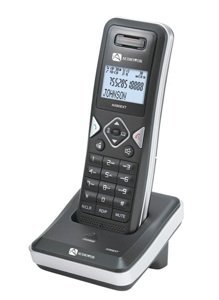
Image: The Audiovox ELEAUDAX80EXT Wireless Extension Unit. This image displays the compact design of the extension handset.
설정
- 배터리 충전: If the battery is not pre-installed, insert it into the extension unit according to the markings. Place the extension unit on its charging cradle (if included) or connect the power adapter directly to the unit and a power outlet. Allow the unit to charge for at least 12-16 hours before initial use.
- Register the Extension:
- Ensure your main Audiovox phone base (AX8001, AX8001E, or AX8101AM) is powered on.
- On the main phone base, locate and press the "Register" or "Page" button. Hold it until the indicator light on the base begins to flash (refer to your main phone's manual for exact instructions).
- While the base is in registration mode, on the ELEAUDAX80EXT extension unit, navigate to the "Menu" and select "Register Handset" or a similar option. Follow the on-screen prompts.
- Once registration is successful, the extension unit will display a confirmation message, and the indicator light on the base will stop flashing.
- 테스트 연결: Make a test call from the extension unit to ensure proper functionality.
작동 지침
전화 걸기
- 핸드셋을 들거나 말하다 단추.
- 원하는 전화번호로 전화를 걸어보세요.
- 를 누르세요 말하다 button again or place the handset back on the cradle to end the call.
전화 받기
- 전화가 울리면 수화기를 들거나 버튼을 누르세요. 말하다 단추.
- 통화를 종료하려면 다음을 누르세요. 끝 버튼을 누르거나 수화기를 다시 거치대에 놓으세요.
Intercom Function (if supported by base unit)
- 를 누르세요 선내 통화 장치 단추.
- Dial the number of the extension you wish to call (e.g., "2" for the second handset).
- 누르다 말하다 to initiate the intercom call.
유지
- 청소: 부드러운 천으로 기기를 닦으십시오. damp 옷감. 강한 화학 물질이나 연마성 세제를 사용하지 마십시오.
- 배터리 관리 : For optimal battery life, avoid fully discharging the battery frequently. Keep the unit on its charger when not in use.
- 저장: 장기간 보관할 경우 배터리를 분리하여 서늘하고 건조한 곳에 보관하십시오.
문제 해결
| 문제 | 해결책 |
|---|---|
| 통화 연결이 되지 않음 / 전화를 걸 수 없음 |
|
| 핸드셋이 충전되지 않습니다 |
|
| 통화 품질이 좋지 않음 / 정적 |
|
명세서
- 모델 번호: ELEAUDAX80EXT
- 호환되는 기본 장치: Audiovox AX8001, AX8001E, AX8101AM
- 치수(길이 x 너비 x 높이): 20 x 40 x 30 밀리미터
- 무게: 20그램
- 한국어: 044476082719
보증 및 지원
For specific warranty information and technical support, please refer to the documentation included with your original Audiovox phone system or visit the official Audiovox web사이트. 보증 청구를 위해 구매 증빙 자료로 구매 영수증을 보관하세요.
For further assistance, please contact Audiovox customer service.