
1. 서론
Thank you for choosing the Bearware Wireless Weather Station with Projection and Outdoor Sensor. This device provides accurate time via DCF radio signal, indoor and outdoor temperature readings, weather forecasts, and a convenient alarm function with projection. Please read this manual carefully to ensure proper use and optimal performance of your weather station.
2. 안전 지침
- 본체 또는 실외 센서를 극한 온도, 직사광선 또는 과도한 습기에 노출시키지 마십시오.
- 장치를 떨어뜨리거나 강한 충격을 가하지 마십시오.
- 직접 분해하거나 수리하지 마십시오. 모든 정비는 자격을 갖춘 기술자에게 맡기십시오.
- 배터리는 어린이의 손이 닿지 않는 곳에 보관하십시오. 사용한 배터리는 지역 규정에 따라 책임감 있게 폐기하십시오.
- Use only the provided power adapter or specified battery types.
3. 패키지 내용
다음 품목이 패키지에 포함되어 있는지 확인하세요.
- Bearware Wireless Weather Station (Main Unit)
- 무선 옥외용 센서
- DC 5V 1.2A 전원 어댑터
- User Manual (Italian version available online)

Image: Contents of the Bearware Weather Station package, including the main unit, outdoor sensor, and power adapter.
4. 제품 오버view
4.1 메인 유닛 (전면) View)
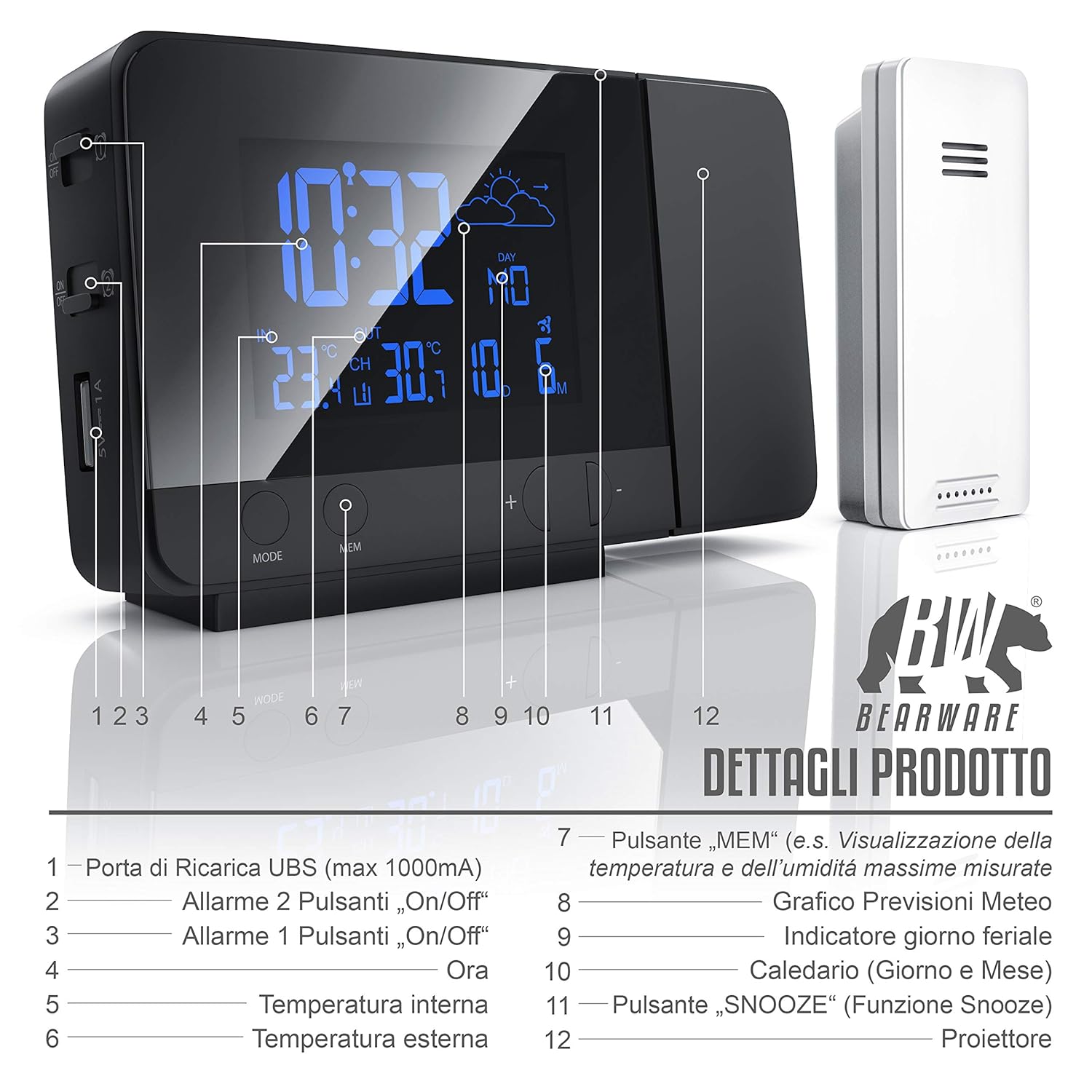
이미지: 앞면 view of the weather station display and control buttons. Key elements include the time, indoor/outdoor temperature, weather forecast icon, day, and date. Buttons for MODE, MEM, and +/- are visible below the display.
- USB Charging Port (max 1000mA)
- Alarm 2 On/Off Button
- Alarm 1 On/Off Button
- 시간 표시
- 실내 온도
- 야외 온도
- "MEM" Button (e.g., Display Max/Min Temperature and Humidity)
- Weather Forecast Graph
- 평일 표시
- Calendar (Day and Month)
- "SNOOZE" Button (Snooze Function)
- 영사기
4.2 Main Unit (Side/Rear View)

Image: Side and rear view of the weather station, highlighting the control buttons and ports. This includes the snooze button, color change settings, alarm switches, battery compartment, and DC power input.
- SNOOZE Button (Stops and postpones alarm)
- Set Color Change in "Loop" (Automatic color cycle)
- Set Color Change in "Rainbow" (Specific color selection)
- Alarm 1 On/Off Switch
- Alarm 2 On/Off Switch
- Battery Compartment (2x 1.5V AAA Batteries)
- DC 5V 1.2A Power Adapter Input
4.3 무선 실외 센서
The outdoor sensor measures external temperature and transmits data wirelessly to the main unit. It is protected against splashes (IPX4) and operates on 2x AAA 1.5V batteries.
5. 설정
5.1 메인 유닛 전원 공급
- 배터리 전원: Open the battery compartment on the rear of the main unit and insert 2 x 1.5V AAA batteries, observing polarity (+/-). This provides backup power in case of a power outage.
- AC 전원: Connect the included DC 5V 1.2A power adapter to the DC input port on the rear of the main unit, then plug it into a wall outlet. The display will light up.
5.2 실외 센서 전원 공급
- Open the battery compartment on the outdoor sensor and insert 2 x 1.5V AAA batteries, observing polarity (+/-).
- Place the outdoor sensor in a sheltered location, away from direct sunlight and rain, to ensure accurate readings. The maximum wireless range is approximately 10 meters.
5.3 Initial Synchronization (DCF Time & Sensor)
Upon initial power-up, the weather station will automatically attempt to synchronize with the DCF radio signal for accurate time and date. It will also search for the outdoor sensor.
- Place the main unit near a window for better DCF signal reception.
- The synchronization process may take several minutes or up to 6 hours.
- Once synchronized, the DCF icon will appear on the display.
- If the outdoor temperature does not appear, ensure the sensor batteries are correctly installed and it is within range. You may need to manually initiate a sensor search (refer to Operating Instructions).
6. 사용 설명서
6.1 시간 및 날짜 설정
- In normal time display mode, press and hold the "MODE" button to enter time setting mode.
- Use the "+/-" buttons to adjust values. Press "MODE" to confirm and move to the next setting (e.g., 12/24 hour format, hour, minute, year, month, day, weekday language).
- The weekday display supports 7 different languages.
6.2 알람 설정
The weather station features two independent alarms.
- Press the "MODE" button repeatedly to cycle through time, Alarm 1, and Alarm 2 display modes.
- To set an alarm, select Alarm 1 or Alarm 2 display, then press and hold the "MODE" button. Use "+/-" to adjust the hour and minute. Press "MODE" to confirm.
- Use the dedicated Alarm 1 On/Off and Alarm 2 On/Off switches on the side/rear of the unit to activate or deactivate each alarm.
- When an alarm sounds, press the "SNOOZE" button to activate the snooze function. The alarm will sound again after a few minutes. To stop the alarm completely, press any other button.
6.3 Display Settings (Backlight & Brightness)

Image: The weather station display showcasing its 8-color RGB backlight feature, with different colors like green, blue, red, and yellow.
- The display features an 8-color RGB backlight (green, turquoise, blue, purple, white, red, orange, yellow).
- Use the "Set Color Change in 'Loop'" switch on the side/rear to enable automatic color cycling.
- Use the "Set Color Change in 'Rainbow'" switch to manually select a specific color.
- Brightness can be adjusted (details not specified, typically via a dedicated button or holding a button).
6.4 Temperature Display & Min/Max Values
- The display shows both indoor and outdoor temperatures.
- "MEM" 버튼을 누르세요 view the minimum and maximum recorded temperatures. Press again to cycle through min/max indoor and outdoor temperatures.
- To switch between Celsius (°C) and Fahrenheit (°F), locate the °C/°F switch (often on the back or via a button combination).
6.5 일기예보
The weather station provides a weather forecast for approximately the next 12 hours based on changes in atmospheric pressure. Icons on the display will indicate sunny, partly cloudy, cloudy, rainy, or snowy conditions.
6.6 USB 충전 기능

Image: A smartphone connected to the USB charging port on the side of the Bearware Weather Station, illustrating its charging capability.
The main unit includes a USB Type A female port (max 1000mA output) for charging external devices like smartphones. Connect your device's USB charging cable to this port.
6.7 투영 함수
The integrated projector can display the time and temperature onto a wall or ceiling. The projection angle can be adjusted. The projection is typically red for clear visibility in low light conditions.
7. 유지관리
- 청소: Wipe the unit and sensor with a soft, dry cloth. Do not use abrasive cleaners or solvents.
- 배터리 교체: Replace batteries in both the main unit and outdoor sensor when the low battery indicator appears on the display or when performance degrades. Ensure correct battery type (AAA) and polarity.
- 저장: 장기간 기기를 보관할 경우, 누출을 방지하기 위해 모든 배터리를 제거하세요.
8. 문제 해결
| 문제 | 가능한 원인 | 해결책 |
|---|---|---|
| 화면이 표시되지 않음 / 기기가 켜지지 않음 | No power from adapter; dead batteries; incorrect battery polarity. | Check power adapter connection; replace batteries; ensure correct battery orientation. |
| 실외 온도가 표시되지 않습니다. | Outdoor sensor out of range; dead sensor batteries; interference. | Move sensor closer to main unit; replace sensor batteries; try repositioning both units. |
| DCF 시간이 동기화되지 않습니다 | Poor signal reception; interference. | Move unit near a window; avoid electronic devices that may cause interference; allow more time for synchronization. |
| 부정확한 온도 판독값 | Sensor exposed to direct sunlight or heat sources; poor ventilation. | 센서를 그늘지고 통풍이 잘 되는 곳으로 옮기세요. |
| 투사가 흐릿하거나 불분명합니다. | Incorrect focus; projection surface too far or uneven. | Adjust the projector's focus (if available); ensure projection surface is flat and within optimal distance. |
9. 사양

이미지: 상단 및 전면 view of the Bearware Weather Station with key dimensions: 137mm length, 85mm height, and 33mm depth.
- 모델 번호: 302688
- 치수(본체): 13.7 x 3.3 x 8.5cm(길이 x 너비 x 높이)
- 무게(본체): 168그램
- 색상: 블랙(매트)
- 재료: 플라스틱
- 전원 공급 장치(본체): 2 x 1.5V AAA batteries or DC 5V 1.2A power adapter (included)
- 전원 공급 장치(실외 센서): 2 x 1.5V AAA 배터리
- 실내 온도 범위: -9.9°C(14°F) ~ 50°C(122°F)
- 실외 온도 범위: -40°C(-40°F) ~ 70°C(158°F)
- 온도 정확도: 1 ° C (섭씨 XNUMX도)
- 센서 기술: 무선 전화
- USB 충전 출력: Max. 1000 mA (USB Type A female)
- 디스플레이 백라이트: 8-color RGB (green, turquoise, blue, purple, white, red, orange, yellow)
- 시간 형식: 12/24시간
- 특별 기능: DCF radio-controlled time, 2 adjustable alarms, Snooze function, Min/Max temperature display, Weather trend function, USB charging port, Time projection on ceiling/wall.
10. 보증 및 지원
This Bearware product comes with a 24-month warranty from the date of purchase. In case of any issues or for technical support, please contact Bearware customer service. Please refer to the contact information provided with your purchase or on the official Bearware web대지.