
1. 서론
This manual provides detailed instructions for the proper use and maintenance of your Edifier W820BT Bluetooth Headphones. Please read this manual thoroughly before using the product to ensure optimal performance and longevity.
2. 패키지 내용
Verify that all items listed below are included in your package. If any items are missing or damaged, please contact Edifier customer support.
- Edifier W820BT Bluetooth Headphones
- 충전 케이블(USB)
- 오디오 케이블(3.5mm)
- 사용 설명서 (본 문서)
3. 제품 오버view
The Edifier W820BT headphones are designed for comfort and extended listening, featuring Bluetooth v4.1 connectivity and a long-lasting battery.
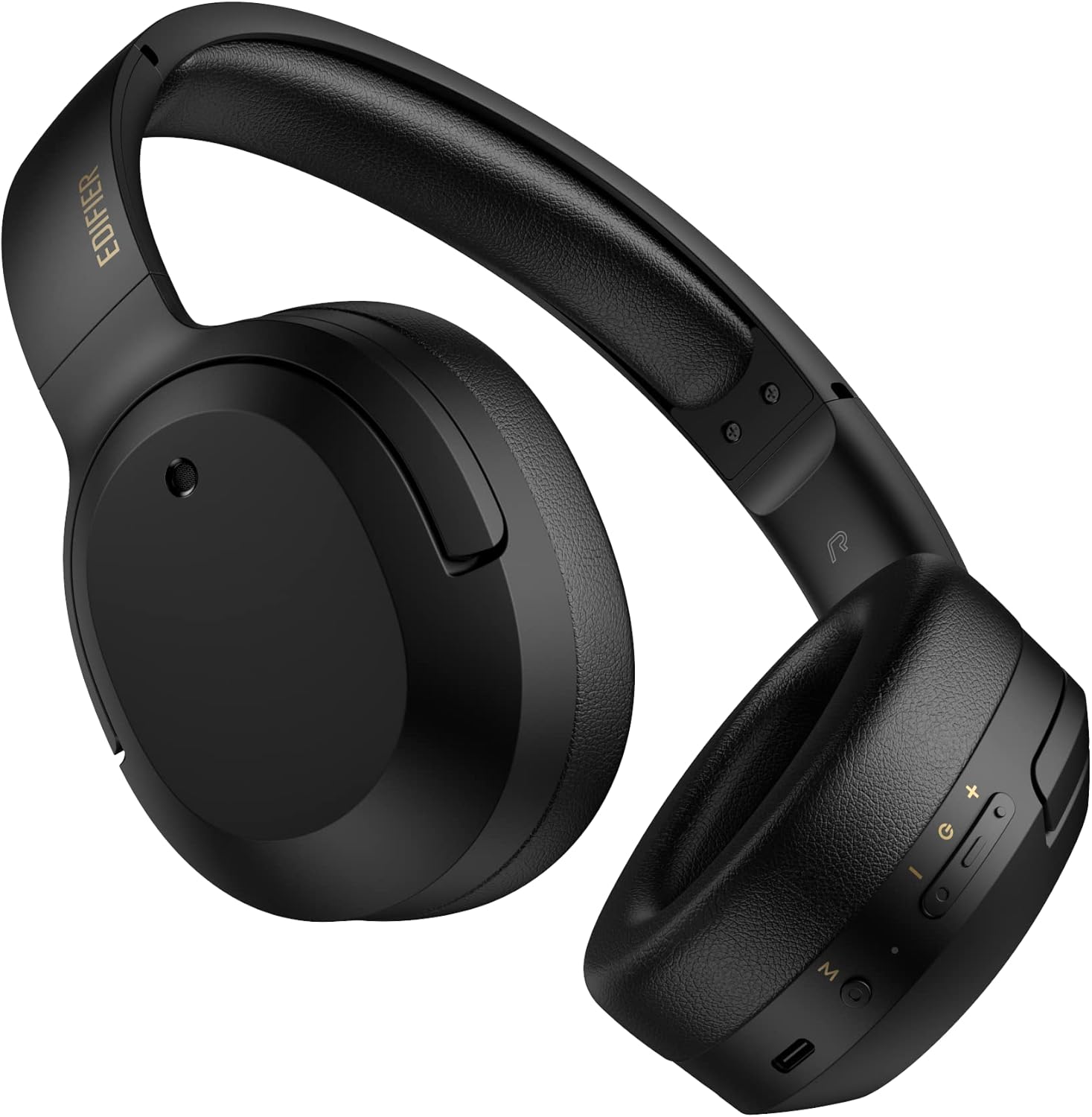
그림 3.1: 전면 view of the Edifier W820BT Bluetooth Headphones.

그림 3.2: 측면 view of the Edifier W820BT Bluetooth Headphones, highlighting the control buttons.
주요 특징:
- Bluetooth V4.1 with CSR Technology for stable wireless connection.
- 배터리 수명은 최대 80시간입니다.
- 휴대성을 고려한 접이식 디자인.
- Soft leather ear pads for comfort.
- Durable and flexible steel headband.
- On-ear controls for media playback and calls.
4. 설정
4.1 헤드폰 충전
처음 사용하기 전에 헤드폰을 완전히 충전하세요.
- Connect the micro-USB end of the charging cable to the charging port on the headphone (located on the right earcup).
- 충전 케이블의 USB-A 단자를 USB 전원 어댑터(별매) 또는 컴퓨터의 USB 포트에 연결하십시오.
- 충전 중에는 LED 표시등이 켜지고, 충전이 완료되면 꺼집니다.
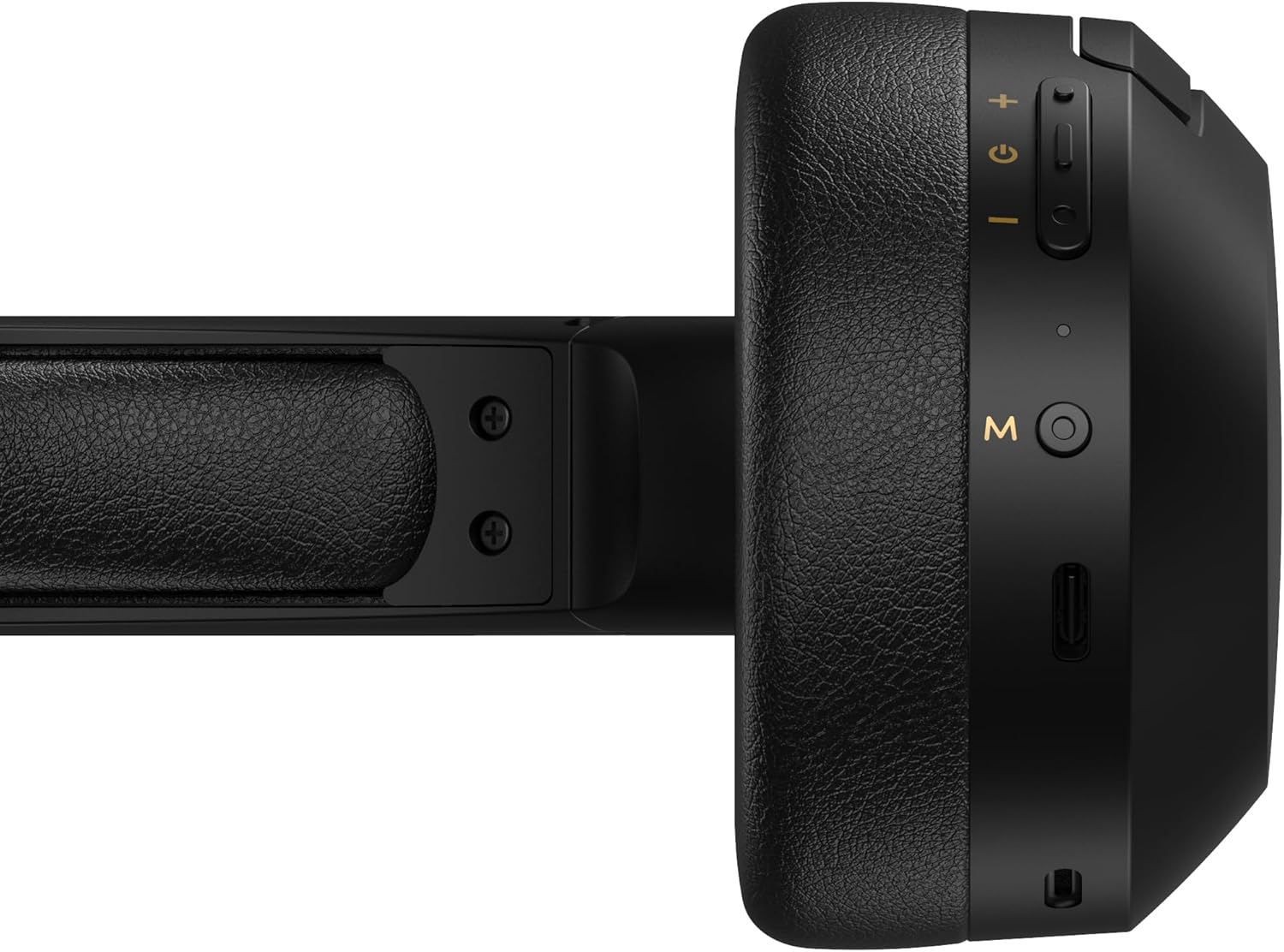
Figure 4.1: Close-up of the charging port and control buttons on the right earcup.
4.2 전원 켜기/끄기
- 전원을 켜려면: Press and hold the multi-function button (usually marked with a power icon or 'M') for approximately 3 seconds until the LED indicator flashes blue.
- 전원을 끄려면: 다기능 버튼을 약 5초 동안 길게 누르면 LED 표시등이 빨간색으로 깜빡인 후 꺼집니다.
4.3 블루투스 페어링
헤드폰을 Bluetooth 지원 장치에 연결하려면:
- 헤드폰의 전원이 꺼져 있는지 확인하십시오.
- 다기능 버튼을 약 5~7초 동안 길게 누르면 LED 표시등이 빨간색과 파란색으로 번갈아 깜빡입니다. 이는 페어링 모드 진입을 나타냅니다.
- 기기(스마트폰, 태블릿, 컴퓨터)에서 Bluetooth를 활성화하고 사용 가능한 기기를 검색하세요.
- Select "EDIFIER W820BT" from the list of found devices.
- 페어링이 완료되면 LED 표시등이 파란색으로 천천히 깜빡입니다.
메모: 헤드폰의 전원을 켜면 마지막으로 페어링된 기기에 자동으로 다시 연결을 시도합니다.
5. 사용 설명서
5.1 이어 컨트롤
The control buttons are located on the right earcup.
| 버튼/액션 | 기능 |
|---|---|
| 다기능 버튼(M) |
|
| 볼륨 업(+) |
|
| 볼륨 작게 (-) |
|
5.2 유선 연결
The W820BT headphones can also be used with a wired connection.
- Connect one end of the 3.5mm audio cable to the audio input jack on the left earcup of the headphones.
- 3.5mm 오디오 케이블의 다른 쪽 끝을 장치의 오디오 출력 잭에 연결합니다.
- 헤드폰이 자동으로 유선 모드로 전환됩니다. 블루투스 기능은 비활성화됩니다.

Figure 5.1: Connecting the 3.5mm audio cable for wired listening.
6. 유지관리
- 부드럽고 마른 천으로 헤드폰을 닦으세요. 연마성 세제나 용제를 사용하지 마세요.
- 헤드폰을 극한의 온도, 습도 또는 직사광선에 노출시키지 마세요.
- 사용하지 않을 때는 헤드폰을 서늘하고 건조한 곳에 보관하세요. 접이식 디자인으로 컴팩트하게 보관할 수 있습니다.
- Do not disassemble the headphones. This will void the warranty.
7. 문제 해결
If you encounter issues with your Edifier W820BT headphones, refer to the following common problems and solutions:
| 문제 | 해결책 |
|---|---|
| 전원을 켤 수 없습니다 | Ensure the headphones are charged. Connect to a power source using the charging cable. |
| 블루투스로 페어링이 불가능합니다 |
|
| 소리가 나지 않습니다 |
|
| 음질이 좋지 않음 |
|
8. 사양
| 특징 | 세부 사항 |
|---|---|
| 모델명 | W820BT |
| 연결 기술 | 무선(블루투스), 유선(3.5mm 잭) |
| 블루투스 버전 | 4.1 |
| 배터리 수명 | 최대 80시간 |
| 이어피스 모양 | 귀 위 |
| 재료 | 스틸(헤드밴드) |
| 품목 무게 | 1.14파운드(약 517g) |
| 제품 치수 | 9.25 x 7.64 x 3.41 인치 |
| 제조업체 | 에디파이어 |
9. 보증 및 지원
Edifier provides a 1년 보증 in the USA and Canada for the W820BT headphones. For warranty claims or technical support, please contact Edifier customer service.
For more information, visit the official Edifier web사이트를 방문하거나 구매 문서를 참조하세요.
10. 비디오 데모
Watch the official product video for a visual guide on the Edifier W820BT Bluetooth Headphones' features and usage.
영상 10.1: 공식 제품 출시 완료view of the Edifier W820BT Bluetooth Headphones, demonstrating features like battery life, comfort, foldable design, and on-ear controls.