
소개
The Aputure 120D Mark II is a high-performance 180W daylight-balanced LED video light designed for professional film and photography applications. It features enhanced brightness, improved color accuracy (CRI 96+, TLCI 97+), and a redesigned integrated controller-power unit for a streamlined setup. This manual provides essential information for the safe and effective use of your Aputure 120D Mark II.
안전 정보
- Do not look directly into the light source when operating.
- Ensure proper ventilation to prevent overheating. The unit features an ultra-silent fan for cooling.
- 지정된 전원 어댑터와 케이블만 사용하세요.
- 장치를 물과 기타 액체에서 멀리하세요.
- 장치를 분해하거나 개조하지 마십시오. 모든 정비는 자격을 갖춘 기술자에게 맡기십시오.
- Always secure the light head properly on a stand or mounting point.
패키지 내용
패키지에 모든 품목이 들어 있는지 확인하세요.
- Aputure 120D Mark II LED Light Head
- Integrated Controller-Power Unit
- 표준 반사판
- 원격 제어
- 전원 케이블
- 케이블 연결
- 운반 가방
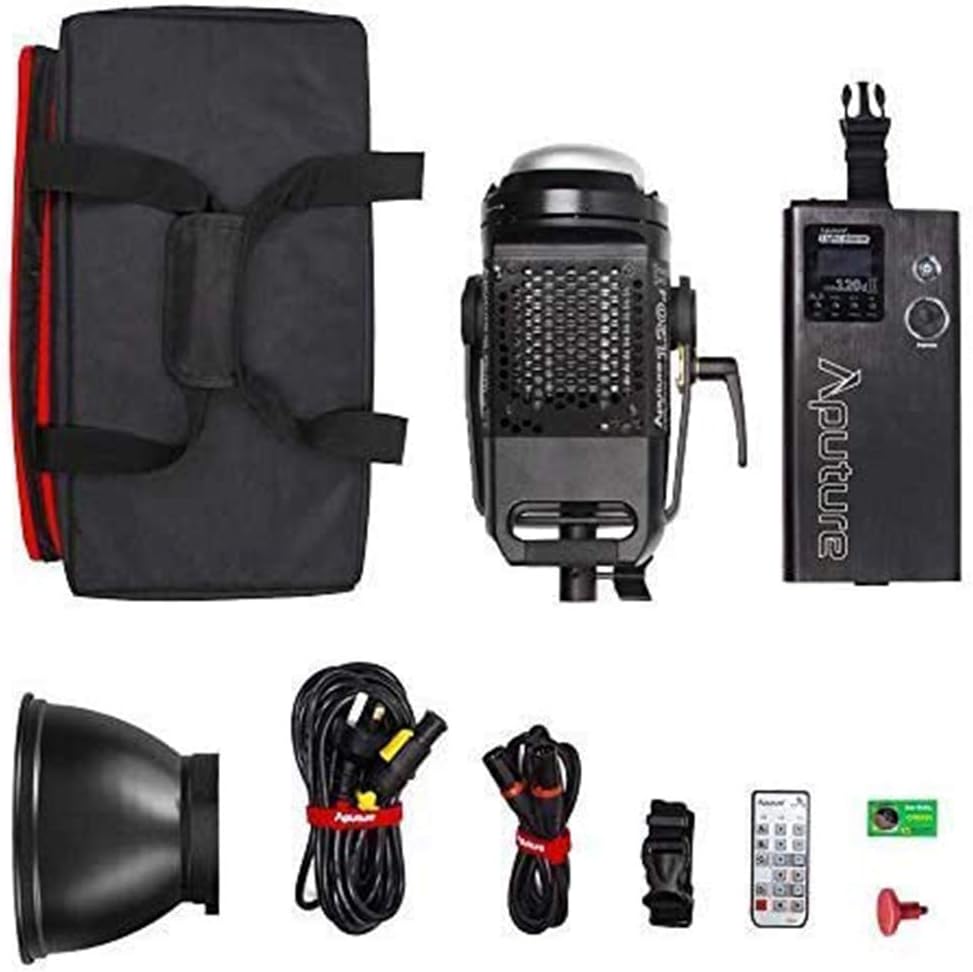
Image: All components included in the Aputure 120D Mark II package, neatly arranged.
설정
- 라이트 헤드 장착: Attach the Aputure 120D Mark II light head to a compatible light stand using its handbrake locking yoke. Ensure it is securely fastened.
- Connecting the Controller-Power Unit: Connect the light head to the integrated controller-power unit using the provided Neutrik locking cables. The unified design simplifies cabling.
- 액세서리 부착: The light features a universal Bowens mount. To attach the standard reflector or other Bowens-mount modifiers (like a softbox or Fresnel lens), align the accessory with the mount on the light head and twist until it locks into place. Press the release switch to detach.
- 전원 연결: Connect the power cable from the controller-power unit to a suitable power outlet.

Image: The Aputure 120D Mark II light head, showcasing its compact design and handle, alongside its dedicated carrying bag.

Image: Close-up of the Aputure 120D Mark II light head with a standard reflector, emphasizing its robust aircraft-grade aluminum construction and the versatile Bowens mount.
비디오: 소개view of the Aputure 120D Mark II LED Video Light, demonstrating its features and basic setup.
운영
- 전원 켜기/끄기: Press the power button on the controller-power unit to turn the light on or off.
- 밝기 조정: Use the control knob on the unit to adjust the brightness from 0% to 100%. The C120D II allows for fine adjustments even below 10%.
- DMX 제어 : The C120D II supports DMX lighting functions, allowing integration into professional lighting setups for precise control.
- Pre-Programmed Lighting Effects: Access and select from 5 pre-programmed lighting effects (e.g., thunder, fireworks) via the controller.
- 무선 제어: The light can be controlled wirelessly using the included remote control or a compatible mobile application.

Image: The integrated controller-power unit of the Aputure 120D Mark II, showing its display and intuitive control knobs for brightness and settings.

Image: The Aputure 120D Mark II in an outdoor environment, illustrating its powerful and adjustable brightness output.

Image: A visual representation of the Aputure 120D Mark II's accurate color rendition, featuring a color chart and the light illuminating a scene.
유지
- 청소: Use a soft, dry cloth to clean the exterior of the light head and controller. Avoid using harsh chemicals or abrasive materials.
- 팬 유지 보수: The ultra-silent fan is designed for longevity. Ensure the fan vents are clear of dust and obstructions to maintain optimal cooling performance.
- 저장: When not in use, store the Aputure 120D Mark II in its dedicated carrying bag in a cool, dry place, away from direct sunlight and extreme temperatures.

이미지: 자세한 view of the Aputure 120D Mark II light head, highlighting its ultra-silent fan system designed for efficient temperature control.
문제 해결
- 조명이 켜지지 않음: Check all cable connections, especially the Neutrik locking cables between the light head and controller. Ensure the power cable is securely plugged into a working outlet.
- 팬 소음: The 120D Mark II features an ultra-silent fan. If unusual noise occurs, check for obstructions in the fan vents. If the issue persists, contact customer support.
- 원격 제어 문제: Ensure the remote control has fresh batteries and is within range. Verify that the light and remote are set to the same channel and group.
- 밝기가 일정하지 않음: Check for loose cable connections. If using DMX, verify DMX settings.
명세서
| 특징 | 사양 |
|---|---|
| 상표 | 아퓨처 |
| 모델 번호 | LS C120d II |
| 전력 소비 | 최대 180W |
| 색온도 | 5500K (주광색) |
| 크리 | ≥96 |
| 티엘씨아이 | ≥97 |
| 조도 | 30,000 lux@0.5m (with Reflector) |
| 연결 기술 | DMX, 2.4GHz Wireless |
| 품목 무게 | 16.53 파운드 |
보증 및 지원
The Aputure 120D Mark II LED Video Light comes with a manufacturer's warranty. Please refer to the warranty card included in your product packaging for specific terms and conditions. For technical support, troubleshooting assistance, or warranty claims, please contact Aputure customer service through their official web사이트 또는 공인 대리점.
추가 리소스 및 제품 정보는 다음을 방문하세요. 아마존에서 Aputure 스토어를 만나보세요.