
1. 서론
Thank you for choosing the Igloo ICEB26WH Automatic Portable Countertop Ice Maker. This manual provides essential information for the safe and efficient operation, maintenance, and troubleshooting of your new appliance. Please read it thoroughly before first use and retain it for future reference.
This portable ice maker is designed for convenience, producing up to 26 pounds of ice in a 24-hour period, with the first batch of 9 ice cubes ready in as little as 7 minutes. It offers two ice cube sizes to suit your preferences.
2. 안전 정보
안전한 작동과 손상 방지를 위해 다음 안전 지침을 준수해 주십시오.
- 전기 안전: Ensure the appliance is plugged into a grounded outlet. Do not operate with wet hands or if the power cord is damaged.
- 놓기: Place the ice maker on a stable, level surface, away from direct sunlight, heat sources, and corrosive gases. Ensure adequate ventilation around the unit.
- 물의 질: Use only potable (drinkable) water in the reservoir.
- 어린이들: Keep the appliance out of reach of children and supervise them when the unit is in use.
- 유지: Always unplug the unit before cleaning or performing any maintenance. Do not immerse the appliance in water.
- 제안 65 경고: 이 제품에는 캘리포니아 주에서 암 및 선천적 기형 또는 기타 생식 장애를 유발하는 것으로 알려진 화학 물질이 포함되어있을 수 있습니다.
3. 제품 오버view
Familiarize yourself with the components of your Igloo ICEB26WH Ice Maker:

이미지 3.1: 오른쪽 앞면 view of the Igloo ICEB26WH Ice Maker, showcasin컴팩트한 디자인과 제어판을 갖추고 있습니다.

Image 3.2: Diagram illustrating the dimensions of the ice maker, highlighting the removable ice basket, LED control panel, and included ice scoop.
구성 요소:
- 제빙기 장치: The main appliance housing the compressor, water reservoir, and ice-making mechanism.
- 얼음 바구니: A removable basket to collect the freshly made ice cubes.
- 얼음 국자: A plastic scoop for convenient ice retrieval.
제어판:
The intuitive LED control panel features indicators and buttons for easy operation:
- 물 추가 표시기: 물통을 다시 채워야 할 때 켜집니다.
- ICE FULL 표시기: Illuminates when the ice basket is full, and the unit will pause ice production.
- SMALL/LARGE Ice Size Selection: Button to toggle between small and large cylindrical ice cube sizes.
- 전원 버튼: 장치를 켜거나 끕니다.

Image 3.3: Visual representation of key features including instant ice, dual ice sizes, low noise, self-cleaning, and the LED control panel.
4. 설정
- 풀다: Carefully remove the ice maker from its packaging. Remove all packing materials, including any tape or protective films.
- 위치: Place the ice maker on a flat, stable, and heat-resistant surface. Ensure there is at least 4 inches of clearance around the unit for proper ventilation. Avoid placing it near heat sources or in direct sunlight.
- 안정화: 전원을 연결하기 전에 최소 2시간 동안 제품을 똑바로 세워 두십시오. 이렇게 하면 냉매가 안정됩니다.
- 초기 청소: Before first use, clean the interior of the ice maker. Refer to the "Cleaning and Maintenance" section for detailed instructions.
- 저수지 채우기: Open the top lid and fill the water reservoir with potable water up to the MAX fill line. Do not overfill.
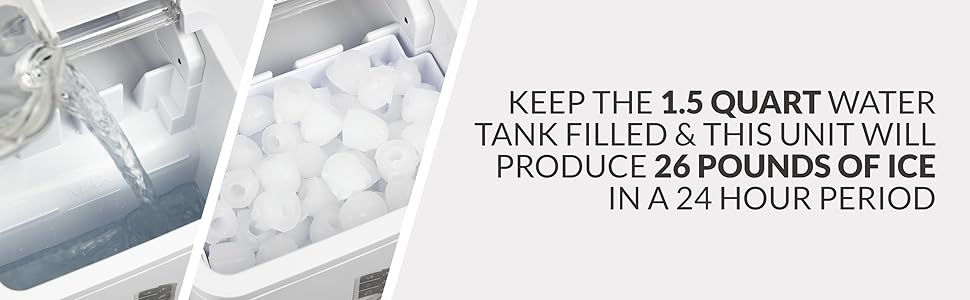
Image 4.1: Illustrates filling the water reservoir and the ice production capacity.
5. 사용 설명서
- 전원 켜기: 제빙기를 접지된 콘센트에 꽂으세요. 버튼을 누르세요. 힘 제어판의 버튼을 눌러 기기를 켜십시오.
- 얼음 크기 선택: 를 누르세요 선택하다 button to choose between small or large ice cube sizes. The corresponding indicator light will illuminate.
- 얼음 생산: The ice maker will begin its cycle. Water will be pumped to the freezing fingers, and ice cubes will form. The first batch of 9 ice cubes will be ready in approximately 7 minutes.
- 얼음 수집: Once formed, the ice cubes will be released into the ice basket. The unit will continue to make ice until the basket is full or the water reservoir is empty.
- 지표:
- 만약 물을 추가하세요 indicator illuminates, refill the water reservoir. The unit will resume operation automatically once water is added.
- 만약 얼음 가득 indicator illuminates, remove ice from the basket. The unit will resume ice production automatically.
- 얼음 보관: The ice basket is not refrigerated. For long-term storage, transfer ice cubes to a freezer.

Image 5.1: Details on the ice maker's quick production and automatic features.

Image 5.2: Depicts the two available ice cube sizes: small and large bullet ice.
6. 청소 및 유지 관리
Regular cleaning and maintenance will prolong the life of your ice maker and ensure optimal performance.
6.1. 매일 청소
- 장치의 플러그를 뽑으세요.
- Remove the ice basket and wash it with warm, soapy water. Rinse and dry thoroughly.
- 부드러운 천으로 기기 외부를 닦아주세요.amp 옷감.
6.2. 셀프 클리닝 기능
The Igloo ICEB26WH features an automatic self-cleaning function:
- 기기 내부에 얼음과 물이 없는지 확인하십시오.
- Fill the water reservoir with a mixture of water and white vinegar (or a recommended ice maker cleaning solution) according to the product instructions.
- Activate the self-cleaning cycle (refer to your specific model's control panel instructions, typically a long press of a button or a specific sequence).
- After the cycle, drain the cleaning solution completely.
- Rinse the reservoir thoroughly with clean water and drain again to remove any residue.

Image 6.1: Highlights the low noise operation and the automatic self-cleaning feature.
6.3. 물 빼기 및 보관
- When not in use for an extended period, unplug the unit and drain all water from the reservoir.
- 곰팡이나 세균 번식을 방지하기 위해 내부를 깨끗이 청소하고 완전히 말리십시오.
- Store the ice maker in a cool, dry place.
7. 문제 해결
If you encounter issues with your ice maker, consult the following table before contacting customer support:
| 문제 | 가능한 원인 | 해결책 |
|---|---|---|
| 기기가 켜지지 않습니다. | 플러그가 꽂혀 있지 않음; 전원이 꺼짐tage; 콘센트에 결함이 있음. | Ensure unit is securely plugged into a working, grounded outlet. Check circuit breaker. |
| "물 추가" 표시등이 켜져 있지만 물통은 가득 차 있습니다. | 물 센서 오작동; 기포 발생. | Unplug and replug the unit. Gently shake the unit to dislodge any air bubbles near the sensor. |
| Ice is not forming or is very small. | Insufficient water; high ambient temperature; poor ventilation; unit recently moved. | Ensure water reservoir is full. Operate in a cooler environment. Ensure proper ventilation. Allow unit to sit upright for 2 hours if recently moved. |
| "얼음 가득" 표시등이 켜져 있지만, 바구니가 가득 차지 않았습니다. | 얼음 감지 센서가 막혔거나 더럽습니다. | Clean the ice sensor (located near the ice basket). Ensure no ice cubes are blocking the sensor. |
| 바구니 안의 얼음은 금방 녹는다. | Ice basket is not refrigerated. | This is normal. Transfer ice to a freezer for storage. |
8. 사양
| 특징 | 사양 |
|---|---|
| 모델 번호 | ICEB26WH |
| 상표 | 이글루 |
| 제품 크기(D x W x H) | 12.2인치 x 9인치 x 12.8인치 |
| 일일 얼음 생산량 | 최대 26파운드 |
| 물탱크 용량 | 1.5쿼트 |
| 얼음 생산 주기 | 단 7분 만에 큐브 9개 만들기 |
| 작동 와트tage | 120 와트 |
| 전원 공급 장치 | 120V, 60Hz (Standard US) |
| 포함된 액세서리 | Ice Maker, Ice Basket, Ice Scoop |
9. 보증 및 지원
This Igloo ICEB26WH Ice Maker comes with a manufacturer's warranty. Please refer to the warranty card included with your purchase for specific terms and conditions, including coverage duration and limitations.
For technical support, troubleshooting assistance beyond this manual, or warranty claims, please contact the retailer where the product was purchased or the manufacturer directly. Contact information can typically be found on the product packaging or the manufacturer's official web대지.