
소개
This manual provides essential instructions for the setup, operation, and maintenance of your Easytry123 replacement remote control. This remote is designed to be compatible with various Mitsubishi air conditioner models, including MSZ-GC25VA, MSZ-GA25VA-A1, MSZ-GA35VA-A1, MSZ-FA35VA-E3, MSZ-FA35VA-A2, MSZ-FA35VA-E2, MSZ-FA25VA-A2, KM09D, KM09E, and KM09F. It functions as a direct replacement without requiring any programming.
주요 특징:
- Infrared (IR) replacement remote.
- No setup or programming required.
- Easy to use with familiar button layout.
설정
Your Easytry123 replacement remote control requires two AAA batteries (not included) for operation. No programming or pairing is necessary; simply insert the batteries, and the remote will be ready to use with compatible Mitsubishi air conditioner units.
배터리 설치
- 리모콘 뒷면에서 배터리함을 찾으세요.
- 배터리함 덮개를 아래로 밀어서 분리하세요.
- 새 AAA 배터리 2개를 넣고 양극(+)과 음극(-) 단자가 배터리 보관함 내부 표시와 올바르게 맞춰졌는지 확인합니다.
- 배터리 칸 덮개를 제자리에 다시 밀어 넣어 딸깍 소리가 날 때까지 단단히 고정합니다.
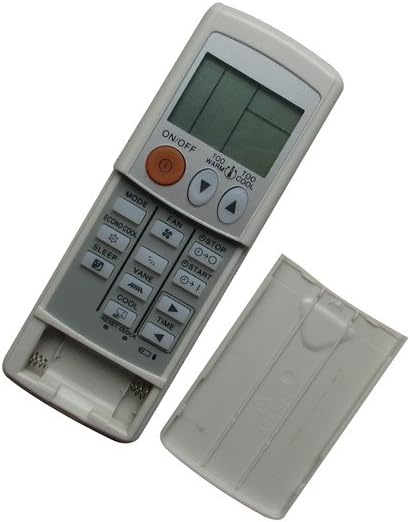
Image: The remote control with its battery cover removed, revealing the two AAA battery slots. This illustrates where to insert the batteries.
작동 지침
To operate your air conditioner, point the remote control directly at the indoor unit's receiver. Ensure there are no obstructions between the remote and the air conditioner.

Image: The remote control with its battery cover securely in place, ready for normal operation. This shows the remote's complete appearance.
일반적인 기능:
- 켜기/끄기 버튼: 에어컨을 켜거나 끄려면 누르세요.
- MODE 버튼: 냉방, 난방, 송풍, 제습 및 자동 모드와 같은 작동 모드를 순환합니다.
- 팬 버튼: 팬 속도를 조절합니다(예: 낮음, 중간, 높음, 자동).
- 온도 조절 버튼(▲ / ▼): 원하는 온도 설정을 높이거나 낮춥니다.
- 슬립 버튼: Activates or deactivates the sleep mode for comfortable nighttime operation.
- VANE 버튼: 공기 흐름 날개의 방향을 조절합니다.
- 시간 버튼: Used for setting timer functions (e.g., ON/OFF timer).
- ECONO COOL 버튼: 에너지 절약형 냉방 모드를 활성화합니다.
- TOO WARM / TOO COOL Buttons: Provides quick adjustments to temperature.
유지
Proper care ensures the longevity and reliable performance of your remote control.
청소:
- 부드럽고 마른 천으로 리모컨을 닦으세요.
- 잘 지워지지 않는 더러움에는 가볍게 damp물이나 순하고 비연마성 세척제를 사용하여 천을 닦으십시오.
- 독한 화학 약품, 용제 또는 연마성 세척 패드를 사용하지 마십시오. 리모컨 표면이나 내부 부품이 손상될 수 있습니다.
배터리 교체:
- 리모컨의 작동 범위가 줄어들거나 에어컨이 제대로 작동하지 않을 경우 배터리를 교체하십시오.
- Always replace both batteries at the same time with new AAA batteries.
- 장기간 리모컨을 사용하지 않을 경우 배터리 누출을 방지하기 위해 배터리를 제거하세요.
문제 해결
리모컨 사용에 문제가 발생하면 다음의 일반적인 해결 방법을 참조하십시오.
- 리모컨이 응답하지 않음:
- 배터리가 올바른 극성에 맞게 올바르게 삽입되었는지 확인하세요.
- 오래된 배터리를 새 AAA 배터리로 교체하세요.
- Ensure there is a clear line of sight between the remote and the air conditioner's receiver.
- Verify that the remote is pointed directly at the air conditioner unit.
- 에어컨이 작동 명령에 반응하지 않습니다.
- Confirm that your air conditioner model is listed as compatible with this remote.
- Try operating the air conditioner manually from its control panel to ensure the unit itself is functioning correctly.
- 버튼이 작동하지 않음:
- 리모컨이 깨끗하고 버튼 작동을 방해할 수 있는 이물질이 없는지 확인하십시오.
- 특정 버튼만 작동하지 않는다면 리모컨이 손상되어 교체가 필요할 수 있습니다.
This remote control does not require programming. If the air conditioner does not respond after following these steps, the remote may be incompatible with your specific unit or faulty.
명세서
| 상표 | 이지트라이123 |
| 모델 | 이지트라이1642 |
| 연결 기술 | 적외선 (IR) |
| 컨트롤러 유형 | 버튼 제어 |
| 특별 기능 | No Programming Required, Not Universal |
| 필요한 배터리 | AAA 2개(포함되지 않음) |
| 재료 | ABS 플라스틱 |
보증 및 지원
This product is a replacement remote control. For any issues or support inquiries, please contact the seller, Easytry123, directly through your purchase platform. Refer to your purchase details for information regarding return policies, which typically include a 30-day refund or replacement period.