
소개
This manual provides detailed instructions for the setup, operation, and maintenance of your Zerone BN59-01179A Replacement Remote Control. Please read this manual carefully before using the product to ensure proper functionality and longevity.
제품 끝view
The Zerone BN59-01179A is a universal replacement remote control designed for compatible Smart TVs. It offers a compact design and a comprehensive set of buttons for various functions.
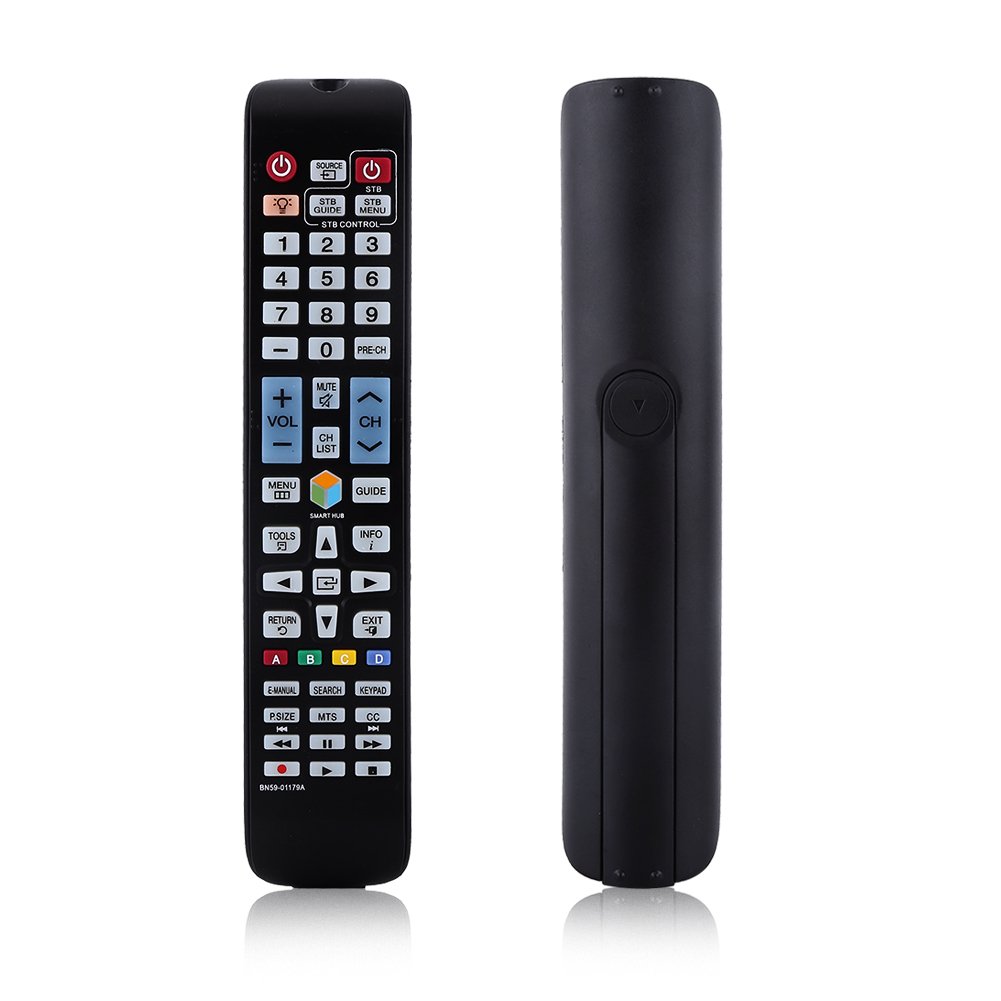
이미지: 앞면 view of the Zerone BN59-01179A remote control, showing its full layout and approximate dimensions (23cm length, 4.7cm width, 2cm thickness).
설정
배터리 설치
- 리모콘 뒷면에서 배터리함을 찾으세요.
- 배터리 덮개를 아래로 밀거나 걸쇠를 누르고 들어올려 엽니다.
- 2개(2)의 AAA 배터리를 넣고 양극(+)과 음극(-) 단자가 배터리 보관함 내부 표시와 올바르게 맞춰지도록 합니다.
- 배터리 덮개를 다시 밀어서 제자리에 고정하고 딸깍 소리가 날 때까지 밀어 넣습니다.
메모: Batteries are not included with the remote control. Please use new AAA batteries for optimal performance.

Image: The back of the remote control with the battery cover removed, showing the empty battery compartment ready for two AAA batteries.
작동 지침
This remote control is designed for immediate use with compatible TVs without requiring programming. Simply insert batteries and point the remote towards your television.
주요 기능

Image: A hand holding the Zerone remote control, with inset close-ups highlighting the power/source buttons and the navigation/Smart Hub buttons.
- 전원(빨간색 버튼): TV를 켜거나 끕니다.
- 원천: 입력 소스(HDMI, AV 등)를 선택합니다.
- STB/DTV: Switches between Set-Top Box and Digital TV modes.
- 숫자 버튼(0-9): 직접 채널 선택.
- 이전 채널: 이전 채널로 돌아갑니다.
- 볼륨 (+/-): 볼륨 레벨을 조절합니다.
- 무음: TV 소리를 음소거하거나 음소거 해제합니다.
- 채널(CH 위/아래): TV 채널을 순차적으로 변경합니다.
- 채널 목록: 채널 목록을 표시합니다.
- 메뉴: TV의 메인 메뉴에 접속합니다.
- 스마트 허브: 앱과 스트리밍 서비스를 위한 스마트 허브 인터페이스를 엽니다.
- 가이드: 전자 프로그램 가이드를 표시합니다.
- 정보: Shows information about the current program.
- 도구: Accesses quick settings or contextual options.
- 탐색 버튼(위/아래/좌측/우측/엔터): 메뉴를 탐색하고 옵션을 선택합니다.
- 반품: 이전 화면이나 메뉴로 돌아갑니다.
- 출구: 현재 메뉴나 애플리케이션을 종료합니다.
- 색상 버튼(A, B, C, D): 기능은 TV 모델과 애플리케이션에 따라 다릅니다.
- 전자 매뉴얼: TV의 전자 매뉴얼에 접속합니다.
- 찾다: 검색 기능을 엽니다.
- 키패드: Displays an on-screen keypad.
- P. 크기 : 그림 크기/종횡비를 조정합니다.
- MTS : Multi-channel Television Sound (SAP).
- 참조: 자막 기능.
- 미디어 제어 버튼(재생, 일시 정지, 정지, 되감기, 빨리 감기): 미디어 재생을 제어합니다.
유지
- 청소: 리모컨을 닦을 때는 부드럽고 마른 천을 사용하세요. 액체 세제나 연마재를 사용하지 마세요.
- 배터리 교체: 리모컨의 반응이 느려지거나 작동이 멈추면 배터리를 교체하십시오. 항상 두 개의 배터리를 동시에 새 배터리로 교체해야 합니다.
- 저장: 장기간 리모컨을 사용하지 않을 경우, 누출 및 손상을 방지하기 위해 배터리를 제거하세요.
- 노출 방지: Keep the remote away from direct sunlight, heat sources, and moisture.
문제 해결
- 리모컨이 응답하지 않음:
- 배터리가 올바른 극성에 맞게 올바르게 삽입되었는지 확인하세요.
- 오래된 배터리를 새 AAA 배터리로 교체하세요.
- 리모컨과 TV의 적외선 센서 사이에 장애물이 있는지 확인하십시오.
- 리모컨이 TV를 향해 직접 향하도록 하세요.
- 제한된 범위:
- 배터리를 교체하세요.
- Ensure there are no strong light sources or electronic devices interfering with the signal.
- 작동하지 않는 특정 버튼:
- 리모컨을 깨끗이 닦으세요. 특히 반응이 없는 버튼 주변을 깨끗이 닦아 먼지나 이물질을 제거하세요.
- If the issue persists after battery replacement and cleaning, the remote may be faulty.
명세서
| 특징 | 설명 |
|---|---|
| 상표 | 제론 |
| 모델명 | Zerone32687x9gqs (BN59-01179A compatible) |
| 연결 기술 | 적외선 |
| 호환 장치 | Television (specifically for Samsung BN59-01179A compatible models) |
| 지원되는 최대 장치 수 | 8 (Universal functionality) |
| 버튼 수량 | 12 (referring to main function groups, actual count is higher) |
| 컨트롤러 유형 | 버튼 제어 |
| 최대 범위 | 8 미터 |
| 배터리 유형 | AAA |
| 배터리 수 | AAA 배터리 2개 필요(포함되지 않음) |
| 특징 | Universal replacement, no programming required |
보증 및 지원
Zerone provides a service guarantee for this product. If you encounter any questions or issues regarding your remote control, please contact the seller or manufacturer for assistance. They will provide follow-up services to address your concerns.
For specific warranty details and support contact information, please refer to your purchase documentation or the retailer's web대지.