
Invision GT1200
Invision GT1200 ScreenStation Universal Mobile TV Stand
사용 설명서
소개
The Invision GT1200 ScreenStation offers a versatile and stable solution for displaying your television. Designed for effortless maneuverability, this mobile TV stand allows you to easily move your screen between rooms, making it ideal for both home and office environments. This manual provides detailed instructions for assembly, operation, and maintenance to ensure safe and optimal use of your GT1200 ScreenStation.
제품 끝view
The GT1200 ScreenStation is engineered for strength and durability, featuring a robust carbon steel construction and high-quality components. It supports a wide range of TV sizes and offers adjustable height for optimal view주고받음.

Figure 1: The Invision GT1200 ScreenStation with a mounted television, showcasing its mobile design.

Figure 2: The GT1200 ScreenStation in a professional setting, demonstrating its versatility for presentations and collaborative work.
설정 및 조립
Assembly of the GT1200 ScreenStation is straightforward. All necessary parts and instructions are included in the product packaging. Please ensure you have adequate space and assistance if needed, especially when mounting the television.
1. VESA 호환성 확인
Before assembly, verify that your television's VESA mounting pattern is compatible with the GT1200 ScreenStation. This stand supports VESA patterns from 100 x 100 mm to 600 x 400 mm (Width x Height).
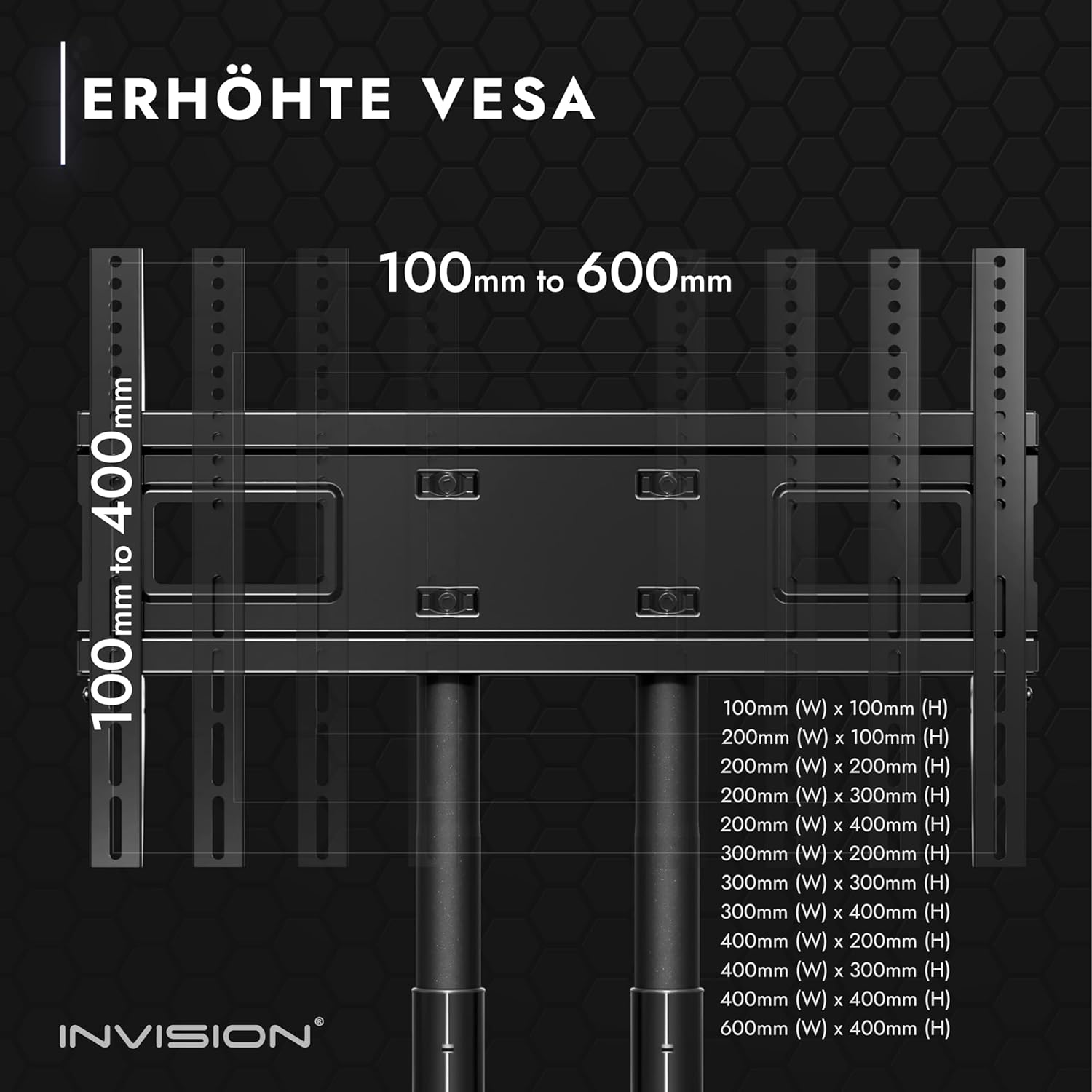
Figure 3: Detailed VESA compatibility chart, illustrating supported mounting hole patterns.
2. 구성 요소 식별
Unpack all components and identify them using the parts list provided in your product box. Ensure all parts are present and undamaged before proceeding.
3. 베이스 어셈블리
Assemble the base of the stand, attaching the durable, non-slip castors. Each castor is equipped with an integrated brake for secure positioning.
4. Column and Shelf Installation
Attach the double support columns to the base. Install the adjustable AV shelf at your desired height. The shelf is made of durable plastic and can hold up to 4.5 kg.

Figure 4: Key features of the stand, including integrated cable management access, high-strength adjustment pins, and the adjustable AV shelf.
5. TV Bracket Attachment
Secure the TV mounting brackets to the back of your television. Ensure the brackets are aligned with your TV's VESA holes and are securely fastened.
6. 텔레비전 설치
Carefully lift and attach the television with the mounted brackets onto the stand's main frame. Ensure the TV is securely hooked and locked into place. The stand supports screen sizes from 32" to 75" and a maximum load of 45.5 kg (100 lbs).
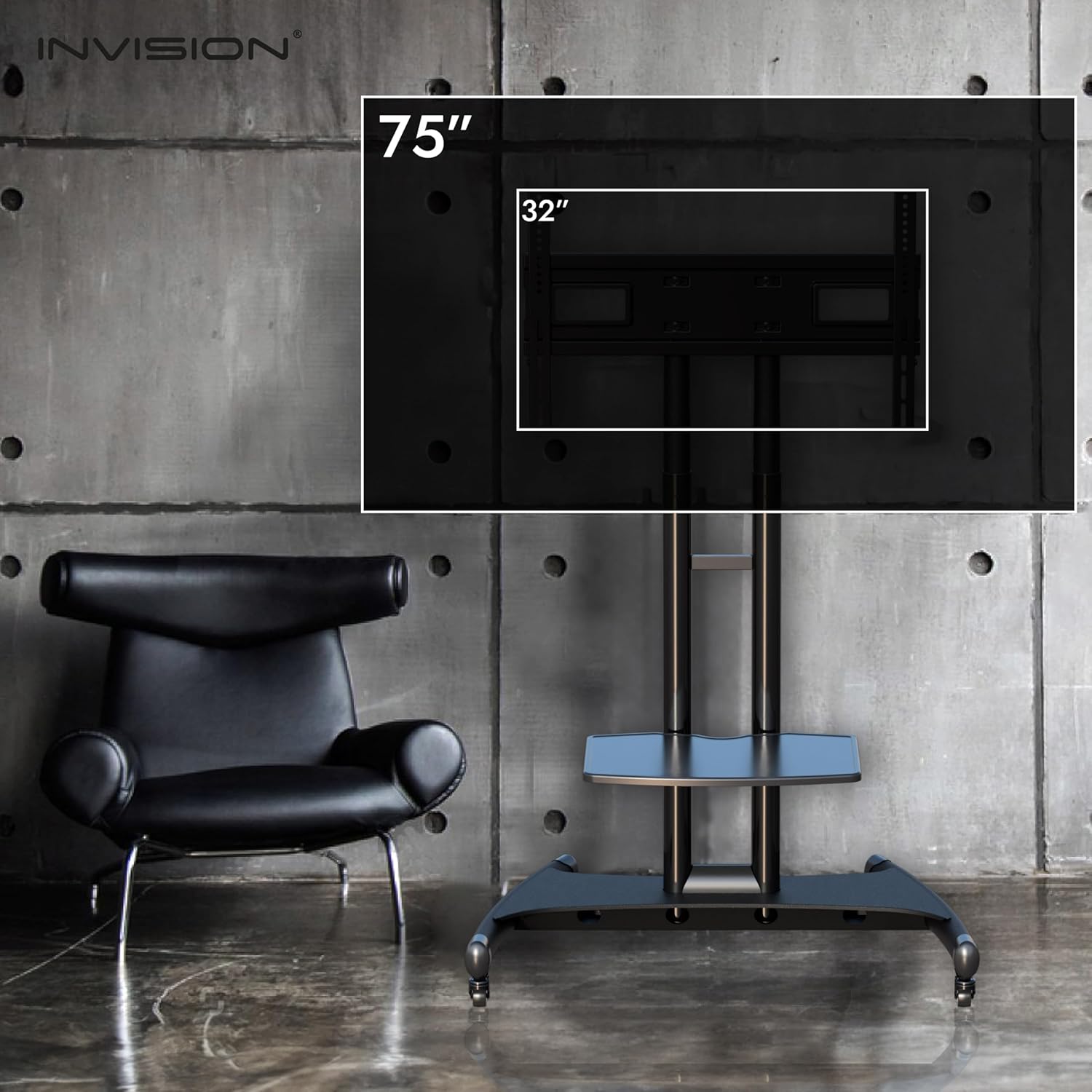
Figure 5: Illustration of the stand's compatibility with television sizes ranging from 32 inches to 75 inches.
작동 지침
1. 높이 조절
The television height can be adjusted from 119 cm (47 inches) to 150 cm (59 inches) to achieve optimal viewing angles. Use the high-strength adjustment pins to secure the desired height.

Figure 6: Visual representation of the maximum and minimum central screen heights and shelf heights.
2. 이동성 및 안정성
The GT1200 ScreenStation is designed for easy movement. Its multi-directional casters allow smooth transportation across various floor types. For stationary use, engage the foot-operated parking brakes on each wheel to prevent accidental movement and ensure absolute stability.

Figure 7: Design elements contributing to the stand's enhanced stability, such as reinforced U-clamps, welded struts, an extra-wide steel base, and robust lockable 360° casters.
3. 화면 방향
Screens can be mounted in both landscape and portrait orientations. Please note that portrait mounting may require specific TV compatibility and potentially retrofitting of the rear TV brackets.
유지
To ensure the longevity and optimal performance of your Invision GT1200 ScreenStation, follow these simple maintenance guidelines:
- 청소: 부드러운 천으로 스탠드를 닦습니다. damp 천으로 닦아주세요. 마감재를 손상시킬 수 있는 연마성 세제나 용제는 사용하지 마세요.
- 캐스터 관리: 바퀴에 이물질이나 머리카락이 끼어 움직임을 방해하지 않는지 주기적으로 확인하고 필요에 따라 청소하십시오.
- 패스너 점검: Regularly inspect all screws and bolts to ensure they remain tight. Re-tighten any loose fasteners to maintain stability.
- 하중 용량: Do not exceed the maximum load capacity of 45.5 kg (100 lbs) for the TV or 4.5 kg for the shelf.
문제 해결
If you encounter any issues with your Invision GT1200 ScreenStation, please consider the following:
- 스탠드 불안정성: Ensure all casters are locked when the stand is stationary. Verify that all assembly fasteners are securely tightened. Ensure the TV weight does not exceed the maximum load capacity.
- 이동의 어려움: Check casters for debris or engaged brakes. Ensure the floor surface is clear.
- TV 수평이 맞지 않음: Re-check the TV mounting brackets and ensure they are evenly installed and secured to the stand.
For any issues not resolved by these steps, please contact Invision customer service for assistance.
명세서
| 특징 | 사양 |
|---|---|
| 모델 | Invision GT1200 ScreenStation |
| 호환되는 화면 크기 | 32인치에서 75인치까지 |
| VESA Mounting Patterns (W x H) | 100 x 100mm ~ 600 x 400mm |
| Maximum TV Load Capacity | 45.5kg(100파운드) |
| Adjustable TV Height Range | 119 cm (47 inches) to 150 cm (59 inches) |
| 선반 적재 용량 | 4.5kg |
| 재료 | Reinforced Carbon Steel (Stand), Durable Plastic (Shelf) |
| 색상 | 검은색 |
| 바퀴 | 4 durable non-slip, smooth-running castors with integrated brakes |
| 패키지 크기 | 94 x 62.6 x 13.5cm |
| 패키지 무게 | 18.37kg |
| 장착 유형 | 플로어 마운트 |
| 이동 유형 | 경사 |

Figure 8: Comprehensive dimensional drawing of the Invision GT1200 ScreenStation, including VESA mounting area and overall height/width.
보증 및 지원
The Invision GT1200 ScreenStation comes with a 5년 보증 and a compatibility guarantee, ensuring peace of mind with your purchase.
If you have any questions, require assistance with assembly, or need support regarding your product, please do not hesitate to contact our friendly customer service team. They will be happy to help you.
For the most up-to-date contact information, please refer to the Invision web웹사이트 또는 제품 포장에 제공된 연락처 정보를 참조하십시오.
Ask a question about this manual
Ask about setup, troubleshooting, compatibility, parts, safety, or missing instructions. Manuals+ will review the question and use this page’s manual context to help answer it.