
1. 서론
Thank you for choosing the AVANTEK CW-11 Wireless Doorbell. This manual provides essential information for the proper installation, operation, and maintenance of your new doorbell system. Please read these instructions carefully before use and retain them for future reference.

Image 1.1: AVANTEK CW-11 Wireless Doorbell system, showing the compact transmitter and receiver units.
2. 안전 정보
- 장치를 극한의 온도나 직사광선에 노출시키지 마십시오.
- Keep the device away from water and high humidity. The transmitter is IP55 waterproof, but the receiver is for indoor use only.
- 기기를 직접 분해하거나 수리하려고 하지 마세요. 도움이 필요하면 고객 지원에 문의하세요.
- 배터리는 어린이의 손이 닿지 않는 곳에 보관하세요. 사용한 배터리는 올바르게 폐기하세요.
3. 패키지 내용
- 1 x Wireless Transmitter (Doorbell Button)
- 플러그인 수신기(차임벨 장치) 1개
- CR2 배터리 1개 (송신기에 사전 설치됨)
- 2 x 나사
- 앵커 2개
- 1 x 양면 접착 테이프
- 1 x 드라이버
4. 제품 오버view
The AVANTEK CW-11 Wireless Doorbell system consists of a battery-powered transmitter (doorbell button) and a plug-in receiver (chime unit). The receiver features 52 selectable melodies, 5 adjustable volume levels, and an LED indicator for visual alerts.

Image 4.1: The receiver unit, illustrating its features including 52 chimes, 5 volume levels, and an LED indicator.
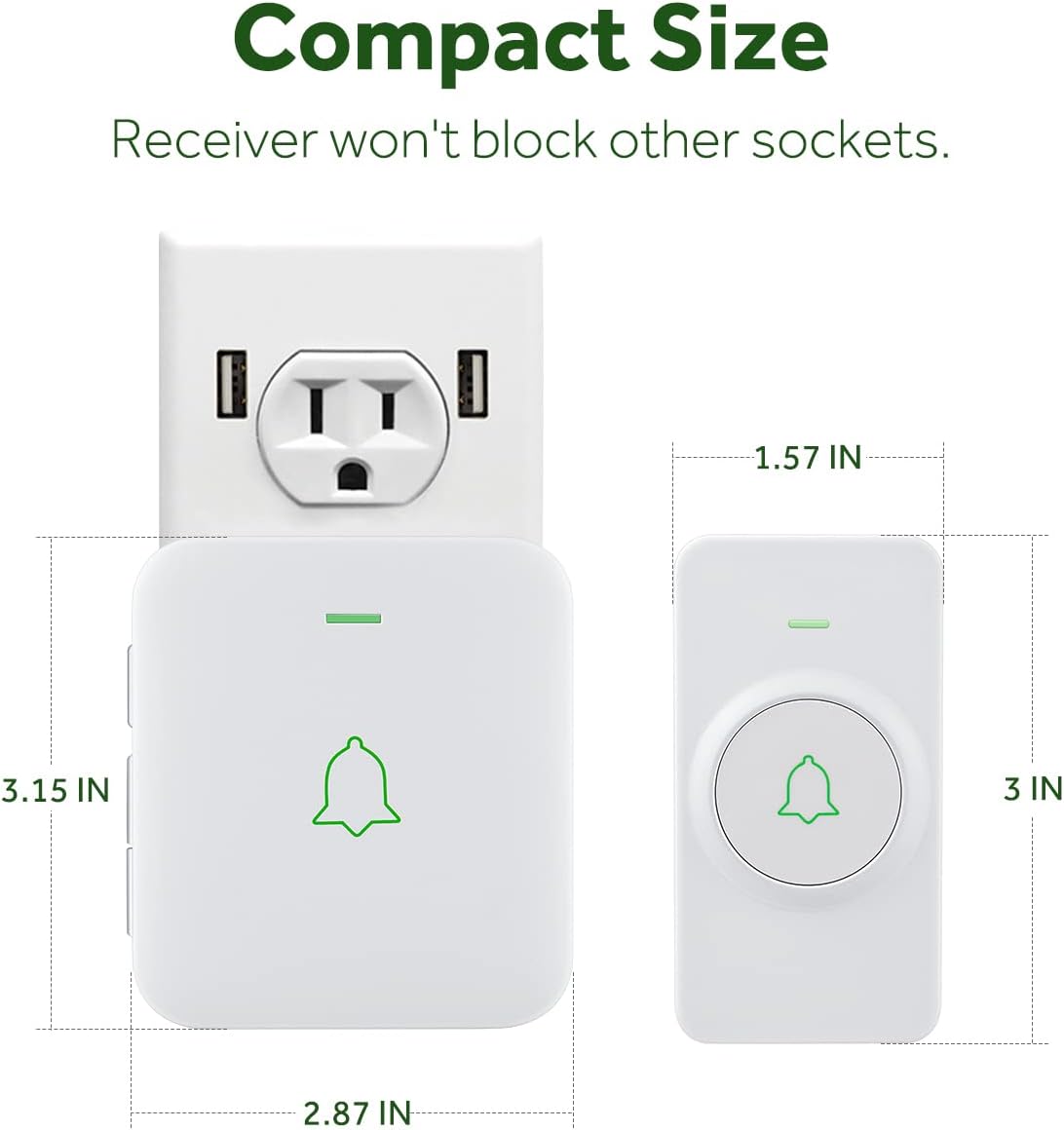
Image 4.2: The compact size of both the transmitter and receiver, designed to not obstruct adjacent power sockets.
5. 설정 지침
5.1 송신기 설치
The transmitter can be installed using either the provided double-sided adhesive tape or screws and anchor plugs.

Image 5.1: Visual guide for installing the transmitter using either adhesive tape or screws and anchor plugs.
방법 A: 양면 접착 테이프 사용
- 설치하고자 하는 표면을 먼지와 습기가 없도록 깨끗하게 닦으십시오.
- Peel off one side of the protective film from the double-sided adhesive tape and attach it to the back of the transmitter.
- Peel off the other side of the protective film and firmly press the transmitter onto the cleaned surface for at least 30 seconds.
Method B: Using Screws and Anchor Plugs
- Mark the desired mounting points for the transmitter on the wall.
- 표시된 위치에 두 개의 구멍을 뚫습니다.
- Insert the anchor plugs into the drilled holes.
- Align the transmitter's mounting holes with the anchor plugs and secure it with the provided screws.
중요한: To prevent signal interference, do not install the transmitter close to or on metal surfaces such as metal door frames or mailboxes.
5.2 수신기 연결하기
Plug the receiver into a standard electrical outlet in a location where the chime can be easily heard. The LED on the receiver will flash upon initial power-up.
5.3 Pairing the Doorbell System
The transmitter and receiver are pre-paired at the factory. If re-pairing is needed or if you add additional transmitters/receivers, follow these steps:
- 수신기를 전원 소켓에 연결합니다.
- To enter pairing mode, hold down the Volume button on the receiver for 3 seconds. The LED on the receiver will flash.
- Remove the battery insulating film from the transmitter (if not already done).
- Press the Push button on the transmitter. Its LED will flash.
- After successful pairing, the receiver will chime once, and the LEDs on both the receiver and transmitter will flash simultaneously.
Video 5.2: Official AVANTEK video demonstrating how to install the wireless doorbell transmitter.
Video 5.3: Official AVANTEK video demonstrating how to pair the wireless doorbell system.
6. 사용 설명서
6.1 멜로디 변화
The receiver offers 52 different melodies. Use the 'Next' and 'Previous' buttons on the side of the receiver to cycle through the available tunes. Press the doorbell button to preview the selected melody.

Image 6.1: The receiver offers a wide selection of melodies for personalization.
6.2 볼륨 조절
There are 5 adjustable volume levels, with a maximum setting of 115 dB. Use the 'Volume' button on the side of the receiver to increase or decrease the sound level.
6.3 음소거 모드
To activate mute mode (0 dB), repeatedly press the 'Volume' button until the sound is off. In this mode, only the LED indicator will flash when the doorbell is pressed, providing a silent visual alert.

Image 6.2: The mute mode feature allows for silent notifications, ideal for quiet environments.
7. 유지관리
7.1 청소
부드럽고 마른 천으로 기기를 닦으십시오. 연마성 세척제나 용제를 사용하지 마십시오.
7.2 배터리 교체 (송신기)
The transmitter uses a CR2 battery with an estimated lifespan of 3 years. When the battery is low, the transmitter's LED may not light up or the signal range may decrease. To replace the battery:
- 송신기 c를 조심스럽게 여세요asin제공된 드라이버 또는 작은 일자 드라이버를 사용하여 조립하십시오.
- 기존 CR2 배터리를 제거하세요.
- 올바른 극성(+/-)을 확인하여 새 CR2 배터리를 삽입합니다.
- C를 닫으세요asing 안전하게.
8. 문제 해결
- 초인종이 울리지 않음: Ensure the receiver is plugged in and powered. Check the transmitter battery. Re-pair the devices if necessary (refer to Section 5.3).
- Short signal range: Ensure the transmitter is not installed on or near metal surfaces. Relocate the receiver to a more central position. Replace the transmitter battery.
- 간섭: The doorbell operates on a frequency that minimizes interference with other household devices. If interference occurs, try changing the melody or relocating the receiver.
- 메모리 기능: The device remembers your last melody and volume level after a power outage, so no need to reset settings.
9. 사양
| 특징 | 사양 |
|---|---|
| 모델 번호 | CW-11 |
| 무선 범위 | 최대 1000피트(300미터) |
| 멜로디 | 52 |
| 볼륨 레벨 | 5 (up to 115 dB) |
| 송신기 배터리 | 1 x CR2 (포함) |
| 송신기 배터리 수명 | 약 3년 |
| 방수 등급 | IP55 (송신기) |
| 작동 온도 | -4 °F ~ 140 °F (-20 °C ~ 60 °C) |
| 전원 | AC 및 배터리 |
| 제품 치수 | Receiver: 2.8 x 0.6 x 3.1 inches; Transmitter: 3.15 x 1.57 x 0.79 inches (approx.) |
10. 보증 및 지원
For warranty information or technical support, please refer to the contact details provided with your product packaging or visit the official AVANTEK web사이트. 구매 증빙 자료로 구매 영수증을 보관하세요.