
1. 서론
This manual provides essential instructions for the installation, operation, and maintenance of your HiLook by Hikvision IPC-T240H 4MP IP PoE Turret Network Camera. Please read this manual thoroughly before using the product to ensure correct and safe operation. Keep this manual for future reference.
The IPC-T240H is a high-performance 4-megapixel IP camera designed for surveillance applications. It features a 2.8mm lens, 30-meter night vision, IP67 weather resistance for outdoor use, and supports H.265+/H.265 high-efficiency video codecs for optimized bandwidth and storage. Integrated 120dB Wide Dynamic Range (WDR) ensures clear images in challenging lighting conditions.
2. 안전 정보
- 전원 공급 장치: Use only the specified power adapter or Power over Ethernet (PoE) compliant devices. Ensure the power source meets the camera's requirements.
- 설치: Install the camera in a secure location where it cannot be easily tampered with. Ensure the mounting surface can support the camera's weight.
- 환경: Avoid exposing the camera to extreme temperatures, humidity, dust, or corrosive environments.
- 청소: 청소하기 전에 전원을 차단하십시오. 부드럽고 마른 천을 사용하십시오. 강한 세제나 연마성 재질은 사용하지 마십시오.
- 물과 습기: This camera is IP67 rated for outdoor use, but avoid submerging it in water. Ensure all cable connections are properly sealed to maintain weather resistance.
- 서비스: 카메라를 직접 분해하거나 수리하지 마십시오. 모든 정비는 자격을 갖춘 기술자에게 맡기십시오.
3. 패키지 내용
Verify that all items are present in your package. If any items are missing or damaged, contact your supplier.
- HiLook by Hikvision IPC-T240H Turret Network Camera
- 장착 템플릿
- 장착 나사 및 벽면 플러그
- 이더넷 케이블용 방수 커넥터
- 빠른 시작 가이드(이 문서)
4. 제품 오버view
The HiLook IPC-T240H is a compact turret-style IP camera designed for versatile surveillance. Its robust construction and IP67 rating make it suitable for both indoor and outdoor environments.
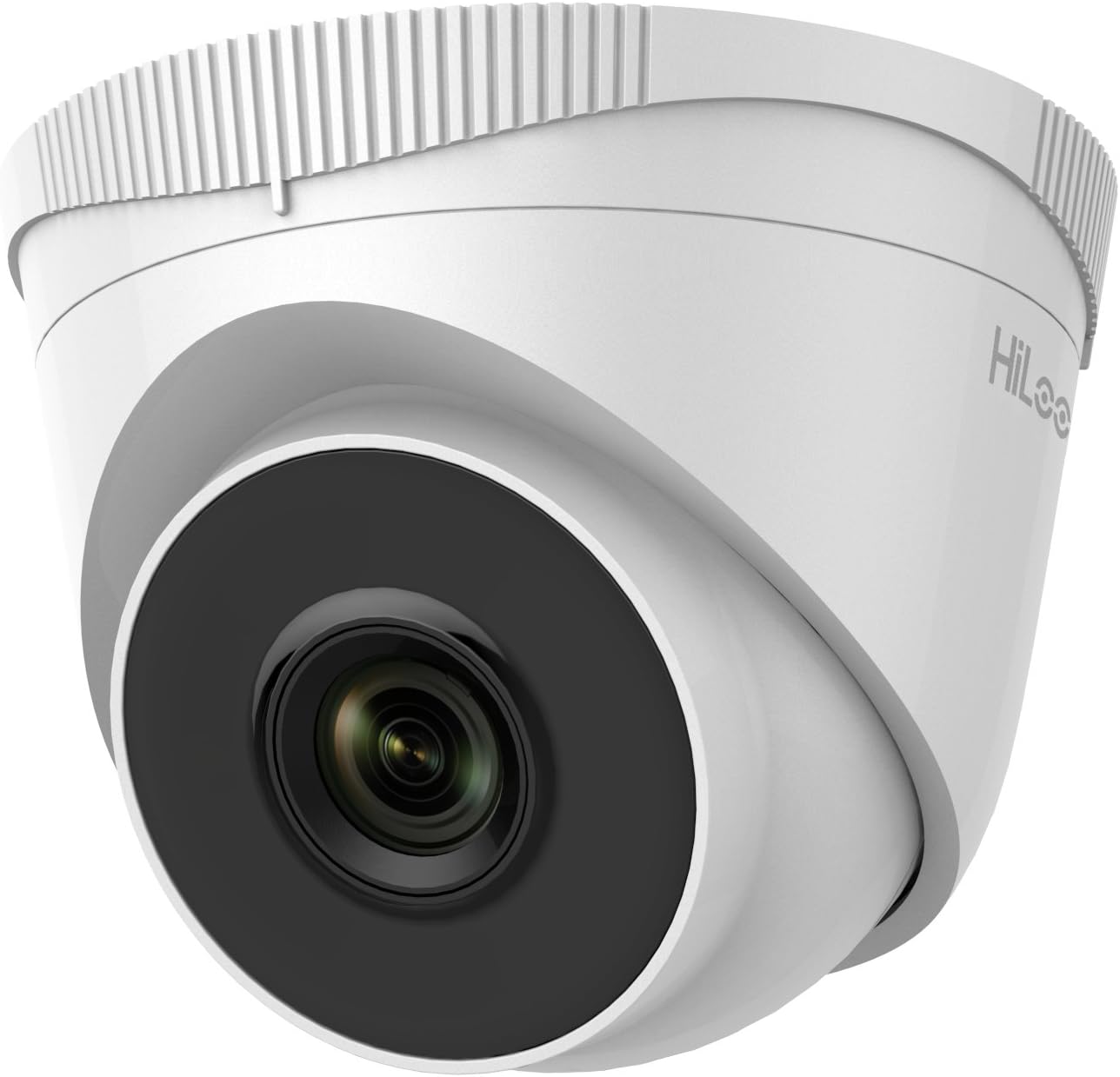
그림 4.1: 앞쪽 view of the HiLook IPC-T240H Turret Network Camera. This image shows the camera's main lens and infrared illuminators, housed within its white turret casing.

그림 4.2: 각진 view of the HiLook IPC-T240H Turret Network Camera. This perspective highlights the camera's dome-like structure and the adjustable base for mounting.
주요 구성 요소:
- 렌즈: 2.8mm fixed lens for a wide field of view.
- IR LED : 최대 30미터 야간 투시용 적외선 조명 장치.
- 이더넷 포트(RJ45): 네트워크 연결 및 PoE(Power over Ethernet) 기능을 지원합니다.
- 전원 입력: 12V DC power input (if not using PoE).
- 장착베이스: 벽이나 천장에 설치할 수 있도록 높이 조절이 가능한 받침대입니다.
5. 설정
5.1 물리적 설치
- 위치를 선택하세요: Select a suitable location for surveillance, considering the camera's field of view and night vision range.
- 설치: Use the provided mounting template to mark drill holes. Drill holes, insert wall plugs, and secure the mounting base with screws.
- 케이블 라우팅: Route the Ethernet cable through the designated opening in the mounting base. Use the waterproof connector for outdoor installations to protect the RJ45 connection.
- 카메라 부착: Secure the camera body to the mounting base. Adjust the camera angle for optimal coverage.
5.2 네트워크 연결 및 초기 구성
- 네트워크에 연결: Connect the camera to your network using an Ethernet cable. If using PoE, connect to a PoE-enabled switch or NVR. If not using PoE, connect a 12V DC power adapter.
- 장치 검색: The camera typically ships with a default static IP address. To discover the camera on your network and change its IP address, use the Hikvision SADP (Search Active Device Protocol) tool. This tool can be downloaded from the Hikvision official web대지.
- 카메라 활성화: Upon first access, you will be prompted to create a strong password for the camera. This activates the device.
- 입장 Web 인터페이스: 열기 web browser (Internet Explorer is often recommended for full functionality with older Hikvision/HiLook firmware due to ActiveX plugins). Enter the camera's IP address in the address bar. Log in with your newly created password.
- 네트워크 설정: Configure network settings (e.g., change to DHCP or assign a static IP address within your network range) through the web 인터페이스.
6. 사용 설명서
6.1 Video Codec Efficiency (H.265+)
The IPC-T240H supports H.265+ video compression, which significantly reduces bandwidth and storage requirements compared to older H.264 or H.265 standards. This allows for longer recording times and more efficient network usage without compromising video quality.

그림 6.1: This chart illustrates the storage efficiency of H.265+ compared to H.264 and H.265 codecs. H.265+ can reduce 24-hour recording file sizes by up to 83% for daytime footage and 67% for nighttime footage, optimizing storage and bandwidth.
6.2 광역 동적 범위(WDR)
The 120dB WDR feature allows the camera to capture clear images in scenes with both very bright and very dark areas. It balances the exposure to prevent overexposure in bright spots and underexposure in shadows, ensuring details are visible across the entire image.

그림 6.2: Comparison of image quality with WDR off (top) and WDR on (bottom). The top image shows significant glare and underexposed areas, while the bottom image, with WDR enabled, provides balanced exposure and clearer details in both bright and dark regions.
6.3 야간 투시경
The camera is equipped with infrared (IR) LEDs, providing clear black and white video surveillance in low-light or completely dark conditions up to a range of 30 meters.
6.4 Remote Access (HiLookVision)
관리할 수 있으며 view your camera remotely using the HiLookVision PC Client software or the HiLookVision mobile application. These tools allow for live viewing, playback, and configuration from your computer or smartphone.

그림 6.3: This diagram illustrates the HiLookVision ecosystem for easy device management. HiLook products can connect to the HiLookVision Cloud Server, which then allows access via the HiLookVision PC Client or the HiLookVision App on a smartphone.
7. 유지관리
- 청소: Regularly clean the camera lens and housing with a soft, lint-free cloth. For stubborn dirt, use a mild cleaning solution applied to the cloth, not directly to the camera.
- 펌웨어 업데이트: Periodically check the official HiLook or Hikvision website for firmware updates. Firmware updates can improve performance, add new features, and enhance security. Follow the provided instructions carefully when performing updates.
- 케이블 검사: Periodically inspect all cables and connections for signs of wear, damage, or corrosion, especially for outdoor installations.
8. 문제 해결
- 이미지/비디오 없음:
- Check power supply (PoE or 12V DC adapter).
- 네트워크 케이블 연결을 확인하세요.
- Ensure the camera's IP address is correct and accessible on your network. Use the SADP tool to confirm.
- 이미지 품질이 좋지 않음:
- 카메라 렌즈를 청소하세요.
- 카메라 시야에 장애물이 있는지 확인하십시오. view.
- 이미지 설정(밝기, 대비, WDR)은 다음을 통해 조정하세요. web 인터페이스.
- Ensure sufficient lighting for night vision within the 30m range.
- 접근할 수 없습니다 Web 인터페이스:
- Confirm the camera's IP address using the SADP tool.
- Ensure your computer is on the same network segment as the camera.
- 다른 것을 시도해보세요 web browser, especially Internet Explorer for initial setup with older firmware.
- Temporarily disable firewall or antivirus software on your computer.
- Fixed IP Address Issue: If the camera starts with a fixed IP address that conflicts with your network, use the Hikvision SADP tool to modify its IP address to match your network's range or enable DHCP.
9. 사양
| 특징 | 사양 |
|---|---|
| 모델 | IPC-T240H |
| 해결 | 4메가픽셀 |
| 렌즈 | 2.8mm 고정 렌즈 |
| 나이트 비전 범위 | 최대 30미터 |
| 내후성 | IP67 등급 |
| 비디오 압축 | H.265+/H.265, H.264+/H.264 |
| 와이드 다이나믹 레인지 (WDR) | 120dB 광역역학 |
| 연결성 | Wired (PoE), ONVIF Protocol |
| 전원 | PoE (802.3af) or 12V DC |
| 실내/실외 사용 | 집 밖의 |
| 제품 치수 | 15 x 15 x 14.1cm |
| 무게 | 350g |
| 제조업체 | 히크비전 |
10. 보증 및 지원
For warranty information and technical support, please refer to the documentation provided with your purchase or visit the official HiLook or Hikvision web사이트. 보증 청구를 위해 구매 증빙 자료를 보관하세요.


