
소개
This manual provides instructions for the HyperGear HYG-14590 Wireless Fast Charging Car Dash Mount. This device is designed to securely hold and wirelessly charge Qi-enabled smartphones in your vehicle, offering hands-free navigation and communication.
패키지 내용
패키지에 모든 품목이 들어 있는지 확인하세요.
- Telescopic Mount
- Fast Charge Car Adapter
- 마이크로 USB 케이블
- 사용 설명서 (본 문서)
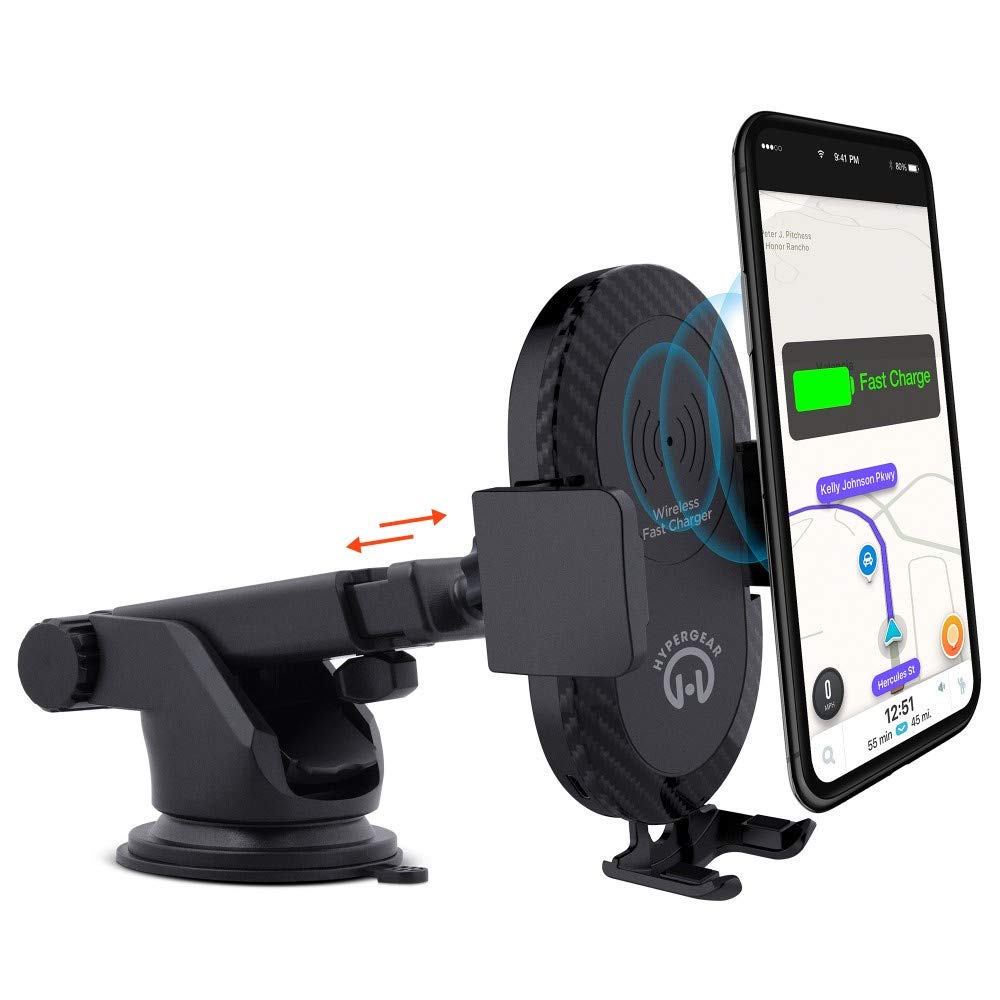
설치 지침
- 장착 위치 선택: Select a clean, flat surface on your dashboard or windshield. Ensure the location does not obstruct your view 또는 차량 제어를 방해합니다.
- 마운트 부착:
- Clean the chosen surface thoroughly.
- Remove the protective film from the sticky gel suction cup.
- 흡입컵을 표면에 단단히 눌러주세요.
- Engage the 2-step locking lever to secure the mount in place.
- 전원 연결:
- Insert the Micro USB cable into the charging port on the mount.
- Plug the other end of the Micro USB cable into the Fast Charge Car Adapter.
- Insert the Fast Charge Car Adapter into your vehicle's 12V power outlet (cigarette lighter socket).
- Adjust the Mount:
- Extend the telescopic arm up to 8 inches as needed.
- Pivot the arm up to 230° to achieve the desired angle.
- Rotate the cradle head 360° to switch between portrait and landscape orientation.
작동 지침
- 기기 배치 방법: Gently open the adjustable padded cradle grips and place your Qi-enabled smartphone into the mount. The grips will automatically secure the device.
- 무선 충전: Once your device is placed in the mount and the mount is powered, wireless charging will begin automatically. Ensure your device is centered on the charging pad for optimal performance.
- 장치 제거: To remove your device, gently open the cradle grips and lift your smartphone out.
- 핸즈프리 사용: The mount allows for hands-free use of navigation, calls, and other applications while driving. Always ensure your device is positioned safely and does not obstruct your view 도로의.
유지
- 청소: 부드럽고 마른 천으로 마운트를 닦으십시오. 연마성 세척제나 용제를 사용하지 마십시오.
- 흡입 컵 관리: If the sticky gel suction cup loses adhesion, rinse it with warm water and let it air dry. This can help restore its stickiness.
- 저장: 장기간 사용하지 않을 경우, 직사광선을 피해 시원하고 건조한 곳에 보관하세요.
문제 해결
- 장치가 무선으로 충전되지 않음:
- Ensure your smartphone is Qi-enabled or has a Qi-enabled receiver.
- Verify the Micro USB cable is securely connected to both the mount and the car adapter.
- Check that the car adapter is firmly seated in the vehicle's 12V power outlet.
- Ensure your phone is centered on the charging pad of the mount.
- 무선 충전을 방해할 수 있는 두꺼운 휴대폰 케이스를 제거하세요.
- Mount not sticking to surface:
- Clean the dashboard or windshield surface thoroughly before attachment.
- Ensure the 2-step locking lever is fully engaged.
- Rinse the sticky gel suction cup with warm water and air dry to restore adhesion.
- Avoid mounting on textured or porous surfaces.
- Phone not held securely:
- Ensure the adjustable padded cradle grips are properly closed around your device.
- Verify that your phone's size is compatible with the mount's adjustable range.
명세서
| 모델 번호 | HYG-14590 |
| 상표 | 하이퍼기어 |
| 연결 기술 | 무선 전화 |
| 커넥터 유형 | USB, 무선 |
| 호환 장치 | 휴대폰(Qi 지원) |
| 호환되는 전화 모델 | iPhone X/8/8 Plus, Samsung Galaxy S9/S9+, S8/S8+, Note 8, and other Qi-enabled devices |
| 특징 | 빠른 충전, 무선 충전 |
| 왓tage | 10 와트 |
| 전원 | Vehicle 12V Power Outlet |
| 주 전원 커넥터 유형 | USB Type C (for car adapter) |
| 품목 무게 | 11.84 온스 |
| 인클로저 재료 | Gel (suction cup) |
| 색상 | 검은색 |
| 한국어: | 633755145902 |
보증 정보
This HyperGear product comes with a 30일 보증 from the date of purchase. This warranty covers manufacturing defects. Please retain your proof of purchase for warranty claims. For further details or to initiate a claim, please refer to the HyperGear official web사이트를 방문하거나 고객 지원팀에 문의하세요.
고객 지원
For technical assistance, product inquiries, or warranty support, please visit the official HyperGear web웹사이트를 방문하거나 고객 서비스 부서에 문의하세요. 연락처 정보는 일반적으로 제품 포장이나 브랜드 공식 온라인 사이트에서 확인할 수 있습니다.