
1. 서론
This user manual provides detailed instructions for the installation, operation, and maintenance of your LeeKooLuu RV Backup Camera Wireless HD 1080P LK5 system. Please read this manual thoroughly before using the product to ensure proper function and safety. This system is designed to enhance your driving and parking experience by providing a clear, wide-angle view of your vehicle's rear surroundings.
2. 패키지 내용
아래 나열된 모든 품목이 패키지에 포함되어 있는지 확인하세요.
- 1 x 7인치 모니터
- 1 x 무선 백업 카메라
- 2 x 전원 코드
- 1 x 담배 라이터 어댑터
- 1 x 차양
- 1 x 앞 유리 마운트
- U자형 브래킷 1개
- 4 x 안테나
- 1 x 사용자 설명서
- Other necessary installation parts
3. 안전 정보
Always prioritize safety when installing and operating the backup camera system. Adhere to all local traffic laws and regulations. This system is an aid and should not replace careful driving and direct observation.
- 모든 연결 부분이 안전하고 적절하게 절연되어 단락을 방지하세요.
- 방해하지 마세요 view of the road with the monitor.
- Regularly check the camera and monitor for damage or loose connections.
- Clean the camera lens periodically to maintain clear visibility.
- 설치 과정에 자신이 없으시면 전문가에게 설치를 의뢰하시는 것을 권장합니다.
4. 제품 오버view
The LeeKooLuu LK5 system features a 7-inch HD 1080P monitor and a durable wireless camera, designed for reliable performance in various vehicle types.

그림 4.1: 이상view of the LeeKooLuu LK5 wireless backup camera system, showing the 7-inch monitor and the camera unit with dual antennas.
4.1. 주요 특징
- HD 1080P 해상도: 선명하고 상세한 이미지를 제공합니다.
- Digital Wireless Signal: Dual antenna design for stable, uninterrupted signal up to 600ft in open areas.
- 7-Inch Touch Key Screen: Large display with responsive touch controls for easy operation.
- DVR 녹화 기능: Supports simultaneous recording of up to 4 cameras with loop recording.
- 분할 화면 기능: Monitor can display dual or quad split views.
- IP69K 방수 카메라: Full metal construction ensures durability in harsh weather conditions.
- 야간 투시경: 18 infrared lights for enhanced visibility in low-light environments.
- DIY Guide Lines: Customizable parking guide lines for precise maneuvering.
- Furrion Pre-Wired Compatibility: Includes adapter for easy integration with Furrion pre-wired RVs.
5. 설정 및 설치
The LeeKooLuu LK5 system is designed for straightforward installation. Follow these steps for optimal performance.
5.1. 카메라 설치
The camera can be wired to your vehicle's running lights, tail lights, or reverse lights, depending on whether you want it active continuously or only when reversing.
- 장착 위치 선택: Select a central location at the rear of your RV or vehicle that provides an unobstructed view.
- 와이어 파워: Connect the camera's red wire to a 12V power source (e.g., running light, tail light, or reverse light positive wire) and the black wire to a ground point.
- Furrion Pre-Wired RVs: If your RV is Furrion pre-wired, use the provided adapter and pigtail wire for a plug-and-play installation.
- 보안 카메라: Mount the camera securely using the provided bracket and hardware. Ensure the antennas are positioned for optimal signal transmission.

Figure 5.1: Diagram illustrating the easy installation process, including wiring options for the camera and monitor, and compatibility with Furrion pre-installed mounting kits.

Figure 5.2: Information regarding the included bracket adapter and pigtail wire for compatibility with Furrion pre-wired RVs.
5.2. 모니터 설치
7인치 모니터는 대시보드나 앞유리에 장착할 수 있습니다.
- 마운트 부착: Secure the U bracket or windshield mount to the monitor.
- Position Monitor: Place the monitor in a location that does not obstruct your driving view but is easily accessible.
- 전원 모니터: Connect the monitor's power cord to the cigarette lighter adapter or directly to an ACC/Fuse/Radio power source.
- 안테나 연결: Attach the two antennas to the monitor for stable signal reception.

Figure 5.3: Visual representation of the monitor mounted on a dashboard using the U-bracket and on a windshield using the suction cup mount.
6. 운영
Once installed, the system will automatically pair. If pairing is needed, refer to the monitor's menu settings.
6.1. 기본 기능
- 전원 켜기/끄기: 모니터의 전원 버튼을 누릅니다.
- 신호 안정성: The dual antenna design ensures a stable signal, reducing lag and interruptions.
- Touch Key Operation: Use the touch keys on the monitor for navigation and settings adjustments.
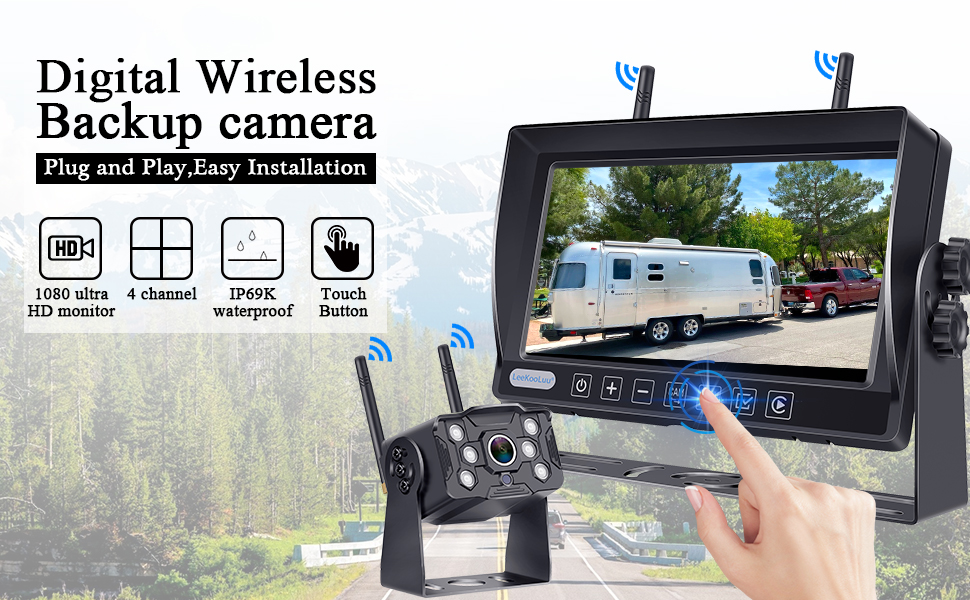
Figure 6.1: Illustration of the digital wireless backup camera system in operation, highlighting the touch button interface on the monitor.
6.2. Split Screen Monitoring
The monitor supports displaying multiple camera feeds simultaneously.
- 스위치 Views: Use the "Split" or "Quad" button on the monitor to cycle through single, dual, or quad-screen views.
- 카메라 추가하기: The system supports up to 4 wireless cameras. Additional cameras can be purchased separately and paired.

Figure 6.2: The 7-inch monitor displaying various split-screen configurations, demonstrating its ability to support up to four wireless camera inputs simultaneously.
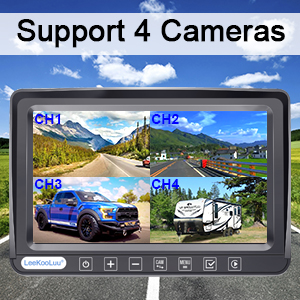
Figure 6.3: Visual confirmation that the system supports up to four cameras, showing a quad-view 모니터에 표시됩니다.
6.3. DIY Guide Lines
Customize the parking guide lines to match your vehicle and preferences.
- 조정: Access the guide line settings through the monitor's menu to adjust width, vertical position, and horizontal position.
- 활성화/비활성화: Guide lines can be turned on or off as needed.

그림 6.4: 예amples of customizable guide lines on the monitor, demonstrating adjustments for width, vertical movement, and horizontal movement.
7. 메뉴 설정
The monitor's menu allows for various adjustments and feature controls.

Figure 7.1: Icons representing various functions accessible through the monitor's menu, including Night Vision, Easy Install, Wireless, HD 1080P, 4 Channel, 7" Screen, Plug and Play, Touch Button, 170° Wide Angle, and Guide Lines DIY.
- 이미지 뒤집기 : Adjust the image orientation (Normal, Mirror, Vertical Normal, Vertical Mirror) to suit your mounting preference.
- Brightness/Saturation/Contrast: Fine-tune display quality.
- 편성: Re-pair cameras to the monitor if needed.
- 시스템 설정: 일반적인 시스템 구성.
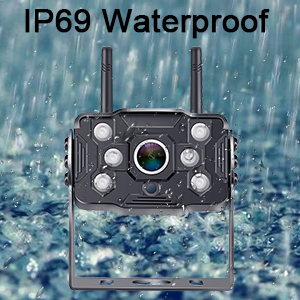
Figure 7.2: Display showing the four image flip modes: Normal, Mirror, Vertical Normal, and Vertical Mirror, allowing users to adjust the view based on camera orientation.
8. Recording Function (DVR)
The LK5 system includes a DVR function, allowing you to record video footage from the connected cameras.
- 루프 녹음: Videos are automatically saved and overwrite the oldest files 저장 공간이 가득 찼을 때.
- 재생: Review 기록된 footag모니터에 직접 표시됩니다.
- 저장: An SD card (not included) is required for recording.

Figure 8.1: Illustration of the loop recording feature, showing video playback on the monitor and the ability to search recorded video by time and mode.
9. 유지관리
Proper maintenance ensures the longevity and optimal performance of your LeeKooLuu backup camera system.
- 카메라 렌즈 청소하기: 카메라 렌즈를 부드러운 천으로 정기적으로 닦아주세요.amp 먼지, 때 또는 물 얼룩 등 시야를 가릴 수 있는 부분을 닦아낼 천 view. 연마성 세척제는 피하세요.
- 모니터 화면 청소하기: Use a microfiber cloth to gently clean the monitor screen. Do not spray cleaning solutions directly onto the screen.
- 연결 확인 중: Periodically inspect all power cables and antenna connections for any signs of wear, corrosion, or looseness. Ensure they are securely fastened.
- 날씨 보호: While the camera is IP69K waterproof, extreme weather conditions (e.g., heavy snow, ice) may temporarily affect performance. Clear any obstructions from the camera lens.
- 저장: If storing the vehicle for an extended period, consider disconnecting the system from power to prevent battery drain.
10. 문제 해결
If you encounter issues with your LeeKooLuu RV Backup Camera system, refer to the following common problems and solutions:
| 문제 | 가능한 원인 | 해결책 |
|---|---|---|
| 모니터에 이미지가 없습니다 |
|
|
| 이미지가 깜빡이거나 불안정함 |
|
|
| 이미지 품질이 좋지 않음 (흐릿하고 어두움) |
|
|
| 녹음이 작동하지 않습니다 |
|
|
11. 사양
| 특징 | 세부 사항 |
|---|---|
| 모델 번호 | M1 |
| 모니터 크기 | 7 인치 |
| 비디오 캡처 해상도 | 1080p |
| 무선 범위 | Up to 600ft (open area), 270ft (in vehicles) |
| 방수 등급 | IP69K (Camera) |
| 권tage | 12 볼트 |
| 디스플레이 기술 | 주도의 |
| 특별 기능 | 7 Inch Screen, Powerful Digital Wireless Signal, Real 1080P Resolution, Recording Ability, Split Screen (Support 2 wireless Cameras) |
| 연결 기술 | 무선 전화 |
| 광센서 기술 | CMOS |
| 렌즈 유형 | 와이드 앵글 |
| 제품 치수 | 8 x 2 x 8 인치 |
| 품목 무게 | 3.21파운드 |
12. 보증 및 지원
LeeKooLuu is committed to providing high-quality products and excellent customer service. While specific warranty terms are not detailed in this manual, the manufacturer offers dedicated support for their products.
- 고객 서비스: For any questions, technical assistance, or support needs, please contact LeeKooLuu customer service.
- 온라인 리소스: Check the official LeeKooLuu website or product page for FAQs, updated manuals, or video tutorials.

Figure 12.1: Image representing the availability of 24-hour customer service for support and inquiries.