1. 서론
The Kaito Voyager Pro KA600 is a versatile digital emergency radio designed for both daily use and emergency preparedness. It features multiple power options, comprehensive radio band coverage, and additional functions like a smartphone charger, reading lamp, and flashlight. This manual provides detailed instructions for its setup, operation, and maintenance.
2. 안전 정보
- 라디오를 극한 온도, 장시간 직사광선 또는 높은 습도에 노출시키지 마십시오.
- 라디오를 떨어뜨리거나 강한 충격을 주지 마세요.
- 라디오를 강한 자기장에서 멀리 두십시오.
- 라디오를 분해하거나 개조하지 마십시오. 그렇게 하면 보증이 무효화됩니다.
- Use only recommended batteries and power adapters.
- When charging external devices, ensure they are compatible with 5V USB output.
3. 패키지 내용
패키지에 모든 품목이 들어 있는지 확인하세요.
- Kaito Voyager Pro KA600 Digital Emergency Radio
- 이어폰
- 사용 설명서 (본 문서)
- 보증 카드
4. 제품 오버view
Familiarize yourself with the main components of your Kaito Voyager Pro KA600 radio.

그림 1: 전면 패널 레이아웃
This image displays the front of the Kaito Voyager Pro KA600 radio, highlighting the digital display, numeric keypad, speaker grille, and various control buttons and knobs for tuning and volume.
주요 구성 요소:
- 디지털 디스플레이: Shows frequency, time, temperature, humidity, and other operational information.
- 스피커: 오디오 출력.
- 키패드 : Numeric buttons for direct frequency entry and function selection.
- 튜닝 노브: For manual frequency adjustment.
- 볼륨 노브: 오디오 출력 레벨을 조정합니다.
- Power Select Switch: Choose between battery, solar/crank, or adapter power.
- 텔레스코픽 안테나: 라디오 수신 성능 향상을 위해.
- 핸드 크랭크: 수동 발전용입니다.
- 태양광 패널: 태양광 충전용입니다.
- USB 출력 포트: 외부 장치를 충전하는 데 사용됩니다.
- LED 읽기 Lamp & Flashlight: Integrated lighting features.
Video 1: Kaito Voyager Pro KA600 Radio Overview
This video provides a visual demonstration of the Kaito Voyager Pro KA600 radio, showcasing its various features and components in action, including tuning and power options.
5. 설정
5.1 라디오 전원 공급
The KA600 offers multiple power options:
- Internal Rechargeable Ni-MH Battery: The radio includes a built-in rechargeable battery pack (3 Ni-MH batteries, 600mAh). This battery can be charged via hand crank, solar panel, USB input, or an optional AC/DC adapter.
- AA Batteries (Not Included): For extended use, insert three (3) AA batteries into the battery compartment.
- 수동 크랭크 발전기: Rotate the hand crank on the side of the radio to generate power and charge the internal battery.
- 태양광 패널: Expose the integrated solar panel to direct sunlight to charge the internal battery.
- USB Input (5V): Connect the radio to a computer or a standard USB wall adapter using a USB cable (not included) to charge the internal battery.
- AC/DC Adapter (Optional): A 6V DC wall power adapter (sold separately) can be used to power the radio and charge the internal battery.

그림 2: 배터리함
This image shows the rear of the radio with the battery cover removed, revealing the internal rechargeable Ni-MH battery and the slots for optional AA batteries.
5.2 안테나 확장
For optimal reception, extend the telescopic antenna fully when listening to FM, LW, SW, or NOAA Weather bands. For AM reception, the radio uses an internal ferrite bar antenna, so the telescopic antenna is not required.
6. 사용 설명서
6.1 전원 켜기/끄기 및 밴드 선택
를 누르세요 힘 button to turn the radio on or off. Use the FM/WB button to cycle through FM and NOAA Weather bands. Use the AM button to select the AM band. For Longwave (LW) and Shortwave (SW), use the appropriate band selection buttons or direct frequency entry.
6.2 튜닝 방법
The KA600 offers several ways to tune into stations:
- 수동 조정 : 회전하다 동조 knob on the side of the radio to manually scan frequencies.
- Direct Keypad Entry: Enter the desired frequency directly using the numeric keypad and press 입력하다 (or similar confirmation button, refer to display).
- 자동 튜닝 시스템(ATS): This function automatically scans and stores strong stations. Refer to the on-screen prompts or specific button for ATS activation.
- 메모리 튜닝: Store your favorite stations into memory for quick access. Use the M+ 그리고 M- 저장된 방송국을 탐색하는 버튼입니다.
6.3 NOAA 기상 경보 기능
The NOAA Weather Alert feature automatically activates the radio to broadcast emergency weather alerts. To enable this:
- Ensure the radio is set to a NOAA Weather channel (1-7).
- Activate the "Alert" mode (refer to the specific button or menu option on the radio, typically labeled 알리다).
- The radio will remain in standby and automatically turn on with an audible alert and broadcast the weather warning when activated by the NOAA network.
6.4 RDS(무선 데이터 시스템)
When tuned to an FM station broadcasting RDS, the radio's display may show additional information such as station name, program type, or song title. This feature is automatic when available.
6.5 Emergency Mobile Charger
The KA600 can charge external devices via its built-in standard DC 5V USB output port.
- Connect your smartphone, GPS unit, MP3 player, or digital camera to the USB output port using a compatible USB cable.
- Ensure the radio has sufficient power (internal battery charged, or actively cranking/solar charging).
- 자동으로 충전이 시작됩니다.
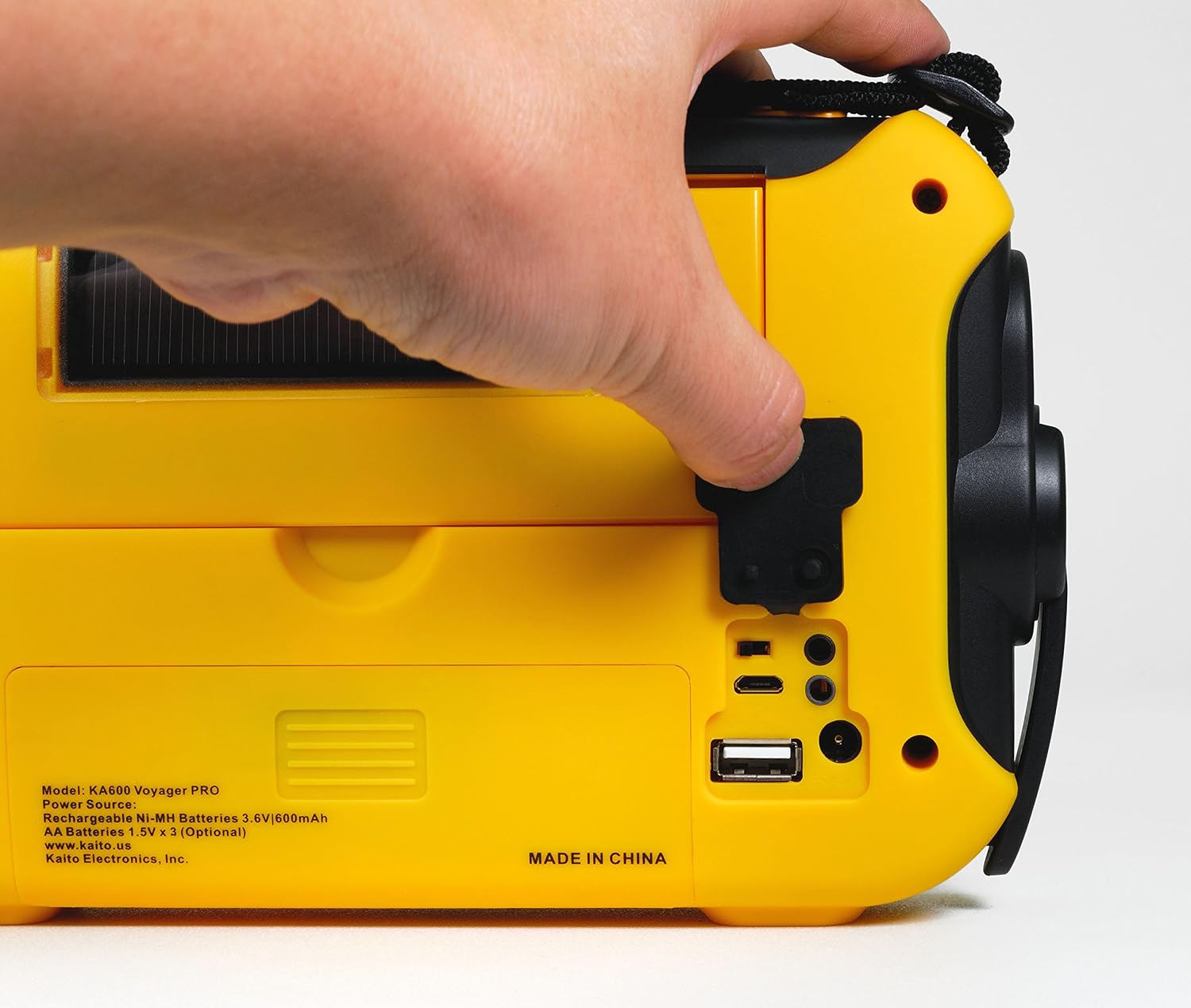
Figure 3: USB Output Port
This image highlights the USB output port on the side of the radio, used for charging external mobile devices.
6.6 조명 기능
- 5-LED 독서 Lamp: Flip up the solar panel to reveal the integrated reading lamp. Activate it using the designated button.
- LED 손전등: A powerful LED flashlight is integrated into the radio. Activate it using its dedicated button.
- Red LED S.O.S. Beacon Light: In emergencies, activate the S.O.S. beacon for signaling.

Figure 4: Reading Lamp and Solar Panel
This image shows the rear of the radio with the solar panel raised, exposing the 5-LED reading lamp 조명용.
7. 유지관리
- 청소: 부드러운 d로 라디오를 닦으십시오.amp 천. 연마성 세척제나 용매를 사용하지 마십시오.
- 배터리 관리 : If storing the radio for an extended period, remove any non-rechargeable AA batteries to prevent leakage. Ensure the internal Ni-MH battery is charged periodically to maintain its lifespan.
- 저장: 라디오는 직사광선과 극한의 온도를 피해 서늘하고 건조한 곳에 보관하세요.
8. 문제 해결
| 문제 | 가능한 원인 | 해결책 |
|---|---|---|
| 라디오가 켜지지 않습니다. | Low or depleted battery; incorrect power source selected. | Charge the internal battery via hand crank, solar, or USB. Insert fresh AA batteries. Ensure the power select switch is in the correct position. |
| 라디오 수신 상태가 좋지 않습니다. | 안테나가 확장되지 않음; 신호가 약함; 간섭. | Fully extend the telescopic antenna. Reposition the radio for better signal. Avoid sources of electronic interference. |
| 외부 기기를 충전할 수 없습니다. | Radio battery too low; incompatible device; faulty cable. | Ensure the radio's internal battery is sufficiently charged. Verify device compatibility. Try a different USB cable. |
| NOAA Alert not activating. | Not on a NOAA channel; Alert mode not enabled; no active alerts. | Tune to a NOAA Weather channel. Ensure Alert mode is activated. Confirm there are active alerts in your area. |
9. 사양
- FM: 88~108MHz
- AM (MW) : 520 - 1710kHz
- LW (Longwave): 150 - 521kHz
- SW (Shortwave): 2,300 - 23,000kHz
- NOAA 날씨: Channels 1 - 7
- 내부 스피커: 직경 66mm
- 헤드셋 잭: 3.5mm (XNUMXmm)
- 충전식 배터리: 3 Ni-MH batteries, 600mAh
- 치수: 9.5 x 5.5 x 2.5인치(24.13 x 13.97 x 6.35cm)
- 무게: 1파운드(0.45kg)
- 연결성: USB(외부 장치 충전용)
- 전원: Hand crank, solar panel, 3x AA batteries (not included), 5V USB input, 6V DC adapter (optional), internal Ni-MH battery.
10. 보증 및 지원
Your Kaito Voyager Pro KA600 radio comes with a warranty. Please refer to the included Warranty Card for details on coverage, terms, and how to register your product. For technical support or service inquiries, please visit the official Kaito web사이트 또는 고객 서비스 부서에 문의하십시오.
Kaito Official Web대지: www.kaito.us