
1. 서론
This manual provides detailed instructions for the installation, operation, and maintenance of your Alptop AT-100BW WiFi Camera. Please read this manual thoroughly before using the product to ensure correct setup and optimal performance.
1.1 패키지 내용
- 1 x Alptop AT-100BW Bullet Security Camera
- 1 x 10ft Power Adapter (DC 12V 1A)
- 1 x 네트워크 케이블
- 1 x 사용자 설명서
- 1 x Set of Screws for Mounting
2. 제품 오버view
Familiarize yourself with the components and interfaces of your Alptop AT-100BW camera.
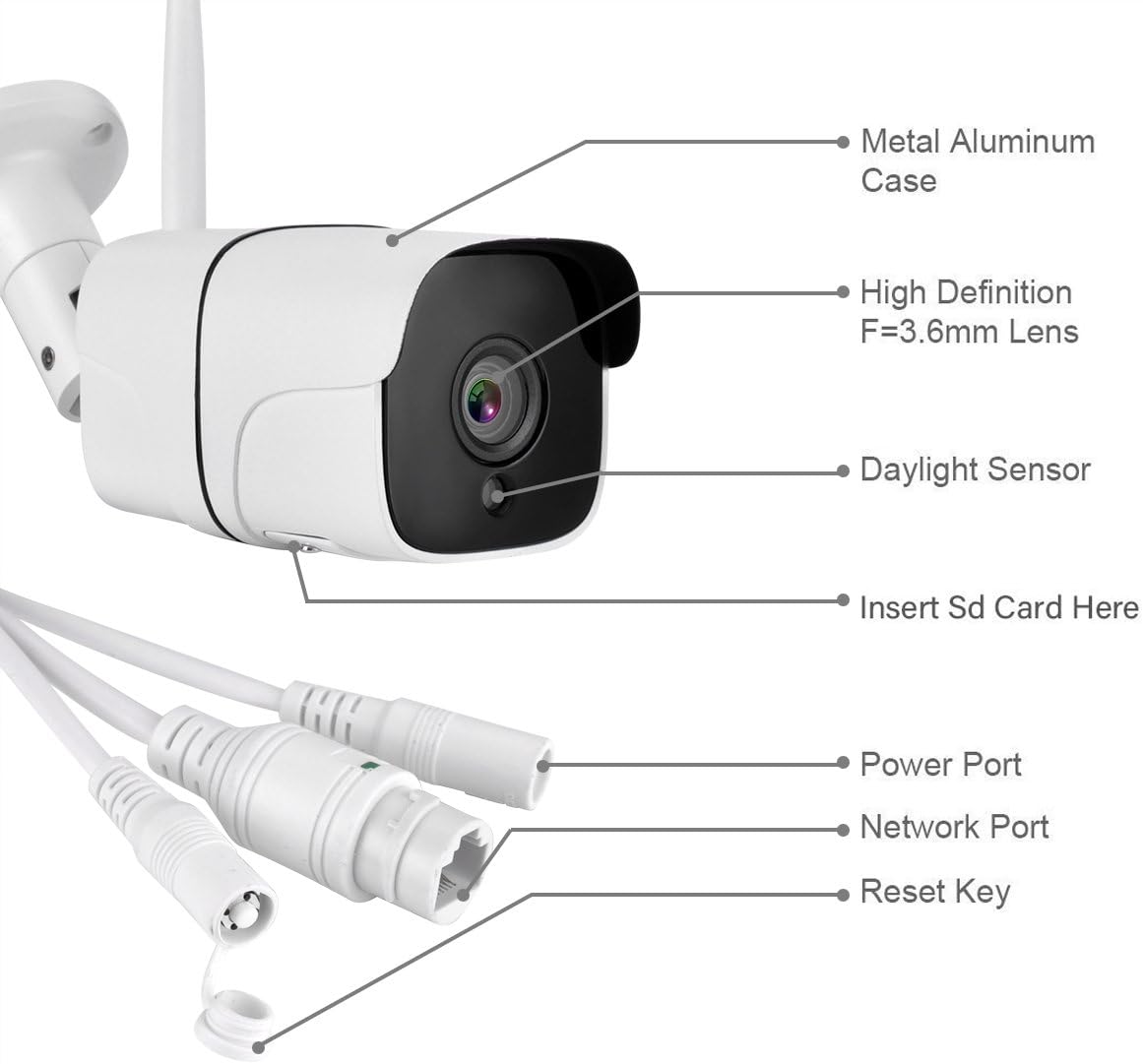
이미지 2.1: Alptop AT-100BW Camera Component Diagram. This image illustrates the camera's main parts including the metal aluminum case, high definition F=3.6mm lens, daylight sensor, SD card slot, power port, network port, and reset key.
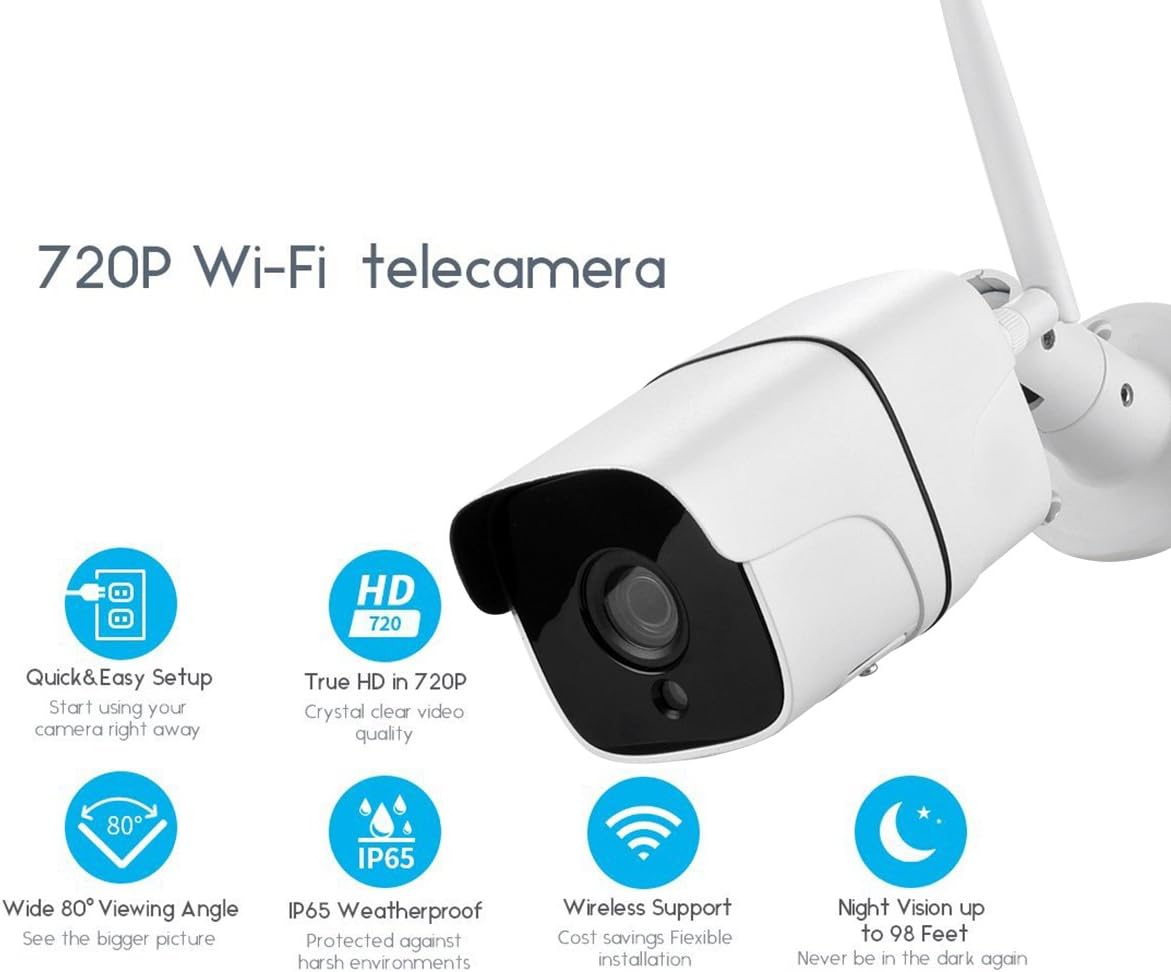
이미지 2.2: Alptop AT-100BW Key Features. This image highlights features such as 720P HD resolution, quick and easy setup, wide 80-degree viewing angle, IP65 weatherproof rating, wireless support, and night vision up to 98 feet.
3. 설정
3.1 하드웨어 설치
- 설치: Choose a suitable outdoor location for the camera. Use the provided screws to securely mount the camera to a wall or ceiling. Ensure the camera has a clear line of sight to the area you wish to monitor.
- 전원 연결: Connect the 10ft power adapter to the camera's power port and plug it into a standard electrical outlet.
- Network Connection (Initial Setup Recommended): For the initial setup, it is recommended to connect the camera directly to your router using the provided network cable. This ensures a stable connection for configuration.
- SD 카드 설치: The camera supports a Micro SD card (up to 64GB, Class 10 or above, not included) for local storage. Locate the SD card slot, typically under a protective cover on the camera body. Insert the Micro SD card with the contacts facing down until it clicks into place.
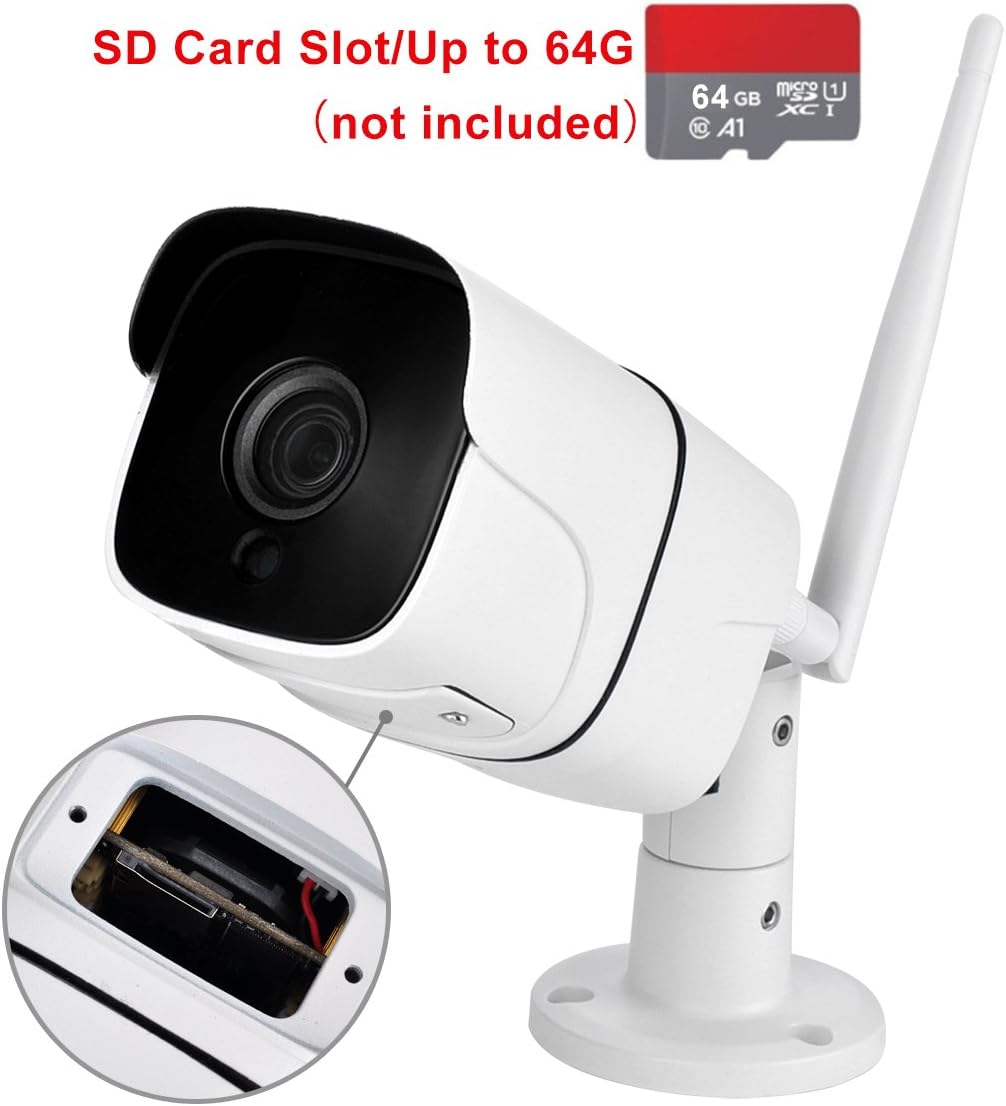
이미지 3.1: SD Card Slot Location. This image shows the camera with a close-up of the SD card slot, indicating where to insert a Micro SD card (up to 64GB, not included).
3.2 Software Setup and Wi-Fi Connection
- 앱 다운로드: 검색 and download the "CamHi" application from your mobile device's app store (Google Play Store for Android or Apple App Store for iOS).
- 등록/로그인: Open the CamHi app and follow the on-screen instructions to register a new account or log in if you already have one.
- 카메라 추가: In the app, select the option to add a new device. You may be prompted to scan a QR code on the camera or manually enter the camera's ID.
- 와이파이 구성: If you initially connected via Ethernet, the app should detect the camera. Follow the prompts to configure the camera's Wi-Fi settings. 중요한: The camera only supports 2.4GHz Wi-Fi networks. It does not support 5GHz Wi-Fi. Ensure your mobile device is connected to a 2.4GHz network during setup.
- Wireless Setup (Alternative): If you prefer to set up wirelessly from the start, ensure your phone is connected to a 2.4GHz Wi-Fi network. The app will guide you through connecting the camera to your Wi-Fi.
4. 사용 설명서
4.1 라이브 View 및 원격 액세스
Once the camera is successfully added to the CamHi app, you can access the live video feed from anywhere with an internet connection. Open the app and select your camera from the device list to view 라이브 스트림.
4.2 동작 감지 및 알림
The Alptop AT-100BW features smart motion detection. When motion is detected, the camera can send real-time push notifications to your mobile phone or send snapshots to your email.
- Enabling Motion Detection: Navigate to the camera settings within the CamHi app. Locate the "Motion Detection" or "Alarm Settings" section.
- 감도 조정: You can adjust the motion detection sensitivity. Note that the effective motion sensor distance is up to 20ft. High sensitivity may result in more false alarms from environmental factors like insects or moving branches.
- 알림 구성: Configure how you wish to receive alerts (push notifications, email snapshots).

이미지 4.1: Smart Motion Detection Alerts. This image shows a smartphone screen displaying push notifications, email alerts, and FTP upload options triggered by motion detection from the camera.
4.3 야간 투시경
The camera is equipped with 18PCS IR LED lights, providing clear night vision up to approximately 65 feet (20 meters). The camera automatically switches between day and night mode based on ambient light conditions.

이미지 4.2: Clear Night Vision vs. Colorful Day Vision. This image demonstrates the camera's ability to provide clear black and white night vision in low light conditions and colorful day vision during daylight hours.
4.4 녹음
The camera supports continuous recording or motion-activated recording to an installed Micro SD card. You can also access recorded footage through the CamHi app.
- 녹음 설정: In the app, navigate to the recording settings to choose your preferred recording mode (e.g., continuous, scheduled, motion-triggered).
- 재생: 앱의 재생 기능을 사용하여 다시 재생하세요.view recorded video clips stored on the SD card.
5. 유지관리
5.1 SD 카드 관리
Regularly check the status of your Micro SD card. If the card becomes full, older recordings may be overwritten. You can format the SD card through the CamHi app settings if needed.
5.2 청소
To maintain optimal image quality, periodically clean the camera lens with a soft, dry cloth. Avoid using harsh chemicals or abrasive materials that could scratch the lens.
5.3 날씨 보호
The camera has an IP66 waterproof rating, designed to withstand various outdoor conditions. However, ensure all cable connections are secure and protected from direct exposure to heavy rain or extreme weather to prevent water ingress.

이미지 5.1: IP66 Waterproof Rating. This image shows the camera being subjected to water spray, illustrating its IP66 waterproof and dustproof capabilities for outdoor use.
6. 문제 해결
- 카메라가 Wi-Fi에 연결되지 않음: Ensure your Wi-Fi network is 2.4GHz. The camera does not support 5GHz Wi-Fi. Try connecting the camera via Ethernet cable for initial setup, then configure Wi-Fi through the app.
- 이미지 품질이 좋지 않음: Check if the lens is clean. Ensure there is adequate lighting for day vision or that night vision is active in low light. Verify your network connection is stable.
- Frequent Motion Alerts: Adjust the motion detection sensitivity settings in the app. Environmental factors like moving branches, insects, or changes in light can trigger false alarms.
- No Recording to SD Card: Ensure a Class 10 or higher Micro SD card (up to 64GB) is correctly inserted and formatted within the app. Check recording settings to confirm it's enabled.
- PC 소프트웨어 호환성: The PC Client and Search Tool software are designed for Windows operating systems only and do not support MAC OS.
- 카메라 오프라인: Check the power connection and ensure your Wi-Fi router is functioning correctly. If the camera was recently moved, re-establish the Wi-Fi connection in the app.
7. 사양
| 특징 | 사양 |
|---|---|
| 모델 번호 | AT-100BW |
| 센서 유형 | 1/3" Megapixel CMOS sensor |
| 비디오 캡처 해상도 | 720p |
| 렌즈 | 3.6mm |
| View 각도 | 70-90도 |
| 야간 시야 거리 | Up to 65ft (18PCS IR LEDs) |
| 모션 센서 거리 | 최대 20피트 |
| 연결 기술 | 무선(Wi-Fi 2.4GHz만 지원) |
| 전원 | DC 12V 1A (AC/DC adapter included) |
| 방수성 | IP66 방수 |
| 저장 | Micro SD Card (Max 64GB, Class 10 or above) |
| 작동 온도 | -20°C ~ 60°C (-4°F ~ 140°F) |
| 재료 | 알류미늄 |
| 치수(길이 x 너비 x 높이) | 7.6 x 2.4 x 2.4 인치 |
| 품목 무게 | 1.1파운드 |

이미지 7.1: Alptop AT-100BW Camera Dimensions. This image provides a visual representation of the camera's length (4.17 inches for the body, 3.54 inches for the mount) and height (2.36 inches).
8. 중요 사항
- The camera exclusively supports 2.4GHz Wi-Fi networks and is not compatible with 5GHz Wi-Fi.
- PC Client and Search Tool software are compatible only with Windows operating systems, not with macOS.
- For reliable recording, use a high-speed Micro SD card (Class 10 or above).
- This camera is not battery-powered and requires a continuous power supply via the included adapter.
- The camera does not include audio, pan/tilt/zoom (PTZ) functions.
9. 보증 및 지원
For warranty information, technical support, or service inquiries, please refer to the contact information provided with your purchase or visit the official Alptop web대지. 보증 청구를 위해 구매 영수증을 보관하십시오.