
소개
This manual provides detailed instructions for the safe and proper installation, operation, and maintenance of your SANUS Simplicity Full Motion TV Mount, Model SMF421-B3. Please read all instructions carefully before beginning installation to ensure correct assembly and to prevent injury or damage.
This mount is designed to securely hold televisions ranging from 26 inches to 55 inches in size, with a maximum weight capacity of 55 lbs (25 kg). It offers full motion capabilities, including tilt, swivel, and extension, allowing for optimal view각도를 나타냅니다.
안전 정보
경고: Failure to read and follow all instructions can result in personal injury, property damage, or voiding of warranty. Do not install this product if you do not understand these instructions or have doubts about the safety of the installation.
- Verify that the mounting surface can safely support the combined weight of the mount and the television.
- 최대 중량 용량은 55파운드(25kg)를 초과하지 마십시오.
- 본 제품은 실내에서만 사용하도록 설계되었습니다.
- Use only the hardware provided by SANUS.
- If mounting to wood studs, ensure the studs are solid and located accurately.
- If mounting to concrete or concrete block, ensure the wall is solid and use appropriate anchors (not always included).
- Always use a qualified installer if you are unsure about your ability to install this product safely.
패키지 내용
Before installation, ensure all parts are present and undamaged. If any parts are missing or defective, contact SANUS customer service.

Image: All components of the SANUS Simplicity Full Motion TV Mount, including the wall plate, TV brackets, and various hardware, are laid out for inspection.
일반적인 패키지 내용물은 다음과 같습니다.
- 벽판 조립체
- TV 브래킷 암 (2)
- Mounting Hardware Kit (screws, washers, spacers for various TV types and wall types)
- 사용 설명서
설정 및 설치
필요한 도구 (포함되지 않음):
- 스터드 찾기
- 적절한 드릴 비트(목재용 또는 석재용)를 사용하여 구멍을 뚫으십시오.
- 수준
- Phillips 헤드 스크루 드라이버
- 소켓 렌치
- 연필
- 줄자
1단계: TV 브래킷을 TV에 부착
- 화면 손상을 방지하려면 부드럽고 깨끗한 표면에 TV를 뒤집어서 조심스럽게 놓으세요.
- TV 뒷면에 있는 VESA 장착 구멍을 확인하세요.
- Select the correct diameter and length screws from the hardware kit that fit your TV's mounting holes. Use washers and spacers if necessary to ensure a snug fit without overtightening.
- Attach the two TV bracket arms to the back of your TV using the selected screws. Ensure the arms are level and securely fastened. Do not overtighten.
Step 2: Install Wall Plate to Wall
- Determine the desired height for your TV. Mark the center of the desired TV location on the wall.
- 목재 스터드 설치용: Use a stud finder to locate the center of two adjacent wood studs. Position the wall plate so that its mounting holes align with the center of the studs. Use a level to ensure the wall plate is perfectly horizontal. Mark the drill points. Drill pilot holes (refer to manual for specific drill bit size). Secure the wall plate to the studs using the provided lag bolts and washers.
- For Concrete/Concrete Block Installation: Position the wall plate at the desired height and use a level to ensure it is horizontal. Mark the drill points. Drill pilot holes (refer to manual for specific drill bit size and depth). Insert concrete anchors (if provided or purchased separately) into the pilot holes. Secure the wall plate to the wall using the provided lag bolts and washers.
- Ensure the wall plate is firmly and securely attached to the wall before proceeding.
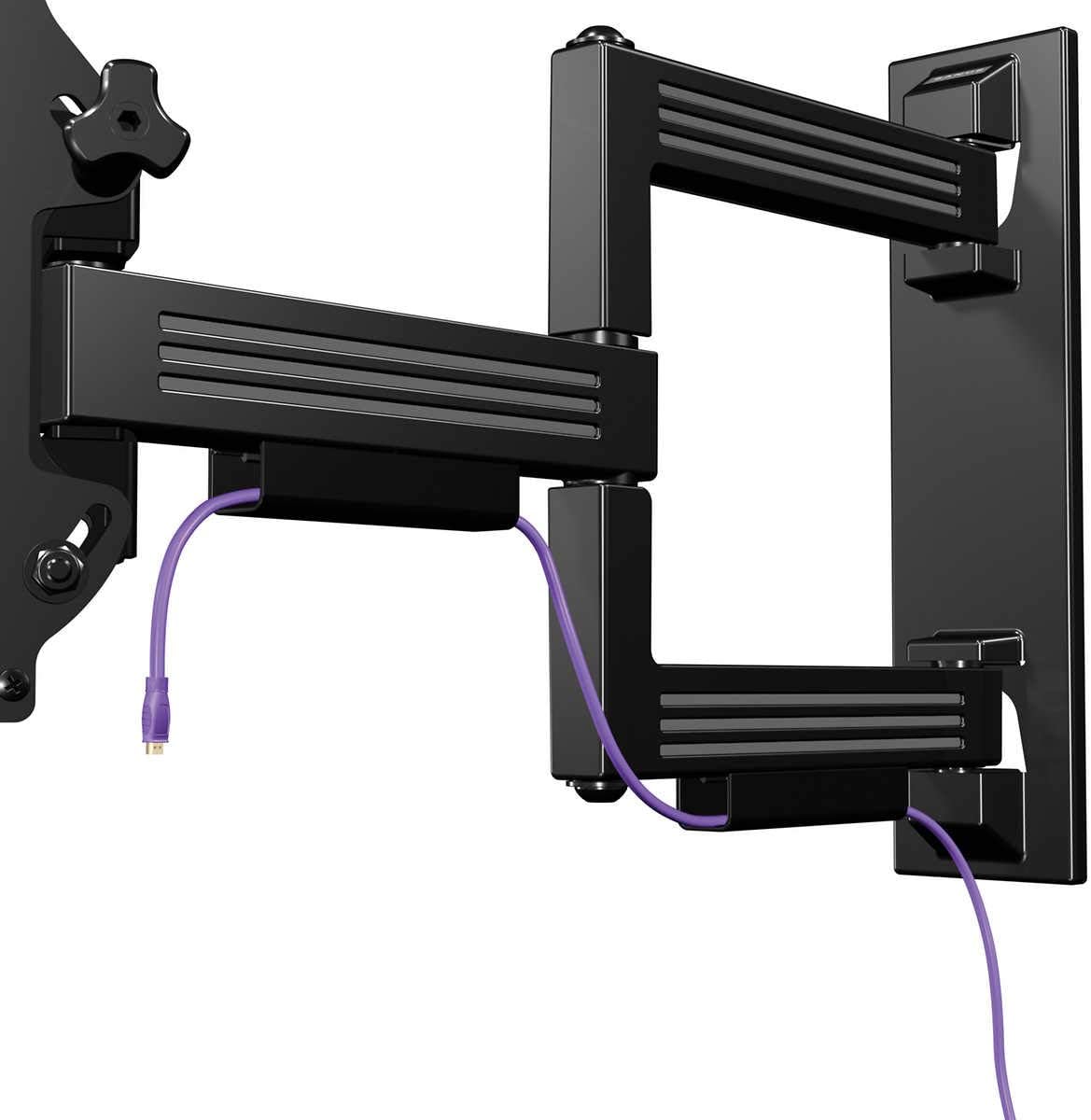
Image: The SANUS Simplicity Full Motion TV Mount is shown installed on a wall, extended, with a purple cable neatly routed through its integrated cable management channels.
3단계: 벽걸이 플레이트에 TV를 걸기
- With assistance, carefully lift the TV with the attached brackets and hook the brackets onto the wall plate.
- TV가 벽걸이 받침대에 제대로 고정되었는지 확인하십시오.
- Engage any safety locking mechanisms on the TV brackets to prevent accidental dislodgement. Refer to the specific instructions for your mount model for details on locking mechanisms.
작동 지침
Your SANUS Simplicity Full Motion TV Mount allows for flexible positioning of your television.
- 확대: TV를 벽에서 살짝 당겨서 팔을 펼치세요.
- 받침: Carefully pivot the TV left or right to achieve your desired view잉 각도.
- 경사: Loosen the tilt adjustment knobs (if applicable, refer to your specific model's design), adjust the TV to the desired vertical angle, and then retighten the knobs to secure the position. The mount supports up to 60 degrees of tilt.
- 케이블 관리 : Utilize the integrated cable channels on the mount arm to route and conceal cables for a tidy appearance.
Always move the TV smoothly and avoid sudden, forceful movements. Do not hang or apply excessive weight to the TV or mount arm.
유지
정기적인 유지 관리는 TV 거치대의 수명 연장과 안전한 작동을 보장합니다.
- 정기 검사: Every 6-12 months, inspect all mounting hardware and connections to ensure they are secure. Tighten any loose screws or bolts.
- 청소: 부드럽고 마른 천으로 마운트를 닦으십시오. 연마성 세척제나 용제를 사용하지 마십시오. 마감재가 손상될 수 있습니다.
- 매끄럽게 하기: The moving parts of the mount are designed for smooth operation and generally do not require lubrication. If movement becomes stiff, consult SANUS customer support.
문제 해결
| 문제 | 가능한 원인 | 해결책 |
|---|---|---|
| 설치 후 TV가 수평이 아닙니다. | Wall plate was not installed level. | Remove TV, adjust wall plate to be level, and re-mount TV. Some mounts have post-installation leveling adjustments; refer to your specific model's features. |
| 마운트가 느슨하거나 흔들립니다. | Mounting hardware is not fully tightened or wall support is inadequate. | Immediately remove TV. Re-check all wall plate fasteners and ensure they are securely tightened into solid studs or concrete. If the wall is damaged, consult a professional. |
| Difficulty moving the TV (swivel/tilt/extend). | Friction points may be too tight or mechanism needs adjustment. | Check for any adjustment screws or knobs on the mount that control tension. Loosen slightly if movement is too stiff. Do not over-loosen. |
명세서
- 모델: SMF421-B3
- 상표: 사누스
- 장착 유형: 벽걸이형
- 이동 유형: 회전, 기울기, 확장
- 재료: 플라스틱
- 색상: 검은색
- 호환 가능한 TV 크기: 26인치 - 55인치
- 최대 중량 용량: 55파운드(25kg)
- 벽에서 확장: 최대 21인치
- 로우프로file 설계: 2.1" from wall when retracted
- 최대 기울기 각도: 60도
- 한국어: 793795532121
보증 및 지원
보증: This SANUS product is covered by a 2-Year Manufacturer's Warranty. Please retain your proof of purchase for warranty claims. The warranty covers defects in materials and workmanship under normal use.
고객 지원: For technical assistance, missing parts, or warranty inquiries, please contact SANUS customer service. Visit the official SANUS web연락처 정보와 추가 자료는 해당 사이트를 참조하세요.
온라인 리소스: For further information, installation videos, and FAQs, please visit the 아마존의 Sanus 스토어 or the official SANUS web대지.