
소개
This manual provides comprehensive instructions for the Sharp EN2A27S TV Remote Control. It covers essential information regarding setup, operation, maintenance, and troubleshooting to ensure optimal performance with your compatible Sharp Smart LCD HDTV Television.
패키지 내용
- Sharp EN2A27S TV Remote Control
Note: Batteries are not included and must be purchased separately. Two AAA batteries are required.
설정
배터리 설치
- 리모콘 뒷면에서 배터리함을 찾으세요.
- 배터리 덮개를 아래로 밀어서 엽니다.
- AAA 배터리 2개를 넣고 양극(+)과 음극(-) 단자가 배터리 보관함 내부 표시와 올바르게 맞춰지도록 합니다.
- 배터리 덮개를 제자리에 밀어 넣어 딸깍 소리가 날 때까지 밀어 넣습니다.
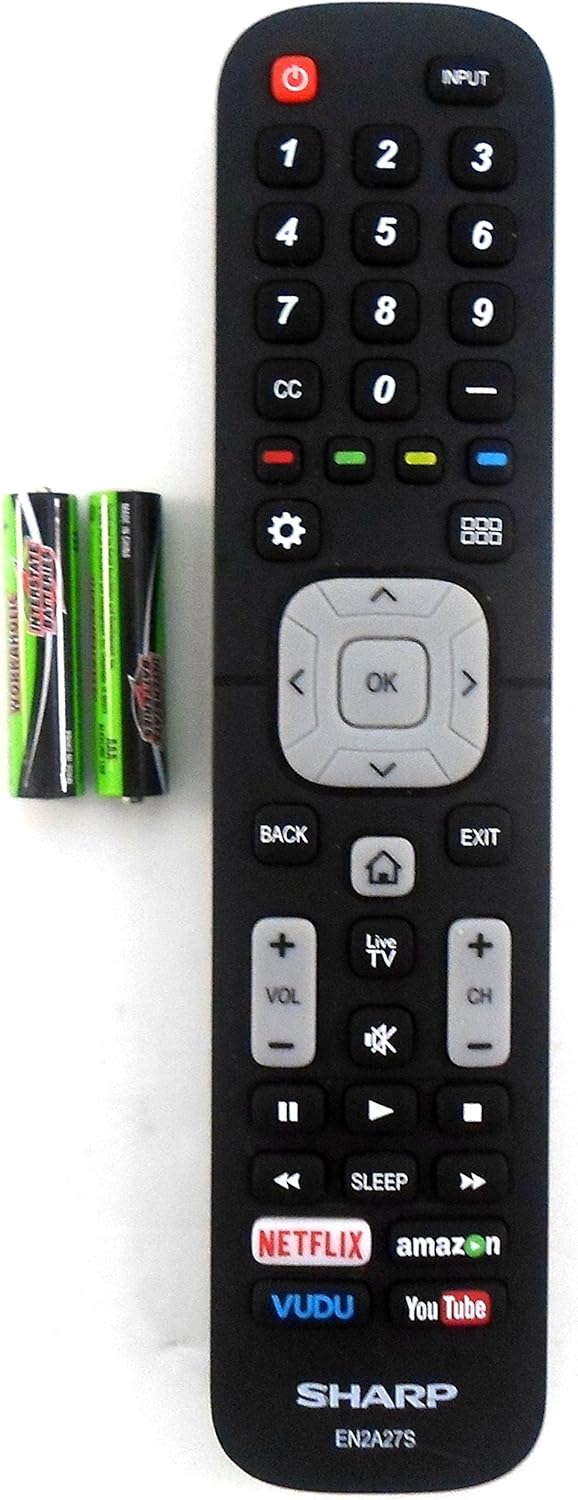
Image: The Sharp EN2A27S remote control shown alongside two AAA batteries, indicating where batteries are inserted for operation.
The remote control is now ready for use with your compatible Sharp TV. No programming is typically required for original Sharp remote controls.
작동 지침
The Sharp EN2A27S remote control provides direct access to various functions of your Sharp Smart LCD HDTV. Familiarize yourself with the button layout for efficient operation.

이미지: 자세한 view of the lower portion of the Sharp EN2A27S remote, showcasing dedicated buttons for Netflix, Amazon, Vudu, and YouTube.
주요 기능:
- 전원(빨간색 버튼): TV를 켜거나 끕니다.
- 입력: Selects the video input source (e.g., HDMI 1, HDMI 2, AV).
- 숫자 버튼(0-9): TV 채널을 직접 선택하세요.
- CC (자막): 자막 기능을 켜거나 끕니다.
- 색상 버튼(빨간색, 녹색, 노란색, 파란색): TV 화면에 표시된 대로 메뉴 또는 애플리케이션 내의 특정 기능에 사용됩니다.
- 설정(톱니바퀴 아이콘): TV의 기본 설정 메뉴에 접근합니다.
- Grid Icon: Opens the TV's smart hub or app launcher.
- 탐색 패드(위, 아래, 왼쪽, 오른쪽, 확인): 메뉴를 탐색하고 선택 사항을 확인합니다.
- 뒤쪽에: 이전 화면 또는 메뉴로 돌아갑니다.
- 출구: 현재 메뉴나 애플리케이션을 종료합니다.
- 집 (집 아이콘): TV 홈 화면으로 돌아갑니다.
- 라이브 TV: 생방송 TV 중계로 전환합니다.
- 볼륨 업/다운(VOL +/-): TV의 볼륨을 조절합니다.
- 음소거(스피커 아이콘): TV 오디오를 음소거하거나 음소거 해제합니다.
- 채널 업/다운 (CH +/-): TV 채널을 변경합니다.
- Playback Controls (Play, Pause, Fast Forward, Rewind, Stop): 미디어 재생을 제어합니다.
- 잠: 텔레비전이 자동으로 꺼지도록 타이머를 설정합니다.
- Dedicated App Buttons (Netflix, Amazon, Vudu, YouTube): 이러한 스트리밍 애플리케이션에 직접 액세스할 수 있도록 제공합니다.
호환성
The Sharp EN2A27S TV Remote Control is compatible with the following Sharp Smart LCD HDTV Television models:
55H6B, 50H7GB, 50H6B, N6200U, LC-60N6200U, LC-60N7000U, LC-65N7000U, LC-43N7000U, LC-50N7000U, LC-55N7000U, LC-40N5000U, LC-43N5000U, LC-43N6100U, LC-50N5000U, LC-50N6000U, LC-55N620CU, LC-55N5300U, LC-55N6000U, LC-60N5100U, LC-65N5200U, LC-65N6200U, LC-65N9000U, LC-75N620U, LC-75N8000U.
유지
청소:
- 부드럽고 마른 천으로 리모컨을 닦으세요.
- 액체 세척제, 스프레이 또는 연마제를 사용하지 마십시오. 이러한 제품은 리모컨의 표면이나 내부 부품을 손상시킬 수 있습니다.
배터리 관리 :
- Replace batteries when the remote's responsiveness decreases.
- 장기간 리모컨을 사용하지 않을 경우 배터리 누출을 방지하기 위해 배터리를 제거하세요.
- 사용한 배터리는 현지 규정에 따라 폐기하십시오.
문제 해결
원격 응답 없음:
- 배터리 확인: 배터리가 극성(+/-)에 맞게 올바르게 삽입되었는지 확인하십시오. 오래되었거나 방전된 배터리는 새 배터리로 교체하십시오.
- 시선: 리모컨과 TV의 적외선 센서 사이에 시야가 확보되어 있는지 확인하십시오. 장애물이 있으면 신호가 차단될 수 있습니다.
- 원격 센서 : Verify that the TV's remote sensor is not blocked or dirty.
- 텔레비젼 힘: TV 전원이 켜져 있는지, 대기 모드가 아닌지 확인하십시오.
버튼이 작동하지 않음:
- Individual Button Test: If only specific buttons are not working, try pressing them firmly. If the issue persists, the remote may require replacement.
- 리모컨 청소: Dust or debris under buttons can sometimes cause issues. Refer to the cleaning instructions in the Maintenance section.
명세서
| 모델 번호 | EN2A27S |
| Internal Item Number | 8541714996 |
| 상표 | 날카로운 |
| 제품 치수 | 8 x 2 x 0.5 인치 |
| 품목 무게 | 2.89 온스 |
| 색상 | 검은색 |
| 지원되는 최대 장치 수 | 1 |
| 호환 장치 | 텔레비전 |
| 제조업체 | OEM Sharp |
지원하다
For further assistance or inquiries regarding your Sharp EN2A27S TV Remote Control, please refer to the support resources provided by Sharp or your television's original documentation. You may also visit the official Sharp website for product information and customer service contacts.