
소개
Thank you for choosing the Awei B923BL Wireless Magnetic Sports Bluetooth Earphones. This manual provides essential information for setting up, operating, maintaining, and troubleshooting your new earphones. Please read it carefully before use to ensure optimal performance and longevity of your device.
패키지 내용
다음 품목이 패키지에 포함되어 있는지 확인하세요.
- Awei B923BL Wireless Magnetic Sports Bluetooth Earphones
- USB 충전 케이블
- 다양한 크기의 이어팁
- 사용자 설명서
제품 끝view
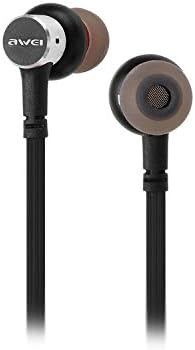
The Awei B923BL earphones are designed for active lifestyles, featuring a wireless Bluetooth connection and a magnetic design for convenient storage around your neck when not in use. They include an integrated microphone for hands-free calling.

설정
1. 이어폰 충전하기
Before first use, fully charge your earphones. Connect the provided USB charging cable to the charging port on the earphones and the other end to a USB power source (e.g., computer USB port, wall adapter). The indicator light will show charging status and turn off or change color when fully charged.
2. 블루투스 페어링
- 이어폰이 꺼져 있는지 확인하십시오.
- Press and hold the multi-function button (usually the power button) until the indicator light flashes red and blue alternately, indicating pairing mode.
- 휴대전화 또는 블루투스 지원 기기에서 블루투스 설정으로 이동하여 블루투스를 활성화하세요.
- 검색 available devices. You should see "Awei B923BL" or a similar name in the list.
- Select "Awei B923BL" to connect. Once connected, the indicator light will usually flash blue slowly or turn off, and you may hear a confirmation tone.
- 비밀번호를 입력하라는 메시지가 나타나면 "0000"을 입력하세요.
Once paired, the earphones will automatically connect to the last paired device when turned on, if the device's Bluetooth is active and within range.
작동 지침
전원 켜기/끄기
- 전원 켜기: 다기능 버튼을 약 3초간 길게 누르면 파란색 표시등이 깜빡입니다.
- 전원 끄기 : 다기능 버튼을 약 5초 동안 길게 누르면 빨간색 표시등이 깜빡인 후 꺼집니다.
음악 재생
- 재생/일시 중지: 다기능 버튼을 한 번 누릅니다.
- 다음 트랙: 볼륨 + 버튼을 길게 누릅니다.
- 이전 트랙 : 볼륨 - 버튼을 길게 누릅니다.
통화 관리
- 전화 받기/종료: 다기능 버튼을 한 번 누릅니다.
- 전화 거부: 다기능 버튼을 약 2초간 길게 누르세요.
- 마지막 번호 재다이얼: 다기능 버튼을 두 번 누르세요.
볼륨 조절
- 볼륨 증가: 볼륨 + 버튼을 누릅니다.
- 볼륨 감소: 볼륨 - 버튼을 누르세요.
유지
- Clean the earphones regularly with a soft, dry cloth. Do not use harsh chemicals or abrasive materials.
- 이어팁을 제거하고 필요한 경우 순한 비누와 물로 세척한 후 다시 부착하기 전에 완전히 말랐는지 확인하세요.
- 이어폰은 직사광선과 극한의 온도를 피해 서늘하고 건조한 곳에 보관하세요.
- 이어폰을 물이나 과도한 습기에 노출시키지 마십시오.
- 이어폰을 분해하거나 개조하지 마십시오. 그렇게 하면 보증이 무효화됩니다.
문제 해결
- 이어폰이 켜지지 않음: 이어폰이 완전히 충전되었는지 확인하세요.
- 기기와 페어링할 수 없습니다:
- 이어폰이 페어링 모드(빨간색과 파란색 불빛이 깜빡이는 상태)인지 확인하세요.
- 기기에서 Bluetooth가 활성화되어 있는지 확인하세요.
- 이어폰을 기기에 더 가까이 대세요.
- 이어폰과 기기를 모두 재시작해 보세요.
- 기기에서 이전에 연결된 Bluetooth 연결이 너무 많은 경우 삭제하세요.
- 소리가 나지 않거나 볼륨이 낮음:
- 이어폰과 연결된 기기의 볼륨 레벨을 확인하세요.
- 이어폰이 기기에 제대로 연결되어 있는지 확인하세요.
- 다양한 오디오 소스를 재생해보세요.
- 통화 품질 문제:
- 마이크가 가려지지 않았는지 확인하세요.
- 간섭이 적은 곳으로 이동하세요.
명세서
| 특징 | 세부 사항 |
|---|---|
| 브랜드 이름 | 아웨이 |
| 모델 번호 | 비투비엘 |
| 색상 | 검은색 |
| 헤드폰 폼 팩터 | 귀에 |
| 연결 기술 | 무선 전화 |
| 무선 통신 기술 | 무선 전화 |
| 연령대 설명 | 성인 |
| 재료 | 고무 |
| 호환 장치 | 모바일 폰 |
| 케이블 기능 | 케이블 없이 |
| 제어 방법 | 만지다 |
| 항목 수 | 1 |
| 제조업체 | 아웨이 |
| 특별 기능 | Microphone Included (Note: This model does not feature active noise cancellation as per product description.) |
보증 및 지원
보증 정보
This product comes with a 1-year manufacturer's warranty from the date of purchase. For warranty claims or service, please contact the manufacturer or their authorized service agent. For further details, you may also contact the retailer where the product was purchased.
고객 지원
If you encounter any issues not covered in this manual or require further assistance, please refer to the contact information provided with your product packaging or visit the official Awei web지원 리소스 사이트.


