
ASUS STRIX B360-H GAMING
ASUS ROG Strix B360-H 게이밍 마더보드 사용자 설명서
Model: STRIX B360-H GAMING
1. 제품 오버view
The ASUS ROG Strix B360-H Gaming motherboard is engineered for optimal gaming performance, featuring robust hardware safeguards and advanced cooling solutions. It supports Intel 8th Gen processors and offers high-speed data transfer capabilities.

Image 1.1: The ASUS ROG Strix B360-H Gaming motherboard alongside its retail packaging, showcasin제품의 디자인과 브랜딩.
주요 특징:
- Designed exclusively for 8th generation Intel Core processors to maximize connectivity and speed with Dual NVMe M.2, USB 3.1 Gen2 and Intel Optane Memory compatibility.
- ASUS Optic-MEM improves memory stability and performance by improving trace isolation between PCB layers to maintain signal integrity even at higher frequencies.
- Gamer's Guardian Hardware-level safeguards provide component longevity and reliability.
- FanXpert 4 allows for dynamic fan calibration and optimized system cooling while gaming.
- Pre-mounted I/O shield ensures streamlined installation and represents ROG's attention to detail and quality.
2. 상자 안에는 무엇이 들어있을까요?
제품 패키지에 아래 나열된 모든 구성품이 포함되어 있는지 확인하십시오.

Image 2.1: A visual representation of all items included in the ASUS ROG Strix B360-H Gaming motherboard package.
- 마더보드
- 보증 카드
- 사용자 설명서
- Software Drivers DVD
- 케이블 타이
- ROG Strix 스티커
- 나사
- 도어 행거
- SATA 케이블 4개
- RGB Extension Cable
3. 설정 및 설치
Follow these steps for proper installation of your motherboard into a compatible PC case.
3.1 마더보드 레이아웃 및 커넥터

이미지 3.1: 상세 view of the motherboard highlighting key areas such as DIMM slots, SafeSlot PCIe, and Dual M.2 sockets.
Familiarize yourself with the motherboard's layout, including the CPU socket (LGA1151), 4x DIMM slots for DDR4 memory (up to 64GB), SafeSlot PCIe 3.0 x16 slots, and Dual M.2 sockets for high-speed storage.
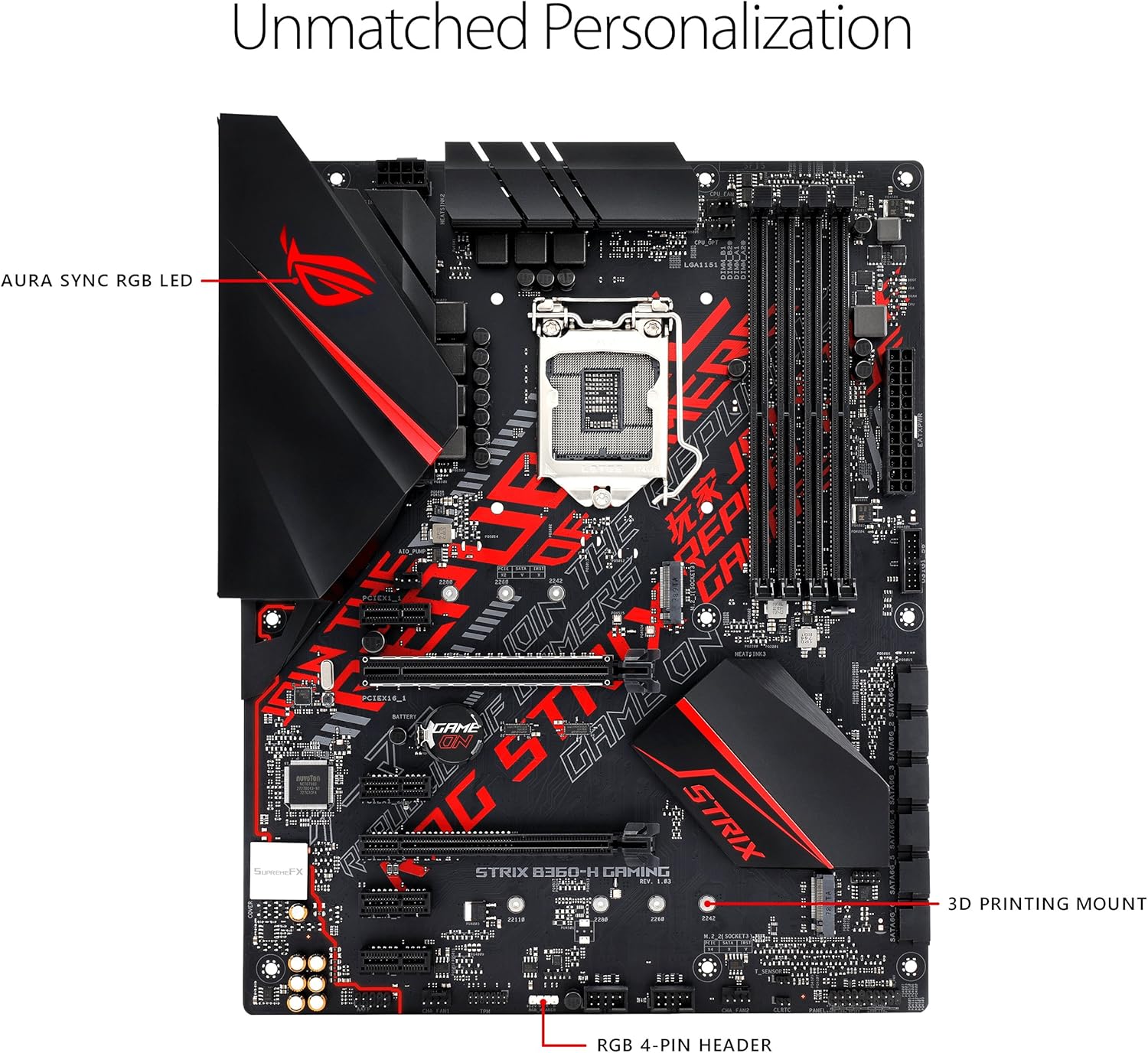
Image 3.2: The motherboard's personalization features, including the AURA SYNC RGB LED area and the RGB 4-pin header for lighting customization.
3.2 구성 요소 설치
- CPU 설치: Carefully align your 8th Generation Intel Core processor with the LGA1151 socket. Ensure the triangle on the CPU matches the triangle on the socket. Lower the retention arm to secure the CPU.
- 메모리(RAM) 설치: Open the clips on both ends of the DIMM slots. Align the notch on the DDR4 memory module with the key in the slot. Press down firmly on both ends until the clips snap into place.
- Storage Devices (M.2/SATA): Install M.2 SSDs into the designated M.2 sockets. For SATA drives, connect them to the SATA ports using the provided SATA cables.
- 그래픽 카드(GPU) 설치: Insert your graphics card into the reinforced SafeSlot PCIe 3.0 x16 slot. Ensure it is seated firmly and secure it with the case screw.
- 전원 연결 : 전원 공급 장치의 24핀 ATX 전원 커넥터와 8핀 CPU 전원 커넥터를 마더보드에 연결합니다.
3.3 주변기기 연결하기
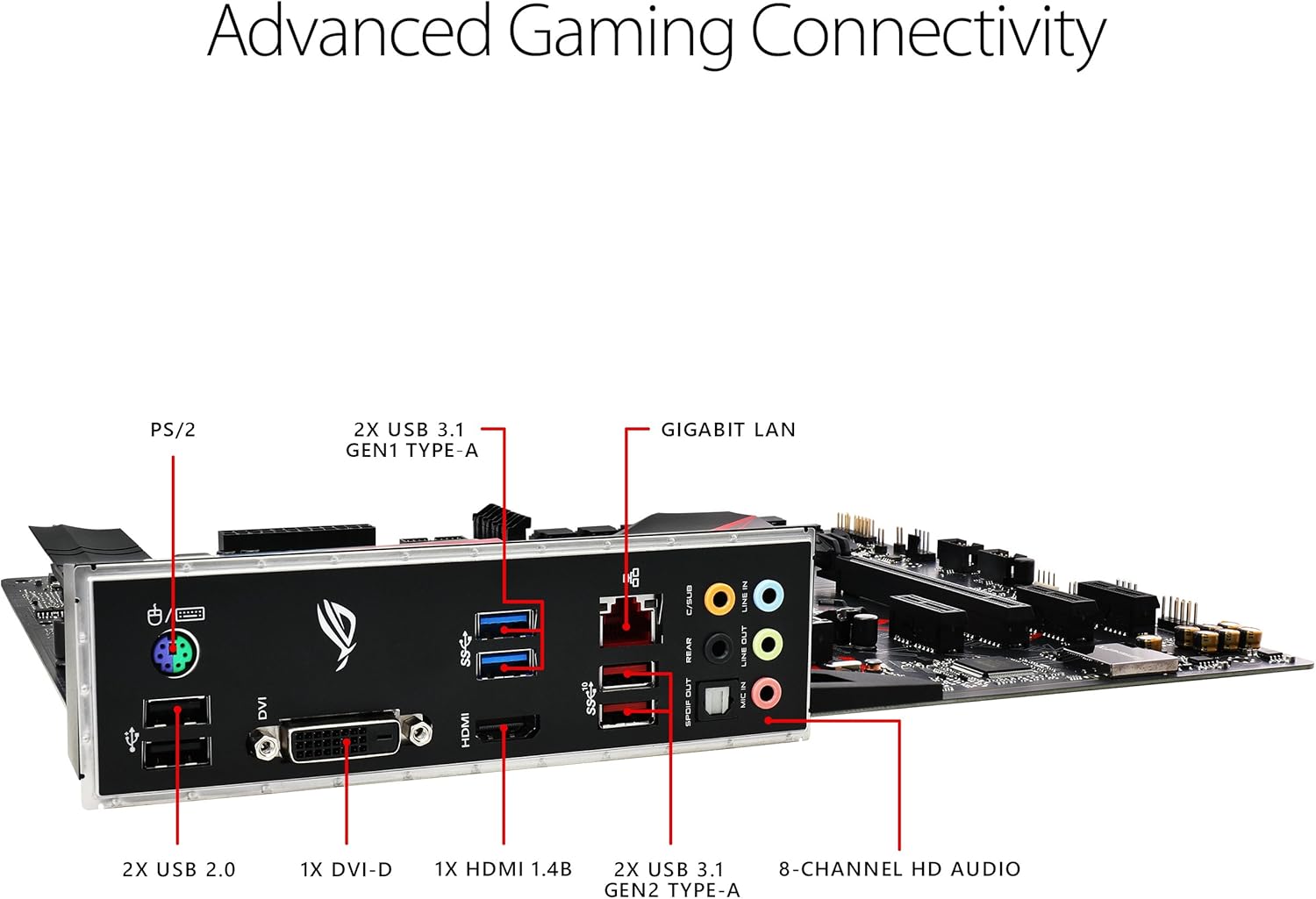
Image 3.3: The rear I/O panel of the motherboard, showing various ports for connectivity including USB, HDMI, DVI-D, LAN, and audio jacks.
Connect your monitor, keyboard, mouse, and other peripherals to the appropriate ports on the rear I/O panel. This includes PS/2, USB 2.0, USB 3.1 Gen1 Type-A, USB 3.1 Gen2 Type-A, DVI-D, HDMI 1.4b, Gigabit LAN, and 8-channel HD audio ports.
4. 마더보드 작동
모든 구성 요소를 설치하고 연결하면 시스템의 전원을 켤 수 있습니다.
4.1 BIOS/UEFI 설정
BIOS/UEFI 설정 유틸리티에 액세스하려면 다음을 누르십시오. 델 키 또는 F2 key during the Power-On Self-Test (POST) when the ASUS logo appears. The BIOS allows you to configure system settings, boot order, and monitor hardware status.
4.2 소프트웨어 및 드라이버
After installing your operating system (e.g., Windows 10), install the necessary drivers from the included support DVD or download the latest versions from the official ASUS support website. This includes chipset drivers, audio drivers, LAN drivers, and any utility software like FanXpert 4 for fan control and ASUS Aura Sync for RGB lighting customization.

Image 4.1: The motherboard's cooling features, including the ROG Strix Armor Plating and multiple fan headers for comprehensive thermal management.
5. 유지관리
정기적인 유지관리는 마더보드와 PC 시스템의 수명과 최적의 성능을 보장하는 데 도움이 됩니다.
- 먼지 제거: Periodically clean dust from inside your PC case, especially from fans and heatsinks, using compressed air. Ensure the system is powered off and unplugged before cleaning.
- 케이블 관리 : 공기 흐름을 개선하고 간섭을 방지하기 위해 케이블을 깔끔하게 배치하세요.
- BIOS/드라이버 업데이트: ASUS 지원을 확인하세요 website regularly for updated BIOS versions and drivers to improve stability and performance.
6. 문제 해결
문제가 발생하면 다음의 일반적인 문제 해결 단계를 참조하세요.
- 디스플레이 없음: Ensure your monitor is connected to the graphics card (or motherboard's integrated graphics port) and is powered on. Reseat the graphics card and RAM modules.
- 시스템이 부팅되지 않음: Check all power connections (24-pin ATX, 8-pin CPU). Verify that the CPU and RAM are correctly seated. Try booting with only essential components (CPU, one RAM stick, GPU).
- 주변 장치가 감지되지 않음: Ensure the peripheral is properly connected to the correct port. Try a different port or update drivers.
- 과열: Check fan connections and ensure proper airflow within the case. Monitor temperatures using software utilities.
- BIOS 재설정: If system instability occurs after changing BIOS settings, clear the CMOS by removing the motherboard battery for a few minutes or using the CLRTC jumper (refer to the full user manual for location).
보다 자세한 문제 해결 방법은 종합 안내서를 참조하십시오. 사용 설명서 (PDF).
7. 사양
| 특징 | 사양 |
|---|---|
| 상표 | 아수스 |
| 시리즈 | STRIX B360-H GAMING |
| 품목 모델 번호 | STRIX B360-H GAMING |
| CPU 소켓 | LGA 1151 |
| 호환 프로세서 | 8세대 인텔 코어 |
| 칩셋 유형 | 인텔 B360 |
| RAM 메모리 기술 | DDR4 |
| 메모리 클럭 속도 | 2400MHz |
| 메모리 저장 용량 | 64GB(최대) |
| 제품 치수 | 12 x 2.68 x 9.6 인치 |
| 품목 무게 | 2.86파운드 |
| 무선형 | 802.11a/b/g/n/ac (Note: This model does not include integrated Wi-Fi, this specification might refer to compatible accessories) |
| USB 2.0 포트 수 | 1 (Internal Header) |
| USB 3.0 포트 수 | 4 (Internal Headers/Rear I/O) |
| 플랫폼 | 윈도우 10 |
8. 보증 및 지원
ASUS provides a limited warranty for its products. Please refer to the warranty card included in your product package for specific terms and conditions, including warranty period and coverage details.
8.1 고객 지원
For technical assistance, driver downloads, or further information, please visit the official ASUS support website or contact their customer service. You can also find the complete 사용 설명서 (PDF) online for detailed instructions and diagrams.
Ask a question about this manual
Ask about setup, troubleshooting, compatibility, parts, safety, or missing instructions. Manuals+ will review the question and use this page’s manual context to help answer it.