
1. 서론
The Edifier M3600D is a high-performance 2.1 active speaker system designed for multimedia use. Featuring THX certification and a total RMS output of 200 Watts, this system delivers powerful and clear audio. It includes a robust subwoofer and two satellite speakers, offering versatile connectivity options for various audio sources.
2. 상자 안에 무엇이 들어있나요?
- 1 x 서브우퍼
- 위성 스피커 2개
- 1 x 전원 케이블
- Connecting Cables (for satellites and audio input)
- 1 x 사용자 설명서
3. 설정
Follow these steps to set up your Edifier M3600D speaker system:
- 놓기: Position the subwoofer on the floor, ideally near a wall for enhanced bass. Place the satellite speakers on either side of your listening area, ensuring they are equidistant from you for optimal stereo imaging.
- 위성 스피커 연결: Connect the right and left satellite speakers to the corresponding output ports on the rear of the subwoofer using the provided cables. The right satellite speaker typically features the volume control and input selection.
- 오디오 소스 연결: Choose your preferred audio input method (Optical, Coaxial, Line In, or AUX) and connect the appropriate cable from your audio source (e.g., computer, TV, smartphone) to the subwoofer's input ports.
- 전원 연결: Plug the power cable into the subwoofer's power input, then connect it to a wall outlet.
- 전원 켜기: Turn on the power switch located on the rear of the subwoofer. The system is now ready for operation.

Figure 3.1: Edifier M3600D Multimedia 2.1 Active Speaker System. This image shows the main subwoofer unit alongside the two satellite speakers, illustrating the complete system setup.
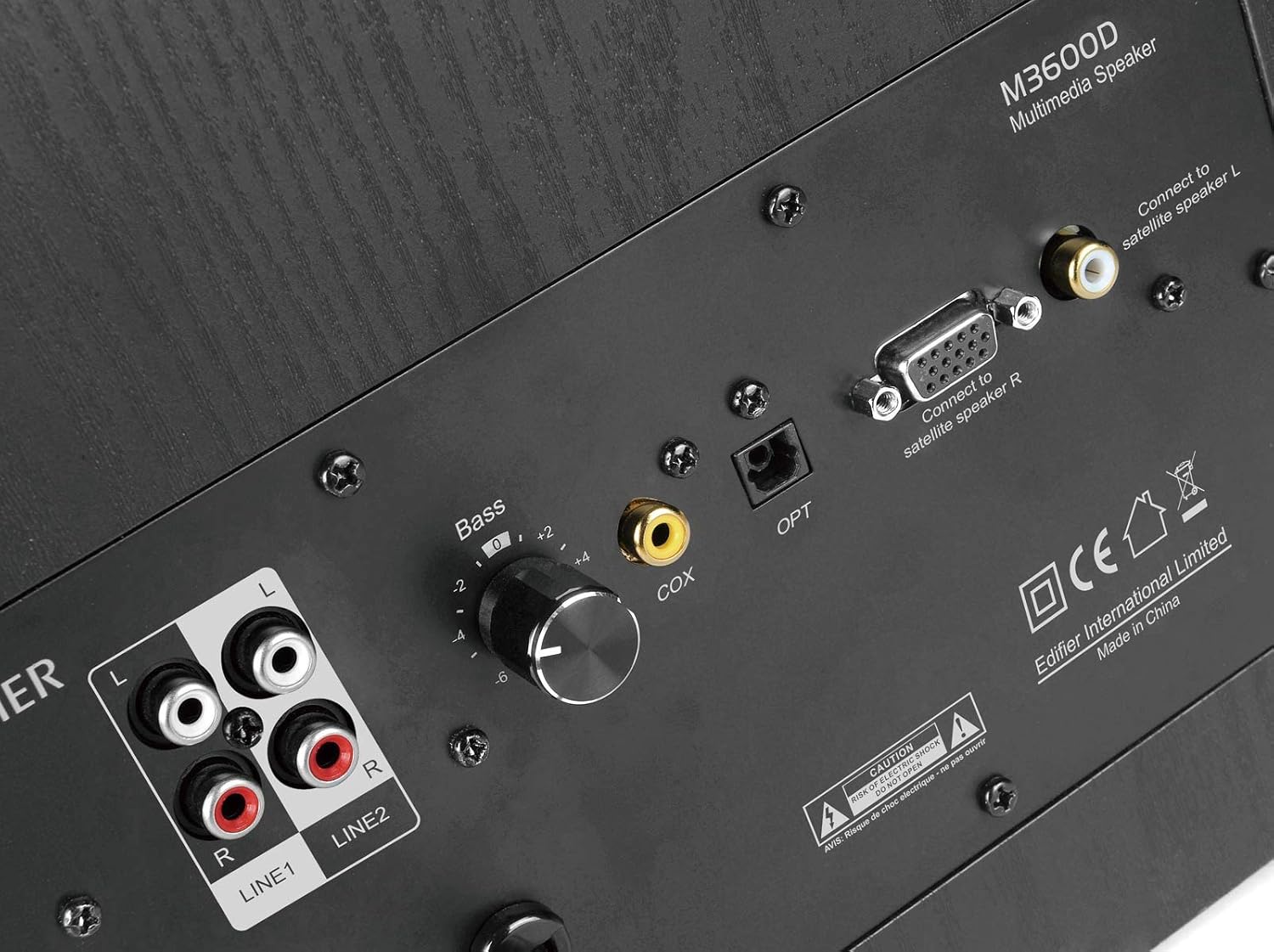
Figure 3.2: Rear panel of the M3600D subwoofer. This image highlights the various input ports (Line In 1, Line In 2, Coaxial, Optical) and the output connections for the satellite speakers, along with the bass control knob and power switch.
4. 사용 설명서
Once the system is set up, follow these instructions for operation:
- 전원 켜기/끄기: Use the main power switch on the rear of the subwoofer to turn the system on or off.
- 볼륨 조절: The large rotary dial on the front of the right satellite speaker controls the master volume. Rotate clockwise to increase volume and counter-clockwise to decrease it.
- 입력 선택: Press the volume dial on the right satellite speaker to cycle through the available audio inputs (Optical, Coaxial, Line In 1, Line In 2, AUX). An indicator light will show the currently selected input.
- 베이스 조정: Use the 'Bass' control knob located on the rear panel of the subwoofer to adjust the bass level to your preference.
- 헤드폰 출력: A 3.5mm headphone jack is available on the right satellite speaker for private listening. Plugging in headphones will mute the speakers.
5. 연결성
The M3600D offers multiple connectivity options:
- 광 입력(OPT): For high-quality digital audio connection from devices like TVs, game consoles, or Blu-ray players.
- Coaxial Input (COX): Another digital audio input option, suitable for similar devices as the optical input.
- Line In 1 (RCA): Stereo RCA input for connecting devices with RCA audio outputs.
- Line In 2 (RCA): Additional stereo RCA input for another audio source.
- AUX 입력(3.5mm): A standard 3.5mm auxiliary input for connecting smartphones, tablets, laptops, or MP3 players.
메모: This system does not support Bluetooth connectivity. For wireless audio, an external Bluetooth adapter would be required (not included).
6. 사양
| 특징 | 사양 |
|---|---|
| 모델명 | M3600D |
| 스피커 유형 | 2.1 Multimedia Speaker System (Subwoofer) |
| 총 전력 출력 | 200 Watts RMS (Subwoofer: 130W, Satellites: 2 x 35W) |
| THX 인증 | 예 |
| 재료 | Wood (MDF cabinet with vinyl wood grain laminate) |
| 입력 | Optical, Coaxial, Line In (RCA x2), AUX (3.5mm) |
| 제어 방법 | Rotary Volume/Input Dial (on satellite), Bass Knob (on subwoofer) |
| 서브우퍼 직경 | 7 Centimeters (Woofer Diameter) |
| 오디오 드라이버 크기 | 17.78 센티미터 |
| 색상 | 검은색 |
| 제품 치수 | 12 x 16.75 x 11 인치 |
| 품목 무게 | 21 파운드 |
| 호환 장치 | Smartphone, Tablet, Desktop, Laptop, MP3 Player, Television, Projector |
7. 문제 해결
If you encounter issues with your M3600D speaker system, please refer to the following common troubleshooting steps:
- 소리 없음:
- Ensure the power cable is securely connected and the power switch on the subwoofer is ON.
- Verify that the correct input source is selected on the right satellite speaker.
- Check all audio cables for secure connections between the source, satellites, and subwoofer.
- Increase the volume on both the speaker system and your audio source.
- If using headphones, ensure they are unplugged from the satellite speaker.
- 왜곡된 소리:
- 스피커 시스템과 오디오 소스의 볼륨을 모두 줄이세요.
- Check if the audio source itself is producing distorted sound. Try a different source.
- 모든 케이블이 올바르게 연결되어 있고 손상되지 않았는지 확인하십시오.
- 서브우퍼의 베이스 조절 노브를 조정하세요.
- 간헐적인 소리:
- 느슨한 케이블 연결을 확인하십시오.
- Ensure there are no strong electromagnetic interferences near the speakers.
- 문제를 확인하려면 다른 오디오 케이블이나 입력 소스를 시도해 보세요.
If the issue persists after trying these steps, please contact Edifier customer support.
8. 유지관리
To ensure the longevity and optimal performance of your Edifier M3600D speaker system, follow these maintenance guidelines:
- 청소: Use a soft, dry cloth to clean the surfaces of the speakers and subwoofer. Avoid using abrasive cleaners, waxes, or solvents.
- 놓기: Place the speakers on a stable, level surface to prevent accidental falls. Avoid placing them in direct sunlight, near heat sources, or in areas with high humidity or dust.
- 통풍: 서브우퍼의 과열을 방지하기 위해 서브우퍼 주변에 적절한 통풍이 이루어지도록 하십시오. 통풍구를 막지 마십시오.
- 케이블 관리 : 케이블 손상을 방지하기 위해 케이블을 정리하고 꼬임이나 과도한 장력이 발생하지 않도록 하십시오.
- 사용하지 않을 때 전원 끄기: For extended periods of inactivity, it is recommended to turn off the system using the main power switch.
9. 보증 및 지원
The Edifier M3600D Multimedia 2.1 Active Speaker System comes with a 2년 한정 보증. This warranty covers manufacturing defects and ensures hassle-free full replacement in the USA and Canada.
For warranty claims, technical assistance, or further inquiries, please contact Edifier USA customer support. Refer to the official Edifier web최신 지원 세부 정보는 해당 사이트나 제품 포장에 제공된 연락처 정보를 참조하세요.