
1. 서론
This manual provides detailed instructions for the operation and maintenance of your FEELWORLD T7PLUS 7-inch DSLR Camera Monitor. Please read this manual thoroughly before using the product to ensure proper function and to prevent damage. Keep this manual for future reference.
2. 제품 오버view
The FEELWORLD T7PLUS is a high-resolution 7-inch camera monitor designed for professional photography and video production. It features a 1920x1200 display, 4K HDMI input/output, and advanced monitoring tools.
2.1 주요 특징
- 고해상도 디스플레이: 7-inch screen with 1920 x 1200 resolution, 1200:1 contrast ratio, and Rec.709 color standard for vivid and accurate image reproduction.
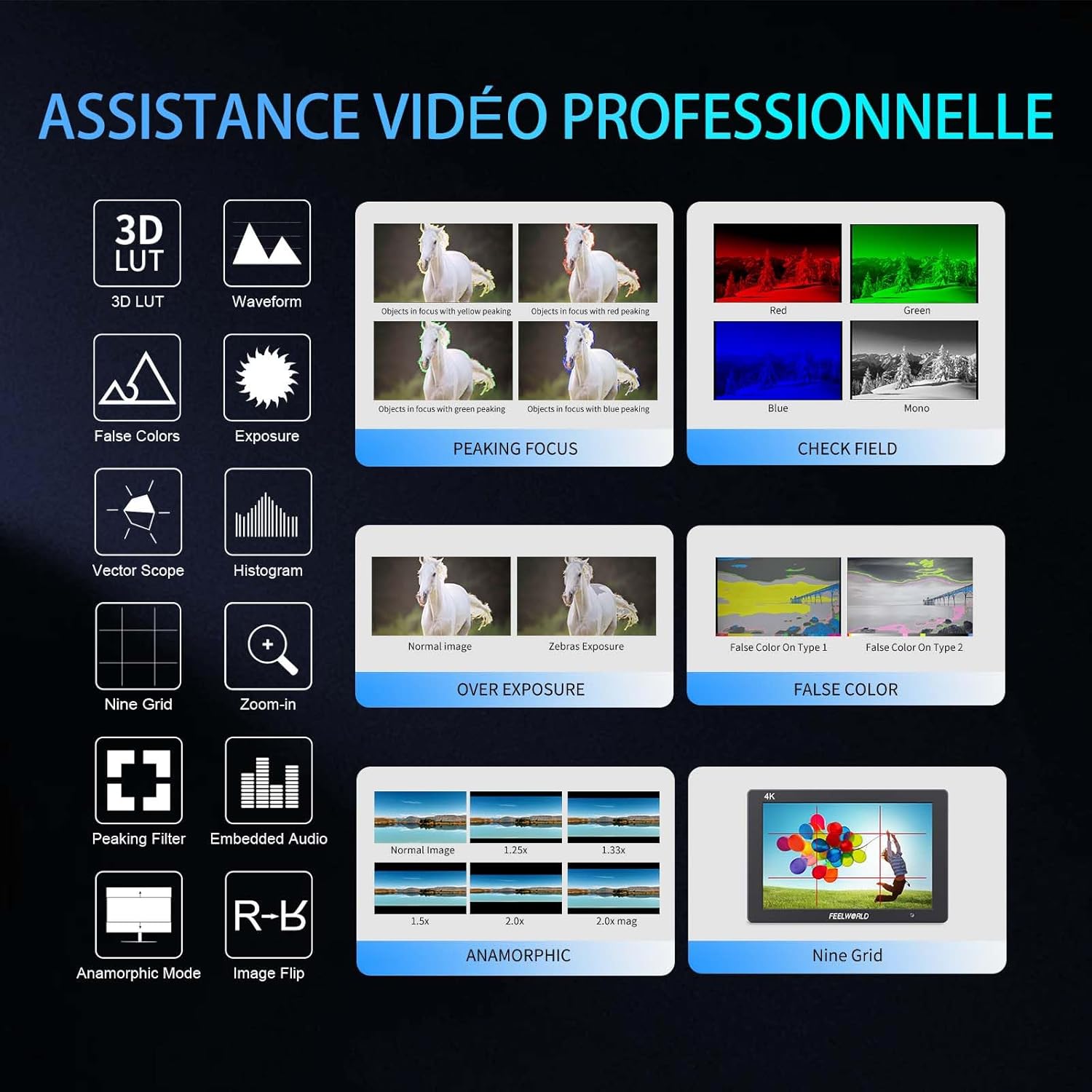
- Advanced Customization Functions: Supports 32 custom 3D LUTs and professional tools including waveform, vector scope, RGB histogram, peaking focus, false color, and more for precise control during shooting.
- 다양한 연결성: Equipped with 4K HDMI input and output, allowing simultaneous display and transmission of live signals to other monitors without compromising video quality.
- Lightweight and Durable Design: Slim 18mm aluminum casing, weighing only 320g.
- 유연한 전원 옵션: Compatible with F550/F970 series batteries and DC 12V power input.
2.2개의 구성요소
패키지에는 다음 품목이 포함됩니다.
- 1 x FEELWORLD T7PLUS Monitor
- 미니 HDMI 케이블 1개
- 1 x 차양
- 1 x Warming Boot Holder
- 1 x F970 Battery Plate
- 1 x F550 Battery
- 1 x 사용자 설명서
- USB 어댑터 케이블 1개
- 1 x 가방

이미지: 앞면 view of the FEELWORLD T7PLUS monitor, showcasin7인치 디스플레이를 탑재했습니다.

Image: A visual representation of all items included in the FEELWORLD T7PLUS package, including the monitor, cables, battery, and accessories.
3. 설정
3.1 모니터 장착
The T7PLUS monitor can be mounted using the included warming boot holder or other compatible mounting solutions. Ensure the monitor is securely attached to your camera rig or stand.

Image: The FEELWORLD T7PLUS monitor shown mounted on top of a DSLR camera, ready for use.
3.2 전원 연결
The monitor supports two power input methods:
- 배터리 전원: Attach a compatible F550 or F970 series battery to the F970 battery plate on the back of the monitor.
- DC 12V 전원: Connect a 12V/1.5A DC power adapter to the DC 12V input port on the side of the monitor.

이미지: 클로즈업 view of the rear of the FEELWORLD T7PLUS monitor, highlighting the battery plate and DC 12V power input port.
3.3 HDMI 연결
Connect your camera or video source to the HDMI-IN port using the provided Mini HDMI cable. If you need to output the signal to another monitor, use the HDMI-OUT port.
이미지: 측면 view of the FEELWORLD T7PLUS monitor, showing the HDMI-IN and HDMI-OUT ports, along with the DC 12V input and headphone jack.
4. 사용 설명서
4.1 기본 컨트롤
모니터에는 탐색 및 기능 제어를 위한 여러 개의 버튼이 있습니다.
- 전원 버튼: Press and hold to turn the monitor on/off.
- 메뉴 버튼: 주 메뉴에 액세스합니다.
- 방향키(위/아래/좌/우): 메뉴 옵션을 탐색하고 설정을 조정합니다.
- F1-F4 Function Buttons: Customizable shortcut buttons for quick access to frequently used features.

Image: Close-up of the control buttons on the top edge of the FEELWORLD T7PLUS monitor, including power, menu, navigation, and customizable function buttons (F1-F4).
4.2 메뉴 탐색
Press the MENU button to open the main menu. Use the arrow buttons to navigate through categories and options. Press the MENU button again or the right arrow to confirm selections. To exit the menu, press the left arrow button repeatedly until the menu closes.
5. 고급 기능
5.1 3D LUT (Look Up Table)
The T7PLUS supports loading up to 32 custom 3D LUTs via a USB drive. This allows you to preview 당신의 푸tage with specific color grades in real-time.
- Save your .cube LUT files to the root directory of a USB drive.
- Connect the USB drive to the monitor's USB port.
- Navigate to the "LUT" menu option.
- Select "Load LUT" and choose your desired LUT file.
- You can switch between loaded LUTs for quick comparison.

Image: The FEELWORLD T7PLUS monitor displaying the 3D LUT menu, showing options for loading and managing custom LUT fileUSB 드라이브에서 s.
5.2 Waveform, Vector Scope, and Histogram
These tools provide detailed analysis of your video signal, helping you achieve accurate exposure and color balance.
- 파형 : 비디오 신호의 휘도와 색차 레벨을 표시합니다.
- 벡터 범위: Shows the color hue and saturation.
- RGB 히스토그램: Illustrates the distribution of red, green, and blue color channels.
These functions can be activated individually or simultaneously via the menu or assigned to a function button.
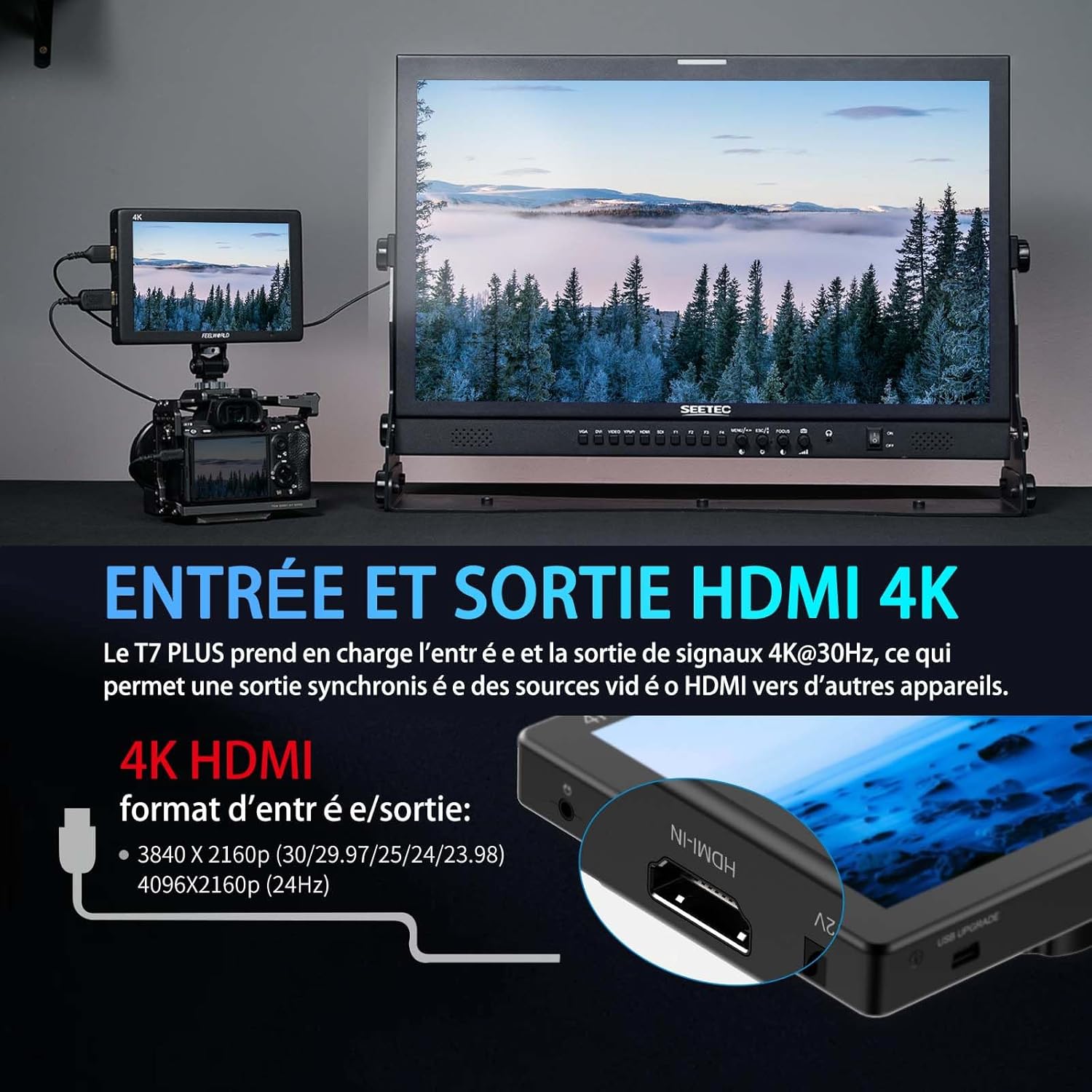
Image: The FEELWORLD T7PLUS monitor displaying a waveform monitor, showing the luminance and chrominance levels of the video input.
5.3 Other Monitoring Tools
- 피킹 포커스 어시스트: 정확한 초점을 맞추는 데 도움이 되는 날카로운 모서리를 강조 표시합니다.
- 거짓 색상 : 색상 스펙트럼을 이용하여 노출 수준을 표시합니다.
- 노출(얼룩말): 과도하게 노출된 영역을 얼룩말 무늬로 나타냅니다.
- 확대: 중요한 초점을 맞추기 위해 이미지의 일부를 확대합니다.
- 나인 그리드: Overlays a grid for composition assistance.
- 아나모픽 모드: 아나모픽 푸를 압축 해제합니다tage.
- 이미지 뒤집기 : 이미지를 수평 또는 수직으로 뒤집습니다.
- 임베디드 오디오: HDMI 입력의 오디오 레벨을 표시합니다.
6. 사양
| 특징 | 사양 |
|---|---|
| 상표 | 느낌 |
| 모델 번호 | T7 플러스 |
| 화면 크기 | 7 인치 |
| 해결 | 1920 x 1200 (UXGA Wide) |
| 종횡비 | 16시 10분 |
| 대비율 | 1200시 1분 |
| 명도 | 450니트 |
| 새로 고침 빈도 | 60Hz |
| View잉 각도 | 178도 |
| 연결 기술 | HDMI |
| HDMI 포트 | 1x HDMI-IN, 1x HDMI-OUT (Supports 4K@30Hz) |
| 특징 | Advanced Customization with 3D LUT |
| 호환 장치 | DSLR Camera, Camcorder, Handheld Stabilizer |
| 무게 | 1 Kilogram (approx. 320g for monitor only) |
| 전원 입력 | DC 12V, NP-F 배터리 플레이트 |
7. 문제 해결
- 전원 없음:
- Ensure the battery is fully charged and correctly inserted, or the DC adapter is securely connected to a power source.
- 전원 버튼이 제대로 끼워졌는지 확인하세요.
- 신호 없음:
- Verify that the HDMI cable is securely connected to both the camera/source and the monitor's HDMI-IN port.
- Confirm the camera's HDMI output settings are correct and active.
- 다른 HDMI 케이블을 사용해 보세요.
- 이미지 왜곡/잘못된 색상:
- Check the monitor's color settings and ensure no LUTs are incorrectly applied.
- Verify the camera's video output format is compatible with the monitor.
- 버튼이 응답하지 않음:
- Restart the monitor by turning it off and on again.
- 버튼을 가리는 이물질이 없는지 확인하세요.
8. 유지관리
- 청소: Use a soft, dry cloth to clean the monitor's body. For the screen, use a specialized screen cleaning solution and a microfiber cloth. Avoid harsh chemicals or abrasive materials.
- 저장: When not in use, store the monitor in a cool, dry place, away from direct sunlight and extreme temperatures. Use the provided bag for protection during transport.
- 배터리 관리 : If using batteries, ensure they are charged periodically even when not in use to maintain battery health.
9. 보증 및 지원
The FEELWORLD T7PLUS monitor comes with a 1년 보증 from the FEELWORLD Official Store. For technical support, service, or warranty claims, please contact FEELWORLD customer service through their official channels or the retailer where the product was purchased.
자세한 내용은 다음을 방문하세요. FEELWORLD Brand Store.
10. 제품 비디오
Video: A short product showcase of the FEELWORLD T7PLUS monitor, demonstrating its physical design, various ports (HDMI-IN, HDMI-OUT, DC 12V), and control buttons. This video provides a visual overview of the monitor's external features and connectivity options.