
1. 제품 오버view
The Sharp EL-531TG-GY is a scientific calculator designed for students and professionals requiring advanced mathematical functions. It features a 2-line display and Multi-Line Playback, facilitating the input and review of complex equations. This model is suitable for general math, algebra, geometry, trigonometry, statistics, biology, chemistry, and general science applications.
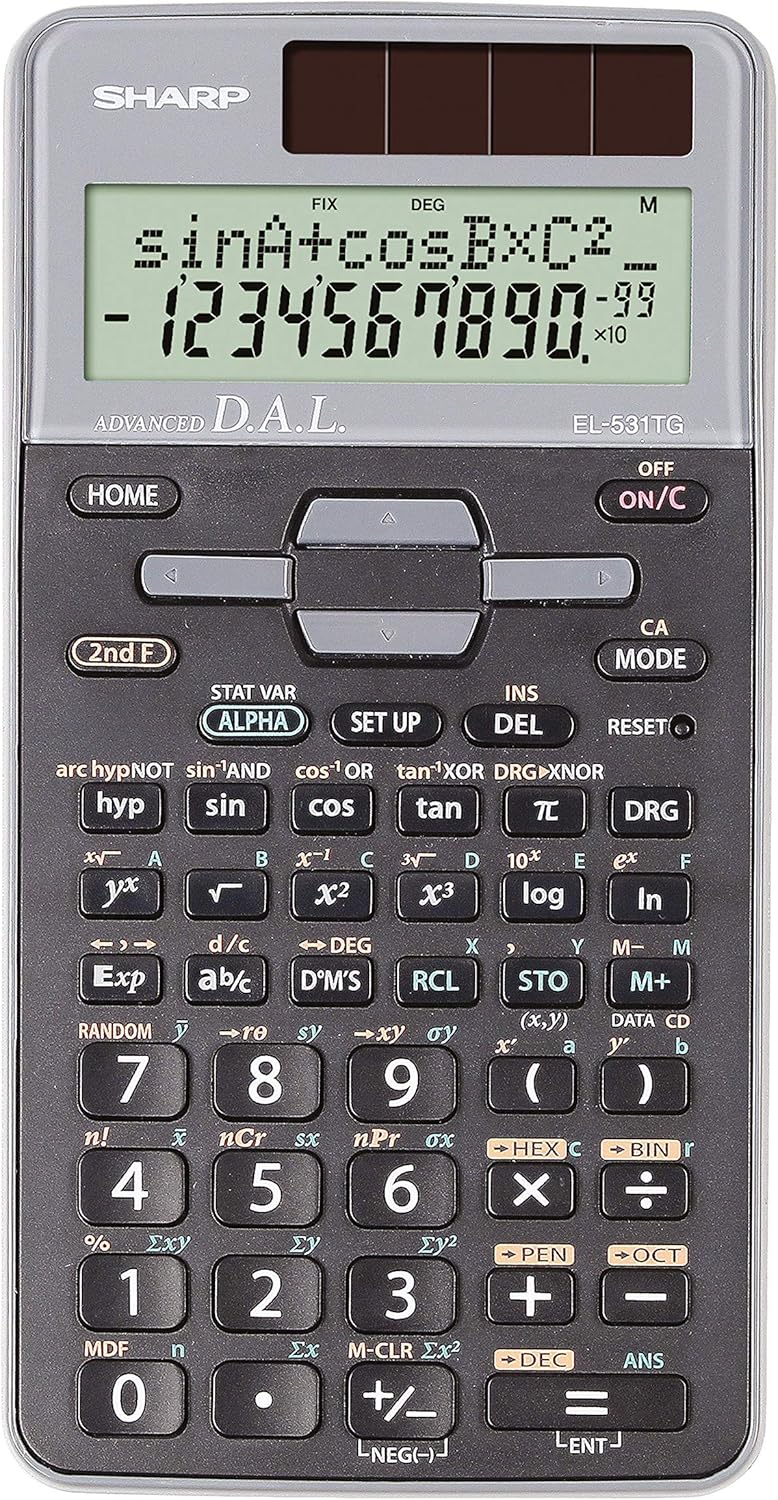
그림 1: 전면 view of the Sharp EL-531TG-GY Scientific Calculator, showing the display, keypad, and solar panel.
2. 설정 및 초기 사용
2.1 전원
The EL-531TG-GY calculator operates using both solar power and a single LR44 button cell battery. The solar panel provides power in well-lit environments, while the battery ensures operation in low-light conditions or when solar power is insufficient. An LR44 battery is included with the calculator.
2.2 켜기/끄기
- 계산기를 돌리려면 ON, 누르세요 켜짐/꺼짐 열쇠.
- 계산기를 돌리려면 끄다, 누르세요 2번째 F 키 다음에 끄다 key (which is typically the same as 켜짐/꺼짐).
2.3 초기 디스플레이 설정
Upon first use or after a reset, the calculator will typically default to certain settings (e.g., DEG for angle units). Refer to Section 3.3 for details on changing mode settings.
3. 사용 설명서
3.1 기본 산술 연산
숫자 키패드를 사용하여 숫자를 입력하십시오. +, -, ×, 그리고 ÷ 덧셈, 뺄셈, 곱셈, 나눗셈 키를 각각 누르세요. = 결과를 얻기 위해.
3.2 과학적 함수
The calculator performs over 273 advanced scientific functions. Many functions are accessed by pressing the 2번째 F 원하는 기능 키 바로 앞에 키를 누르십시오.
- 삼각 함수: 사용 죄, 코사인, 탠 껍질. Inverse functions (sin⁻¹, cos⁻¹, tan⁻¹)를 통해 접근합니다. 2번째 F.
- 로그 함수: 사용 통나무 (10진법) 그리고 ln (자연로그).
- 힘과 뿌리: 사용 x², √, x³, ³√.
- 분수: 사용하세요 디씨/디씨 분수 입력 및 변환 키입니다.
3.3 Mode Settings (DEG/RAD/GRAD)
To change the angle unit mode (Degrees, Radians, Gradians):
- 를 누르세요 디알지(DRG) 열쇠.
- 반복해서 누르세요 디알지(DRG) to cycle through DEG (Degrees), RAD (Radians), and GRAD (Gradians). The current mode is indicated on the display.
3.4 메모리 함수
The calculator includes memory functions for storing and recalling values.
- STO(매장): 누르다 스토 followed by a variable key (e.g., A, B) to store the displayed value.
- RCL(회상): 누르다 RCL followed by the variable key to recall the stored value.
- M+ (메모리 플러스): 표시된 값을 독립 메모리에 추가합니다.
- M- (메모리 마이너스): 독립 메모리에서 표시된 값을 뺍니다.
3.5 Multi-Line Playback
The 2-line display allows for Multi-Line Playback, enabling users to review previous calculations and expressions. Use the directional arrow keys (up/down) to scroll through past entries and results. This feature is useful for checking work or re-using parts of previous calculations.
4. 유지관리
4.1 청소
To clean the calculator, wipe the surface gently with a soft, dry cloth. Do not use abrasive cleaners, solvents, or excessive moisture, as these can damage the display or internal components.
4.2 배터리 교체
The calculator uses one LR44 button cell battery. If the display becomes dim or erratic in low-light conditions, the battery may need replacement. To replace the battery:
- 계산기가 꺼져 있는지 확인하십시오.
- 계산기 뒷면에 있는 배터리함을 찾으세요.
- 조심스럽게 수납공간 덮개를 엽니다.
- 기존 LR44 배터리를 제거하고 새 배터리를 삽입하십시오. 이때 극성(+/-)을 반드시 확인하십시오.
- 배터리 덮개를 단단히 닫으세요.
4.3 보관
When not in use, store the calculator in a cool, dry place away from direct sunlight and extreme temperatures. The hard cover included with the calculator provides protection from scratches and minor impacts.
5. 문제 해결
5.1 디스플레이 문제
- 화면이 꺼지거나 어둡게 표시됨: Ensure sufficient light for the solar panel. If the issue persists, replace the LR44 battery.
- Erratic Display: This may indicate a low battery. Replace the LR44 battery.
5.2 잘못된 결과
- Check Mode Settings: Verify that the angle unit (DEG, RAD, GRAD) is set correctly for trigonometric calculations.
- Input Error: Review your input using the Multi-Line Playback feature to ensure the expression was entered correctly.
- Memory Contents: If using memory functions, ensure the stored values are correct.
5.3 계산기가 응답하지 않음
계산기가 작동하지 않으면 재설정을 시도해 보세요. 재설정 버튼을 찾으세요. 다시 놓기 button (often a small recessed button requiring a thin object like a paperclip to press). Pressing this button will clear all memory and return the calculator to its factory default settings.
6. 사양

그림 2: 전면 view of the Sharp EL-531TG-GY Scientific Calculator, illustrating its dimensions.
| 특징 | 설명 |
|---|---|
| 모델 번호 | SH-EL531TGGY |
| 디스플레이 유형 | 2-line LCD with Multi-Line Playback |
| 기능 | 273개 이상의 고급 과학 기능 |
| 전원 | 태양광 패널 및 LR44 배터리 1개(포함) |
| 재료 | 플라스틱 |
| 치수(길이 x 너비 x 높이) | 16.1 x 8 x 1.5cm (대략) |
| 무게 | 100g(대략) |

그림 3: 측면 view of the Sharp EL-531TG-GY Scientific Calculator, showing its slim profile.
7. 보증 및 지원
7.1 보증 정보
This product is covered by a manufacturer's warranty. Please refer to the warranty card included with your purchase or visit the official Sharp web해당 지역의 자세한 보증 약관 및 조건은 해당 사이트에서 확인하세요.
7.2 고객 지원
For technical assistance, troubleshooting not covered in this manual, or service inquiries, please contact Sharp customer support. Contact information can typically be found on the Sharp official web사이트 또는 제품 포장에 표시되어 있습니다.