
소개
This manual provides detailed instructions for the setup, operation, maintenance, and troubleshooting of your Dual DT 450 manual turntable. Designed for optimal audio quality, this belt-driven turntable features a high-quality wooden housing, a balanced tonearm with adjustable tracking force, and an integrated switchable phono pre-amplifier. Please read these instructions carefully before using your turntable to ensure proper function and longevity.
제품 끝view
The Dual DT 450 turntable is engineered to deliver an exceptional vinyl listening experience. Its robust construction and thoughtful features ensure stable playback and clear sound reproduction.
주요 특징:
- 설계: High-quality wooden housing for stable operation and a puristic aesthetic.
- 유연성: Connects to traditional HiFi systems via phono or AUX input; supports two speeds (33/45 RPM).
- 사전amp정수기: Built-in switchable phono pre-amplifier for easy connection.
- 자기 픽업 시스템: Features an Audio Technica AT 3600 cartridge with pre-set tracking force and a dampED 토네암 리프트.
- 포함된 액세서리: Turntable unit, platter with drive belt, counterweight, platter mat, dust cover, center puck, and user manual.
제품 Views:
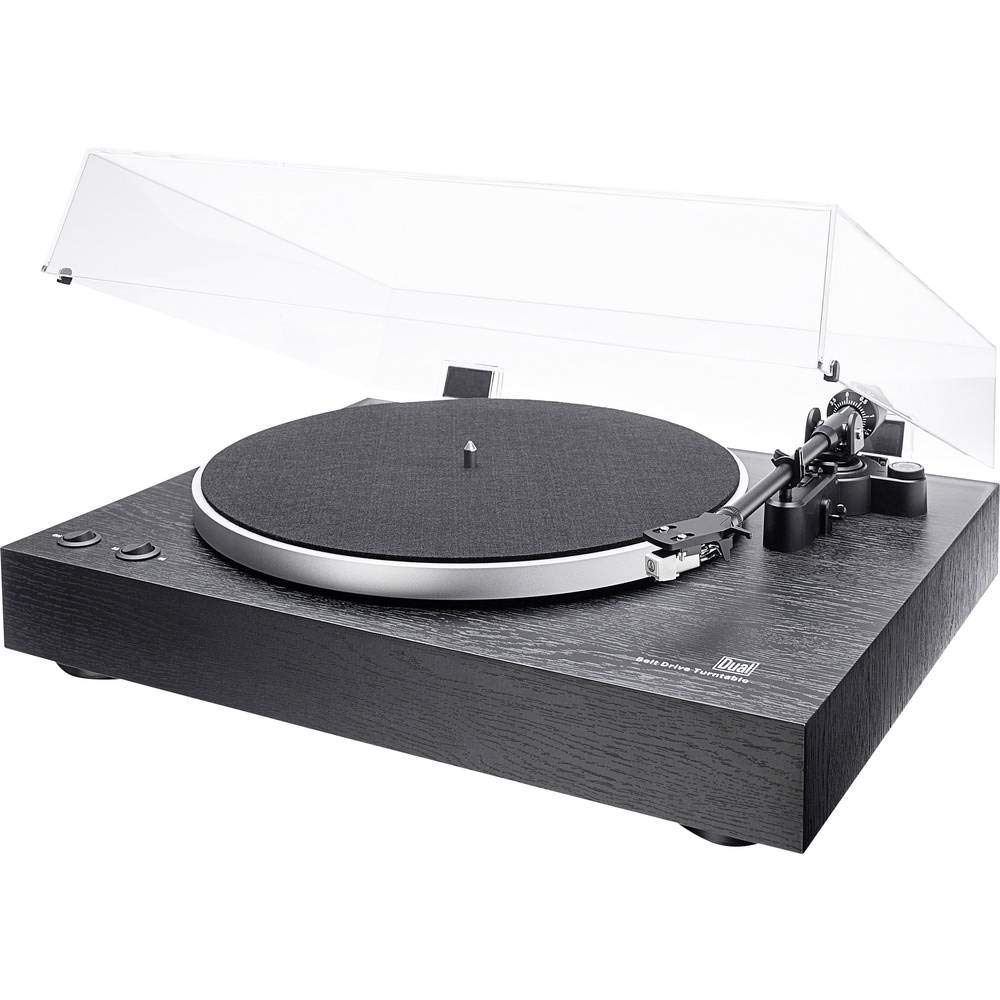
전반적인 view of the Dual DT 450 Turntable with its dust cover.

상세한 view of the Audio Technica AT 3600 magnetic pickup system on the tonearm.

The Dual DT 450 Turntable with its transparent dust cover in the open position.

The Dual DT 450 Turntable with its transparent dust cover in the closed position, protecting the platter and tonearm.
설치 가이드
Follow these steps to correctly set up your Dual DT 450 turntable.
- 짐 풀기: 포장에서 모든 구성품을 조심스럽게 꺼내십시오. 제품 설명에 나열된 모든 액세서리가 있는지 확인하십시오.view 존재합니다.
- 놓기: Place the turntable on a stable, level surface away from direct sunlight, heat sources, and strong vibrations.
- 플래터 및 벨트 설치: Place the platter onto the spindle. Carefully install the drive belt around the inner rim of the platter and around the motor pulley.
- 카운터웨이트 설치: Slide the counterweight onto the rear of the tonearm. Rotate it until the tonearm is balanced and floats freely. Then, adjust the counterweight to the recommended tracking force (refer to cartridge specifications, typically around 2-3 grams for the AT3600).
- 안티 스케이팅 조정: Set the anti-skating dial to match the tracking force you set. This helps prevent the stylus from skipping across the record.
- 먼지 커버 설치: Attach the dust cover hinges to the rear of the turntable unit.
- 전원 연결: Connect the power adapter to the DC input on the rear of the turntable, then plug it into a wall outlet.
- 오디오 연결: 턴테이블과 콘솔의 RCA 케이블을 연결하세요. amplifier or receiver. Use the PHONO input if your amplifier has one and switch the turntable's internal pre-amplifier to 'OFF'. If your amplifier only has AUX/LINE inputs, switch the turntable's internal pre-amplifier to 'ON' and connect to an available AUX/LINE input. Ensure the ground wire is connected to your amp가능하다면 앰프의 접지 단자에 연결하십시오.
설정 데모 비디오:
This video demonstrates the general setup and operation of a turntable. While it may feature a different model, the basic principles of assembly and connection are applicable to the Dual DT 450.
작동 지침
Once your Dual DT 450 is set up, follow these steps to play your vinyl records.
- 전원 켜기: Turn the power switch to the 'ON' position. The platter will begin to rotate.
- 장소 기록: Carefully place your vinyl record onto the platter. If playing a 45 RPM single, use the included center puck.
- 속도 선택: Choose the correct playback speed (33 or 45 RPM) using the speed selector switch.
- 리프트 톤암: 톤암 리프트 레버를 사용하여 톤암을 올립니다.
- 톤암 위치 지정: 원하는 레코드 시작 홈 위로 톤암을 부드럽게 이동시키세요.
- 하단 톤암: Slowly lower the tonearm using the tonearm lift lever. The stylus will descend onto the record, and playback will begin.
- 볼륨 조절: 연결된 기기의 볼륨을 조절하세요 amplifier or receiver to your desired listening level.
- 재생 중지: At the end of the record, or when you wish to stop, use the tonearm lift lever to raise the tonearm, then return it to its rest. Turn the power switch to 'OFF'.
유지
정기적인 유지보수는 최적의 성능을 보장하고 턴테이블의 수명을 연장시켜 줍니다.
- 먼지 커버: Clean the dust cover with a soft, dry cloth. Avoid abrasive cleaners that may scratch the surface.
- 스타일러스 관리: Gently clean the stylus regularly using a soft brush designed for stylus cleaning, brushing from back to front. A dirty stylus can degrade sound quality and damage records.
- 기록 정리: Keep your records clean to prevent dust and debris from accumulating on the stylus and affecting playback. Use a dedicated record cleaning brush or solution.
- 일반 청소: Wipe the turntable chassis with a soft, slightly damp 천. 독한 화학 물질을 사용하지 마십시오.
- 벨트 검사: 주기적으로 구동 벨트의 마모 또는 늘어짐을 점검하십시오. 정확한 재생 속도를 유지하려면 필요한 경우 교체하십시오.
문제 해결
If you encounter issues with your Dual DT 450, refer to the following common problems and solutions:
| 문제 | 가능한 원인 | 해결책 |
|---|---|---|
| 소리가 안 나거나 아주 작게 들린다. | Incorrect audio connection; Pre-amplifier switch setting; Amplifier input selection; Stylus not properly seated. | Check RCA cable connections. Ensure pre-amplifier switch is set correctly (ON for AUX, OFF for PHONO). Select the correct input on your amplifier. Verify stylus is securely attached to the cartridge. |
| 왜곡되거나 먹먹한 소리 | Dirty stylus; Incorrect tracking force; Damaged stylus; Worn record. | Clean the stylus. Re-adjust tracking force. Replace the stylus if damaged. Try a different record. |
| Turntable platter not spinning | Power not connected; Drive belt dislodged or broken; Motor issue. | Ensure power adapter is connected and plugged in. Check if the drive belt is properly seated around the platter and motor pulley. If the issue persists, contact customer support. |
| 기록 건너뛰기 | Dust/debris on record or stylus; Incorrect tracking force or anti-skating; Turntable not level; Damaged record. | Clean record and stylus. Re-adjust tracking force and anti-skating. Ensure turntable is on a level surface. Inspect record for damage. |
기술 사양
| 특징 | 사양 |
|---|---|
| 상표 | 듀얼 |
| 모델명 | DT 450 |
| 모델 번호 | 75268 |
| 스타일 | 수동 턴테이블 |
| 색상 | 검은색 |
| 재료 | 목재 |
| 제품 치수 | 43.5 x 36.7 x 14.4cm |
| 품목 무게 | 6 킬로그램 |
| 최대 회전 속도 | 45 RPM |
| 특별 기능 | 내장 사전amplifier, Dust cover, Adjustable speed |
| 권tage | 12볼트 |
| 전원 | DC(글리히스트롬) |
| 신호 대 잡음비(dB) | 60데시벨 |
보증 및 지원
For warranty information and customer support, please refer to the documentation included with your product or visit the official Dual web사이트. 보증 청구를 위해 구매 증빙 자료를 보관하세요.