
1. 서론
The Vonyx VMM-F701 is a versatile 7-channel mixer designed for various audio applications, including live performances and studio recording. It features multiple input options, an integrated effect processor, USB playback, and +48V phantom power for condenser microphones. This manual provides essential information for the safe and effective use of your VMM-F701 mixer.
2. 안전 지침
- Always read these instructions carefully before using the device. Keep this manual for future reference.
- 전원 공급 장치가 볼륨과 일치하는지 확인하십시오.tage는 장치에 표시됩니다.
- 장치를 비나 습기에 노출시키지 마십시오.
- 번개가 칠 때나 장기간 사용하지 않을 때는 전원 코드를 뽑아 두세요.
- To reduce the risk of electric shock, do not remove the cover. There are no user-serviceable parts inside. Refer all servicing to qualified service personnel.
3. 제품 오버view
The Vonyx VMM-F701 mixer offers a comprehensive set of features for audio mixing. It includes 5 mono microphone/line inputs (XLR/6.3mm Jack combo), 1 stereo line input (6.3mm Jack), and an integrated USB player. Each channel provides Hi, Mid, and Low equalization controls, along with FX, Pan, and AUX adjustments. The mixer also features a built-in effect processor with delay and repeat functions, +48V phantom power for condenser microphones, a balanced stereo main output, and a headphone output.
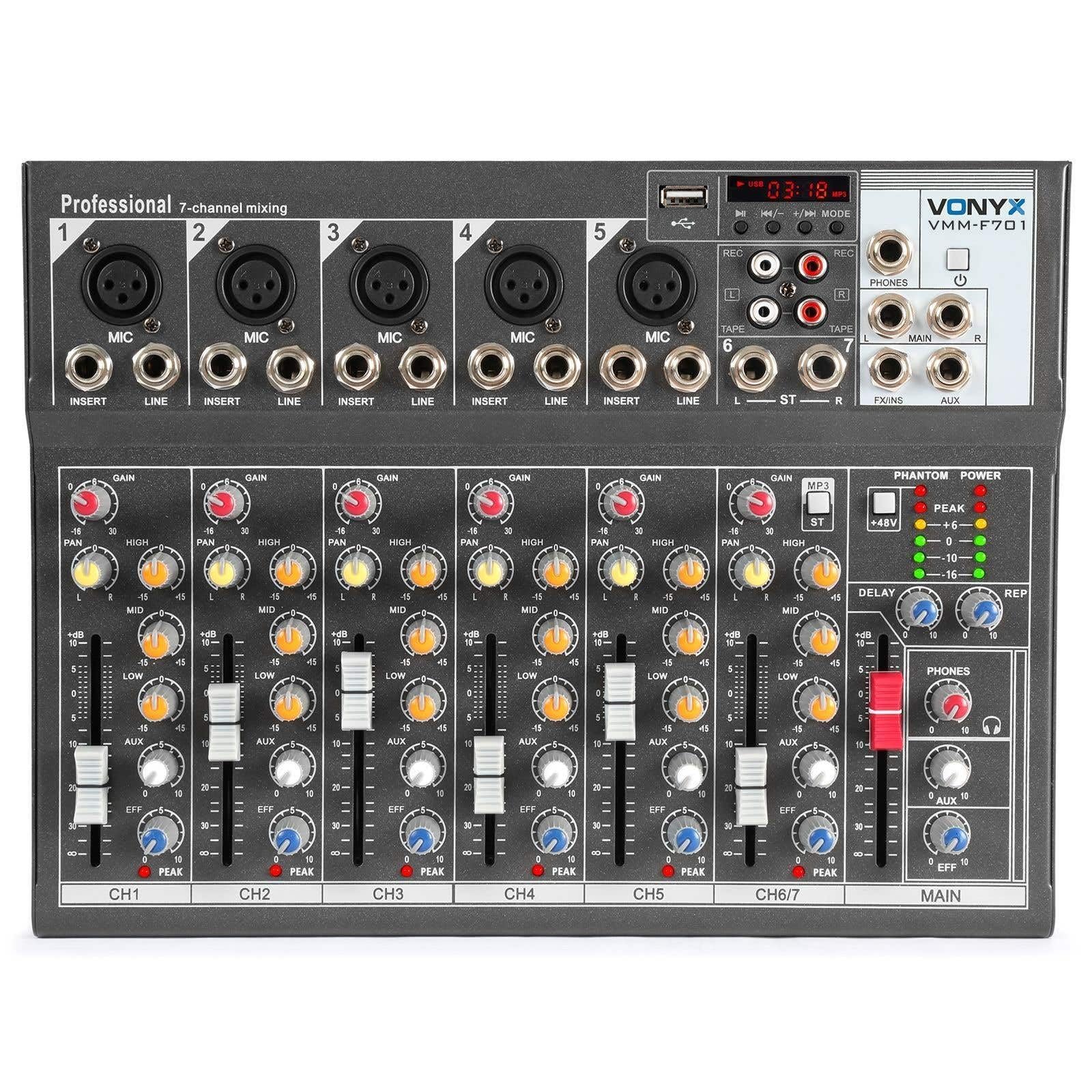
전반적인 view of the Vonyx VMM-F701 7-channel mixer, showcasin컴팩트한 디자인과 제어 레이아웃이 특징입니다.

위에서 아래로 view of the Vonyx VMM-F701 mixer, highlighting the input channels, faders, and equalization knobs.

Close-up of the USB input and media player controls on the Vonyx VMM-F701 mixer, with a USB drive inserted.

Rear panel of the Vonyx VMM-F701 mixer, showing the power input and USB port for external power.
4. 설정
- 전원 연결: Connect the mixer to a 230Vac/50Hz power source using the provided power cable. The mixer can also be powered via USB (5V/1A) for certain functions.
- 입력 연결:
- For microphones, use XLR or 6.3mm jack cables to connect to channels 1-5. Activate +48V phantom power for condenser microphones.
- For line-level instruments or devices, use 6.3mm jack cables to connect to channels 1-5 (line inputs) or the stereo line input (channels 6/7).
- 출력 연결 : 메인 스피커를 연결하거나 amplifier to the balanced stereo main output (6.3mm Jack).
- 헤드폰: Connect headphones to the dedicated headphone output for monitoring.

상세한 view of the mains power input and a wiring diagram for microphone/line inputs on the Vonyx VMM-F701 mixer.
5. 사용 설명서
- 게인 컨트롤 : Adjust the input sensitivity for each channel using the GAIN knob.
- 이퀄라이제이션(EQ): Use the HI, MID, and LOW knobs to adjust the treble, midrange, and bass frequencies for each channel.
- 팬 제어: Adjust the stereo positioning of each channel using the PAN knob.
- FX 보내기: Use the FX knob to send a portion of the channel's signal to the internal effect processor.
- AUX 전송: Use the AUX knob to send a portion of the channel's signal to an external effect unit or monitor mix (via FX Send/Return).
- 채널 페이더 : Adjust the volume level for each individual channel.
- 메인 페이더: 믹서의 전체 출력 볼륨을 제어합니다.
- Effect Processor: Adjust the DELAY and REP (Repeat) knobs to control the characteristics of the built-in delay effect.
- USB 플레이어: 오디오를 재생하려면 USB 포트에 USB 드라이브를 삽입하세요. files. Use the media player controls (play/pause, skip, mode) to navigate and control playback.
- 팬텀 파워 : Press the +48V PHANTOM POWER button to supply power to condenser microphones. Ensure microphones are connected before activating.
6. 유지관리
- 청소: Use a soft, dry cloth to clean the mixer's surface. Avoid liquid cleaners or solvents.
- 저장: 믹서기는 직사광선과 극한의 온도를 피해 서늘하고 건조한 곳에 보관하세요.
- 통풍: 과열을 방지하려면 믹서 주변을 적절히 환기시키십시오.
7. 문제 해결
| 문제 | 가능한 원인 | 해결책 |
|---|---|---|
| 사운드 출력이 없습니다 | Power off; cables disconnected; faders down; incorrect input selection. | Check power connection; ensure all cables are securely connected; raise channel and main faders; verify correct input source. |
| 왜곡된 소리 | 입력 게인이 너무 높음; 출력 레벨이 너무 높음; 케이블 불량. | Reduce GAIN knob; lower main fader; try a different cable. |
| 마이크가 작동하지 않습니다 | Phantom power off (for condenser mics); mic not connected; faulty mic. | Activate +48V PHANTOM POWER; check mic connection; test with another microphone. |
| USB 플레이어가 작동하지 않습니다. | USB drive not recognized; unsupported file 체재. | Ensure USB drive is properly inserted; try a different USB drive; check file formats (e.g., MP3). |
8. 사양
| 특징 | 사양 |
|---|---|
| 모델 번호 | VMM-F701 |
| 채널 수 | 7 |
| 주파수 범위 | 20Hz - 20kHz |
| THD(전체 고조파 왜곡률) | <0.01% |
| 신호 대 잡음 비율 | >110dB |
| 출력 레벨 | ±1V |
| 라인 입력 감도 | ±150mV |
| 마이크 입력 감도 | ±1.5mV |
| 연결 볼륨tage | 230Vac / 50Hz (USB 5V/1A) |
| 치수(길이 x 너비 x 높이) | 230 x 312 x 45mm(9.06 x 12.28 x 1.77인치) |
| 무게 | 2.25kg(4.96파운드) |
| 연결 기술 | USB |
| 오디오 입력 | XLR, 1/4 inch (6.3 mm) jack |
| 출력 커넥터 유형 | TRS 1/4" (balanced) |
9. 보증 및 지원
보증: This product comes with a 2-year warranty on spare parts. For warranty claims, please retain your proof of purchase.
지원하다: For technical assistance, troubleshooting, or service inquiries, please contact your local Vonyx dealer or visit the official Vonyx web지원 리소스 사이트.