
소개
Welcome to the user manual for your Mustool G600 Digital Portable Microscope. This guide provides detailed instructions to help you set up, operate, and maintain your device, ensuring optimal performance and longevity. Please read this manual thoroughly before using the microscope.
제품 끝view
The Mustool G600 is a versatile digital portable microscope designed for detailed observation of tiny objects. It features a high-definition display and adjustable magnification, making it suitable for various applications.
주요 특징
- 4.3-inch HD LCD display for clear view주고받음.
- HD 3.6MP CCD sensor for high-resolution imaging.
- Adjustable magnification from 1x to 600x.
- Eight high-brightness LEDs for optimal illumination.
- Support for Micro SD card up to 64GB (not included) for storage.
- Built-in Li-ion battery providing approximately 6 hours of continuous working time.
- Auto turn-off function for power saving.
- Object distance: 15mm to infinity.
- 다국어 지원.
구성 요소

Figure 1: Mustool G600 Digital Portable Microscope in operation, showing a circuit board under its lens and the magnified image on the display.
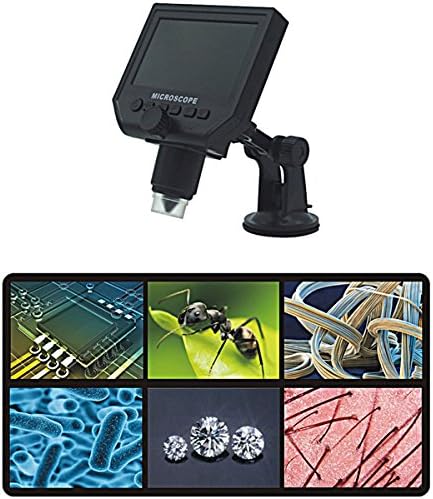
Figure 2: The Mustool G600 Digital Portable Microscope detached from its stand, showcasing the device's compact design and the adjustable stand.

Figure 3: The Mustool G600 Digital Portable Microscope display, illustrating various magnified views such as circuit components, an ant, textile fibers, bacteria, diamonds, and hair strands.

그림 4: 전면 view of the Mustool G600 Digital Portable Microscope mounted on its suction cup stand, highlighting the 4.3-inch LCD screen and control buttons.

그림 5: 측면 view of the Mustool G600 Digital Portable Microscope, illustrating the adjustable arm of the stand and the microscope's lens assembly.

그림 6: 후면 view of the Mustool G600 Digital Portable Microscope, showing the various ports for power, data, and Micro SD card insertion.
패키지 내용
아래 나열된 모든 품목이 패키지에 포함되어 있는지 확인해 주세요. 품목이 누락되었거나 손상된 경우 고객 지원팀에 문의해 주세요.
- 1 x Mustool G600 LCD Digital Microscope
- 1 x EU Plug Power supply (Note: Adapter may vary by region)
- 1 x 데이터 라인(USB 케이블)
- 1 x Multi-functional support (Stand)
- 1 x User’s manual (This document)
설정
배터리 충전
Before first use, fully charge the microscope's built-in Li-ion battery.
- Connect the provided power supply to the microscope's charging port.
- 전원 공급장치를 표준 전기 콘센트에 꽂습니다.
- 충전 표시등이 켜집니다. 완전히 충전되면 표시등의 색상이 바뀌거나 꺼질 수 있습니다.
- 완전 충전 시 약 6시간 동안 연속 사용이 가능합니다.
스탠드 조립
The multi-functional support allows for stable positioning of the microscope.
- Attach the microscope unit to the adjustable arm of the stand. Ensure it is securely fastened.
- Place the suction cup base on a clean, flat, non-porous surface. Press down firmly on the suction cup lever to secure the stand.
- Adjust the arm and microscope angle as needed for your view잉 주제.
Inserting a Micro SD Card (Optional)
To save images and videos, insert a Micro SD card (up to 64GB, not included).
- Locate the Micro SD card slot on the side or back of the microscope unit.
- Gently insert the Micro SD card with the gold contacts facing down (or as indicated by the slot diagram) until it clicks into place.
- 제거하려면 카드가 튀어나올 때까지 다시 살짝 밀어 넣으세요.
작동 지침
전원 켜기/끄기
를 누르고 계세요 힘 button (usually marked with a power symbol) for a few seconds to turn the microscope on or off. The LCD screen will illuminate.
배율 및 초점 조정
The microscope offers 1x to 600x continuous magnification.
- 관찰하고자 하는 물체를 현미경 렌즈 바로 아래에 놓으십시오.
- 큰 것을 회전시키다 초점 노브 (typically located on the side of the microscope body) to bring the image into sharp focus on the LCD screen.
- Adjust the distance between the lens and the object (object distance: 15mm to infinity) using the stand's adjustment mechanisms to achieve the desired magnification and clarity.
LED 밝기 조정
The microscope is equipped with 8 adjustable high-brightness LEDs.
위치 LED 밝기 조절 (often a small knob or button) on the microscope body. Rotate or press it to increase or decrease the illumination on your subject.
이미지 및 비디오 캡처
To capture still images or record videos, ensure a Micro SD card is inserted.
- 하는 동안 viewing your subject, press the 방법 button to switch between photo mode, video mode, and playback mode.
- 사진 모드에서는 확인/캡처 버튼을 눌러 사진을 찍으세요.
- 동영상 모드에서 누르세요 확인/캡처 녹화를 시작하려면 버튼을 누르세요. 녹화를 중지하려면 다시 누르세요.
- 캡처됨 fileMicro SD 카드에 저장됩니다.
메뉴 탐색
사용하세요 메뉴 button to access settings and options.
사용하세요 위/아래 or 왼쪽/오른쪽 메뉴 옵션을 탐색하려면 화살표 버튼을 사용합니다.
를 누르세요 OK 버튼을 눌러 선택 사항을 확인하세요.
Common settings include resolution (1080P, 720P, VGA), language, date/time, and auto-off timer.
유지
청소
To ensure clear viewing and extend the life of your microscope:
- Gently wipe the LCD screen with a soft, lint-free cloth. For stubborn smudges, slightly damp천에 물이나 화면 세척제를 묻혀 닦으세요.
- Use a soft brush or air blower to remove dust from the lens. For smudges on the lens, use a specialized lens cleaning solution and cloth.
- Clean the microscope body with a dry or slightly damp 천. 연마성 세척제나 용매를 사용하지 마십시오.
저장
When not in use, store the microscope in a cool, dry place, away from direct sunlight and extreme temperatures.
Keep the lens covered to prevent dust accumulation.
배터리 관리
배터리 수명을 연장하려면:
- 배터리를 자주 완전히 방전시키지 마세요.
- 장기간 보관할 경우, 배터리를 약 50% 용량까지 충전하세요.
- Recharge the battery every few months if not in use to prevent deep discharge.
문제 해결
| 문제 | 가능한 원인 | 해결책 |
|---|---|---|
| 현미경 전원이 켜지지 않습니다. | 배터리가 소진되었습니다. | 제공된 전원 공급장치를 사용하여 배터리를 충전하세요. |
| 이미지가 흐릿합니다. | Incorrect focus or object distance. | Adjust the focus knob and/or the distance between the lens and the object. |
| 화면이 너무 어둡거나 밝습니다. | LED 밝기가 조절되지 않았습니다. | Adjust the LED brightness control. |
| 이미지/동영상을 저장할 수 없습니다. | Micro SD 카드가 삽입되지 않았거나 카드가 꽉 찼거나 손상되었습니다. | Insert a Micro SD card, ensure it has sufficient space, or try formatting the card (this will erase all data). |
| Microscope turns off automatically. | Auto turn-off function is enabled or battery is low. | Charge the battery. Check menu settings to adjust or disable the auto turn-off timer. |
이러한 해결 방법을 시도한 후에도 문제가 지속되면 고객 지원팀에 문의하세요.
명세서
| 특징 | 세부 사항 |
|---|---|
| 모델 | Mustool G600 |
| 표시하다 | 4.3인치 HD LCD 디스플레이 |
| 픽셀 | HD 3.6MP CCD |
| 해결 | 1080P, 720P, VGA |
| 확대 | 1-600x (Continuous) |
| 물체 거리 | 15mm - infinity |
| 광원 | 8 Adjustable High Brightness LEDs |
| 스토리지 지원 | Micro SD card up to 64GB (Not included) |
| 전원 | 리튬이온 배터리 내장 |
| 배터리 수명 | Approx. 6 hours continuous working |
| 자동 꺼짐 | 예 |
| 언어 지원 | English, Spanish, Russian, Korean, Japanese, Thai, Hebrew, Portuguese, German, French, Italian, Turkish, Czech, Chinese |
| 재료 | Glass/Glass-like (Lens), Other components as per design |
| 색상 | 검은색 |
| 한국어: | 783050248461 |
보증 및 지원
The Mustool G600 Digital Portable Microscope comes with a standard manufacturer's warranty. Please refer to the warranty card included in your package for specific terms and conditions.
For technical support, troubleshooting assistance beyond this manual, or warranty claims, please contact Mustool customer service through the retailer where you purchased the product or visit the official Mustool web대지.
Please have your product model (G600) and purchase information ready when contacting support.