
1. 서론
This manual provides essential information for the safe and efficient operation of your InFocus IN3148HD 1080p 5000 Lumen Professional Projector. Please read these instructions thoroughly before using the projector and retain them for future reference. The InFocus IN3148HD is designed for professional environments, offering high brightness, full HD resolution, and versatile connectivity for various presentation needs.

그림 1: 전면 view of the InFocus IN3148HD Projector.
2. 주요 특징
The InFocus IN3148HD projector offers a range of features designed for high-performance presentations:
- 1080p (1920 x 1080) Native Resolution: Delivers crisp, high-definition images.
- 5000 루멘 밝기 : Ensures clear visibility in well-lit rooms.
- 1.5배 광학 줌: Provides flexibility in projector placement and image sizing.
- 3D 지원: Compatible with Blu-ray and other 3D content sources.
- 10W Speaker: Integrated audio for presentations.
- 다중 연결 옵션: Includes two HDMI 1.4 ports, VGA, and more.
- 네트워크 모니터링: Allows for remote management and control.
비디오 1: 오버view of the InFocus IN3148HD projector's features and capabilities.
3. 설정 및 설치
3.1 풀기
Carefully remove the projector and all accessories from the packaging. Verify that all components listed in the packing list are present and undamaged. Keep the original packaging for future transport or storage.
3.2 배치
Position the projector on a stable, flat surface or mount it securely. Ensure adequate ventilation around the unit to prevent overheating. Consider the throw distance and screen size for optimal image quality. The projector supports both tabletop and ceiling mount installations.

Figure 2: Projector dimensions for installation planning.
4. 연결성
The IN3148HD offers a variety of input and output ports for connecting to different devices.
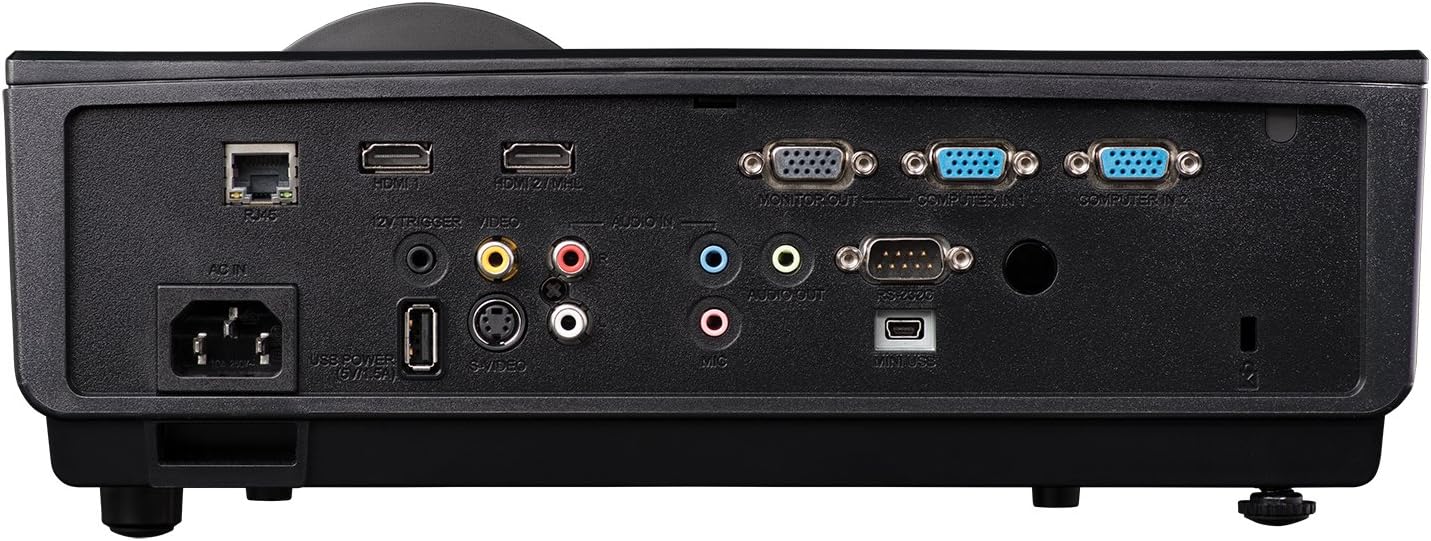
그림 3: 사용 가능한 연결 포트를 보여주는 후면 패널.
- HDMI(x2): For digital video and audio input from computers, Blu-ray players, and other HDMI-enabled devices.
- VGA(x2): 컴퓨터의 아날로그 비디오 입력용입니다.
- USB: 서비스 또는 펌웨어 업데이트 관련 문의입니다.
- 네트워크(RJ45): 네트워크 제어 및 모니터링을 위해.
- 오디오 입력/출력: 3.5mm jacks for external audio sources or output to external speakers.
- 비디오(RCA): 합성 비디오 입력용.
5. 운영
5.1 전원 켜기/끄기
- 전원 켜기: Connect the power cord and press the power button on the projector or remote control. The power indicator light will turn blue.
- 전원 끄기 : Press the power button twice. The projector will enter a cooling cycle before shutting down completely.
5.2 이미지 조정
- 집중하다: 이미지가 선명해질 때까지 렌즈의 초점 링을 돌립니다.
- 줌: 렌즈의 줌 링을 조절하여 이미지 크기를 변경하십시오.
- 키스톤 보정: Use the keystone correction function in the OSD (On-Screen Display) menu to correct trapezoidal image distortion.
6. 3D 기능
The InFocus IN3148HD projector supports 3D content from compatible sources, such as Blu-ray players. To experience 3D, you will need active 3D glasses (sold separately) and a 3D-enabled source device.

Figure 4: Visual representation of 3D content view주고받음.
7. 유지관리
정기적인 유지관리를 통해 최적의 성능을 보장하고 프로젝터의 수명을 연장할 수 있습니다.
- Lamp 대사: 난amp has a limited lifespan. Refer to the OSD menu for lamp hour information. Replace the lamp when its brightness significantly decreases or when the lamp indicator light illuminates. Always use genuine InFocus replacement lamps.
- 필터 청소: Clean the air filter regularly to prevent dust buildup, which can affect cooling and image quality. Refer to the full user manual for specific instructions on accessing and cleaning the filter.
- 렌즈 세척: Use a soft, lint-free cloth and a specialized lens cleaning solution to gently clean the projector lens. Avoid abrasive materials.
8. 문제 해결
If you encounter issues with your projector, consult the table below for common problems and solutions.
| 문제 | 가능한 원인 | 해결책 |
|---|---|---|
| 이미지가 표시되지 않음 | Power cable disconnected, input source not selected, lamp 실패. | Check power connection, select correct input source, replace lamp 필요한 경우. |
| 이미지가 흐릿함 | Lens out of focus, incorrect throw distance. | 초점 링을 조정하고 프로젝터 위치를 조정하십시오. |
| 오디오 없음 | Volume too low, audio cable disconnected, incorrect audio source. | Increase volume, check audio cable connections, select correct audio input. |
| 프로젝터가 과열됩니다 | 환기구가 막혔거나 공기 필터가 더럽습니다. | Ensure clear ventilation, clean air filter. |
9. 사양
Detailed technical specifications for the InFocus IN3148HD projector.
| 특징 | 사양 |
|---|---|
| 상표 | 인포커스 |
| 모델명 | IN3148HD |
| 디스플레이 해상도 | 1920 x 1080(1080p) |
| 명도 | 5000 루멘(ANSI) |
| 대비율 | 1000시 1분 |
| 디스플레이 유형 | 디엘피(DLP) |
| 연결 기술 | HDMI, USB, VGA |
| 특징 | 3D 스트리밍 |
| Lamp 왓tage | 310 와트 |
| 광원 작동 수명 | 4500시간 |
| 품목 무게 | 4.47 킬로그램 |
10. 보증 및 지원
For warranty information, technical support, or service inquiries, please refer to the warranty card included with your product or visit the official InFocus web사이트. 보증 청구를 위해 구매 증빙 자료로 구매 영수증을 보관하세요.