
ILEBYGO H18
ILEBYGO H18 Mini Wireless Keyboard Touchpad Combo User Manual
Model: H18 | Brand: ILEBYGO
1. 서론
This manual provides detailed instructions for the ILEBYGO H18 2.4Ghz Mini Wireless Keyboard Touchpad Combo. This device combines a QWERTY keyboard with a multi-touch touchpad, offering versatile control for various smart devices. Please read this manual thoroughly before use to ensure proper operation and longevity of your device.
2. 상자 안에 무엇이 들어있나요?
- 1 x ILEBYGO H18 2.4G Mini Wireless Keyboard (Batteries included)
- 1 x USB 수신기
- 1 x USB 충전 케이블
- 1 x 사용자 설명서
3. 제품 오버view
The ILEBYGO H18 features a compact design with a large touchpad area that doubles as a keyboard. Key indicators and control buttons are strategically placed for ease of use.
3.1 장치 레이아웃

Figure 1: ILEBYGO H18 device dimensions and top view.
3.2 표시기와 버튼
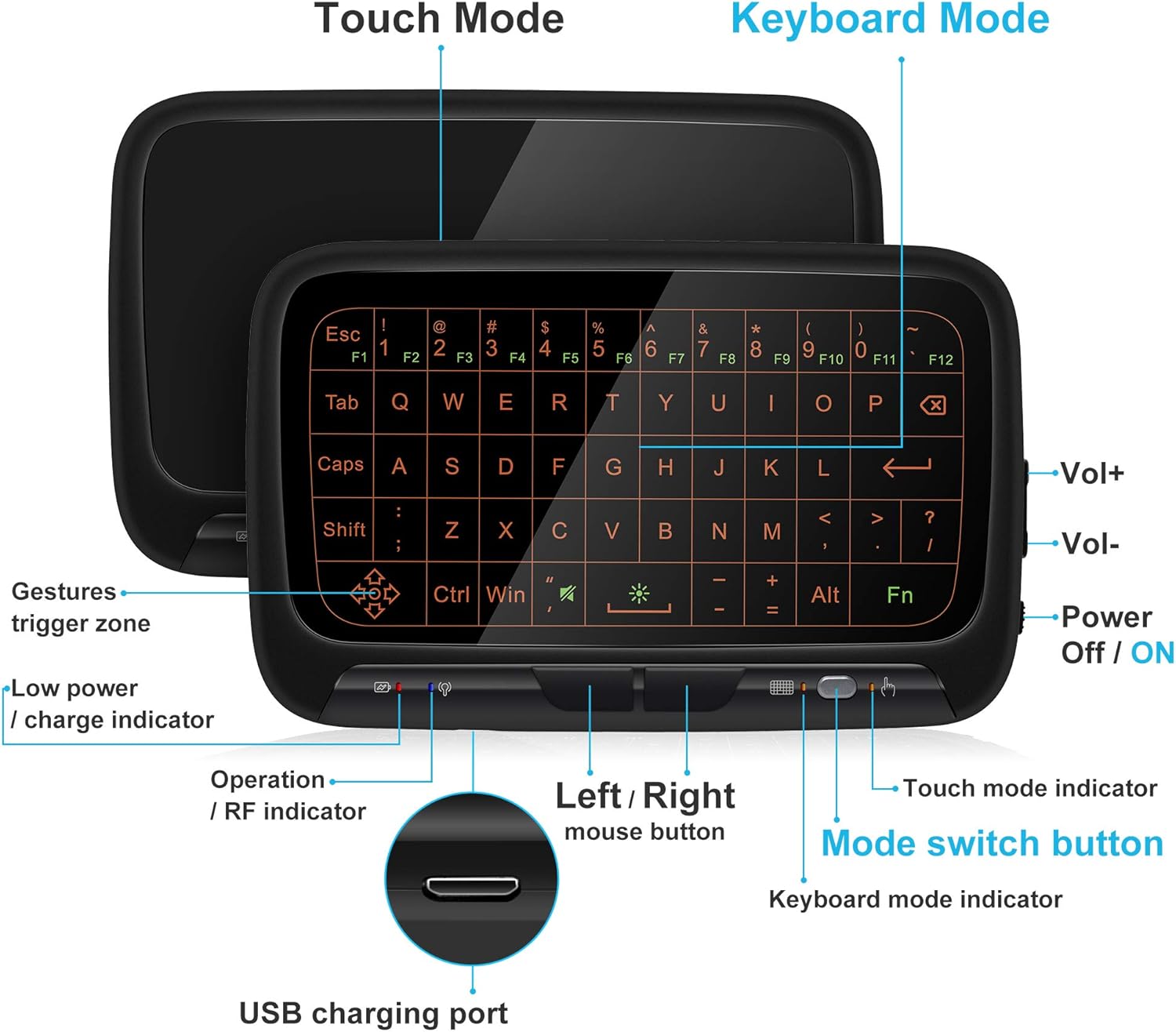
그림 2: 전면 view of the ILEBYGO H18 with labeled indicators and buttons.
- USB 충전 포트 : 장치를 충전합니다.
- Low Power / Charge Indicator: 배터리 상태를 표시합니다.
- Operation / RF Indicator: 연결 상태를 나타냅니다.
- Left / Right Mouse Buttons: Physical buttons for mouse clicks.
- 모드 전환 버튼: Toggles between Touchpad Mode and Keyboard Mode.
- Touch Mode Indicator: Lights up when in Touchpad Mode.
- Keyboard Mode Indicator: Lights up when in Keyboard Mode.
- Volume Controls (Vol+ / Vol-): 오디오 출력을 조절합니다.
- Power Off / ON Switch: 장치를 켜거나 끕니다.
4. 설정
4.1 장치 충전
- Connect the provided USB charging cable to the micro USB port on the device.
- 케이블의 다른 쪽 끝을 USB 전원(예: 컴퓨터 USB 포트, USB 벽면 어댑터)에 연결합니다.
- The Low Power / Charge Indicator will illuminate during charging. It will change or turn off when fully charged.

Figure 3: Charging the ILEBYGO H18.
4.2 장치에 연결하기
- 패키지에 포함된 USB 수신기를 찾으십시오.
- Insert the USB receiver into an available USB port on your target device (e.g., Android TV Box, Projector, HTPC, PC, Laptop).
- Turn on the ILEBYGO H18 by sliding the Power Off / ON switch to the "ON" position.
- The Operation / RF Indicator will blink, then turn solid blue once a connection is established.

Figure 4: Connecting the ILEBYGO H18 via USB receiver.
5. 사용 설명서
5.1 Switching Between Touchpad and Keyboard Modes
를 누르세요 모드 전환 버튼 (located near the right mouse button) to toggle between Touchpad Mode and Keyboard Mode. The corresponding indicator light will illuminate to show the active mode.

Figure 5: Switching between Keyboard and Touchpad Modes.
5.2 Touchpad Mode Gestures
The touchpad supports various multi-touch gestures for intuitive navigation:

Figure 6: Touchpad gesture guide.
- 단일 탭 : 마우스 왼쪽 클릭.
- 두 손가락 탭: 마우스 오른쪽 버튼을 클릭하세요.
- 싱글 핑거 드래그: Mouse movement.
- 두 손가락으로 드래그하기: 화면을 스크롤하세요.
- Two-Finger Pinch: 확대/축소.
- 세 손가락 스와이프: Switch applications or access multitasking view.
5.3 키보드 모드
In Keyboard Mode, the touchpad area illuminates to display a full QWERTY keyboard layout. You can type by tapping on the virtual keys. The keyboard supports standard functions like Shift, Ctrl, Alt, and Windows key combinations.
5.4 백라이트 조정
The keyboard features a 3-level adjustable backlight. To adjust the backlight brightness, press the Fn key and the backlight adjustment key (often indicated by a sun icon or similar) simultaneously or in sequence, depending on the specific model's implementation.

Figure 7: Adjusting keyboard backlight.
6. 유지관리
- 부드럽고 마른 천으로 닦아 장치를 깨끗하게 유지하십시오.
- 장치를 극한의 온도, 습기 또는 직사광선에 노출시키지 마십시오.
- 기기를 분해하려고 시도하지 마세요. 그럴 경우 보증이 무효화됩니다.
- 자주 사용하지 않더라도 배터리 수명을 유지하려면 기기를 정기적으로 충전하십시오.
7. 문제 해결
7.1 장치가 응답하지 않음
- 장치의 전원이 켜져 있는지 확인합니다.
- Check if the USB receiver is securely plugged into the host device.
- Verify the device battery is charged. Recharge if the low power indicator is active.
- Try plugging the USB receiver into a different USB port on the host device.
7.2 백라이트가 작동하지 않음
- Ensure the device is in Keyboard Mode.
- Press the Fn key and the backlight adjustment key to cycle through brightness levels or turn it on.
7.3 Touchpad Sensitivity Issues
- Ensure the device is in Touchpad Mode.
- Clean the touchpad surface to remove any dirt or oils that might affect sensitivity.
8. 사양
| 특징 | 세부 사항 |
|---|---|
| 상표 | 일레비고 |
| 모델 번호 | H18 |
| 연결 기술 | 2.4GHz 무선(USB 수신기) |
| 키보드 레이아웃 | 쿼티 |
| 특별 기능 | 3-Level Backlit, Rechargeable, Touchpad Mode, Keyboard Mode |
| 배터리 | 300mAh 리튬이온 배터리 내장 |
| 제품 치수 | 5.6인치 길이 x 3.6인치 너비 x 0.7인치 높이 |
| 품목 무게 | 0.13 파운드 |
| 호환 장치 | Laptop, PC, Projector, Android TV Box, IPTV, HTPC |
9. 보증 및 지원
ILEBYGO provides a 12-month warranty for this product. For any issues, questions, or support needs, please contact our customer service. Refer to the contact information provided with your purchase or visit the official ILEBYGO web대지.
Note: The warranty does not cover damage caused by misuse, accidents, or unauthorized modifications.
10. 제품 비디오
영상 1: 공식 종료view of the ILEBYGO 2.4Ghz Mini Wireless Keyboard Touchpad Combo, demonstrating its features and functionality.
Ask a question about this manual
Ask about setup, troubleshooting, compatibility, parts, safety, or missing instructions. Manuals+ will review the question and use this page’s manual context to help answer it.