
1. 서론
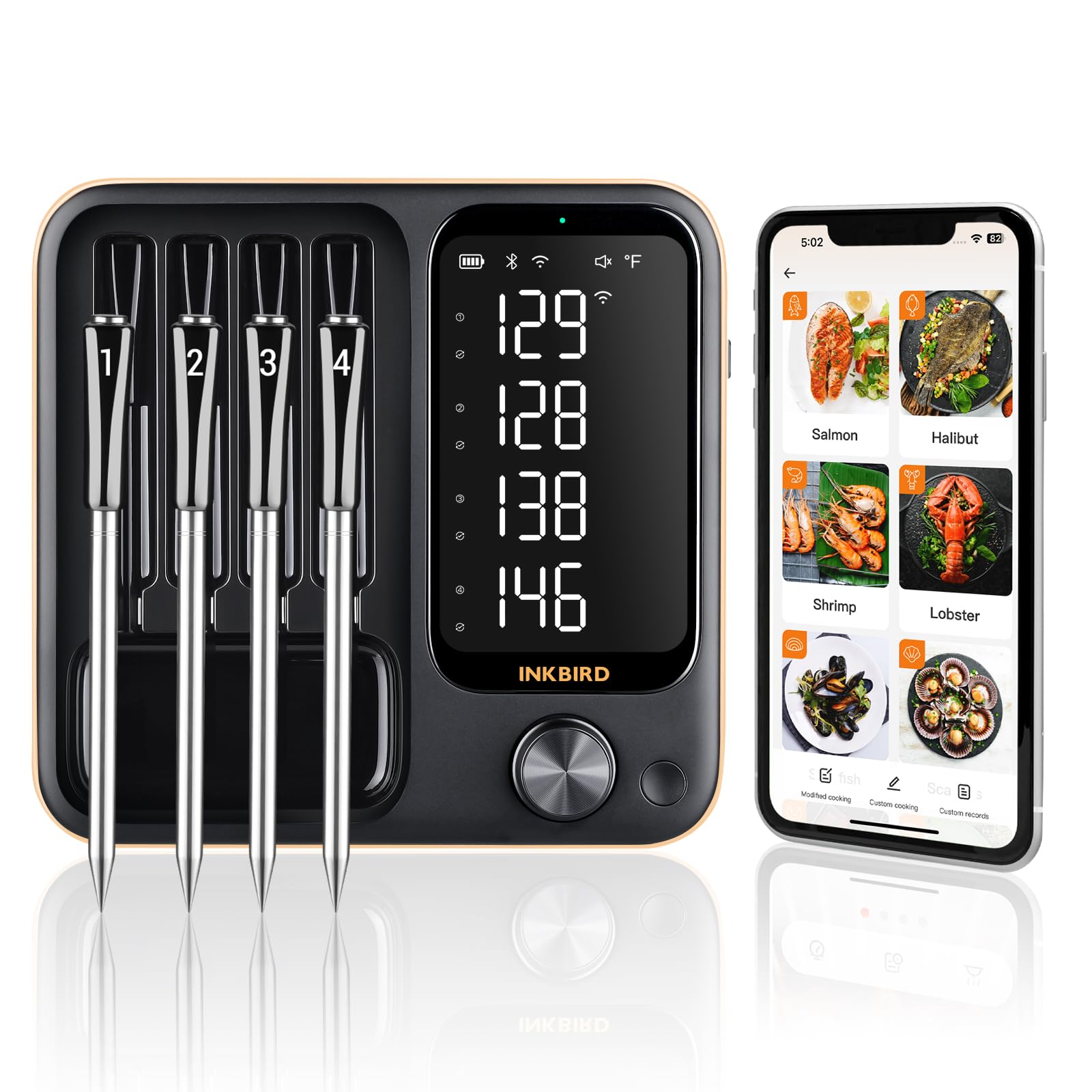
The Inkbird 4-Probe WiFi Wireless Meat Thermometer (Model INT-14-BW-US2) is designed to provide precise temperature monitoring for various cooking methods, including BBQ, grilling, smoking, oven use, and rotisserie. This device offers versatile connectivity options (WiFi, Bluetooth, and local operation) and features durable, waterproof probes to ensure perfectly cooked food every time.
2. 상자 안에 무엇이 들어있나요?
Upon unboxing your Inkbird INT-14-BW-US2, you should find the following components:
- 1 x Thermometer Base Unit
- 4 x Food-Grade Stainless Steel Probes with Zirconia Ceramic Handles
- 1 x 충전 케이블(USB-C)
- 1 x 사용자 설명서
3. 제품 특징
- Three-Mode Operation: The INT-14-BW-US2 supports 2.4GHz WiFi, Bluetooth 5.4, and local offline operation for flexible monitoring.
- 4 Wireless Probes: Monitor up to four different foods or sections of a single large cut simultaneously. Probes feature zirconia ceramic handles for durability and are IPX8 waterproof.
- Dual Sensors per Probe: Each probe includes two sensors to measure both internal food temperature (14°F to 212°F) and ambient cooking environment temperature (32°F to 572°F).
- 높은 정확도: Each probe offers a measurement accuracy of ±1.8°F. Calibration is available if temperature readings are off.
- 긴 배터리 수명: Probes fully charge in 25 minutes and provide up to 25 hours of continuous use. The main unit also has extended battery life.
- 스마트 앱 통합: The INKBIRD app offers 26 USDA-recommended meat menus, custom temperature settings, count-up/down timers, and temperature alarms.
- 오프라인 데이터 저장: The device stores 30 minutes of offline temperature data, which can sync with the app upon wireless connection.
- 자석베이스: The main unit features a strong magnet for convenient attachment to grills or other metal surfaces.
- 360° Readable LCD: A high-definition LCD screen on the base allows clear viewing of all probe temperatures.


4. 설정
4.1 초기 충전
Before first use, ensure both the thermometer base unit and all four probes are fully charged. Place the probes into their designated slots on the base unit. Connect the provided USB-C charging cable to the base unit and a suitable power source. The probes will charge automatically when inserted into the powered base.

4.2 앱 다운로드 및 연결
Download the "INKBIRD" app from your smartphone's app store (Google Play for Android or App Store for iOS). Follow the in-app instructions to pair your device. The thermometer supports WiFi and Bluetooth 5.4 connectivity. For WiFi mode, ensure your router supports 2.4GHz. For Bluetooth, ensure your device is within range.

5. 사용 설명서
5.1 프로브 삽입
Carefully insert the probes into the thickest part of the meat, avoiding bones. Ensure the probe is inserted deep enough, past the safe cooking line, for accurate internal temperature readings. For ambient temperature, position the probe to measure the air temperature within your cooking environment, away from direct heat sources.

5.2 온도 모니터링
You can monitor temperatures directly on the thermometer's LCD screen or through the INKBIRD app. The app provides real-time data, trend charts, and allows you to set target temperatures and alarms. For local mode, ensure the base unit is near your cooking appliance.

5.3 Setting Alarms and Timers
Within the INKBIRD app, select your desired meat type from the 26 preset USDA menus or set a custom target temperature. You can also set a count-up or count-down timer. The app will provide pre-alarms and final alarms when your target temperature is reached, ensuring optimal doneness.

6. 교정
If you notice discrepancies in temperature readings, you can calibrate the probes. The device supports calibration of ±12°F. Refer to the app's settings for specific calibration procedures. It is recommended to calibrate if the temperature is consistently off to ensure accurate readings.

7. 유지관리 및 관리
7.1 청소
The probes are IPX8 waterproof and dishwasher safe, allowing for easy cleaning after use. The main unit is not waterproof and should be wiped clean with a damp cloth. Avoid submerging the main unit in water.

7.2 보관
Store the probes in their designated slots on the base unit. The magnetic back of the base unit allows for convenient storage on metal surfaces, such as a refrigerator or grill side table, keeping it accessible and organized.

8. 문제 해결
- 연결 문제(WiFi/Bluetooth):
- Ensure the thermometer is powered on and within range of your smartphone (for Bluetooth) or WiFi router (for WiFi).
- Verify your WiFi network is 2.4GHz.
- Restart the thermometer and your smartphone.
- If using the app, ensure location services are enabled for the app (some devices require this for connectivity).
- 부정확한 온도 측정값:
- Ensure probes are inserted correctly into the thickest part of the meat, avoiding bones.
- Check if probes are clean and free from residue.
- 섹션 6에 설명된 대로 교정을 수행하십시오.
- Ensure probes are within 19.68ft of the base unit for a stable connection.
- Probes Not Charging:
- Ensure the base unit is connected to a power source and turned on.
- Verify probes are correctly seated in their charging slots.
- 충전 케이블이 손상되었는지 확인하세요.
9. 사양
| 특징 | 세부 사항 |
|---|---|
| 상표 | 잉크버드 |
| 모델명 | INT-14-BW-US2 |
| 연결 기술 | WiFi (2.4GHz), Bluetooth (5.4) |
| 특징 | IPX8 Waterproof Probes, Magnetic Base, 360° Readable LCD |
| 색상 | 검은색 |
| 프로브 수 | 4 |
| 내부 온도 범위 | 화씨 14도 ~ 화씨 212도(섭씨 -10도 ~ 100도) |
| 주변 온도 범위 | 화씨 32도에서 화씨 572도(섭씨 0도에서 300도) |
| 정확성 | ± 1.8 ° F (± 1 ° C) |
| 응답 시간 | 1초 |
| 프로브 배터리 수명 | Up to 25 hours (after 25 min charge) |
| 전원 | Battery Powered (1 AAA battery required for main unit, rechargeable probes) |
| 포함된 구성 요소 | 1*Thermometer, 4*Probes, 1*Charging Cable, 1*User Manual |