
소개
This manual provides essential information for the proper installation, operation, and maintenance of your KYOCERA Genuine TK-5217K Black Toner Cartridge. Please read these instructions carefully before use to ensure optimal performance and longevity of your printer and cartridge.
The KYOCERA TK-5217K toner cartridge is designed specifically for use with KYOCERA TASKalfa 406ci multifunction printers.
제품 끝view
The KYOCERA TK-5217K is a genuine black toner cartridge engineered to deliver consistent print quality and reliable performance. It is a standard yield cartridge, providing an estimated page yield of up to 20,000 pages.
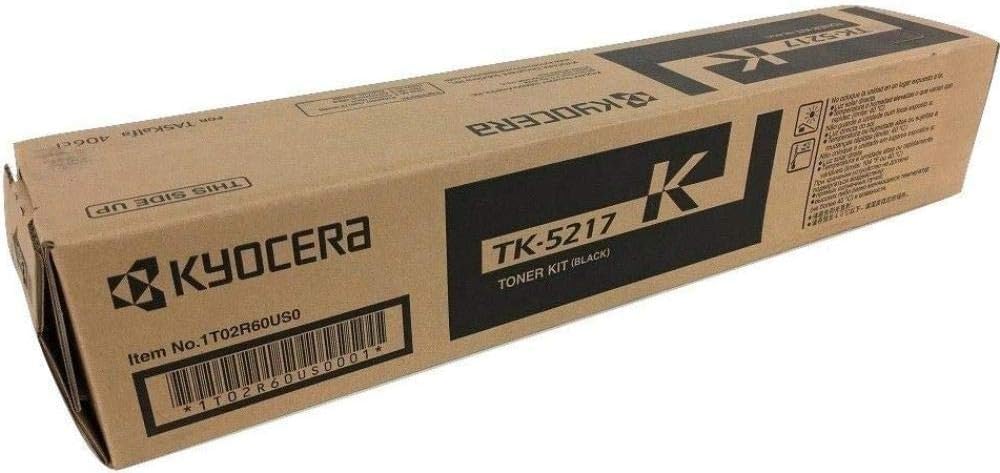
Image: KYOCERA TK-5217K Black Toner Cartridge. This image displays the toner cartridge in its retail packaging, highlighting the product's appearance and branding.
This cartridge contains solvent-free toner, designed for efficient fusing at lower temperatures, contributing to both print quality and environmental considerations.
설정 및 설치
Follow these general steps to install the KYOCERA TK-5217K Black Toner Cartridge. Always refer to your KYOCERA TASKalfa 406ci printer's specific user manual for detailed, model-specific instructions.
- 카트리지를 개봉하세요: 새 토너 카트리지를 포장에서 조심스럽게 꺼내십시오. 드럼이나 전기 접점을 만지지 마십시오.
- 카트리지를 살살 흔들어 주세요: Before installation, gently rock the toner cartridge horizontally several times to distribute the toner evenly inside.
- 프린터 앞면 덮개를 여세요: Locate and open the front cover or toner access door on your KYOCERA TASKalfa 406ci printer.
- 기존 카트리지를 제거하세요: Grasp the handle of the used toner cartridge and pull it straight out of the printer. Place the old cartridge in a protective bag for recycling.
- 새 카트리지를 삽입하세요: Align the new TK-5217K toner cartridge with the guides in the printer and push it firmly until it clicks into place. Ensure it is securely seated.
- Close the Printer's Front Cover: Close the front cover or toner access door. The printer may perform a brief initialization cycle.
- 테스트 페이지 인쇄: After installation, print a test page or a small document to confirm proper installation and print quality.
중요한: Do not force the cartridge into place. If it does not slide in easily, recheck its alignment. Keep toner cartridges out of reach of children.
작동 지침
Once the KYOCERA TK-5217K toner cartridge is correctly installed, the printer will automatically detect it and prepare for printing. No specific user operation is required for the toner cartridge itself beyond proper installation.
- 토너 잔량 모니터링: Your KYOCERA TASKalfa 406ci printer will display toner level warnings when the cartridge is nearing empty. Replace the cartridge when prompted or when print quality degrades significantly.
- 인쇄 품질: If print quality issues arise, ensure the cartridge is properly seated and refer to the troubleshooting section of this manual or your printer's user guide.
유지
The KYOCERA TK-5217K Black Toner Cartridge is a sealed unit and requires no user maintenance. Do not attempt to refill or disassemble the cartridge, as this can damage the unit and void any warranty.
- 저장: 사용하지 않은 토너 카트리지는 원래의 밀봉 포장 상태로 서늘하고 건조한 곳에 직사광선과 극한 온도 변화를 피해 보관하십시오.
- 처분: Dispose of empty toner cartridges responsibly. KYOCERA offers recycling programs for their genuine toner cartridges. Visit the official KYOCERA web재활용 정보 사이트.
문제 해결
If you encounter issues after installing your KYOCERA TK-5217K toner cartridge, consider the following common solutions:
- "토너 부족" 또는 "토너 교체" 메시지:
- Ensure the new cartridge is correctly installed and fully seated.
- 새 카트리지를 설치한 후에도 메시지가 계속 표시되면 프린터를 다시 시작하십시오.
- 인쇄 품질 불량(흐릿하거나, 줄무늬가 있거나, 인쇄 상태가 고르지 않음):
- Gently remove the cartridge and rock it horizontally a few times to redistribute toner, then reinsert it.
- Check if the cartridge is a genuine KYOCERA product. Non-genuine cartridges may cause compatibility or quality issues.
- Perform a printer cleaning cycle or calibration from your printer's control panel or software. Refer to your printer's manual for instructions.
- 카트리지가 인식되지 않음:
- Remove the cartridge and check for any protective seals or tabs that may not have been removed.
- Ensure the cartridge is inserted correctly and fully seated.
- 보푸라기 없는 천으로 카트리지의 전기 접점과 프린터 내부를 청소하세요.
- 프린터를 다시 시작하십시오.
If these steps do not resolve the issue, consult your KYOCERA TASKalfa 406ci printer's user manual or contact KYOCERA customer support.
명세서
| 기인하다 | 세부 사항 |
|---|---|
| 모델명 | TK-5217K |
| 부품 번호 | 1T02R60US0 |
| 색상 | 검은색 |
| 페이지 수율 | 최대 20,000페이지 |
| 호환 장치 | KYOCERA TASKalfa 406ci Copier, Printer |
| 품목 무게 | 1.94파운드(약 0.88kg) |
| 품목 치수(D x W x H) | 4"D x 18"W x 4"H (약 10.16cm D x 45.72cm W x 10.16cm H) |
| 포함된 구성 요소 | 토너 카트리지 |
보증 및 지원
The KYOCERA TK-5217K Black Toner Cartridge is covered by a manufacturer's warranty. For specific details regarding warranty coverage, terms, and conditions, please refer to the documentation included with your product or visit the official KYOCERA web대지.
For technical assistance, troubleshooting beyond the scope of this manual, or warranty claims, please contact KYOCERA customer support directly. You can find contact information on the official KYOCERA web웹사이트 또는 프린터 설명서를 참조하십시오.
공식 교세라 Web대지: www.kyoceradocumentsolutions.com