
1. 서론
This manual provides essential information for the safe and efficient operation of your Rigol DS1104Z-S Plus 100 MHz Digital Oscilloscope. Please read this manual thoroughly before using the instrument to ensure proper functionality and to prevent damage. The Rigol DS1104Z-S Plus is a 4-channel digital storage oscilloscope designed for precise signal analysis with a 100 MHz bandwidth and a 1 GSa/s real-time samp르율.
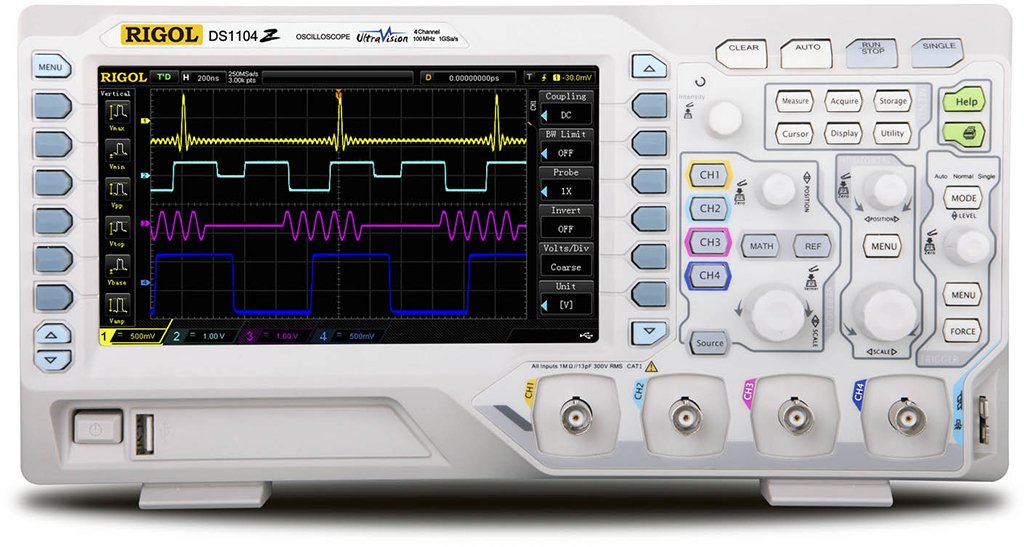
Figure 1: Rigol DS1104Z-S Plus Digital Oscilloscope. This image shows the front panel of the oscilloscope with its display, control knobs, and input channels.
2. 안전 정보
부상과 기기 손상을 방지하기 위해 항상 다음 안전 예방 조치를 준수하세요.
- 전원: 지정된 전압의 전원에만 기기를 연결하십시오.tage와 주파수.
- 접지: 감전을 방지하기 위해 기기가 제대로 접지되었는지 확인하십시오.
- 통풍: 통풍구를 막지 마십시오. 기기 주변에 충분한 공기 흐름이 확보되도록 하십시오.
- 환경: 오실로스코프는 직사광선, 고온 및 과도한 먼지를 피해 건조하고 통풍이 잘 되는 곳에서 작동하십시오.
- 프로브 : Use only probes designed for the specified voltage 및 주파수 등급.
- 서비스: 모든 서비스는 자격을 갖춘 서비스 담당자에게 의뢰하십시오. 기기를 직접 수리하려고 시도하지 마십시오.
- 청소: 청소하기 전에 전원을 분리하세요. 부드러운 천을 사용하세요.amp 천. 연마성 세척제나 용매를 사용하지 마십시오.
3. 패키지 내용
패키지에 다음 품목이 포함되어 있는지 확인하십시오.
- Rigol DS1104Z-S Plus Digital Oscilloscope
- 전원 코드
- Passive Probes (4 units)
- USB 케이블
- 빠른 설명
- Resource CD (User Manual, Programming Manual, Software)
4. 제품 오버view
The Rigol DS1104Z-S Plus features a user-friendly interface and robust design for various measurement applications.
4.1 전면 패널
The front panel includes the display, control knobs, function buttons, and input connectors for channels 1-4.
- 디스플레이 화면: 파형, 측정 결과 및 메뉴 옵션을 표시합니다.
- 수직 컨트롤: 볼륨 조정tage per division and position for each channel.
- 수평 제어: 분할당 시간 및 가로 위치를 조정하십시오.
- 트리거 제어: Set trigger level, mode, and type.
- 기능 버튼: Access various menus such as Acquire, Measure, Storage, Utility, etc.
- Channel Inputs (CH1-CH4): BNC connectors for probe connection.
4.2 후면 패널
The rear panel provides power input, USB host/device ports, and LAN port for connectivity.
- AC 전원 입력: 전원 코드를 연결합니다.
- USB 호스트 포트: USB 저장 장치를 연결합니다.
- USB 장치 포트: PC에 연결하기 위한 용도입니다.
- LAN 포트: 네트워크 연결 및 원격 제어를 위해.
5. 설정
5.1 전원 연결
- 후면 패널의 전원 스위치가 OFF 위치에 있는지 확인하세요.
- 제공된 전원 코드를 오실로스코프 후면 패널의 AC 전원 입력 단자에 연결하십시오.
- 전원 코드의 다른 쪽 끝을 접지된 AC 전원 콘센트에 꽂습니다.
5.2 프로브 연결
- Connect the BNC connector of a passive probe to one of the input channels (CH1, CH2, CH3, or CH4) on the front panel.
- Connect the probe's ground clip to the circuit's ground reference.
- Set the attenuation ratio on the probe to match the setting on the oscilloscope (e.g., 1X or 10X).
5.3 초기 전원 켜기
- Press the power switch on the rear panel to the ON position.
- The oscilloscope will perform a self-test and display the Rigol logo.
- After startup, the default waveform display will appear.
6. 사용 설명서
This section covers basic operations for acquiring and analyzing waveforms.
6.1 기본 파형 표시
- 세로축척(볼트/디비전): Use the vertical scale knob for the active channel to adjust the voltag전자 감도.
- 수직 위치: 세로 위치 조절 손잡이를 사용하여 화면에서 파형을 위아래로 이동하세요.
- 가로축 눈금(초/분): Use the horizontal scale knob to adjust the time base.
- 수평 위치: Use the horizontal position knob to shift the waveform left or right.
6.2 트리거링
트리거링은 반복적인 파형을 안정화하고 단일 샷 이벤트를 포착합니다.
- 트리거 레벨: 트리거 레벨 노브를 조절하여 볼륨을 설정하세요.tag트리거가 발생하는 시점.
- 트리거 메뉴: 를 누르세요 트리거 메뉴 button to configure trigger type (Edge, Pulse, Video, etc.), source, and slope.
- 트리거 모드 : Select between Auto, Normal, and Single modes.
6.3 측정 함수
오실로스코프는 다양한 자동 측정 기능을 제공합니다.
- 를 누르세요 측정하다 button to display the measurement menu.
- Select desired measurements such as Vpp, Vmax, Vmin, Freq, Period, Rise Time, etc.
- The results will be displayed on the screen.
6.4 데이터 저장
Waveforms and settings can be saved to internal memory or a USB storage device.
- 를 누르세요 저장 단추.
- Select the storage type (Waveform, Setup, Image) and destination (Internal, USB).
- Follow the on-screen prompts to save the data.
7. 유지관리
7.1 청소
To maintain the instrument's appearance and performance:
- 청소하기 전에 전원 코드를 뽑으세요.
- 부드러운 천을 사용하세요ampened with mild detergent and water to clean the exterior.
- 연마성 세척제, 용제 또는 강한 화학 물질을 사용하지 마십시오.
- 기기에 액체가 들어가지 않도록 하십시오.
7.2 교정
The oscilloscope is factory calibrated. For optimal performance, periodic calibration by qualified service personnel is recommended, typically every 1-2 years, depending on usage.
7.3 보관
When not in use for extended periods, store the oscilloscope in a dry, dust-free environment within the specified operating temperature range.
8. 문제 해결
This section lists common problems and their solutions. If the problem persists, contact Rigol customer support.
| 문제 | 가능한 원인 | 해결책 |
|---|---|---|
| 전원을 켠 후 표시되지 않음 | Power cord not connected; Power switch off; Faulty power outlet | 전원 코드 연결 상태를 확인하십시오. 전원 스위치가 켜져 있는지 확인하십시오. 다른 기기를 사용하여 콘센트의 전원이 작동하는지 확인하십시오. |
| 파형이 표시되지 않습니다 | Probe not connected; Incorrect channel settings; Trigger level incorrect; Input signal too small/large | Connect probe to active channel; Adjust vertical scale and position; Adjust trigger level; Check input signal source |
| 불안정한 파형 | 잘못된 트리거 설정; 잡음이 심한 신호 | Adjust trigger level and mode; Check signal source for noise; Use averaging acquisition mode |
| Cannot save data to USB | USB drive not formatted correctly; USB drive full; USB drive faulty | Format USB drive to FAT32; Delete unnecessary files; Try a different USB drive |
9. 사양
Key technical specifications for the Rigol DS1104Z-S Plus Digital Oscilloscope:
- 대역폭: 100MHz
- 채널: 4개 아날로그 채널
- 실시간 Samp르 비율: 최대 1 GSa/s
- 기억 깊이: 12 Mpts (Standard), 24 Mpts (Optional)
- 파형 캡처율: 최대 30,000 wfms/s
- 표시하다: 7-inch TFT LCD (800x480 resolution)
- 수직 감도: 1mV/div ~ 10V/div
- 시간 기준 범위: 2 ns/div to 50 s/div
- 트리거 유형: Edge, Pulse, Video, Slope, Alternate, Runt, Window, Delay, Setup/Hold, Nth Edge
- 인터페이스: USB Host, USB Device, LAN, Pass/Fail, Trigger Out
- 전원: 코드식 전기
- 품목 무게: 1 킬로그램
- 규정 준수: CE
10. 보증 및 지원
Rigol Technologies provides a standard warranty for its products. For detailed warranty terms and conditions, please refer to the warranty card included with your product or visit the official Rigol website. For technical support, service, or inquiries, please contact your local Rigol distributor or Rigol customer service. Contact information can typically be found on the Rigol website or in the documentation provided with your oscilloscope.
공식적인 Web대지: www.리골닷컴