
1. 서론
The JOYING ELM 327 V2.1 Bluetooth OBD2 Diagnostic Scanner is a vehicle interface tool designed to communicate with your car's On-Board Diagnostics (OBD-II) system. It allows users to read and clear diagnostic trouble codes (DTCs), view live sensor data, and monitor various vehicle parameters using a compatible Android device and application. This manual provides instructions for the proper setup, operation, and maintenance of your diagnostic tool.

그림 1: 전면 view of the JOYING ELM 327 V2.1 Bluetooth OBD2 Diagnostic Scanner, showing the "ELM327 MINI Interface Supports all OBDII protocols" label.
2. 제품 특징
- Reads and clears diagnostic trouble codes (DTCs).
- Displays the meaning of diagnostic trouble codes.
- Turns off the Malfunction Indicator Light (MIL), also known as the "Check Engine" light.
- Shows current sensor data in real-time.
- Bluetooth connectivity for wireless communication with Android devices.
- Supports various OBD-II protocols.
3. 사양
| 매개변수 | 값 |
|---|---|
| 프로세서 | ELM327 v2.1 |
| 운영 볼륨tage | 12V (with internal protection from short circuits/overvoltag그것은) |
| Nominal Idle Current | 45mA |
| 블루투스 비밀번호 | 1234 |
| 출력 인터페이스 | 블루투스 |
| 적용 가능한 범위 | 5-10m / 16.4-32.8피트 |
| 품목 무게 | 23g(0.81온스) |
| 제품 치수 | 6.3 x 4.72 x 1.97 인치(대략) |
| 제조업체 부품 번호 | 5824090411 |
지원되는 OBDII 프로토콜:
- 9141-2 ISO (5 전송 속도, 10.4 kbaud)
- 14230-4 KWP ISO (5 전송 속도, 10.4 kbaud)
- 14230-4 KWP ISO (빠른 초기화, 10.4 kbaud)
- ISO 15765-4 CAN(11비트 ID, 500kbaud)
- ISO 15765-4 CAN(29비트 ID, 500kbaud)
- ISO 15765-4 CAN(11비트 ID, 250kbaud)
- ISO 15765-4 CAN(29비트 ID, 250kbaud)
알아채다: 이 장치 할 수 없다 work for PWM or VPW (SAE J1850) protocols.

그림 2: 측면 view of the diagnostic scanner showing approximate dimensions: 1.95 inches length, 1 inch width, 1.25 inches height.
4. 설정 가이드
4.1. 설치
- Locate your vehicle's OBD-II port. This port is typically found under the dashboard on the driver's side, but its exact location may vary by vehicle model. Refer to your vehicle's owner's manual if you cannot find it.
- 기기를 연결하기 전에 차량의 시동이 꺼져 있는지 확인하십시오.
- Firmly plug the JOYING ELM 327 V2.1 scanner into the OBD-II port. Do not force the connection.
- Once plugged in, turn your vehicle's ignition to the "ON" position (engine does not need to be running). The device should power on, indicated by an LED light.

그림 3: 각도 view of the diagnostic scanner, highlighting the 16-pin OBD-II connector.
4.2. Bluetooth Pairing with Android Device
- On your Android device, go to "Settings" and enable Bluetooth.
- 검색 available Bluetooth devices. The scanner should appear as "OBDII" or a similar identifier.
- Select the device to pair. When prompted for a password, enter 1234.
- Once paired, your Android device is ready to connect with a compatible OBD2 application.
4.3. 소프트웨어 설치
This diagnostic tool requires a third-party OBD2 application to function. Popular applications include "Torque Pro" (often preinstalled on JOYING car radios as "Torque_pro apk") or other compatible apps available on the Google Play Store.
- Download and install your preferred OBD2 application from the Google Play Store.
- Open the application and navigate to its settings.
- In the application settings, select "Bluetooth" as the connection type and choose the paired "OBDII" device.
- Follow the in-app instructions to establish a connection with the scanner.
5. 사용 설명서
Once the JOYING ELM 327 V2.1 scanner is connected to your vehicle and paired with your Android device and OBD2 application, you can begin diagnostics.
- 연결하다: Ensure the app indicates a successful connection to the OBD2 adapter and your vehicle's ECU.
- 오류 코드 읽기: Navigate to the "Fault Codes" or "DTCs" section within the app to scan for stored diagnostic trouble codes. The app will display the codes and their descriptions.
- 오류 코드 지우기: If applicable, the app will provide an option to clear the fault codes. Clearing codes will also turn off the Malfunction Indicator Light (MIL). Note that if the underlying issue is not resolved, the codes may reappear.
- View 라이브 데이터 : Access the "Realtime Information" or "Live Data" section to monitor various sensor readings such as engine RPM, vehicle speed, coolant temperature, fuel system status, and more.
- 기타 기능: Depending on your chosen app, additional features like performance monitoring, fuel economy tracking, and graphing of sensor data may be available.
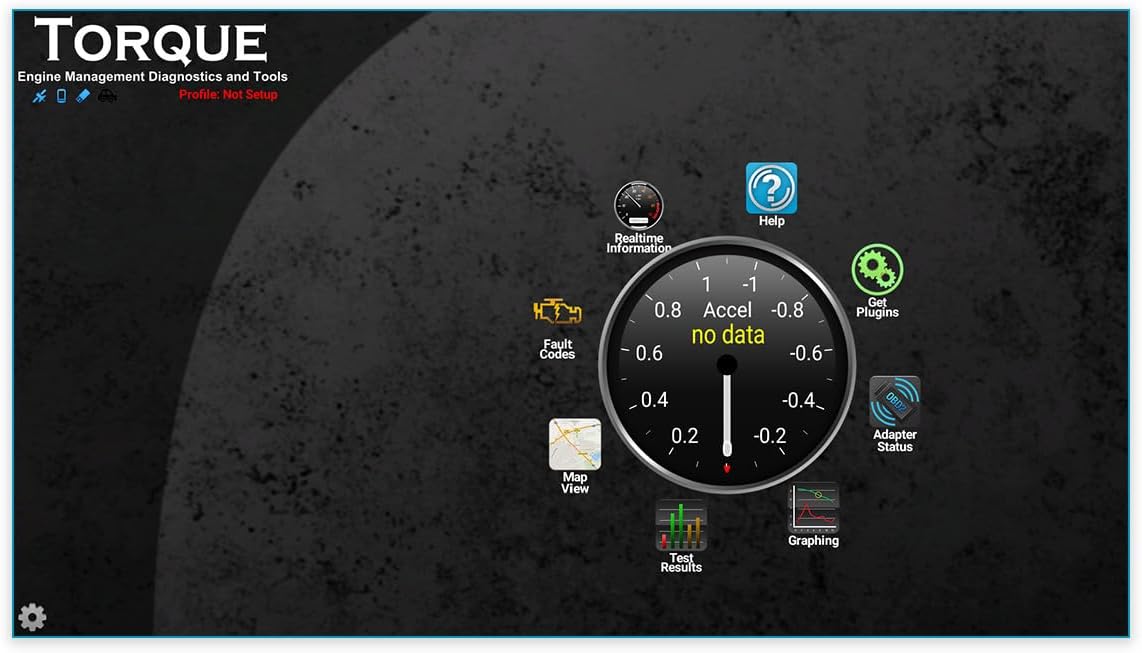
그림 4: 예ample interface of a compatible OBD2 application (Torque Pro), showing options for Realtime Information, Fault Codes, Adapter Status, and Graphing.
For detailed instructions on specific features, please refer to the user manual or help section of your chosen OBD2 application.
6. 유지관리
The JOYING ELM 327 V2.1 diagnostic scanner requires minimal maintenance.
- 청소: 부드럽고 마른 천으로 기기를 닦으십시오. 액체 세척제나 용제를 사용하지 마십시오.
- 저장: 사용하지 않을 때는 직사광선과 극한의 온도를 피해 시원하고 건조한 곳에 보관하세요.
- 손질: 장치를 떨어뜨리거나 강한 충격을 가하지 마십시오.
7. 문제 해결
If you encounter issues with your JOYING ELM 327 V2.1 diagnostic scanner, refer to the following common troubleshooting steps:
- 장치 전원이 켜지지 않음:
- Ensure the device is firmly plugged into the vehicle's OBD-II port.
- 차량의 시동 스위치가 "ON" 위치에 있는지 확인하십시오.
- Check your vehicle's fuse box for any blown fuses related to the OBD-II port (consult your vehicle's manual).
- 블루투스 페어링 문제:
- 안드로이드 기기에서 블루투스가 활성화되어 있는지 확인하세요.
- 스캐너의 전원이 켜져 있는지 확인하세요.
- Try unpairing and re-pairing the device. The default Bluetooth password is 1234.
- Ensure no other devices are actively connected to the scanner via Bluetooth.
- App Not Connecting to Scanner:
- Confirm that the scanner is successfully paired with your Android device via Bluetooth settings.
- In your OBD2 application's settings, verify that "Bluetooth" is selected as the connection type and the correct "OBDII" device is chosen.
- Try restarting both the app and your Android device.
- Some apps may require specific settings or configurations. Consult the app's documentation.
- Ensure the app is compatible with ELM327 v2.1 devices.
- 데이터 없음 또는 잘못된 측정값:
- Verify that your vehicle supports the OBD-II protocols listed in the specifications. This device does not support PWM or VPW (SAE J1850) protocols.
- Ensure the app is correctly configured for your vehicle's protocol (if applicable).
- Check if your vehicle's engine is running or ignition is in the "ON" position.
- Device Not Compatible with iOS:
- This device is designed for use with Android operating systems only and is not compatible with iOS devices.
If problems persist after attempting these steps, please contact JOYING customer support or refer to their official web추가 지원은 사이트를 참조하세요.
8. 보증 및 지원
For information regarding warranty coverage, technical support, or service inquiries, please refer to the documentation included with your purchase or visit the official JOYING web대지.
제조업체: 기쁨
Web대지: JOYING Official Store on Amazon (or refer to product packaging for direct manufacturer contact information)