
소개
The VOLTCRAFT VC40 is a compact and reliable socket tester designed to quickly verify the correct wiring of electrical sockets and test Residual Current Devices (RCDs) with a 30 mA trip current. This device provides visual and audible indications for various wiring conditions, ensuring electrical safety in your installations. It is rated for CAT II 300 V applications.
안전 정보
이 기기를 사용하기 전에 모든 안전 지침을 읽고 이해하십시오.
- Always ensure the device is in good condition before use. Do not use if damaged.
- This device is designed for CAT II 300 V applications. Do not exceed the specified voltag전자 등급.
- The VC40 is intended for testing standard electrical sockets. Do not use it for purposes other than those specified in this manual.
- Important Note: THIS UNIT WILL NOT DETECT EARTH NEUTRAL REVERSE. Always exercise caution and consult a qualified electrician if you have any doubts about your electrical installation.
- The RCD test function should only be performed by competent individuals, as it will trip the RCD, cutting power to the circuit.
제품 끝view
The VOLTCRAFT VC40 features an automatic testing process, finger contacts for protective conductor and RCD tests, and provides clear visual and audible signals for test results.
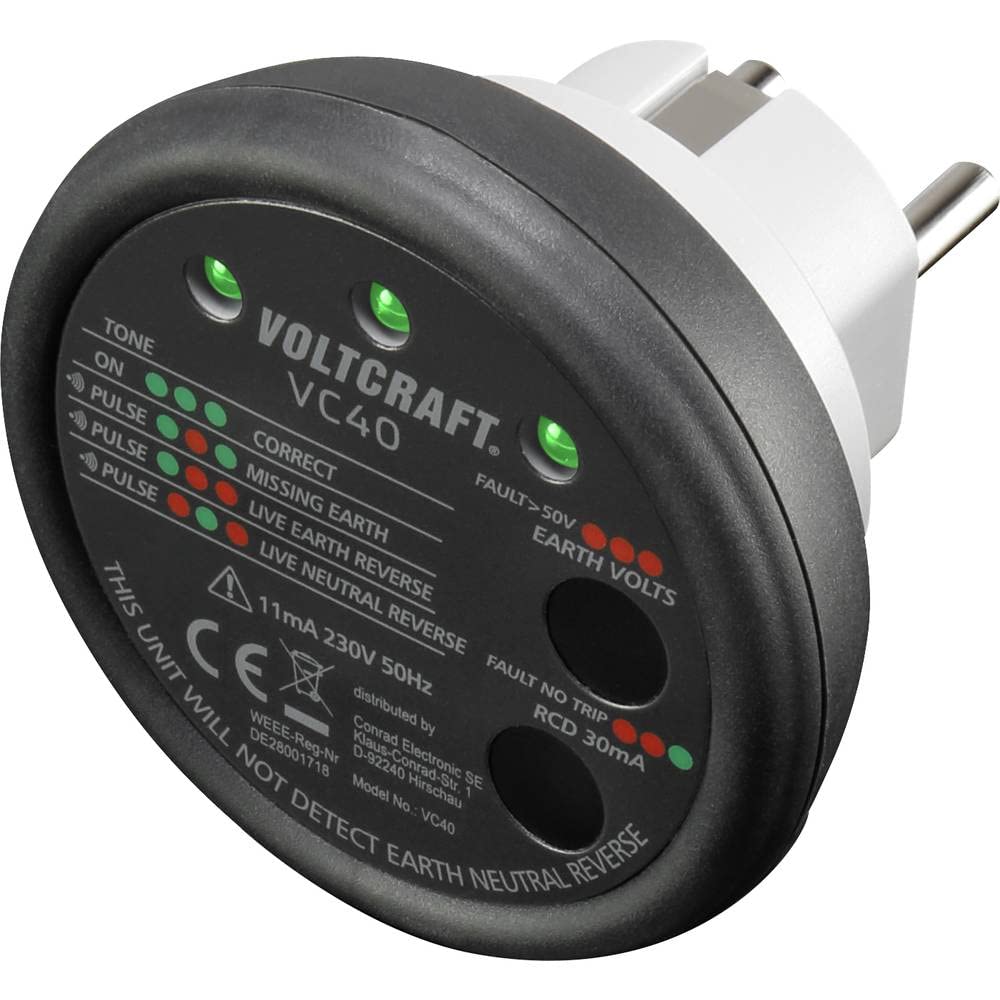
이미지: 각도 view of the VOLTCRAFT VC40 Socket Tester, showing its compact design and plug. This image illustrates the overall appearance of the device.

이미지: 앞면 view of the VOLTCRAFT VC40 Socket Tester, clearly displaying the LED indicators and their corresponding wiring conditions and test functions. This is essential for interpreting test results.

이미지: 후면 view of the VOLTCRAFT VC40 Socket Tester, showing the plug pins and the speaker grille for audible signals.
설정
The VOLTCRAFT VC40 is designed for immediate use. No assembly or battery installation is required as it draws power directly from the socket being tested.
- Ensure the socket tester is clean and free from any damage.
- Verify that the electrical circuit you intend to test is live and within the device's specified voltage range (230V 50Hz).
작동 지침
1. Wiring Check
To check the wiring of a socket:
- Plug the VOLTCRAFT VC40 directly into the socket you wish to test.
- The device will automatically perform a wiring check. Observe the LED indicators and listen for the audible signal.
- Refer to the 'Interpreting Indicators' section below to understand the test result.
2. RCD (Residual Current Device) Test
To test an RCD (30 mA trip current):
- First, perform a wiring check as described above to ensure the socket is correctly wired.
- With the VC40 plugged into the socket, place your fingers on the two metal contact points labeled for RCD test. This initiates the RCD trip test.
- The RCD should trip, cutting power to the circuit. The VC40's indicators should go off.
- If the RCD does not trip, refer to the 'Troubleshooting' section.
- Reset the RCD at your consumer unit/fuse box after the test.
3. Interpreting Indicators
The VC40 uses a combination of green and red LEDs, along with an audible tone, to indicate the wiring status. The labels on the device correspond to the conditions detected.
| 지표 패턴 | 가청 신호 | 의미 |
|---|---|---|
| All Green LEDs (TONE ON CORRECT) | 연속음 | 올바른 배선: Live, Neutral, and Earth are correctly connected. |
| Specific Red/Green LED combination (PULSE MISSING EARTH) | Pulsing Tone | Missing Earth: The protective earth conductor is not connected or faulty. |
| Specific Red/Green LED combination (PULSE LIVE EARTH REVERSE) | Pulsing Tone | Live Earth Reverse: The live and earth conductors are reversed. This is a dangerous condition. |
| Specific Red/Green LED combination (PULSE LIVE NEUTRAL REVERSE) | Pulsing Tone | Live Neutral Reverse: The live and neutral conductors are reversed. |
| All Red LEDs (FAULT >50V EARTH VOLTS) | No specific tone indicated, but implies fault. | Fault >50V Earth Volts: 위험한 볼륨을 나타냅니다.tage present on the earth line. |
| Specific Red/Green LED combination (FAULT NO TRIP RCD 30mA) | No specific tone indicated, but implies fault. | RCD Fault (No Trip): The RCD did not trip during the test, indicating a potential fault with the RCD itself. |
Note: The exact LED patterns for each fault are indicated on the device itself. Always refer to the labels on the VC40 for precise interpretation.
유지
The VOLTCRAFT VC40 requires minimal maintenance.
- 청소: 기기를 마른 부드러운 천으로 닦으십시오. 연마성 세척제나 용제를 사용하지 마십시오. 기기에 습기가 들어가지 않도록 하십시오.
- 저장: 기기를 서늘하고 건조한 곳에 보관하고, 직사광선과 극한의 온도를 피하세요.
- 점검: 기기에 균열과 같은 손상 징후가 있는지 주기적으로 점검하십시오.asing or bent pins. Do not use a damaged device.
문제 해결
If you encounter issues with your VOLTCRAFT VC40, refer to the following common problems and solutions:
- No Indication / Device Not Working:
- Ensure the socket is live and supplying power. Test with another known working appliance.
- Check for visible damage to the VC40. If damaged, discontinue use.
- RCD Does Not Trip During Test:
- Ensure you are firmly pressing the RCD test contacts.
- If the RCD still does not trip, it indicates a potential fault with the RCD itself or the electrical installation. This is a serious safety concern. Do not use the circuit and consult a qualified electrician immediately.
- Incorrect Wiring Indication:
- If the VC40 indicates a wiring fault (e.g., Missing Earth, Live Neutral Reverse), do not use the socket.
- Contact a qualified electrician to inspect and correct the wiring.
- Remember, the device will not detect Earth Neutral Reverse.
명세서
| 특징 | 사양 |
|---|---|
| 모델 번호 | VC40 |
| 상표 | 볼트크래프트 |
| 권tage 등급 | CAT II 300V |
| 운영 볼륨tage | 230볼트(AC) |
| 빈도 | 50Hz |
| RCD Test Current | 30mA |
| 전원 | Manual operation (draws power from socket) |
| 치수(길이 x 너비 x 높이) | 8.3 x 8.3 x 7.7cm |
| 무게 | 80그램 |
| 최대 작동 온도 | 섭씨 85도 |
보증 및 지원
VOLTCRAFT products are built to high standards. This product typically comes with a manufacturer's warranty. Please refer to your purchase documentation for specific warranty terms and duration. Spare parts availability is generally 1 year from the date of purchase.
For technical support, troubleshooting assistance, or warranty claims, please contact VOLTCRAFT customer service or your retailer. Keep your purchase receipt as proof of purchase.