
소개
The RESPONSE Gentle Edges Brush is a versatile, double-sided tool designed for styling and smoothing hair edges. It features pure boar bristles on one side and a fine-tooth comb on the other, providing a comprehensive solution for achieving polished hairstyles.
This portable tool is suitable for all hair types and helps to lay down and smooth baby hairs, distribute natural hair oils, and promote a neat, finished look.

Image: Two Gentle Edges Brushes, one black and one pink. Please note that colors may vary, and only one brush is included per purchase.
설정
The RESPONSE Gentle Edges Brush requires no assembly. Upon unboxing, inspect the brush for any visible damage. It is ready for immediate use.
작동 지침
Follow these steps for effective use of your Gentle Edges Brush:
- 머리카락 준비: Lightly spray water on the boar bristles. Gently brush your baby hairs or edges forward towards your face.
- Apply Product (Optional): Apply a small amount of hair gel or your preferred styling product to your edges.
- Style with Bristles: Use the bristle side of the brush to smooth and curl the hairs towards your hairline, shaping them as desired. The pure boar bristles help to lay down hairs and distribute natural oils.
- Refine with Comb: Utilize the fine-tooth comb end to further straighten, polish, and smooth out any stray hairs for a sleek, finished look.
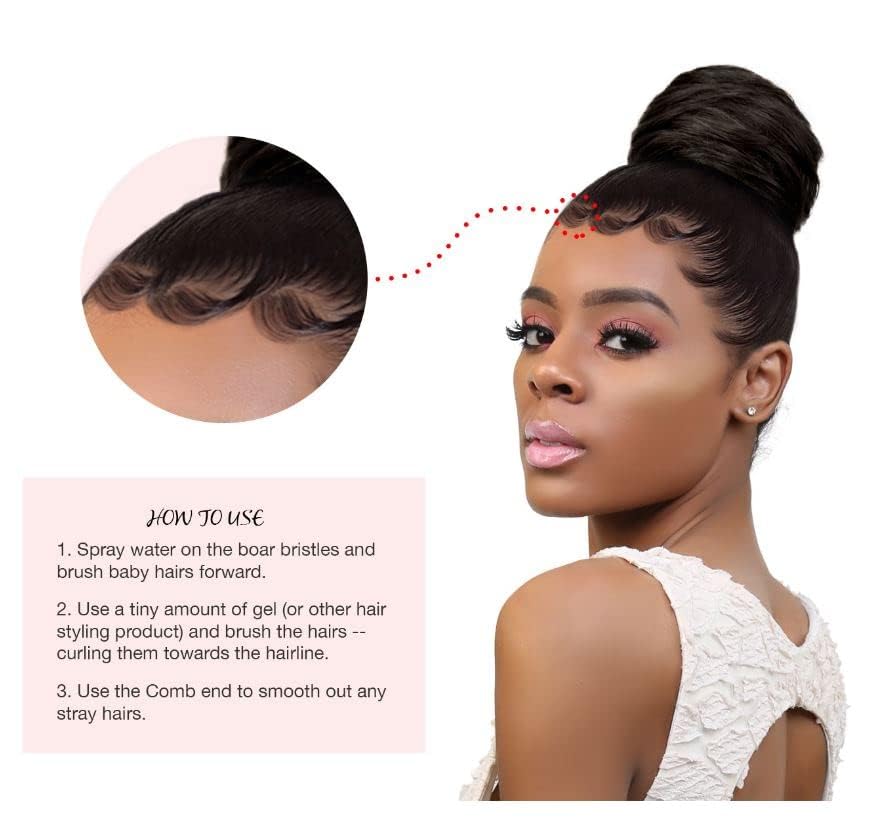
Image: A visual guide demonstrating the three steps for using the edge brush to achieve styled baby hairs.

Image: A close-up of the dual-sided edge brush being used to smooth hair, highlighting its effectiveness for various hair textures.

Image: A person demonstrating the use of the fine teeth comb head to groom and smooth edges for a sleek finish.
관리 및 유지 보수
To ensure the longevity and hygiene of your Gentle Edges Brush:
- 정기 청소: After each use, remove any trapped hair from both the bristles and the comb teeth.
- 세탁: Periodically wash the brush with mild soap and lukewarm water. Gently scrub the bristles and comb to remove product buildup.
- 헹구기 및 건조: Rinse the brush thoroughly under running water until all soap residue is gone. Allow the brush to air dry completely before storing or using again. Avoid direct heat sources.
문제 해결
- Bristles or Comb Bent: If bristles or comb teeth become slightly bent, gently reshape them with your fingers. Avoid excessive force to prevent breakage.
- Ineffective Smoothing: Ensure the brush is clean and free of old product buildup, which can hinder its effectiveness. Applying a small amount of water or styling product to the hair before brushing can also improve results.
제품 사양
| 상표 | 응답 |
| 모델 번호 (ASIN) | B076827MKY |
| 한국어: | 643665649292 |
| 패키지 크기 | 8.78 x 1.89 x 0.59 인치 |
| 품목 무게 | 0.85 온스 |
| 강모 소재 | 수퇘지 |
| 모발 유형 호환성 | 모든 머리카락 유형 |
| 단위 수 | 1.00 카운트 |
| 제조업체 | RE |

이미지: 자세한 view of the brush head, showing the bristles and the fine-tooth comb.

Image: An illustration detailing the features of the brush, including the bristles and the small fine comb head. Note: Product specifications indicate boar bristles.
보증 정보
Specific warranty information for the RESPONSE Gentle Edges Brush is not provided in the product details. Please refer to your retailer's return policy for details regarding returns or exchanges.
고객 지원
For any questions or concerns regarding your RESPONSE Gentle Edges Brush, please contact the retailer from whom you purchased the product. They can provide assistance with product inquiries or support needs.